Forum Replies Created
-
AuthorPosts
-
George
ParticipantHi Ambros,
Thanks for reaching out.
Our plugins do not have any features like you describe built-in to them. 🙁 Sorry to disappoint!
Using another plugin or custom coding is indeed required to have the sort of features you describe.
While we do not officially recommend or have special integration with any plugin, I would recommend searching for plugins that have a lot of users and high ratings on http://wordpress.org/plugins. Our plugin should work fine with any other well-built plugin that complies with WordPress coding standards.
Let me know if there is anything else I can try to help with!
Thank you,
GeorgeParticipantHey Naveen,
Thanks for reaching out.
The QR Codes are just a “scannable” way to check-in folks at the door to your event. They can print out a ticket or show the ticket on their smartphone; then, using a free QR Code scanning app—of which there are many out there for both iOS and Android—you can scan the QR Code that is on the ticket.
When scanned, this will “check-in” that ticket so that you can track attendees and ensure that only one attendee shows up per one ticket.
While we do not have a video at this time, this knowledgebase article covers much of this process and should be helpful ? https://theeventscalendar.com/knowledgebase/managing-your-orders-and-attendees/
As for “over the counter” ticketing, our plugins do not offer any such features or any sort of “offline” mode. The ticket sales from our plugins only happen on the website and then the tickets are emailed to the purchaser.
I hope this information helps!
GeorgeParticipantYes! Check out this page here to learn more → https://theeventscalendar.com/apply-for-nppp/
ParticipantHey Stephen,
Thanks for reaching out!
I don’t intend to be obtuse or make things harder here, but just to be candid and honest it’s difficult to answer the question about how difficult it would be to implement all of the customizations you list. That depends on many things unique to your project, budget, development skill, and other factors.
We are, unfortunately, not able to dive very deep into customization-related questions at all, reasons for which you can read more about here, and should read more about just so you can set your expectations here at the outset of our conversation ? https://theeventscalendar.com/knowledgebase/what-support-is-provided-for-license-holders/
In General
In general, our plugins do provide many hooks and filters. Want to look for some or know where they all are? We unfortunately don’t have a reference of them online, which is something we’re working on, but even if we did the best and most contextualized way to find hooks and filters is to use the “Find in Folder” features of your code editor of choice on the plugin file folders of our plugins. Use this to search for do_action(, which will reveal all instances of plugin action hooks. And search for apply_filters(, which will reveal all instances plugin filter hooks.
With all that being said, now let’s get down to the details.
We need to be able to charge organisers for putting up events, I notice on the community events you can redirect people after they submit an event, if we sent them to a payment page, could we hook into the auto publish on return?
There is indeed a hook that might help with this. The hook is tribe_community_event_created, which fires right after an event is submitted and supplies you the event ID in your callback functions, so you could make the event a “Draft” upon submission and then require payment to make it “Published” from there or something.
We need to have paid featured events, I was thinking we could use a featured category but we would have to hide it until its paid.
This might be possible with CSS alone—each event has CSS classes that reflect what category it is in, so you could use WordPress’ post_class filter to also add CSS classes that reflect whether the event is paid or not. Read more about that filter here ? https://codex.wordpress.org/Function_Reference/post_class
We need a members area where athletes can put in their name, date of birth, club and such and when they sign up for an event, the organiser gets all this information. I know the membership side is nothing to do with your plugins, but how easy would it be to hook into the registration side so that this info is linked?
This should be possible with WordPress-core features, which all you to extract all sorts of user data from a user based on their account ID. You can learn more about this in a function like this one, though this Codex article also links to other similar functions, so explore all of these to get an idea of how powerful WordPress’ built-in membership features are—which our plugins totally work with and support, of course ? https://codex.wordpress.org/Function_Reference/get_userdata
Organisers will also need to be able to charge for tickets, but with different tickets for the one event and discount periods and to be able to sell tshirts and other stuff so they know what to have on hand at the event. Also is PayPal the only gateway you work with, can you do bank transfers?
This sort of thing would be possible with our Community Tickets add-on, which is a rather expensive one given the amount of functionality it provides and the fact that it requires several other add-ons to work ? https://theeventscalendar.com/product/community-tickets/
As for payment gateways, our plugins themselves do not provide that feature at all. Payments are handled by WooCommerce itself, so any payment gateway that you can find for WooCommerce should be totally useful as our plugins simply give all the functionality to get tickets, events, etc. to the WooCommerce Cart. From there, WooCommerce handles the transaction. So explore all of the WooCommerce payment options here ? https://www.woothemes.com/product-category/woocommerce-extensions/payment-gateways/
Apologies for the length of this post—I hope it’s helpful, though!
Cheers,
GeorgeParticipantSorry to disappoint, Mike!
Sincerely,
GeorgeParticipantHi there,
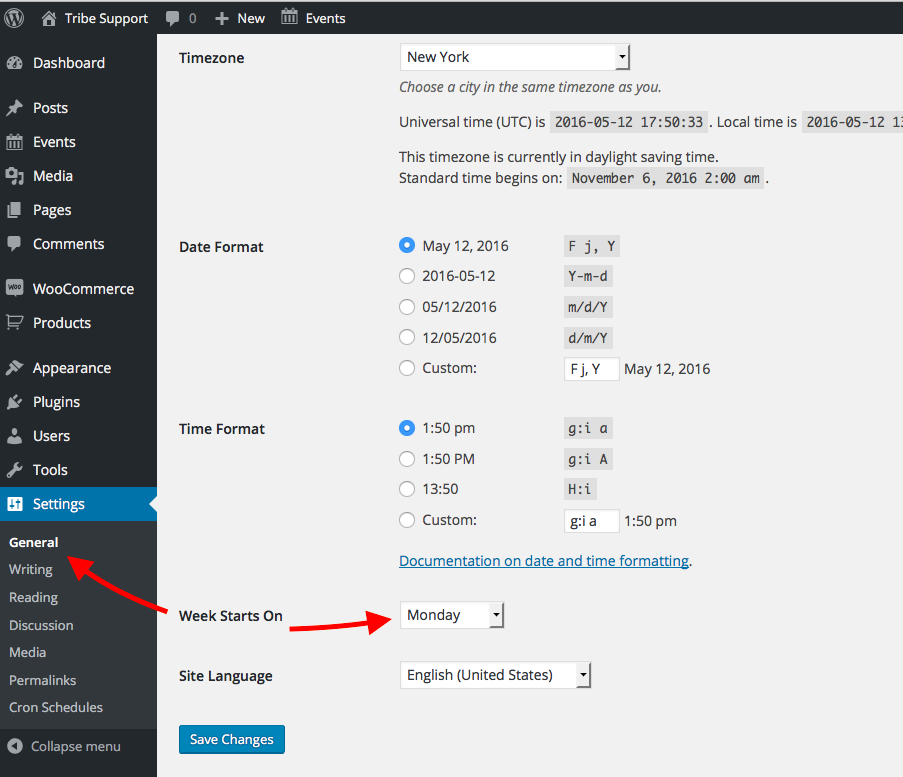
Please go to the Settings > General page I point out in this specific screenshot: https://cldup.com/R16DqDWAzF-1200×1200.png
☝️ Look closely! That is NOT Events > Settings > General
Look at what the red arrow is pointing out in the screenshot. Click that link in your own site. You should be brought to the page shown in this screenshot: https://cldup.com/zVDAgXzCQm.png
Cheers!
GeorgeParticipantHey Mike,
Thanks for clarifying this. That tutorial is not one that can be molded to have more event images listed there; there is also limited space per event and so having more than one image would make the calendar quite crowded and hard to read.
That being said, please check out our official calendar demo site here ? http://wpshindig.com/events/
In the Month View on that page, you’ll see the way The Events Calendar and Events Calendar Pro handle featured images “out-of-the-box”. Hover over various event names, and you’ll see the ones with featured images have the featured images in the tooltips upon hover.
This is a design choice that keeps the calendar readable and still provides each event with its own featured image.
To achieve some sort of implementation of featured images other than this or other than the one-image-per-square tutorial above would require more custom coding that you would have to implement on your own (or hire someone to implement for you).
I hope this information helps,
GeorgeParticipantThank you for sharing this!
1. To be clear, is the [tribe_events_list] shortcode on http://www.vinology.com/summer-wine-school/ at the bottom of the post content?
2. Is the shortcode just literally [tribe_events_list], or does it have options, too? e.g. [tribe_events_list category=”parties”] If the shortcode has options, paste the whole actual shortcode you are using here.
3. Does anything change if you activate a default theme on your site like Twenty Twelve or Twenty Sixteen and then take a look at the post again? What do you find when you try this?
Thank you!
GeorgeParticipantHi Greg,
I can indeed share this thread with Geoff B. To be clear, though, at this time the best way to try and use WPML and The Events Calendar together is to set things up according to this knowledgebase article ? https://theeventscalendar.com/knowledgebase/setting-up-the-events-calendar-with-wpml/
Geoff B. also recommends this in that thread you linked to which seems particularly helpful for the things you described above:
One final note, if you follow the WPML support staff’s suggestion and switch to the Different languages in directories option instead of the Language as a parameter option and then proceed to re-save (update your permalinks), it should solve the bug.
Right now it seems like you’re using the language as a parameter option; I would recommend the other option Geoff B. recommended, and would recommend ensuring that you set up the plugin exactly according to that knowledgebase article.
Thank you,
GeorgeParticipantHey @wineschool, sorry to hear this!
I don’t have any problems with the shortcode, so for starters I’m wondering if you can post your site’s complete, un-edited “System Information” here? Here’s how to do that ? https://theeventscalendar.com/knowledgebase/sharing-sys-info/
Thank you!
GeorgeParticipantHey Pau,
Thank you for reaching out!
We unfortunately cannot help with code modifications like the ones you are requesting here.
Please read this page to learn more ? https://theeventscalendar.com/knowledgebase/what-support-is-provided-for-license-holders/
So to implement the features you describe, you would have to write that custom code or hire a professional developer to do it for you. We have a list of great developers here → http://m.tri.be/18k1 (and have no affiliation with any of these folks—they’re simply some well-respected names in the community that we’ve compiled to share in situations like this one).
Thank you,
GeorgeParticipantHey @Greg,
Thank you for reaching out.
How are you implementing these multi-lingual features on your site? Are you using a plugin like WPML, qTranslate, etc., for example?
If so, we unfortunately do not support WPML or any similar multilingual plugin completely at this time, and so these sorts of features are simply not supported by The Events Calendar and its premium add-ons. 🙁
I’m sorry to disappoint!
Sincerely,
GeorgeParticipantHey @Mathieu,
Thanks for reaching out. I hate to bear bad news but there has not been progress on that front in terms of WPML compatibility.
Other development tasks and bugs have taken higher priority, and as usual the WPML improvements will likely not arrive in our code on the timeline of many months; not many weeks, i.e. not in the one month since that thread or in one month from now.
I’m genuinely sorry to disappoint, and if this is a set of features you desperately need and this lack of WPML integration is a deal-breaker, please let us try to refund your license so we’re not taking your money for a plugin that isn’t satisfactory for your project (you can get a refund by following the steps here ? https://theeventscalendar.com/knowledgebase/refund-policy/).
Let me know if you have any other questions or if there’s anything else I can try to help with.
Sincerely,
GeorgeParticipantHey Mike,
Thanks for reaching out.
You say, “the code in the tutorial”…can you link to the specific tutorial you are referring to?
In regards to this customization, you mention adding a featured image to month views…in the month view, note that each event has its own tooltip. So you can add the featured image to the tooltip, and each event will have its own image.
But if you’re trying to add the image to the actual “day” square in the month grid, this is much more challenging to do, and as you note there are fundamental limitations to how much content you can reasonably fit into a single “day”‘s square on the calendar.
We do not have any knowledgebase resources or otherwise on how to make this customization. It’s a complicated one and something that would be quite specific to your own site and your own design needs. 🙁
— George
-
AuthorPosts