
Home › Forums › Calendar Products › Events Calendar PRO › Starting on Sunday on the Monthly Calendar
- This topic has 6 replies, 2 voices, and was last updated 10 years, 5 months ago by
George.
-
AuthorPosts
-
May 12, 2016 at 10:06 am #1113889
Natasha
ParticipantI cannot locate the option to set the beginning day of the week for the monthly view. I have gone to settings -> general page and cannot locate any option to set it. We are using The Events Calendar PRO.
Any guidance would be most appreciated
May 12, 2016 at 10:53 am #1113931ParticipantHey Robert!
Thanks for reaching out. Just to be certain, when you say “the Settings → General page,” are you referring to the “general” tab within The Events Calendar’s own settings page? Or are you referring to the main WordPress settings?
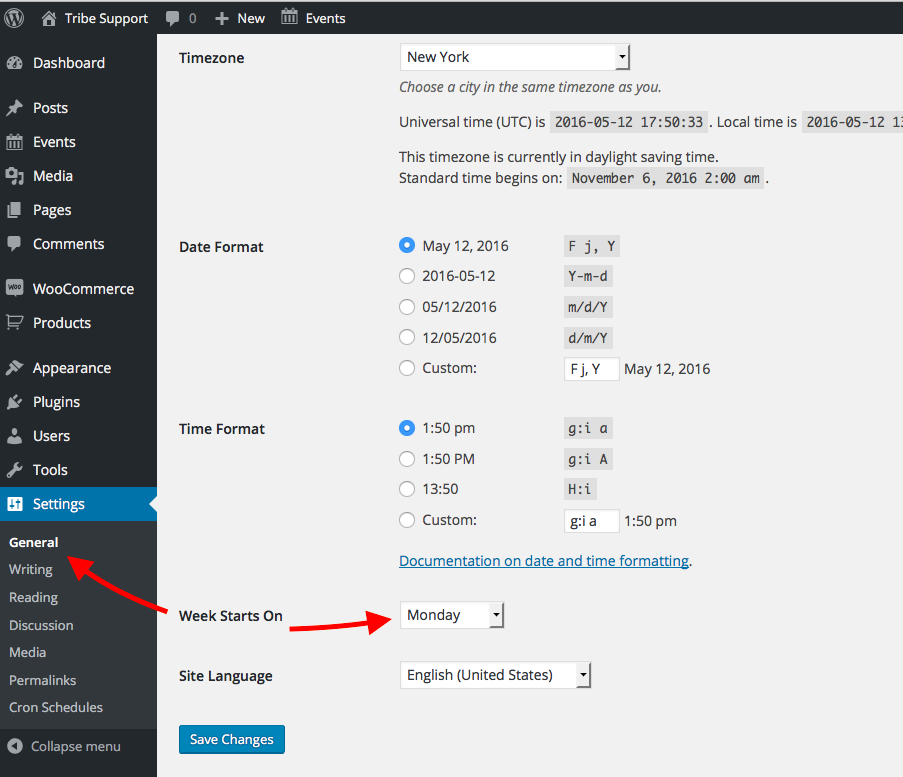
Because the latter option is the one you should be looking for—the general WordPress settings. I’ve highlighted where to find this in your wp-admin in the following screenshot ? https://cldup.com/R16DqDWAzF-1200×1200.png
Once you find this page, you should see the “Week Starts on” option as shown in this screenshot ? https://cldup.com/zVDAgXzCQm.png
If you do not find this page or that option, then in your response please post your system information (which you can learn to do by clicking here).
Thank you!
GeorgeMay 12, 2016 at 1:28 pm #1114021ParticipantYes I am talking about the Events Calendar not WordPress’s general settings.
The image below shows what I see
May 12, 2016 at 1:31 pm #1114022Participantsystem information:
install keys
events-calendar-pro = 34065d556a8296ff0229035e85923a28e6bbf82d
WordPress version
4.5.2
PHP version
5.5.35
pluginsGravity Forms version 1.9.19 by rocketgenius(http://www.rocketgenius.com)
Redux Framework version 3.6.0.2 by Team Redux(http://reduxframework.com)
Breadcrumb NavXT version 5.4.0 by John Havlik(http://mtekk.us/)
The Events Calendar PRO version 4.1.2 by Modern Tribe, Inc.(http://m.tri.be/20)
Google Analyticator version 6.4.9.7 by SumoMe(http://www.sumome.com/?src=wp_readme)
Google XML Sitemaps version 4.0.8 by Arne Brachhold(http://www.arnebrachhold.de/)
Google Website Translator by Prisna.net version 1.3 by Prisna(http://www.prisna.net/)
Meta Slider version 3.3.7 by Matcha Labs(https://www.metaslider.com)
Revision Control version 2.3.2 by Dion Hulse
Page Builder by SiteOrigin version 2.4.6 by SiteOrigin(https://siteorigin.com)
SiteOrigin Widgets Bundle version 1.5.11 by SiteOrigin(https://siteorigin.com)
The Events Calendar version 4.1.3 by Modern Tribe, Inc.(http://m.tri.be/1x)
TinyMCE Advanced version 4.3.10.1 by Andrew Ozz(http://www.laptoptips.ca/)
Social Media and Share Icons (Ultimate Social Media) version 1.4.8 by UltimatelySocial(http://ultimatelysocial.com)
UpdraftPlus – Backup/Restore version 2.12.2.1 by UpdraftPlus.Com, DavidAnderson(https://updraftplus.com)
Wordfence Security version 6.1.7 by Wordfence(http://www.wordfence.com/)
WP Google Fonts version v3.1.4 by Noah Kagan(http://SumoMe.com/)network plugins
–
mu plugins
–
theme
Vantage Premium
multisite
–
settingsschema-version = 4.1.3
recurring_events_are_hidden = exposed
previous_ecp_versions = Array
(
[0] => 0
[1] => 4.1.0.1
[2] => 4.1.1
[3] => 4.1.1.1
[4] => 4.1.2
)
latest_ecp_version = 4.1.3
last-update-message = 4.1.2
donate-link =
postsPerPage = 10
liveFiltersUpdate = 1
showComments =
showEventsInMainLoop =
eventsSlug = calendar
singleEventSlug = calendar
multiDayCutoff = 00:00
defaultCurrencySymbol = $
reverseCurrencyPosition =
embedGoogleMaps = 1
embedGoogleMapsZoom = 10
debugEvents =
tribe_events_timezone_mode = event
tribe_events_timezones_show_zone =
stylesheetOption = full
tribeEventsTemplate = templates/template-full.php
tribeEnableViews = Array
(
[0] => list
[1] => month
[2] => week
[3] => day
)
viewOption = month
tribeDisableTribeBar =
monthEventAmount = 3
enable_month_view_cache = 1
dateWithYearFormat = F j, Y
dateWithoutYearFormat = F j
monthAndYearFormat = F Y
dateTimeSeparator = @
timeRangeSeparator = –
datepickerFormat = 0
tribeEventsBeforeHTML =
tribeEventsAfterHTML =
earliest_date = 2016-04-01 00:00:00
earliest_date_markers = Array
(
[0] => 255
)
latest_date = 2018-05-09 22:00:00
latest_date_markers = Array
(
[0] => 513
)
disable_metabox_custom_fields = show
pro-schema-version = 4.1.2
hideSubsequentRecurrencesDefault =
userToggleSubsequentRecurrences =
recurrenceMaxMonthsBefore = 24
recurrenceMaxMonthsAfter = 24
geoloc_default_geofence = 25
geoloc_default_unit = miles
hideLocationSearch =
hideRelatedEvents =
week_view_hide_weekends =
weekDayFormat = D jS
eventsDefaultOrganizerID = 0
eventsDefaultVenueID = 0
eventsDefaultAddress =
eventsDefaultCity = Pembroke Park
eventsDefaultState = FL
eventsDefaultProvince =
eventsDefaultZip =
defaultCountry = Array
(
[0] => US
[1] => United States
)
eventsDefaultPhone =
tribeEventsCountries =WordPress timezone
–
server timezone
UTC
common library dir
/home/townof23/public_html/wp-content/plugins/the-events-calendar/common/src/Tribe
common library versionMay 13, 2016 at 4:29 am #1114194ParticipantHi there,
Please go to the Settings > General page I point out in this specific screenshot: https://cldup.com/R16DqDWAzF-1200×1200.png
☝️ Look closely! That is NOT Events > Settings > General
Look at what the red arrow is pointing out in the screenshot. Click that link in your own site. You should be brought to the page shown in this screenshot: https://cldup.com/zVDAgXzCQm.png
Cheers!
GeorgeMay 13, 2016 at 2:27 pm #1114477ParticipantOK – I now see what you are talking about…
May 16, 2016 at 8:34 am #1114952ParticipantExcellent! 😀
I hope that option worked—your reply seems to imply that it did work, so I will close this thread for now. If this is a mistake and/or if you have any other questions, open a new thread any time.
Cheers!
George -
AuthorPosts

- The topic ‘Starting on Sunday on the Monthly Calendar’ is closed to new replies.