

Forum Replies Created
-
AuthorPosts
-
George
ParticipantHey Kathryn,
Thanks for reaching out!
You can generally apply content restriction with that plugin by adding the [restrict] shortcode above content you want to restrict….
We do not make that plugin, so you will have to seek further assistance from that plugin’s documentation and support teams.
You can find some basic documentation here → http://docs.pippinsplugins.com/category/38-shortcodes
You can find their free support forums here → https://wordpress.org/support/plugin/restrict-content
And you can find the premium site, with its own support resources, here → restrictcontentpro.com
Best of luck with your project!
GeorgeParticipantHey Robert, thanks for reaching out. I’ll address your queries as follows:
1) If a person filters on a music type (which we would, I assume, put as a category) can they then do a map view to see those bands? Map view is something everyone wants. And can it be restricted by day (“show me everything around me on Friday” he said, planning for the weekend…)
YES — This sort of filtering is generally possible, and with the Filter Bar it’s definitely possible as you describe.
As an example, I invite you to check out our official demo site here → http://wpshindig.com/events/map
You can tinker with some of the filtering options there. Here is an example (click screenshot for larger version):
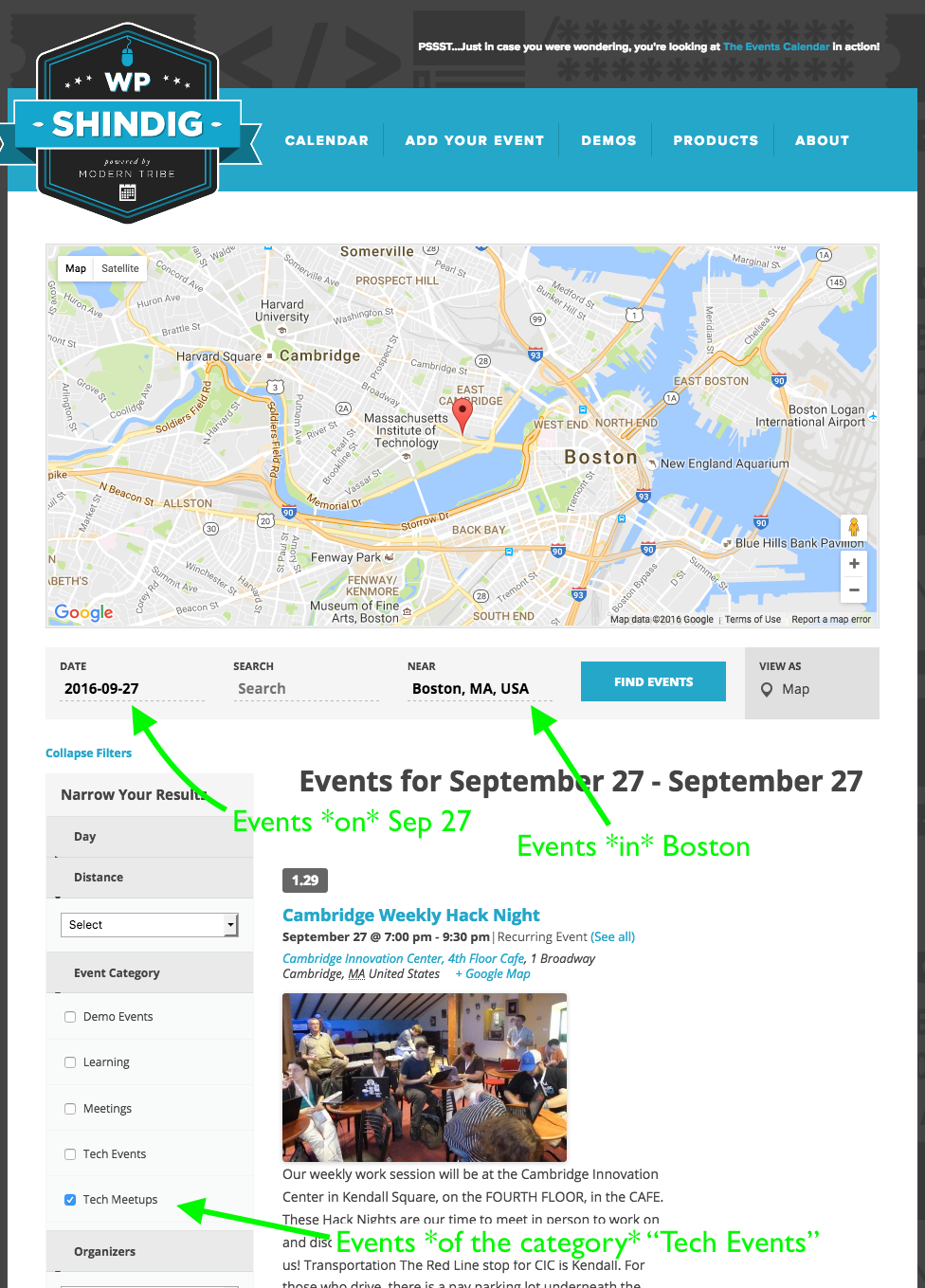
☝️ Definitely click this to see the full version—it shows a location filter, a date filter, and category filter all being used in unison.
You can even link directly to filtered pages; you can click here to go to the above the Map View, filtered to only show events of the “tech event” category in Boston on September 27 is this.
2) I envision adding the Community Events component (eventually) to allow bands and venues to drop their own events in, possible in return for a small voluntary donation to support the site. I think I can restrict end users to add their band (organizer) to add event at any venue, without being able to add other bands. Similarly, I think I get allow a venue to add any band, but not touch other venues. Can I grant granular access to a booking agent to book 10 specific bands into any venue, or book any band into 5 venues for which they book? (Neither is an uncommon arrangement)
There unfortunately is not any granular control over booking in this way, e.g. “10 specific bands into any venue”—our plugins don’t have this sort of feature at this time. 🙁
Sorry to disappoint!
3) Sounds cool, right?
Indeed! ? I hope our plugins are useful!
I also hope this support answer is useful—let me know if so, and you have any other questions I can try to help with.
Cheers,
GeorgeParticipantHey Mitch,
Can you please head to Events → Settings → Display in your site’s wp-admin and confirm a few things for me?
In your System Information, it says that the only event Views you have enabled are List View, Month View, and Day View.
Can you head into your wp-admin and:
1. Ensure that Events Calendar Pro is Activated on your site.
2. Ensure that the Photo View is checked in the “Enable event views” list of checkboxes.Please see this screenshot for reference (click for larger):
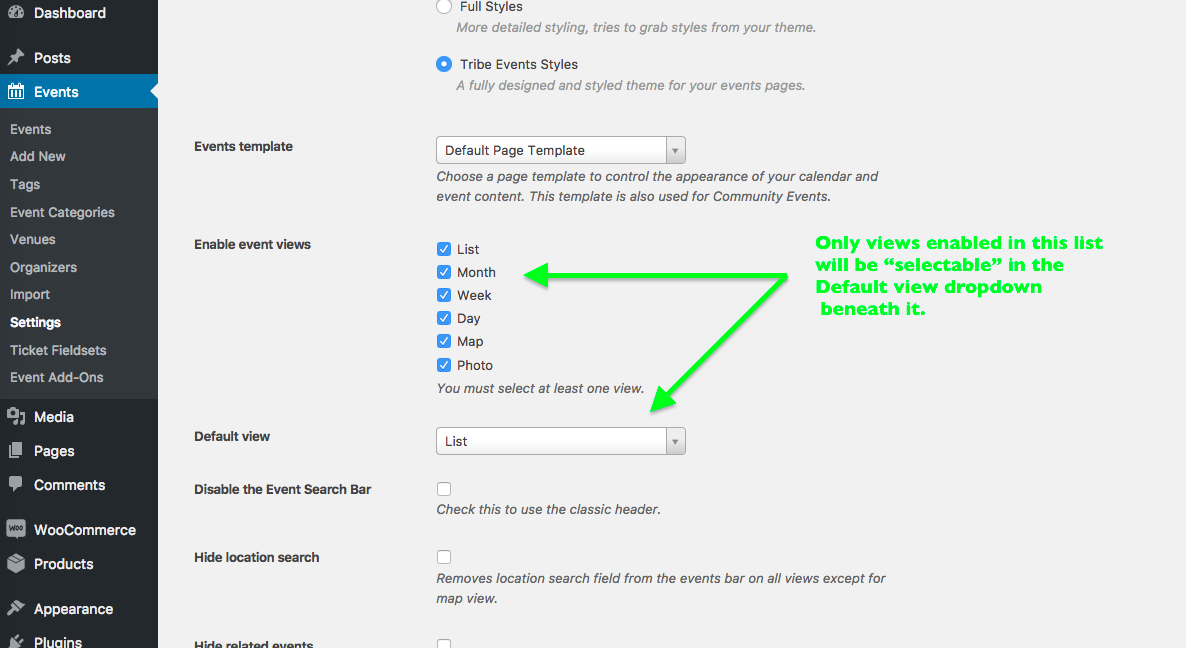
Please share a screenshot of your own settings panel, the same section of the settings that are seen above in my screenshot.
3. Also, I noticed that in your site’s System Information you were using version 4.2.6 of The Events Calendar and version 4.2.5 of Events Calendar Pro. These are certainly recent versions; however, just to cover all of our bases here, can you ensure that you update to the most recent versions of both pieces of software and see if that makes any difference whatsoever? The most recent version of The Events Calendar is 4.2.7 and the most recent of Events Calendar Pro is 4.2.6; again, I doubt this small increase will make a difference, but it’s worth covering all bases here.
Thanks!
GeorgeParticipantHey Mitch,
Really sorry for the delayed response here. We have been having difficulty in recreating your issues but are working on hard on identifying the culprit.
Sit tight—thank you for your patience!
GeorgeParticipantHi Marie,
Thanks for reaching out.
Can you please clarify where you heard about this “operand” option? Was there a specific place online where you say that this was an option you could use with the tribe_events_list shortcode?
Here is the official documentation for that shortcode and other Pro shortcodes: https://theeventscalendar.com/knowledgebase/pro-widget-shortcodes/
“operand” is not a feature of our plugins…
Let me know what you think!
GeorgeParticipantHey Brandon,
Thanks for reaching out.
I’m sorry that you found our website confusing, and appreciate the honest feedback about it.
In regards to your questions, I will answer them in turn as follows:
1. Is Community Events simply an entry portal, requiring Events Cal Pro to actually display the events?
You do NOT need Events Calendar Pro for any add-ons. All you ever need is The Events Calendar, which is the core plugin that provides the basic calendar functionality.
Yes, you need The Events Calendar to have a calendar on your site, and thus you need it before you can add the Community Events plugin. If there wasn’t a calendar, then there would be nowhere to post the Community-Submitted events, so you need to have The Events Calendar installed and activated for Community Events or any other add-on.
2. Does Community Events require the Community Tickets application to sell tickets, or does Events Tickets Plus do the trick?
3. I am looking to allow users to enter their own events and sell tickets to their events. To do so, would Community Tickets, combined with Event TIckets/Event Tickets Plus and WooCommerce meet my needs?
It depends on what you need.
If you want folks who submit events to be able to earn their own money, and split the earnings with you as the site owner, then YES you need Community Tickets.
If you just want folks who submit events to be able to say, “This event will cost $25 and there are 250 seats available” (for example), but then ONLY YOU as the site owner will collect money, and they as event-submitters will NOT share in the revenue, then you do NOT need Community Tickets.
Selling tickets—with or without the Community Tickets features—requires a few different things. You would need the following as a base to sell tickets for money:
• WordPress [free]
• WooCommerce [free]
• The Events Calendar [free]
• Event Tickets [free]
• Event Tickets Plus [premium]If you want to use the features of Community Tickets then to the above roster you would have to add:
• Community Events [premium]
• Community Tickets [premium]I hope this information helps!
GeorgeParticipantHey Bradley,
Thanks for reaching out.
There is not a way to bulk-update all of those fields at this time. There might be other plugins out there that allow for the bulk-updating of meta fields and other custom metabox fields, but it is not a feature of our plugins or of WordPress itself to have the bulk-editing features you describe.
Sorry to disappoint!
GeorgeParticipantThis reply is private.
September 26, 2016 at 9:15 am in reply to: Event Ticket Plus not auto sending tickets after numerous updates #1168762ParticipantThis reply is private.
ParticipantSorry I couldn’t deliver, John! 🙁
Best of luck with your project. And please open a new thread any time if other issues or questions arise.
Sincerely,
GeorgeParticipantThanks for the kind words about our support efforts, Mr. Peri—it means a lot! The WooCommerce team usually provides great support, so I’m not sure what happened there. I wish you the best of luck with those issues—especially the client site one!
As for the issues with the locale, I think your insights here are quite accurate:
So technically af_ZA is the correct naming. Not sure why WordPress does only af then. Perhaps it’s simply because that is how the very 1st translators saved it and since Afrikaans is really not such a big group of people doing sites on the web in that Lagrange it never was an issue before. It would just really be easier for future updates if nrom could be picked.
The proper locale is definitely worth finding out, and I will be bringing this up on our next team meeting. We have some folks on our team who know translations and locales very well, and might have some insights into the correct locale here or at least have some insights into how we can find out—and how we can make a change here!
I’m sorry that this thread didn’t lead to a neat resolution of those concerns, but stay tuned to our plugin updates—any changes on this front will surely be noted in the changelogs of plugin updates. You can stay tuned to http://theeventscalendar.com/blog, where we post release notes, if you’d like—or just wait for the updates to arrive in your wp-admin! 😀
Cheers and best of luck with your projects. If other questions or issues arise, open a new support thread any time.
— George
ParticipantHey Lisa,
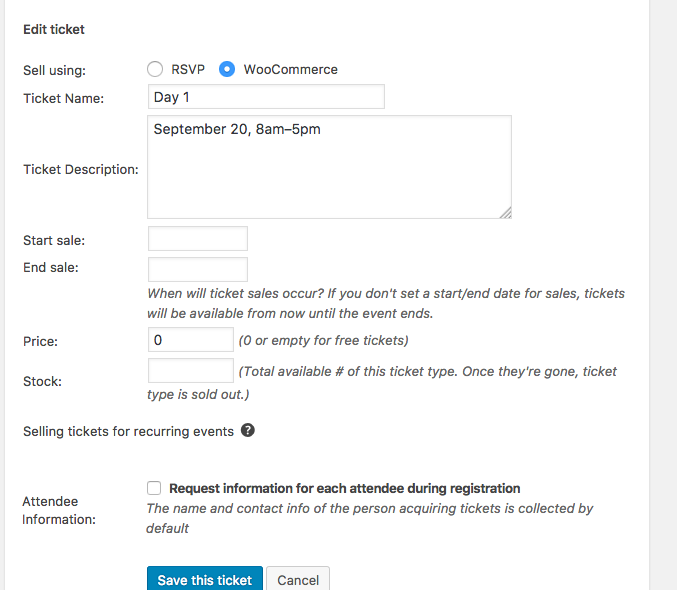
The simplest way to ensure the date information is clear is to add the information in the ticket descriptions.
So, in terms of order the tickets, keep in mind that the first ticket you create on an event will be the bottom ticket that displays on the front-end.
So if you create the ticket for Day 1 first, then Day 2, and end with Day 6, on the front end the ticket for day 6 will be on top.
I recommend creating tickets “backwards”, so create the Day 6 ticket first, then Day 5’s ticket, and so on.
Here is an example of creating these tickets in this order in the wp-admin (click for larger size):
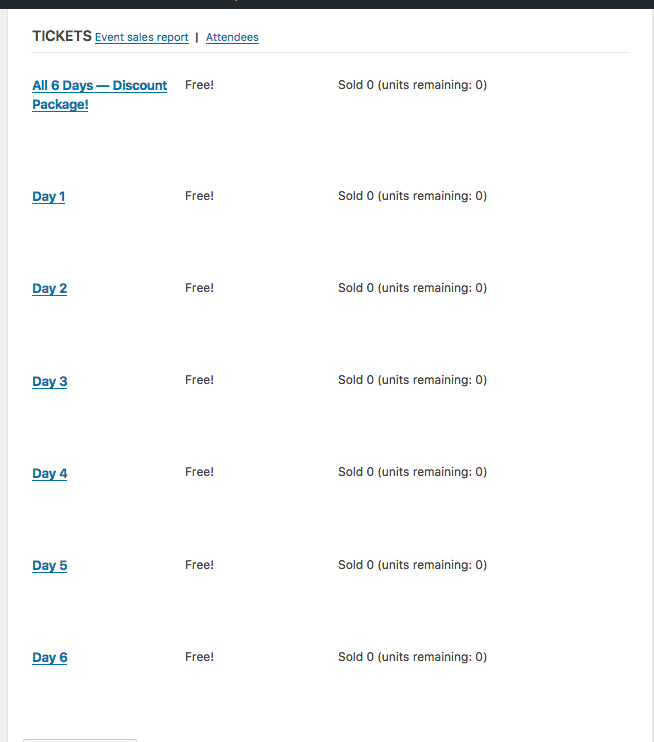
Each individual ticket there has a “description” field when creating it…here is a screenshot showing how I filled out the description field for a ticket (click for larger size):
Finally, when all tickets are added, you publish the event…here is the how the tickets look on the front end at the bottom of the event, where users can select the tickets they want and buy the (click for larger size):
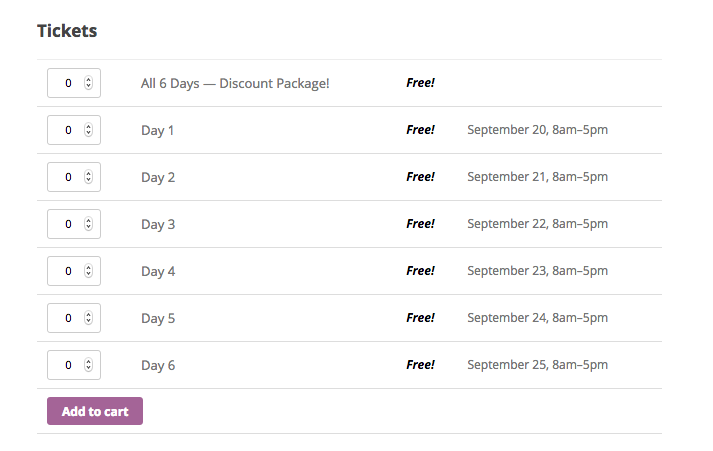
☝️ I hope this helps!
Cheers,
GeorgeParticipantThis reply is private.
ParticipantHey Bob,
Your first post on this thread was this:
I have six different events running at once and I cannot find on the site if I can connect each event to the Events Tickets Plus and sell tickets to each event at same time. So, in a nutshell, how many events can I connect to the Events Tickets Plus at the same time
When you say, “will someone please sort this problem out,” which problem are you referring to?
If it’s the question of yours I quoted above, I responded above.
If it’s the problem have your order being cancelled, I am happy to help with that too.
It looks like you have one license key for Event Tickets Plus. This license is ACTIVE, and is being used on http://www.agent-coasia.com
Our records show that this license is NOT CANCELLED. There should be no problems with that.
Can you clarify what your problems are with the order and such, and what is going on here? Also, I am a person you are talking to. 😀 And I am happy to assist!
Let me know what’s going on and what we can help with.
— George
ParticipantHey Steve,
Thanks for reaching out! I’m glad to hear that the recurring events feature is working well for you.
Events Calendar Pro does not offer any registration or signup functionality at this time. This is possible by using another set of plugins we make, Event Tickets and Event Tickets Plus.
Event Tickets is free and allows for FREE signups to events — where folks can register that they will be attending or not attending, but there is no financial transaction that takes place or cart checkouts, etc.
Event Tickets Plus is an add-on to Event Tickets. With Event Tickets Plus, you can charge money for tickets.
It sounds like the free, core version of Event Tickets on its own is plenty for your needs here — you can let folks sign up for classes using just their name and email address; you can limit the number of spots available; etc.
If you know all of this already, my apologies! In which case, it seems like you are just asking if you can have some sort of signup “right from the calendar”? At this time, users can only buy tickets or register for events on the single-event pages—they can’t do so from calendar views like “Month View”, “List View”, “Week View”, etc….
I hope this information helps!
— George
-
AuthorPosts