

Forum Replies Created
-
AuthorPosts
-
George
ParticipantHey Dave,
I’m sorry to inform you that the snippet I mentioned above no longer exists because of some changes to the Eventbrite API in recent months. 🙁
With their new API it is not possible to set the currency programmatically, and it must be done manually.
One thing that MIGHT help here is to use a custom code snippet we have that attempts to use eventbrite.co.uk for all API references instead of eventbrite.com. This MAY help with the default currency.
To activate this snippet, simply download this file and install it on your site like a normal plugin ? https://github.com/theeventscalendar/configure-eventbrite-tickets-to-use-co-uk/archive/master.zip
Then activate that plugin, and all API references thereon should be through eventbrite.co.uk….
I hope this helps!
GeorgeParticipantThis reply is private.
ParticipantThis reply is private.
ParticipantGlad to hear it Jordan!
Open a new thread in these forums any time other questions or issues arise. ?
Cheers,
GeorgeParticipantGlad to hear it Betty!
Open a new thread in these forums any time other questions or issues arise. 😀
Cheers,
GeorgeParticipantHey @Michelle,
Thanks for your patience here.
I am not able to reproduce this issue on my own site, so I’m curious:
1. You say, “The site is in development and is not accessible publicly but I’m happy to give you access in a private way.” Would you indeed be willing to post some private login credentials here, in a private reply?
If you would like us to log in to view the site, please also write that you understand that our support team will only be accessing the site from a “read-only” perspective; we will NOT change any settings in the admin or front-end.
Finally, if you would like us to log in to view the site, please also write that you understand that we are not responsible for issues to the site that arise any time after our logging into it.
Sorry for these weird caveats; we just need to make sure that the role of our examination is clear and that we will not be clicking or changing anything on the site, just looking! 😀
2. Can you clarify how long you’ve had The Events Calendar and Filter Bar running alongside each other, and when these issues arose? Are both plugins recent additions to your site, and the issues have been there since day one? Or have you used these plugins for a long time, and this issue only appeared recently and suddenly?
Thanks!
GeorgeOctober 7, 2016 at 5:24 pm in reply to: Import contains wrong dates for recurring and multi-day events #1173965ParticipantHey Jill,
Thanks for trying out some new versions of the software and for your follow-up here.
Will repeating/recurring events ever import as a single event with multiple occurrences or will they always be imported as separate events?
At this time, when it comes to iCal Importer they will always be imported as separate events.
Should I still try using the RC version of the Calendar plugin instead of using this new release of iCal importer? I wasn’t sure which would be the better option.
☝️ This is a great question, and the things you’re finding may be related to what versions of our software you are running. To help me answer both this question and to take a closer look at the issues you’re having with multi-day events, can you post your site’s System Information to this thread again? I know you already shared this information when you opened the thread, but I’m just curious for another look at it now that you’ve updated some of the plugins. Here is how to share the system information → https://theeventscalendar.com/knowledgebase/sharing-sys-info/
Thanks for your patience here!
GeorgeParticipantThis reply is private.
ParticipantThanks for this update, Mark. It sounds like this issue is more or less at a stalemate for now—do you agree?
Is there anything else I can try to help you with, Mark?
— George
ParticipantHey Craig,
Can you clarify what your goals are when you describe wanting to “hook into the Woocommerce CSV export feature”?
Next, when you say, “you do allow for exporting to CSV now,” can you confirm that you just mean the CSV export for Attendees Lists?
Sorry for these clarifying questions—I just want to make sure I best understand your goals so that I can best try to help out.
It sounds like you’re trying to make it so that, when you export an event’s Attendees List, “Order Notes” from that attendee’s WooCommerce order are added to the CSV export. Is this correct?
To be clear, the “Attendees List CSV Export” I am referring to is the one you can generated with the button being pointed to with a big green arrow in this screenshot (click for larger version):
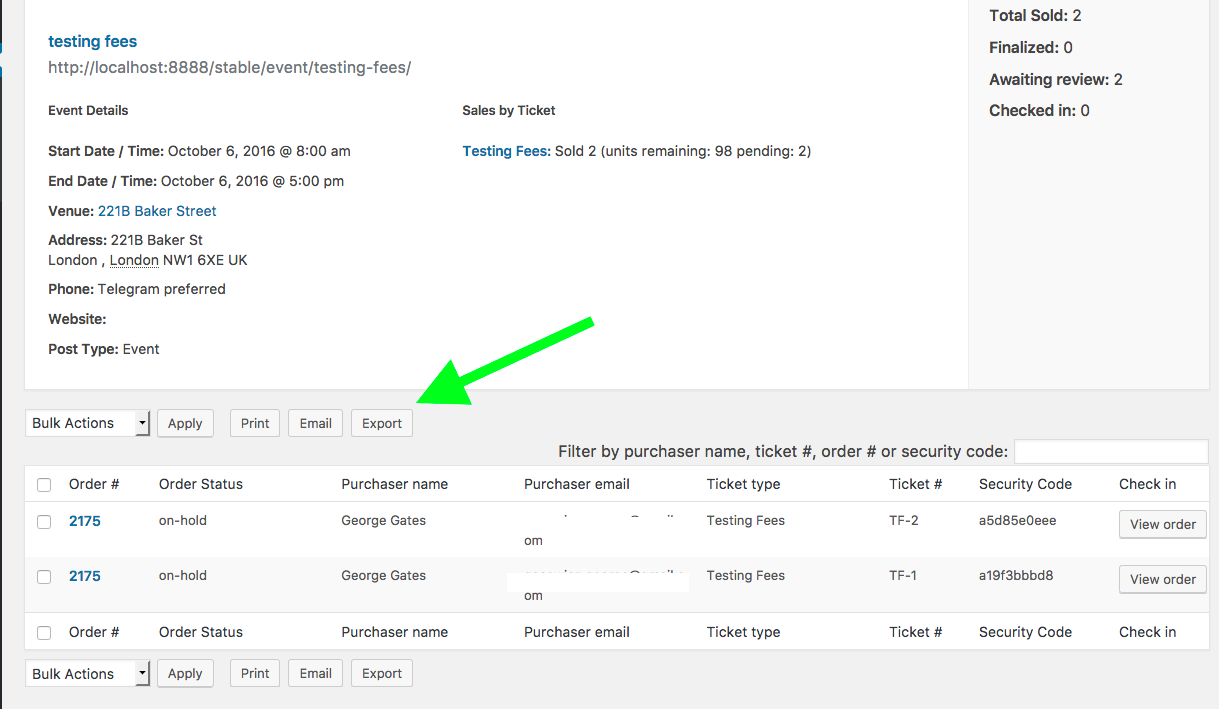
Thanks!
GeorgeParticipantSorry to disappoint, Paul. 🙁
I will close this thread for now, but if you have any other questions please feel free to open a new thread any time!
Sincerely,
GeorgeParticipantHey Brent,
Thanks for your follow-up here. When it comes to limits on “color keys”, our plugins do not impose any limits. But they also don’t really provide specific “color key” functionality. You can use the customizer that Geoff linked to in his reply to change some of the foundation colors of your calendar, links on it, etc.
But to provide different map locations with specific color keys, or give events in certain categories their own colors based on what category they’re in, unfortunately neither thing is a feature our plugins provide out-of-the-box. 🙁
When it comes to the “category colors” feature specifically, though, there is a free, unofficial third-party plugin that many folks love; it provides that “category color” functionality → https://wordpress.org/plugins/the-events-calendar-category-colors/
↑ Just to reiterate, that plugin is free and does not require Events Calendar Pro. So you can start playing with that now, if you’d like! 😀
I hope this information helps you move forward with your project; let me know if there is anything else we can try to help with!
— George
October 7, 2016 at 4:59 pm in reply to: Moving a licence key to a different Modern Tribe account #1173955ParticipantThis reply is private.
ParticipantHey Liz,
I think I’ve got some CSS that will fix this.
Try adding the following block of code to your site:
body.post-type-archive-tribe_events .mk-header {

    z-index: 1 !important;

}
.tribe-events-calendar {
overflow: visible !important;
}.tribe-events-tooltip .tribe-events-description p {
font-size: 12px;
margin-bottom: 0;
}I hope that helps!
GeorgeOctober 7, 2016 at 4:49 pm in reply to: The calendar is no longer displayed when I add or edit an event #1173951ParticipantHey Stephanie,
Sorry to hear this!
This is odd behavior that I cannot recreate, nor do we have other users reporting, so I am curious: can you post your site’s complete system information with us to help us investigate?
It’s very easy to do; here’s how to do it → https://theeventscalendar.com/knowledgebase/sharing-sys-info/
Thanks!
George -
AuthorPosts