
Home › Forums › Ticket Products › Event Tickets Plus › Editing Attendee Information
- This topic has 10 replies, 6 voices, and was last updated 9 years, 11 months ago by
Craig.
-
AuthorPosts
-
October 4, 2016 at 7:06 am #1172245
Craig
ParticipantI’m trying to get some information into the attendee list after the order is complete. I can’t find a way to edit the attendee information fields from the backend. I’ve also tried adding a customer note, but those do not show up on the exported CSV file.
I do not have the “Require Users to Login” before ordering checked, as we use Create Customer on Order plugin instead.
It seems there must be a way for an Admin to edit the Additional Information fields, but I can’t find it.
Thanks,
CraigOctober 4, 2016 at 9:17 am #1172308Geoff
MemberHi Craig — welcome back!
Editing information is actually something the attendee needs to do themselves. If they visit the event, then there will be a notice on there that informs the attendee that they have already reserved a ticket for the event (screenshot).
Once the attendee clicks that link, it will provide a screen on which they can edit the information they had previously entered when purchasing the ticket (screenshot).
You’re probably looking for a way to edit that information yourself but I’m afraid that isn’t something we support just yet, though it is something we are looking into.
Does this help answer your question? Please let me know!
Cheers,
GeoffOctober 4, 2016 at 9:32 am #1172315ParticipantThanks for your response, Jeff. It seems a little odd we wouldn’t be able to edit those fields, so I’ll make a submission to UserVoice for that.
In the meantime, is there a function we could use to add “Order Notes” from Woocommerce to the CSV? I am able to make both user and private notes in there, but I’m unable to see those anywhere except in the order screen.
Thanks,
CraigOctober 4, 2016 at 4:05 pm #1172497MemberThank for following up, Craig! Definitely a good idea to get that feature on the UserVoice radar.
I’m honestly unsure whether it’s possible to include the order notes in a CSV export. That’s something that, if possible, would be part of WooCommerce rather than The Events Calendar. I did a little digging and this plugin might be one way to accomplish that:
Store Exporter – Export WooCommerce Products, Orders, Subscriptions, Customers
I hope it is but, if not, I would suggest reaching out to WooCommerce support since they may be familiar with another or more optimal way to go about it.
Cheers!
GeoffOctober 6, 2016 at 12:30 am #1173105Gabriel
ParticipantI have created an entry in Uservoice: https://tribe.uservoice.com/forums/195723-feature-ideas/suggestions/16518778-edit-attendee-meta-information-in-admin-backend
Please go vote 🙂
October 6, 2016 at 8:30 am #1173219ParticipantHi Christian,
Thanks for adding this to UserVoice for me. I just voted on it.
I’m looking into how to hook into the Woocommerce CSV export feature. Since you do allow for exporting to CSV now, it seems someone there might know how to add in extra columns for export. I see code for that in /events-tickets-plus/src/Tribe/Meta/Export.php, but I haven’t concentrated on how to change it quite yet.
If there’s someone there who could take a quick look at extending it in functions.php, that would be awesome!
Thanks,
CraigOctober 7, 2016 at 5:15 pm #1173961George
ParticipantHey Craig,
Can you clarify what your goals are when you describe wanting to “hook into the Woocommerce CSV export feature”?
Next, when you say, “you do allow for exporting to CSV now,” can you confirm that you just mean the CSV export for Attendees Lists?
Sorry for these clarifying questions—I just want to make sure I best understand your goals so that I can best try to help out.
It sounds like you’re trying to make it so that, when you export an event’s Attendees List, “Order Notes” from that attendee’s WooCommerce order are added to the CSV export. Is this correct?
To be clear, the “Attendees List CSV Export” I am referring to is the one you can generated with the button being pointed to with a big green arrow in this screenshot (click for larger version):
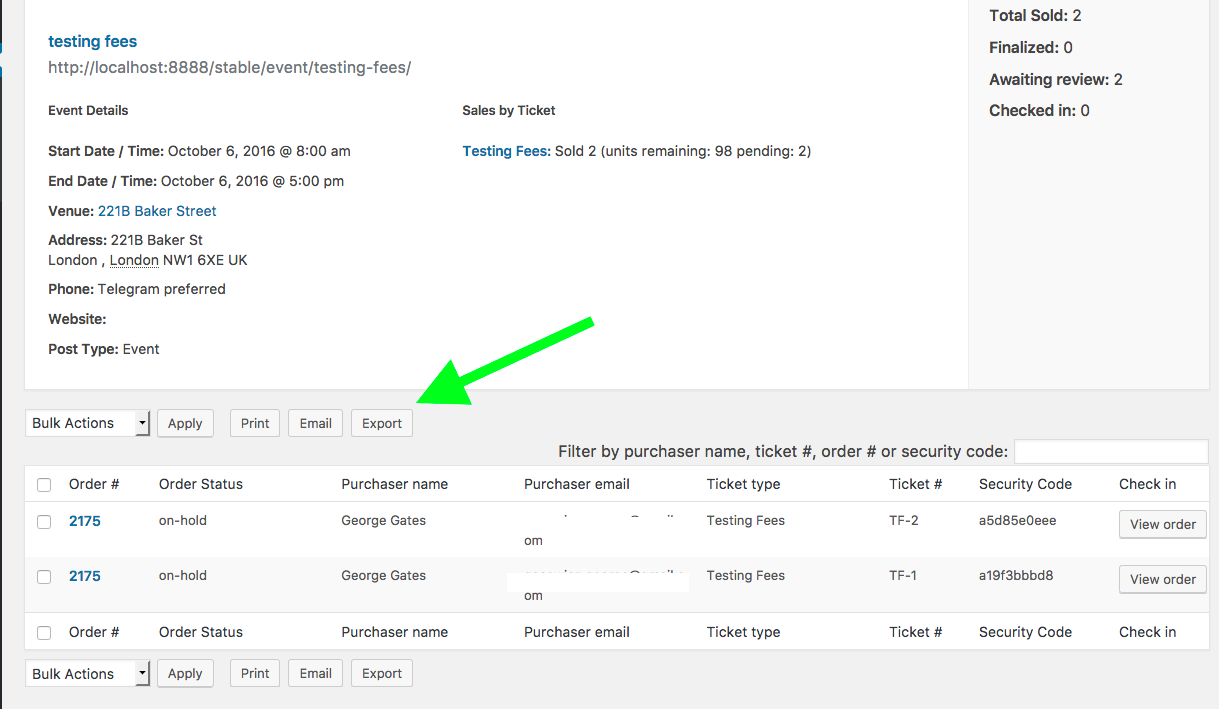
Thanks!
GeorgeOctober 8, 2016 at 6:41 am #1174057ParticipantHi George,
Yes, you’re exactly right about what I mean. You can safely ignore what I said in favor of what you said. 🙂
Thanks,
CraigOctober 8, 2016 at 3:54 pm #1174151ParticipantThanks for clarifying Craig!
So, the good news is that this is technically possible. The bad news is that it’s unfortunately only possible with some extensive custom coding—a level of custom coding beyond the scope of support forums.
It’s unfortunately tricky to do because, while you can filter the columns exported for attendees lists with the filter tribe_events_tickets_attendees_csv_export_columns, it’s tricky to access the order notes from there and to ensure that they export in the CSV. 🙁
If you want to tinker on your own, then to find the necessary code check out this file within Event Tickets:
/event-tickets/src/Tribe/Tickets_Handler.phpSorry to disappoint, Craig!
GeorgeOctober 30, 2016 at 9:35 am #1185047Support Droid
KeymasterHey there! This thread has been pretty quiet for the last three weeks, so we’re going to go ahead and close it to avoid confusion with other topics. If you’re still looking for help with this, please do open a new thread, reference this one and we’d be more than happy to continue the conversation over there.
Thanks so much!
The Events Calendar Support Team -
AuthorPosts
- The topic ‘Editing Attendee Information’ is closed to new replies.