

Forum Replies Created
-
AuthorPosts
-
George
ParticipantGlad to hear it!
Be sure to make a backup of your database in this now-cleaned state! 😀
Best of luck with your site,
GeorgeParticipantHi Chad, thanks for your patience. These are very odd issues and we’ve been trying to determine the best route forward.
The best route we’ve come up with is running a cleanup script. You mention a SQL cleanup script; we don’t have one at this time, but we do have a PHP cleanup script that you can install on your site like a plugin.
There are a few key pieces of information I want to share with you here.
Included in the following text are instructions for (hopefully) getting rid of all the duplicate events on your site, thus lightening the database load dramatically. Please read this all carefully first before proceeding and ensure each step is done with care.
1. Some Background on What is Happening
A big part of the problem here is the sheer number of events which is caused by the sheer number of duplicates. This problem arose from a weird issue between versions 3.3 and 3.5+ of Events Calendar Pro; by looking in your System Information that you’ve posted here, I can see that the upgrade path you followed follows this and is very problematic.
The jump from Events Calendar Pro version 2.0.3 to 3.12.3 is what broke things.
2. Make a Backup
Please make a complete backup of your site and database before proceeding any further. The following steps should not be destructive, but I do not recommend proceeding without a backup. Should something happen where data is lost and you don’t have a backup, there is nothing we would be able to do to help recover that data.
Please make a backup; there are numerous ways of doing this, so research online for the simplest/most-effective method of your preference. Your hosting company may also be able to provide backups upon request.
3. Deactivating Other Things
Please deactivate all plugins on your site except for only The Events Calendar and Events Calendar Pro.
Then, please activate a default theme like Twenty Twelve, Twenty Sixteen, etc.
4. Setting up the Cleanup
Now that your site is in this state, proceed with actually deactivating and deleting The Events Calendar and Events Calendar Pro.
This will not delete event data.
Once those plugins are deleted:
- Install version 3.5.1 of The Events Calendar, which you can download here.
- Install version 3.5.1 of Events Calendar Pro, which you can download here.
- Install the Tribe Cleanup plugin, which you can download here.
Then activate all three of these plugins. Please note that, depending on your site settings, you may see notices like this and a blank white screen upon activation:
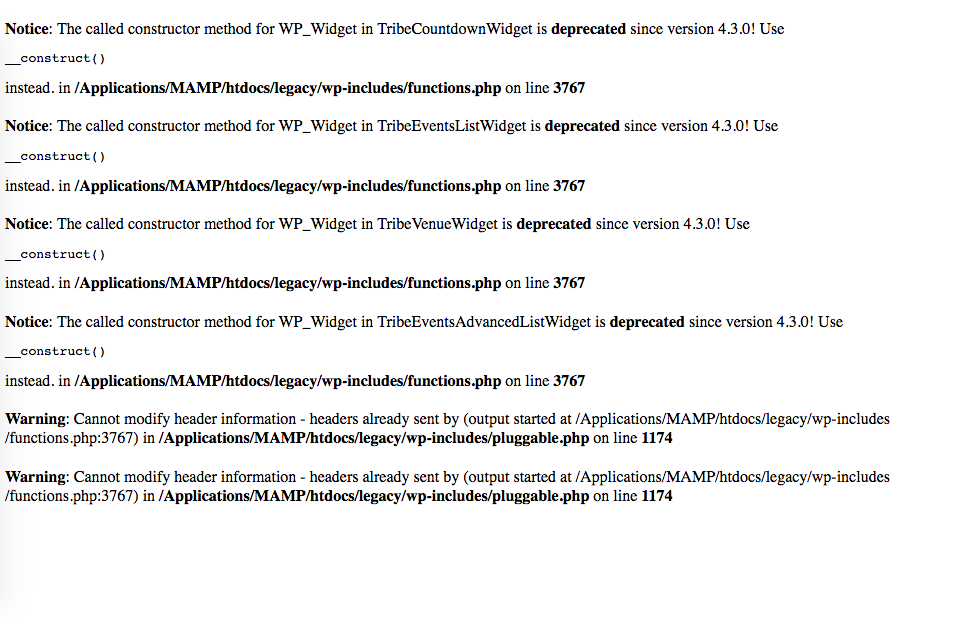
☝️ This is fine. Just close the window and open a new one and go back to your site’s wp-admin, and it will be fine.
5. Performing the Cleanup
Once you’ve installed and activated the three plugins above, go to the Events list in your wp-admin. Find some events that are having many duplicates, and just take note of these events and how many duplicates they have.
Then head to Events → Settings in your wp-admin. Look for a new button there that looks like this:
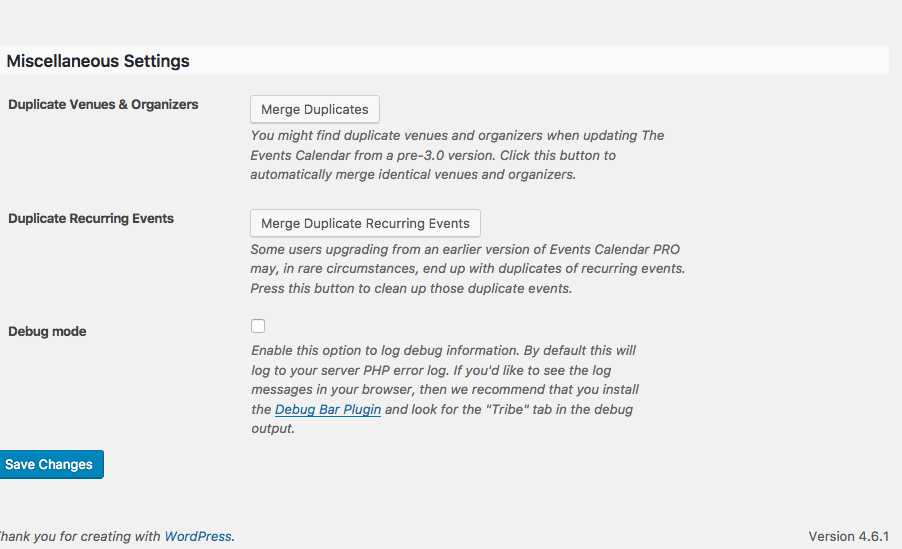
Click “Merge Duplicate Recurring Events”. Let the page sit there a while and then check out your admin Events list again and check to see if any duplicates were successfully removed. It may take a few runs of the “Merge Duplicate Recurring Events” action before you start seriously noticing improvements.
Keep using this button until all of the duplicates are gone!
6. After the Cleanup
Once all duplicates are gone, delete the recurrence cleanup plugin, The Events Calendar 3.5.1, and Events Calendar Pro 3.5.1.
⚠️ IMPORTANT: Make a new backup of your database at this point now that it is “cleaned”! This way, if duplicates or other issues happen again you can reset.
Once that backup is done, install The Events Calendar 4.2.7.1 and activate it. Then install and activate Events Calendar Pro 4.2.7.
Any issues? If not, then proceed with re-activating your other plugins one at a time, and if no issues arise, then activate your normal theme again and resume with your site ….
Let me know how this all goes, and if you have any questions Chad!
— George
October 12, 2016 at 10:20 am in reply to: Can Facebook Events pull in events from multiple Facebook Pages? #1175507ParticipantHi Th,
Yes, there are, though only for approved nonprofits.
You can read more about the Nonprofit Program and find the application form here → https://theeventscalendar.com/knowledgebase/do-you-offer-discounts-for-nonprofit-organizations/
Cheers,
GeorgeOctober 12, 2016 at 10:17 am in reply to: Stopping Ticket Email with Membermouse/Authorize.net (not WooCommerce) #1175505ParticipantThanks for confirming, @annie.
To stop those RSVP emails from being sent, I would recommend adding this snippet of code to your theme’s functions.php file:
add_filter( 'tribe_rsvp_email_recipient', '__return_empty_array' );☝️ If you’re not familiar with adding code to your theme’s functions.php file, fortunately if you do a quick search online there are a ton of tutorials out there — it’s pretty easy so try it out.
I hope this helps!
GeorgeParticipantHi Ron,
Glad to hear about some progress here. When it comes to the “Add to Cart” button, this is not something our plugins provide so I am not sure why your add-to-cart button behaves as it does.
I would recommend contacting your theme developer or WooCommerce for further assistance on that to help ensure it is visible no matter whether the user is logged in or not.
If you have further questions or follow-ups, Ron, no worries! But can you please open a new thread on these forums?
@Darren, did the code I wrote for you help at all? Let us know! 😀
Thanks,
GeorgeParticipantThanks Brian,
I’m trying to recreate the problem but am failing to. I’m wondering; if you head to Events → Settings in your site’s wp-admin, can you share a screenshot of the “Timezone Settings” section on your site?
For some reason those details aren’t showing up in the System Information you posted.
For reference, here is a screenshot my own “Timezone Settings” section:
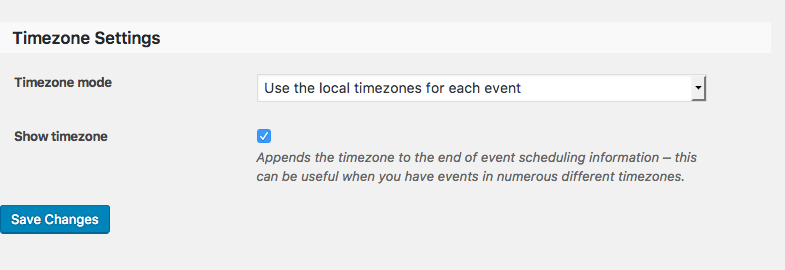
You can share screenshots by uploading the images to this thread. If you have issues with that, you can upload to Imgur.com, Flickr.com, CloudUp.com, or any similar image-hosting site; then just share the links to those images here and I’ll take a look.
Thank you for your patience here!
GeorgeParticipantThis reply is private.
October 12, 2016 at 9:30 am in reply to: Submitted Events for one user ends up in status Pending #1175420ParticipantSorry to hear abut this, Andreas.
You say:
I have other registered users who logs in and are able to publish Events that do not end up in status Pending
☝️ What user role do these other users have? Are they all also “subscribers”?
Thanks!
GeorgeOctober 12, 2016 at 9:24 am in reply to: Action or Filter when WooCommerce Ticket gets created #1175415ParticipantHey @danfeeley,
You can find these actions in this file within Event Tickets:
event-tickets/src/Tribe/Tickets.phpThere you’ll find the action tribe_tickets_ticket_add, whose definition in the file looks like this (note the three arguments you can use):
/**

 * Fired once a ticket has been created and added to a post

 *

 * @var $post_id Post ID

 * @var $ticket Ticket object

 * @var $data Submitted post data

 */

do_action( 'tribe_tickets_ticket_add', $post_id, $ticket, $data );
Please note that the addition of tickets happens with AJAX, so keep this in mind if you are using the hooks that run upon ticket creation and expecting to see UI changes.
You might need or want to listen to event triggers in the JavaScript of the plugin too, not just the PHP, in which case there is a jQuery trigger when a ticket is added called saved-ticket.tribe. You can learn more about saved-ticket.tribe by heading into this file within Event Tickets:
event-tickets/src/resources/js/tickets.jsCheers,
GeorgeParticipantHey @Dorene,
Thanks for reaching out.
This is a heavily customized view, achieved only be way of extensive professional customization.
Please let me know if you have further questions and if there is anything else I can try to help with!
Sincerely,
GeorgeParticipantHey @Jatinder,
Thanks for reaching out.
Depending on your needs, a Multisite License may actually be the most appropriate here.
Please read through this knowledgebase guide on the topic of licenses → https://theeventscalendar.com/knowledgebase/multisite-license/
☝️ Let me know what you think of this guide, if it helps you determine the right license, any other questions you might have! 😀
— George
ParticipantHey Aaron,
Thanks for reaching out.
The name of the widget’s class to use there is Tribe__Events__Pro__Mini_Calendar_Widget.
However, I would not recommend using the_widget() in this case.
I would recommend using PHP like this instead:
<?phpecho do_shortcode( '[tribe_mini_calendar]' ); ?>
The reason why I recommend this is because if you use this method, you still get to place the mini calendar widget output in a PHP page. However, you also can more easily use the shortcode options (which are covered in detail in this knowledgebase article).
So, say you wanted to filter the calendar by category. You could do this:
<?phpecho do_shortcode( '[tribe_mini_calendar categories="concert"]' ); ?>
☝️ Whereas doing this by using the_widget() is a bit more complicated.
Just some thoughts; if you want to use the_widget(), then again the class name to use is Tribe__Events__Pro__Mini_Calendar_Widget.
Best of luck with your customizations!
Sincerely,
GeorgeParticipantHey @masspeaceaction,
Thanks for posting that code here. It unfortuantely was breaking the page a bit. Can you paste all of that code into a Gist at http://gist.github.com and then link to that Gist here in your reply?
That way I can take a closer look! 😀
Thanks,
GeorgeParticipantSorry for the delayed reply @touchpoint,
Thanks for reaching out.
When it comes to migrating from WooTickets to Event Tickets Plus, the process is pretty simple. You will mostly just need to swap out the plugins and license keys. As for how much development work is required, I don’t know if you’ve customized WooTickets extensively or what-not. If so, then some degree of development work will indeed be required to port those customizations over to Event Tickets Plus.
You can read more about this process here → https://theeventscalendar.com/knowledgebase/moving-to-event-tickets-plus/
how do we upgrade the license from personal to business so we can manage both sites with one license?
You can upgrade licenses right from within http://theeventscalendar.com/license-keys — just click the “Upgrade to:” option for the tier you want to upgrade to, and you’ll be good to go.
This second client wants to integrate with Eventbrite. Is there an additional cost to do that, and if so how much?
Yes, our Eventbrite Tickets plugin is a separate product altogether and thus requires an additional license. There are numerous license options starting at $89/year. Learn more here → https://theeventscalendar.com/product/wordpress-eventbrite-tickets/
Cheers! 😀
GeorgeParticipantSorry for the delayed reply here, Gene!
When I went to the event you linked to, I was met with a 404 “not found” error.
http://vegasfoodcoop.com/2016/event/test/
Can you share another link so I can take a closer look? It sounds like there may be a theme or plugin conflict here and I will take a closer look.
Can you also share your site’s System Information? Here’s how to do that → https://theeventscalendar.com/knowledgebase/sharing-sys-info/
Thank you!
George -
AuthorPosts