

Forum Replies Created
-
AuthorPosts
-
George
ParticipantHey Greg,
Filtering by category isn’t available at this time; we’re working hard on implementing it. If you would like to just go ahead and get a refund for now, and your order was placed within the last 30 days, we can refund your order immediately upon request. You can do so by filling out the form here → https://theeventscalendar.com/knowledgebase/refund-policy/
Please let me know if there are any other issues or questions I can try to help with.
— George
ParticipantHey there,
We ran into an issue with the packaging of the 4.3.1 update of The Events Calendar, Event Tickets, and Events Calendar Pro.
The main way to resolve these problems is to DELETE previously-installed versions of these three plugins. This will not delete event or tickets data.
Once done, then download fresh copies of plugin files. You can do so for The Events Calendar 4.3.1.1 at http://wordpress.org/plugins/the-events-calendar
Ensure that you install fresh new copies of The Events Calendar 4.3.1.1, not 4.3.1. Same for Events Calendar Pro if you have it: install fresh copies for 4.3.1.1, which we released Thursday evening, and Event Tickets 4.3.1.1
Thank you so much for your patience! Please let us know if you have further questions on this matter or anything else we can try to help with.
Sincerely,
GeorgeParticipantHey Christine,
Thanks for reaching out.
You can only have one “body” of events, and so having two truly separate, distinct calendars is not really possible.
However, you can approximate it by using a few different methods. Check out this knowledgebase article to see the options available ? https://theeventscalendar.com/knowledgebase/can-you-have-multiple-calendars/
Cheers!
GeorgeOctober 22, 2016 at 11:59 am in reply to: HELP! Bought Calendar Pro license but can't input it (Only shows CALENDAR AGGRE) #1181357ParticipantHey Jon,
Please make sure you download and install Events Calendar Pro on your site. Then you should be able to enter the license key for it. You can access your file downloads any time here → http://theeventscalendar.com/my-account/downloads
Cheers!
GeorgeOctober 22, 2016 at 11:57 am in reply to: Fatal error: Class 'Tribe__PUE__Package_Handler' not found in … #1181355ParticipantSorry for my misunderstanding of things, John — I am able to access your site’s System Information now.
I am still unable to reproduce your issues, so here is I would recommend.
1. The Setup
- Deactivate ALL PLUGINS on your site.
- Activate only The Events Calendar, Event Tickets, and Event Tickets Plus.
- Activate a default theme like Twenty Sixteen, Twenty Twelve, etc.
2. Confirm the Tickets Are Active on Post Types
Once you’ve got things configured as described above, head to Events → Settings → Tickets in your site wp-admin.
Make sure that the “Events” post type is checked for the “Post types that can have tickets” option there, as shown in this screenshot:
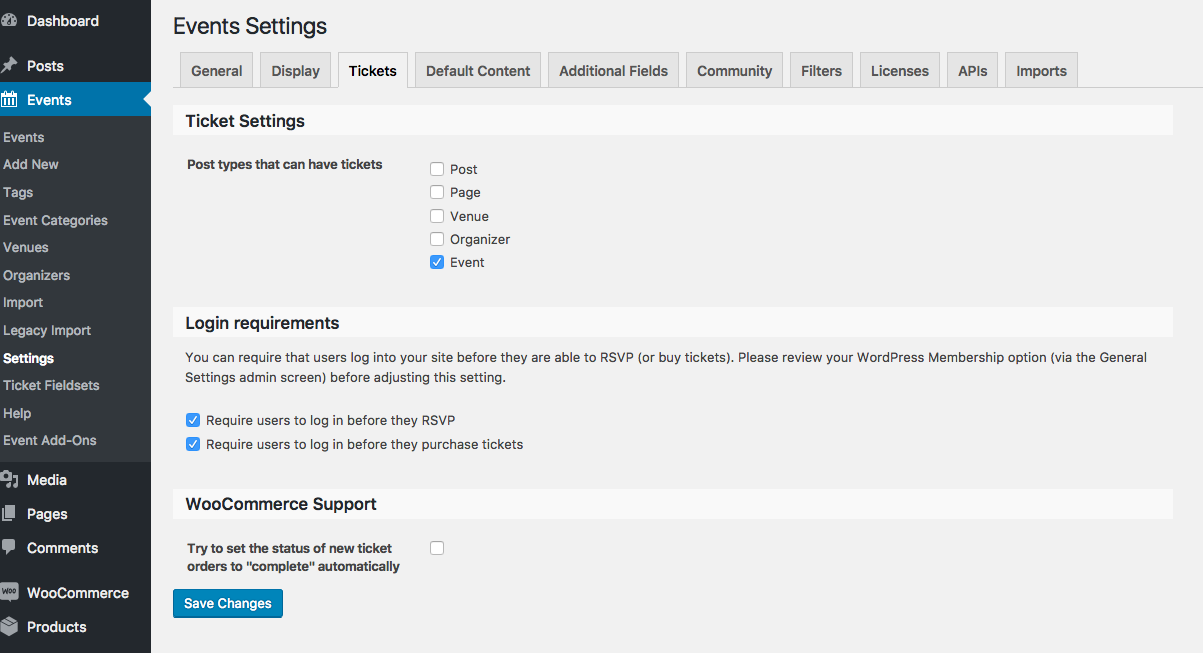
☝️ Even if you see this when you go to this screen, click “Save Changes” just to possibly refresh the option. If it is not checked, of course, then check “Events” and click “Save Changes”.
3. Confirm the Tickets is Available on Post Type Edit Screens
Then, in your wp-admin go to Events → Add New.
• Do you see the “Tickets” metabox showing up anymore?
• If not, then click the “Screen Options” tab in the top-right corner of the admin screen. This will reveal a drawer of checkboxes; do you see a “Tickets” checkbox here? If so, check it. Here is a screenshot of this “Screen Options” drawer: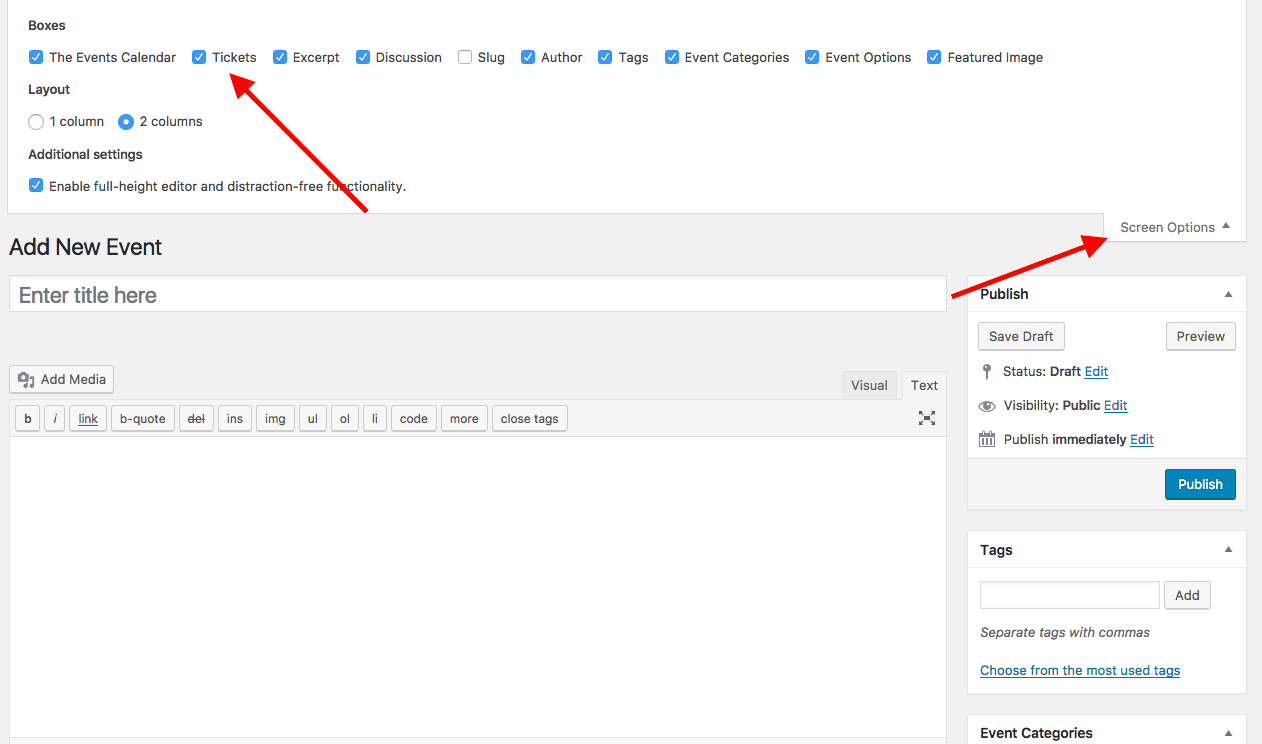
Thanks for your patience here, John. I do apologize for asking more question and doing more troubleshooting here, but as noted this is not a problem we can recreate and nor do we have other reports of this issue. So the steps above will be helpful in confirming the nature of these issues.
Finally, we just recently changed the location of that “System Information” settings box — apologies for not updating the Knowledgebase article in time! I have just updated it to reflect the accurate location of that box now.
Sincerely,
GeorgeParticipantGlad to hear it, Bill! Sorry for the trouble.
Open a new thread any time if other issues or questions arise!
Sincerely,
GeorgeOctober 21, 2016 at 7:21 pm in reply to: Why in comments: During scheduled import, the limit of HTTP requests was reached #1181113ParticipantThis reply is private.
ParticipantHey Jason,
This is a problem with our plugin code and we are working hard on a fix — stay tuned to this thread, I will post as soon as an update is available! 😀
— George
October 21, 2016 at 7:13 pm in reply to: Fatal error: Class 'Tribe__PUE__Package_Handler' not found in … #1181110ParticipantAlso, I notice in your screenshot some other plugins related to The Events Calendar that are not “official plugins”. Things like “The Events Calendar Shortcode”, “Remove Export Links”, “Remove QR codes”, etc.
Can you please deactivate all such plugins, so that only the official main plugins are active? These ones:
• The Events Calendar
• Events Calendar Pro (if you have it installed)
• Event Tickets
• Event Tickets PlusDoes anything improve in this state?
Thanks,
GeorgeOctober 21, 2016 at 7:09 pm in reply to: Fatal error: Class 'Tribe__PUE__Package_Handler' not found in … #1181109ParticipantThanks John!
Can you please post your site’s complete System Information? Here is how to post that ? https://theeventscalendar.com/knowledgebase/sharing-sys-info/
This contains much information other than plugin version numbers that could be quite helpful.
Sincerely,
GeorgeParticipantThis reply is private.
ParticipantThis reply is private.
October 21, 2016 at 6:49 pm in reply to: Update caused Fatal error: Can't use function return value in write context in / #1181106ParticipantThanks for your patience and updates here, Bob and Jon.
At this time, we have published official patches for the problems. You should be able to proceed by updating The Events Calendar to version 4.3.1.1 and Events Calendar Pro to 4.3.1.1, as well.
Note that the version numbers here are NOT 4.3.1, but 4.3.1.1 :slightly_smiling_face:!
I hope these new versions help—you can download fresh files any time at http://theeventscalendar.com/my-account/downloads
Cheers, and sorry for the trouble here!
George
ParticipantHi Nick,
Thanks for sharing all of this information. I am sorry for all of the trouble here!
We just published a new version of Events Calendar Pro a few hours ago; version 4.3.1.1, just like The Events Calendar is now at version 4.3.1.1.
(Note: This is version 4.3.1.1, not 4.3.1 ?!)
If you delete the current version of Events Calendar Pro from your site (which won’t erase event data), install the new Events Calendar Pro 4.3.1.1 on your site, and then activate, do you still get the white screen of death?
You can get new files for our plugins here any time → http://theeventscalendar.com/my-account/downloads
Thank you!
GeorgeParticipantHey Bill,
My apologies for the delayed response here.
Yes, today we just released a new hotfix for Events Calendar Pro and I would recommend updating that, too.
We have published fixed versions of everything and you should be able to proceed by updating The Events Calendar to version 4.3.1.1 and Events Calendar Pro to 4.3.1.1, as well.
Note that the version numbers here are NOT 4.3.1, but 4.3.1.1 ?!
Let me know if you are able to get things working with these versions!
Sincerely,
George -
AuthorPosts