
Home › Forums › Ticket Products › Event Tickets Plus › Fatal error: Class 'Tribe__PUE__Package_Handler' not found in …
- This topic has 10 replies, 4 voices, and was last updated 9 years, 11 months ago by
John.
-
AuthorPosts
-
October 20, 2016 at 3:52 pm #1180200
John
ParticipantThe update to Event Tickets 4.3.1 also broke my site and I was getting a white screen on the homepage and this error:
Fatal error: Class ‘Tribe__PUE__Package_Handler’ not found in /myhome/dir
I uploaded a backed up version of 4.2.7 I had, now all of my events are gone.
I just uploaded a backed up version of Events Tickets Plus 4.2.7.1 and there are still no events and it doesn’t seem to be working either. Please advise. I really need this working again.October 20, 2016 at 7:04 pm #1180276George
ParticipantHey there,
We ran into an issue with the packaging of the 4.3.1 update of The Events Calendar and Event Tickets.
There are two main solutions to proceed and work around these issues.
First: Replace the Files of The Events Calendar 4.3.1.1
- If you are able to access your site files via FTP, head to the /wp-content/plugins directory and delete the /the-events-calendar folder there. This will not delete event content.
- Once that is deleted, download a fresh copy of The Events Calendar 4.3.1.1 from WordPress.org ? http://wordpress.org/plugins/the-events-calendar
- Install this new fresh copy of The Events Calendar 4.3.1.1 on your site.
⚠️ Please Note: If you have Event Tickets on your site, you may also want to do this process for Event Tickets 4.3.1.1, available on WordPress.org here.
Next: PHP 5.2 Fix
If you do the above steps and still see fatal error when you try to access your site, then this is the result of your site’s server running an old version of PHP.
To proceed, first please contact your web host and ask them to upgrade the version of PHP they are running. While we do try to support old versions of PHP 5.2, because WordPress itself does, using out-of-date versions of software like this is bad for security and site performance.
You can contact your web host and request they update their servers by sending a message like this:
I'm interested in running the open-source WordPress (https://wordpress.org/) web software and I was wondering if my account supported the following:• PHP 5.6 or greater
• MySQL 5.6 or greater
• The mod_rewrite Apache moduleThanks!
Then, you have two options for a temporary fix:
- You can head to line 97 of events-calendar-pro/src/functions/template-tags/venue.php from this:
return ! empty( tribe_get_events( $args ) );to this:
$tribe_events = tribe_get_events( $args );

return ! empty( $tribe_events ); - Or you can delete The Events Calendar 4.3.1.1 and Events Calendar Pro 4.3.1 from your site and temporarily re-install versions 4.3 of both plugins until we release a fix for this issue—which we will do promptly and are working on as I type this response.
Thank you so much for your patience! Please let us know if you have further questions on this matter or anything else we can try to help with.
Sincerely,
GeorgeOctober 21, 2016 at 12:21 pm #1180864ParticipantSo I got this working last night by downgrading to 4.2.7. However, all attendee lists for events have disappeared. Now even though I have the 4.3.1.1 versions of The Events Calendar, Event Tickets and Event Tickets Plus installed, I don’t get the option to add a ticket. Please see the screen grab.
October 21, 2016 at 1:26 pm #1180918ParticipantHey John,
Thanks for working through this, and again I just wanted to apologize for this trouble.
You say that you downgraded to 4.2.7, but then you say, “Now even though I have the 4.3.1.1 versions of The Events Calendar, Event Tickets and Event Tickets Plus installed” — to be clear, can you please upgrade to these versions of things on your site and ensure the following versions of software are active?
- The Events Calendar 4.3.1.1
- Events Calendar Pro 4.3.1.1 (not 4.3.1! 4.3.1.1 is a new update we published just a few hours ago)
- Event Tickets 4.3.1.1 (not 4.3.1! 4.3.1.1 is another hotfix published late last night
- Event Tickets Plus 4.3.1
Also, please make sure your site’s version of WordPress itself is up-to-date; it should be the current version, 4.6.1.
If you ensure all of the above software is running and still have issues, then in your reply can you please post your site’s complete System Information? Here is how to post that ? https://theeventscalendar.com/knowledgebase/sharing-sys-info/
Thank you!
GeorgeOctober 21, 2016 at 1:39 pm #1180933ParticipantAll of my Modern Tribe plugs are in the screen grab. Yes, most recent WP version also. I’ve checked the box for sharing my WP setup with you.
October 21, 2016 at 7:09 pm #1181109ParticipantThanks John!
Can you please post your site’s complete System Information? Here is how to post that ? https://theeventscalendar.com/knowledgebase/sharing-sys-info/
This contains much information other than plugin version numbers that could be quite helpful.
Sincerely,
GeorgeOctober 21, 2016 at 7:13 pm #1181110ParticipantAlso, I notice in your screenshot some other plugins related to The Events Calendar that are not “official plugins”. Things like “The Events Calendar Shortcode”, “Remove Export Links”, “Remove QR codes”, etc.
Can you please deactivate all such plugins, so that only the official main plugins are active? These ones:
• The Events Calendar
• Events Calendar Pro (if you have it installed)
• Event Tickets
• Event Tickets PlusDoes anything improve in this state?
Thanks,
GeorgeOctober 21, 2016 at 9:07 pm #1181154ParticipantHi George,
I will do my best to be more explicit in my messages.
You directed me to a link, now twice, that tells me this:
As of The Events Calendar 4.3, when you go to Events → Settings → Licenses in your wp-admin you will see the option shown in the following screenshot:
I do not see what’s reflected in the screenshot when I go to Events → Settings → Licenses. However, I did find such a box, and I’ve checked it in Events → Settings → Help, System Information.
Are you not able to retrieve this information from my wordpress installation? I posted the screen capture because you questioned whether I really had 4.3.1.1 versions installed instead of 4.3.1, not as a replacement for my full system information.
I have tried deactivating all plugins except for the Official plugins:
• The Events Calendar
• Event Tickets
• Event Tickets PlusThere is no change, attendee reports are gone, so are the ticket options in the event posts themselves.
Thank you for your time, please advise.
October 22, 2016 at 11:57 am #1181355ParticipantSorry for my misunderstanding of things, John — I am able to access your site’s System Information now.
I am still unable to reproduce your issues, so here is I would recommend.
1. The Setup
- Deactivate ALL PLUGINS on your site.
- Activate only The Events Calendar, Event Tickets, and Event Tickets Plus.
- Activate a default theme like Twenty Sixteen, Twenty Twelve, etc.
2. Confirm the Tickets Are Active on Post Types
Once you’ve got things configured as described above, head to Events → Settings → Tickets in your site wp-admin.
Make sure that the “Events” post type is checked for the “Post types that can have tickets” option there, as shown in this screenshot:
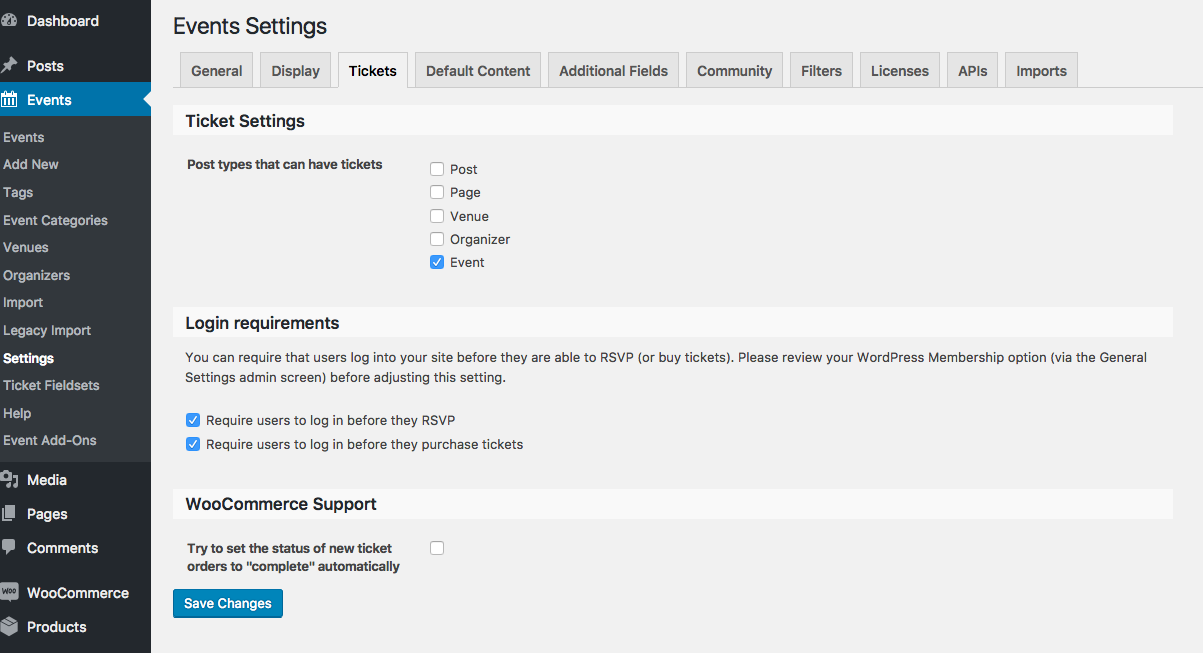
☝️ Even if you see this when you go to this screen, click “Save Changes” just to possibly refresh the option. If it is not checked, of course, then check “Events” and click “Save Changes”.
3. Confirm the Tickets is Available on Post Type Edit Screens
Then, in your wp-admin go to Events → Add New.
• Do you see the “Tickets” metabox showing up anymore?
• If not, then click the “Screen Options” tab in the top-right corner of the admin screen. This will reveal a drawer of checkboxes; do you see a “Tickets” checkbox here? If so, check it. Here is a screenshot of this “Screen Options” drawer: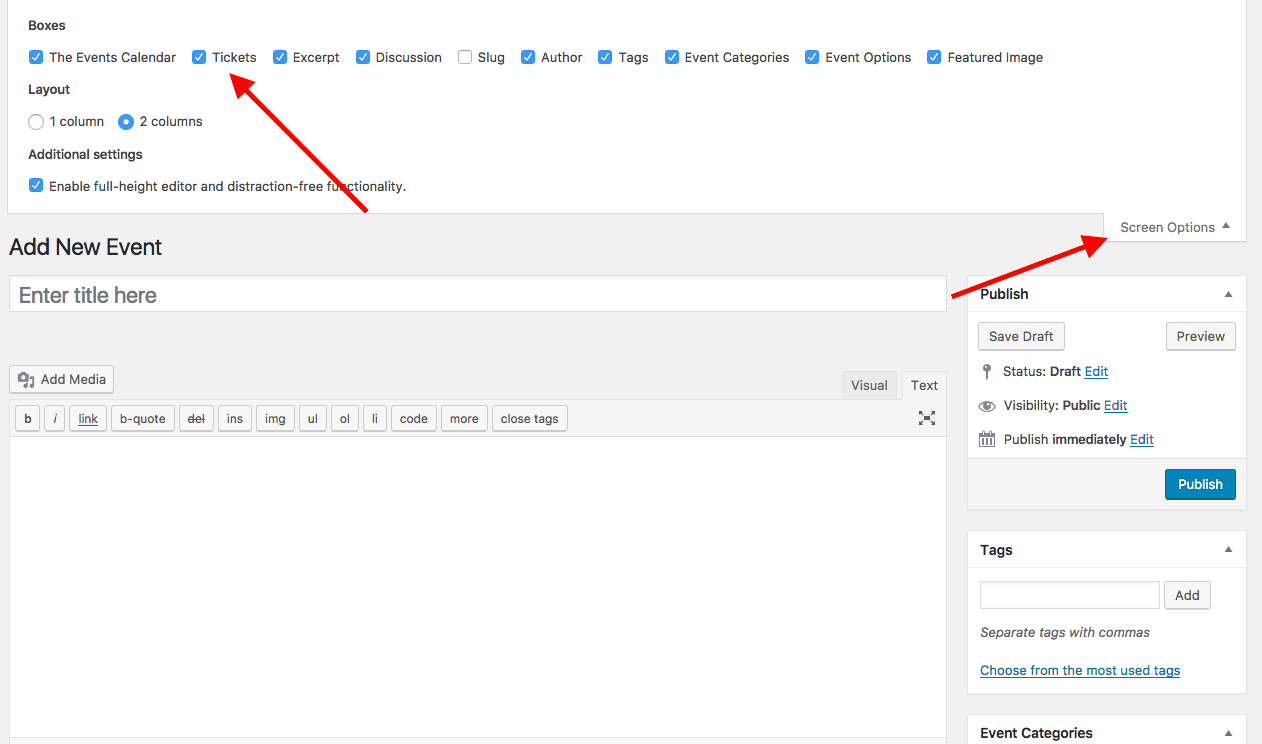
Thanks for your patience here, John. I do apologize for asking more question and doing more troubleshooting here, but as noted this is not a problem we can recreate and nor do we have other reports of this issue. So the steps above will be helpful in confirming the nature of these issues.
Finally, we just recently changed the location of that “System Information” settings box — apologies for not updating the Knowledgebase article in time! I have just updated it to reflect the accurate location of that box now.
Sincerely,
GeorgeNovember 13, 2016 at 8:35 am #1191590Support Droid
KeymasterHey there! This thread has been pretty quiet for the last three weeks, so we’re going to go ahead and close it to avoid confusion with other topics. If you’re still looking for help with this, please do open a new thread, reference this one and we’d be more than happy to continue the conversation over there.
Thanks so much!
The Events Calendar Support Team -
AuthorPosts
- The topic ‘Fatal error: Class 'Tribe__PUE__Package_Handler' not found in …’ is closed to new replies.