

Forum Replies Created
-
AuthorPosts
-
Geoff B.
MemberGood evening Tony,
Thank you for writing back and for the system information.
Please keep me updated on the status of the bug submission, as it is not possible for us to have different named events. We need to keep them all the same. I hope this isn’t too big of a problem, as we would like to continue using this calendar solution.
Currently, the bug is open and undergoing the maintenance release cycle.
As a side note, using the latest versions of our plugins (including Filter Bar 4.2.1) and a default WordPress theme, I was able to import the CSV file correctly.
So the good news is that this is totally solvable. As we would like you to continue using our plugins as a calendar solution.However, I did notice that there is a glitch in the CSV file you handed me. The first row contains only commas (instead of column titles), so I had to delete the first row prior to running the CSV import.
Here are the next steps I would recommend:
- Could you either update or deactivate the Filter Bar plugin ?
- Try the import again with the current settings under Events > Import : Default status = pending, Default encoding = encode contents
- If that still does not work. Could you also please go through our testing for conflicts procedure (preferably in a staging/dev environment or local install of your WordPress website) and let us know what you find out. Basically the goal here is to revert back to a bare WordPress installation to see if the problem persists. It also allows us to pinpoint what the cause of the issue is.
Best regards,
Geoff B.
MemberGood evening David,
It is surprising that this option is not there if you updated the iCal importer to it’s latest version.
Would you mind:
- Resending your complete updated system information in a private reply using the instructions found in the following link?
https://theeventscalendar.com/knowledgebase/sharing-sys-info/
- Sending me a copy of your WordPress theme / child theme in a .zip file link (via Dropbox or Google Drive) so that I can run some tests on my end ?
- Sending me a screenshot of what happens when you click on the “edit” link of your recurring import (see my screenshot below) ?
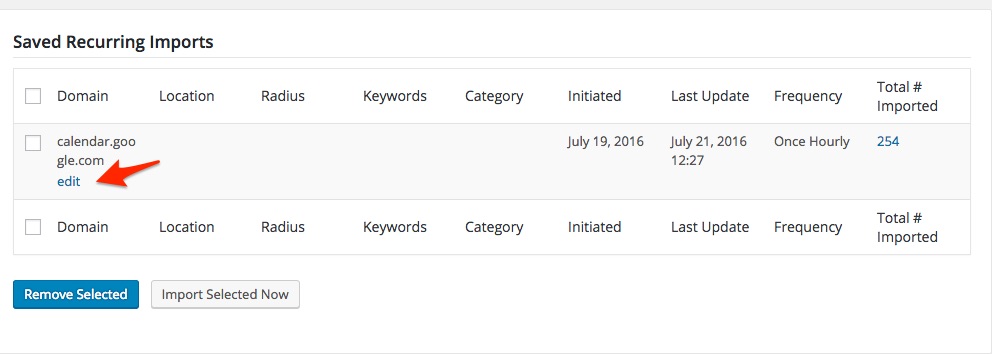
Best regards,
Geoff B.
MemberGood evening Julia,
Thank you for your patience and understanding.
I don’t want to hide passed events automatically and want to show passed events too please let me know we can do that
Your best bet is to read the following, to get started on the right track:
- https://theeventscalendar.com/support/forums/topic/ability-to-show-upcoming-and-past-events-in-list-view/#post-1135956
- And it’s suggested documentation post: https://theeventscalendar.com/knowledgebase/using-tribe_get_events/
Let me know how that goes.
Best regards,
Geoff B.MemberGood evening Nadia,
Thank you for writing back, for your great words and for setting up a test site.
I apologize for not answering your questions earlier.
I was unfortunately out of the office over the last 2 days.I am sorry to hear that your site is currently a mess.
Hopefully, our collaborative efforts will allow us to get to the bottom of this quickly.I was able to re-create the site locally. I’m able to have Pro activated without the site crashing (version 4.2.2.1) but activating the mini-calendar or other widgets associated with the Pro version make the site crash. And the site is very very slow.
This is very useful information.
I would like to ask some follow-up questions about that, just to make sure we leave no stone unturned.- Is your test/local site on a similar type of server and available ressources as your regular server ?
- Could you send me the complete system information of that test/local installation in a private reply using the instructions found in the following link?https://theeventscalendar.com/knowledgebase/sharing-sys-info/
- Since this is a local installation, can you freely manipulate the Database on the local installation ? Would it possible to get a copy of it ?
- Have you tried downgrading on the local install ?
- Is the Cache plugin activated on both installs and if so, was the cache cleared after the upgrade ?
I’m a bit nervous that the plugin isn’t working since numbers in the database (postmeta, posts, etc) are not going down. For info, the posts are ab it over 45,000. With the number of recurring events that we have, do you have rough estimate on how long it will take for the plugin to work its magic?
Normally, the plugin should kick-in with WP Cron (depending how that is set up on your installs and at what frequency it runs). If nothing is running after, let’s say, a day, it means that :
- WP Cron jobs are not running or running at a very slow rate on your installs
- There is some database corruption that is preventing the cleanup of your database.
One last question, I’ve left my computer on thinking that if I turn it off the plugin will stop. Is this right?
Yes, when you shut down your computer, you also shut down the virtual local server on your computer. As such, the code snippet does not run during that time.
Furthermore, it is possible that your local install is not be setup to run CRON jobs altogether.I would recommend checking the number of entries in the actual live Database to compare if that is the case.
Any additional advice you can provide would be very helpful.
Could you also send me a screenshot of your settings under Events -> Settings -> Display and Events -> Settings -> General ?
Thank you for your patience as we try to get to the bottom of this.
Best regards,
Geoff B.
MemberGood evening Bruce,
I’m super stocked that you have managed to find the culprit!
Kudos for sticking with us through this very lengthy process. Hopefully, this will soon all just a bad memory.
You are welcome back on our support forums any time 🙂
For now, I am going to close this thread.
Have a great week!
Geoff B.
MemberGood evening Bruce,
Thank you for sticking with us and running some tests.
To be fully transparent, I am unsure if the issue is caused by Ignition (since it does not fail on my end and the issue returned with 2016 on your end).
So yes, I’m thinking DB corruption.
Based on what you are telling me, I would recommend keeping a manual copy of your DB on your computer before attempting anything else.
But yes, after a backup, manually deleting these events is totally worth a shot.
Additionally, before you do that, would you mind sending me a DB dump (via a dropbox link in a private reply), so that I can take a look at it ?
Best regards,
Geoff B.
MemberGood evening Julia,
Thank you for writing back.
Just to set expectations, the scope of our support is mostly to get our customers started on the right track and to help them in case of issues.
We unfortunately do not provide complete support for customization or complete code syntax to perform customizations.
With that in mind, as stated before, the organizer is simply a different post type and echoing the featured image works exactly like any other WordPress post’s.
I would recommend reading the following on that topic:
- https://developer.wordpress.org/reference/functions/the_post_thumbnail/
- https://developer.wordpress.org/reference/functions/get_the_post_thumbnail/
- https://wordpress.org/support/topic/getting-a-post-featured-image-url
As for changing how the time is displayed, you have a couple of options:
- Do a template customization with our Themer’s guide on the list view (to display the time below).
- Use CSS to limit the width of the date and increase it’s height so that the time goes under. If you are struggling with this, I could help you provided that you send me a link to your actual website.
Please let me know how to change organiser website field and phone field layout and please where I can located function file of plugin
As stated above, the easiest way to change the layout would be through CSS.
The fastest way to accomplish this would be for you to provide me with a link to the page on your site where you are trying to accomplish this (as well as an idea of what you are trying to do).I would recommend not touching our plugin’s functions functions.php if you want to make change, but rather use the functions.php file of your WordPress theme as suggested in our Themer’s guide
Best regards,
Geoff B.
MemberGood evening Sandra,
Thank you for writing back and providing us with your system information.
If you don’t mind, could you please send me a copy of your WordPress child theme in a .zip file link (via Dropbox or Google Drive) so that I can run some tests on my end ?
As an alternative to our built-in Try to set the status of new ticket orders to “complete” automatically option, you might want to take a look at the following snippet that you can add to your child theme’s fucntions.php to accomplish a similar goal.
The only downside is that it will set ALL WooCommerce orders to complete automatically (not just Tickets): https://docs.woothemes.com/document/automatically-complete-orders/
Let me know if that helps.
Have a great day!
Geoff B.
MemberThis reply is private.
MemberGood evening Vincent,
I am sorry that these 2 snippet suggestions did not work.
With that in mind, I decided to push the investigation a bit further and, as a result, there is something that is bothering me about the add to cart screenshot you have sent me.
The default Twenty Fourteen Add to cart button should look like the following screenshot (not like a dropdown) in yours.
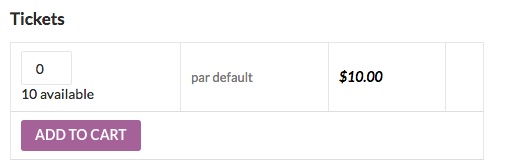
That means that something on your install is creating this custom add to cart menu.
The 2 most likely culprits are:
- A template customization found in your version of twenty-fourteen.
- Perhaps this is a result of you Paypal by Braintree plugin
A quick test would be to temporarily (perhaps while using a maintenance page) switch to twenty-fifteen and deactivating that plugin to see if the issue persists.
The other thing that would be worth a shot is providing me with a copy of your theme.
To answer your earlier question, the simplest way to get me a copy of your theme would be through the following plugin: https://wordpress.org/plugins/wp-downloader/Once you have that folder in your Computer, simply compress it and send me the link to a Dropbox or Google Drive copy of that file.
Hang in there as we figure this out!
Best regards,
Geoff B.
MemberGood evening Abby,
Thank you for writing back, for running some additional tests and for your system information.
Kudos on finding the buttons!
Question – I know you’re not including this information right now in the emails that get sent out, but are there any code snippets I could take a look at to try to add it into the email that goes when someone places an order?
I would recommend reading the following thread where one of our customers was awesome enough to share his code to accomplish just that: https://theeventscalendar.com/support/forums/topic/have-the-additional-fields-appear-on-invoice/
When I look at the Order Details for a ticket someone has purchased and filled out the attendee information for, is it supposed to show up on the order page? I see it says
_tribe_wooticket_attendee_output:
That is a known glitch that should get addressed in our upcoming maintenance release.
The good news is that, aside from being odd, this has no real consequence. We will let you know as soon as the bug fix is out.
As for what you are trying to achieve, for now my top 2 recommendations are:
- Try out the snippet I have referred to
- Use the CSV export to get access to the attendee info in one clear and concise place
Let me know how that goes.
Best regards,
Geoff B.MemberThis reply is private.
MemberGood evening David,
I am not sure if that is indeed the issue. But it’s certainly worth a shot!
See the following screenshot to activate the “overwrite” checkbox.
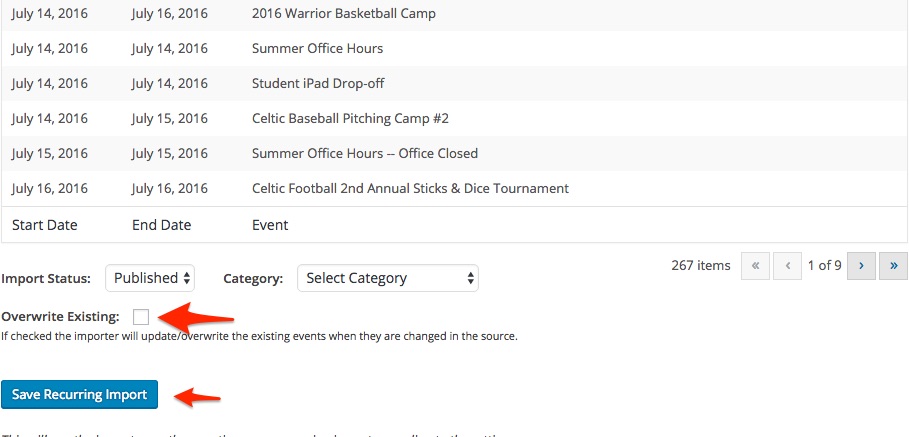
Let me know how that goes.
Best regards,
Geoff B.MemberGood evening Michael,
I’m stoked that this was helpful to you.
You are welcome back on our support forums any time 🙂
For now, I am going to close this thread.
Have a great week!
Geoff B.
MemberGood evening Sandra and welcome back!
Thank you for reaching out to us.
We are sorry to hear about the message popping up on you.
I would love to help you with this topic.As a first troubleshooting step, could you please provide us with your complete system information in a private reply using the instructions found in the following link?
https://theeventscalendar.com/knowledgebase/sharing-sys-info/
Secondly, I would highly recommend deactivating that option for now until we can figure out what is going on exactly.
Have a good week-end,
Geoff B.
-
AuthorPosts