

Forum Replies Created
-
AuthorPosts
-
Geoff B.
MemberThis reply is private.
MemberBonsoir Philippe,
Je suis bien heureux de savoir que les strings translations ne font plus ramer votre site!
Attaquons-nous donc aux soucis restants.
Par exemple, les jours de la semaine.
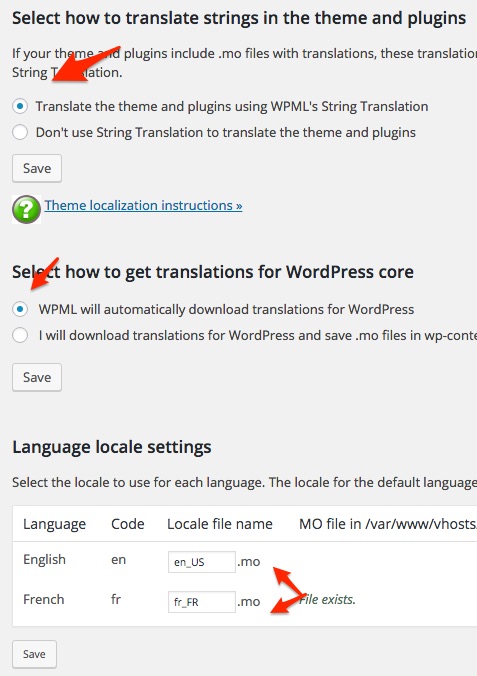
Cette traduction est normalement gérée (sauf en cas “d’override”) par les fichiers .po et .mo de WordPress.
Idéalement, vos réglages à cet effet devraient ressembler à la capture d’écran suivante.
Ou encore le titre du widget Event Calendar sur la home page.
Pour arriver à faire ça, vous avez quelques options qui s’offrent à vous.
- Lire attentivement le guide suivant: https://wpml.org/documentation/getting-started-guide/translating-widgets/
- Utiliser le plugin Widget Logic: https://wpml.org/2011/03/howto-display-different-widgets-per-language/
Personnellement, j’ai tendance à utiliser Widget Logic, car je trouve ça plus direct.
Donnez-moi des nouvelles de ce que ces suggestions donnent de votre côté.
Salutations,
Geoff B.
MemberGood evening Charles,
I’m stoked that this was useful to you!
You are welcome back on our support forums any time 🙂
For now, I am going to close this thread.
Have a great week!
Geoff B.
MemberGood afternoon Amanda,
I’m super stoked that this is finally working for you.
Is there anything else I can help you with on this topic ?
Best regards,
Geoff B.
MemberGood afternoon Kimberley,
Thank you for voting on this. We are absolutely looking forward to seeing more votes on this one too!
As a side note, you can also browse user voice and vote for any other feature you feel would be useful to you: https://tribe.uservoice.com/forums/195723-feature-ideas
You are welcome back on our support forums any time 🙂
For now, I am going to close this thread.
Have a great week!
Geoff B.
MemberGood afternoon Bryan,
I’m super stoked that this worked for you.
You are welcome back on our support forums any time 🙂
For now, I am going to close this thread.
Have a great week!
Geoff B.
MemberThis reply is private.
MemberGood evening Bryan and welcome back!
Thank you for reaching out to us.
I would love to help you with this topic.The good news is that there are 3 different ways to accomplish what you want:
- Use the snippet found here in your WordPress theme’s functions.php
- Customize the view completely using template customization. You might want to read our Themer’s guide to get a sense of how that works.
- Finding the string you want to modify in our language files and changing it
Let me know if that helps.
Have a great day!
Geoff B.
MemberGood evening Robin,
I’m sorry to hear your issues are still persisting.
The next step would be to go through our testing for conflicts procedure (preferably in a staging/dev environment or local install of your WordPress website) and let us know what you find out.
Basically the goal here is to revert back to a bare WordPress installation to see if the problem persists. It also allows us to pinpoint what the cause of the issue is.
As a note, this include theevents calendar: shortcodes version 999 by modern tribe, inc & nicasio, llc.
I have not seen this plugin in action for a long time. I actually think you might no longer need it.The timeout setting does not have to be higher than on a normal install. That being said, you might want to ensure that you have at least 96MB allocated to WordPress memory either in your php.in or in wp-config.php (depending on your server).
Finally, I suggest giving a shot to the “enable caching” for the monthly view under Events -> Settings -> Display
Let me know how that goes.
Best regards,
Geoff B.MemberGood evening Donavan and welcome back!
Thank you for reaching out to us.
I would love to help you with this topic.Unfortunately, I cannot see your page as it requires login.
But, the good news is that there are 3 different ways to accomplish what you want:
- Use the snippet found here in your WordPress theme’s functions.php
- Customize the view completely using template customization. You might want to read our Themer’s guide to get a sense of how that works.
- Finding the string you want to modify in our language files and changing it
Let me know if that helps.
Have a great day!
Geoff B.
August 5, 2016 at 7:24 pm in reply to: Events Ticket Plus & Woocommerce – Data lost ! IMPORTANT ! #1148503MemberGood evening Thomas,
That’s awesome news.
You are welcome back on our support forums any time 🙂
For now, I am going to close this thread.
Have a great weekend!
Geoff B.
MemberGood afternoon Vicki,
Congratulations on getting this far.
You are almost there! The error message is because you have included “*/” in the query.
The actual query to use should look like:
delete a,b,c,d

FROM wp_posts a

LEFT JOIN wp_term_relationships b ON ( a.ID = b.object_id )

LEFT JOIN wp_postmeta c ON ( a.ID = c.post_id )

LEFT JOIN wp_term_taxonomy d ON ( d.term_taxonomy_id = b.term_taxonomy_id )

LEFT JOIN wp_terms e ON ( e.term_id = d.term_id )

WHERE a.post_parent = 12421
Let me know how that goes.
Best regards,
Geoff B.MemberHey Jesper,
I’m super stoked that you managed to solve all of your issues.
You are welcome back on our support forums any time 🙂
For now, I am going to close this thread.
Have a great weekend!
Geoff B.
MemberGood afternoon Nathan,
I did a bit of research and here is the answer to your question.
WooCommerce tickets are created via event_tickets_woocommerce_ticket_created which is found in event-tickets-plus/src/Tribe/Commerce/WooCommerce/Main.php
Let me know if that helps.
Have a great day!
Geoff B.
August 5, 2016 at 11:40 am in reply to: Events List Widget missed – don't see it in widget area #1148330MemberGood afternoon Hansjoerg,
Thank you for the info and clarifications.
The correct widget to use from your list would be “Veranstaltungsliste”.
I do see the event list shortcode in action in the under ERZIEHUNG – PUPPIES …. – WELPENSPIELGRUPPE
The good new is that the shortcode is working. But the look is terrible!
I took a look at that page HTML and there is something pretty odd going on.It seems like the shortcode on that page is wrapped in
tags and that there is a weird link at the top of it
<!-- Event -->I would recommend cleaning up the text area in which the shortcode is used (by going to the "text" version of the editor) to make sure there is nothing before it or "around it". Let me know how that goes. Best regards, Geoff B. -
AuthorPosts