

Forum Replies Created
-
AuthorPosts
-
Geoff B.
MemberGood afternoon Jaco and welcome to the Events Calendar Support forum!
Thank you for reaching out to us.
We are sorry to hear about the fact that you cannot update Location on existing events on your site. Yikes!
I would love to help you with this topic.At this point, my best guesses are:
- There is a conflict with your Twenty-thirteen child theme.
- There might be some type of data corruption on the older events.
Could you please send me a copy of your Child theme in a .zip file link (via Dropbox or Google Drive) so that I can run some tests on my end ?
Additionally, can you tell me if changing any other type of information on the existing events work ?
Finally, could you please send me a screenshot of one of the existing events Edit Event screen ?
Best regards,
Geoff B.
MemberGood afternoon Barnabas,
Thank you for writing back.
As you have figured out, the scope of our support is mostly to get our customers started on the right track and to help them in case of issues.
On the plus side, we will gladly help you if you bump into questions as you are “learning how to fish” 🙂
Best of luck and have a great weekend!
Geoff B.
MemberGood afternoon Sarah,
Awesome! Thank you for your fantastic words!
You are welcome back on our support forums any time 🙂
For now, I am going to close this thread.
Have a good weekend!
Geoff B.
MemberGood evening Barnabas and welcome back!
Thank you for reaching out to us.
I would love to help you with this topic.Is it possible for me to add category as an option into the widget code? I’ve attached a screenshot to help illustrate.
The short answer is yes. In fact you can make any change you wish.
To do that, you will need to use a template customization. You might want to read our Themer’s guide to get a sense of how that works.
That will allow you to “steal code” from other views and tweak the list widget to your liking.
Let me know how that goes.
Best regards,
Geoff B.MemberGood evening Jonathan and welcome to the Events Calendar Support forum!
Thank you for reaching out to us and for your login invitation.
Unfortunately, our policy does not allow us to log in to clients websites for several reasons, including liability.We are sorry to hear about your maps not displaying. Yikes!
I would love to help you with this topic.The first thing I would recommend is to read the following knowledge base article thoroughly (just to make extra sure, everything is perfectly setup): https://theeventscalendar.com/knowledgebase/setting-up-your-google-maps-api-key/
Secondly, could you tell me which version of Divi you are using and if you have a child theme active ?
Best regards,
Geoff B.
September 1, 2016 at 11:37 pm in reply to: 'Out of stock' not displaying on event page tickets #1159137MemberGood evening Tim and welcome back!
Thank you for reaching out to us.
We are sorry to hear about the early bird ticket not being shown as sold out on your install. Yikes!
I would love to help you with this topic.Short term, I would recommend hiding the early-bird ticket via CSS
.postid-14600 .tribe-events-tickets tr:first-child {display:none !important}Secondly, could you please provide me with screenshots of your Edit event screen for that specific event, including individual screenshots for each ticket settings ?
Hang in there as we figure this one out.
Best regards,
Geoff B.
MemberGood evening Ken and welcome back!
Thank you for reaching out to us.
We are sorry to hear about your events disappearing on you. Yikes!
I would love to help you with this topic.I have a couple of follow-up questions to help us troubleshoot this further:
- Is there a reason for having the Housekeeper plugin installed ? I am asking because this triggered similar issues in the past
- Could you please provide me with a screenshot of your Events -> Settings -> General settings page ?
Hang in there as we figure this one out.
Best regards,
Geoff B.
September 1, 2016 at 11:21 pm in reply to: Will Events Calendar Pro still work after license expires? #1159133MemberGood evening Chris and welcome to the Events Calendar Support forum!
Thank you for reaching out to us.
I would love to help you with this topic.
This does not say that the product will cease to function after a year if the license is not renewed. Obviously should the WordPress CMS be updated and you need to release an update primarily so the product remains compatible, then the update will be necessary for the functionality to continue. But otherwise???
Please can you clarify, thanks.
That’s a good point.
The short answer is yes, the plugins will continue to function after the license has expired.
There are however a few things to know:
- We can’t guarantee compatibility with WordPress upgrades
- You will continue to be able to browse through our premium forums, but you will no longer be able to open new threads on it
- We can’t guarantee compatibility with upcoming versions of our free the Events Calendar plugin
In other words, the Events Calendar plugins always have to be at “matching versions” to work together.
So you’ll have to freeze the updates on the free Events Calendar plugin.Let me know if that helps.
Have a great day!
Geoff B.
September 1, 2016 at 10:30 pm in reply to: Month Display shows bullets instead of event names #1159127MemberGood evening Alan,
First I want to congratulate you on all your awesome efforts.
I sincerely believe that you are on to something.
But before that, I would strongly advice you to upgrade our regular plugin to 4.2.6 which is it’s latest version.
If I completely disable minify in w3 total cache the calendar month view is not the responsive bullet view.
I am pretty sure that this might be the issue.
Especially if you are already caching the month view under Events -> Settings -> DisplayIn any case, if playing with that setting does not help, I am pretty sure you could keep W3TC minification on with some exception for our plugins.
Let me know how that goes.
Best regards,
Geoff B.MemberGood evening Glenn,
Thank you for your reply.
That lead me to perform some further testing.
I tried to match your configuration as close as possible.While doing so, I was absolutely able to reproduce the issue.
As such, I will open a bug ticket for this.You will be happy to know that we are currently working hand-in-hand with the good folks at WPML.
So this should not take too long to solve. In fact, we should have some pretty nice improvements in our WPML integration to announce this month if everything goes according to plan.In the meantime, I have found a simple workaround that is not perfect, but that will work.
What you need to do is to change the language handling of WPML to directory based (any of the two methods will work – see screenshot):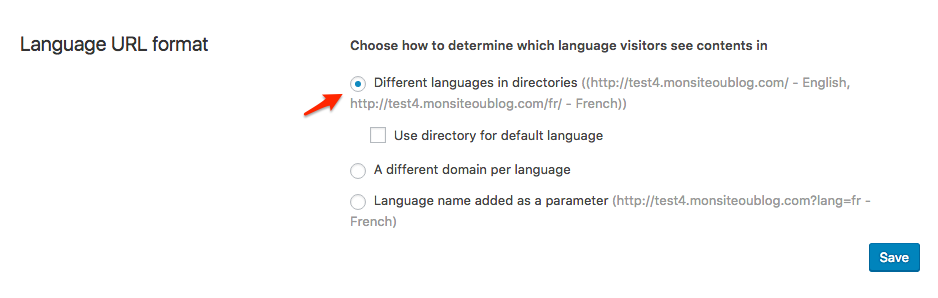
The only downside to this approach is that the faulty ?lang= parameter remains in the URL, but it should buy you some time.
Let me know how that goes.
Best regards,
Geoff B.MemberGood evening Sarah,
I am glad you are happy with the final results.
Kudos on figuring out the cause of the conflict too!
Is there anything else I can help you out with ?
Best regards,
Geoff B.
MemberGood evening Brandi and welcome to the Events Calendar Support forum!
Thank you for reaching out to us and for doing all those tests.
We are sorry to hear about the tickets option disappearing from your pages. Yikes!
I would love to help you with this topic.You are right, there seems to be a conflict between Event Tickets Plus and something else on your WordPress install.
However, what I can tell you is that this conflict is not with WooCommerce.At this point, there are 2 potential sources for that conflict:
- Your WordPress theme or one of it’s customization. Did you try reverting back to a default WordPress theme such as twenty-fifteen to see if that solves the issue ?
- One of the other third-party WooCommerce extensions. You did not specify if you had also deactivated those as well.
If you are unable to perform the temporary theme change, could you please send me a copy of your WordPress theme / child theme in a .zip file link (via Dropbox or Google Drive) so that I can run some tests on my end ?
Please ensure you are using the latest files as found on your actual website.
This way I will get access to any updates you might have made.Hang in there as we figure this one out!
Best regards,
Geoff B.
MemberGood evening Dan and welcome back!
Thank you for reaching out to us.
We are sorry to hear about the maps not displaying properly on your site.
I would love to help you with this topic.As a starting point, could it be possible to have a link to an URL where you are experiencing this issue ?
Secondly, could you please read the following knowledge base article carefully to ensure everything is set up properly ? https://theeventscalendar.com/knowledgebase/setting-up-your-google-maps-api-key/
Let me know how that goes.
Best regards,
Geoff B.MemberGood evening Jennifer and welcome back!
Thank you for reaching out to us.
I would love to help you with this topic.There are a couple of ways to achieve that:
- Using the following code snippet in the functions.php file of your WordPress theme: https://theeventscalendar.com/knowledgebase/change-the-wording-of-any-bit-of-text-or-string/
- Changing the string in the language file
- Doing a template customization. You might want to read our Themer’s guide to get a sense of how that works.
Let me know if you have a preference or if you need help with any of these.
Best regards,
Geoff B.
September 1, 2016 at 9:33 pm in reply to: Is there a way to give a discount if a customer buys more than 1 ticket? #1159113MemberGood evening Martin and welcome back!
Thank you for reaching out to us.
I would love to help you with this topic.
Before we begin, if you get the chance, I would recommend upgrading your server to PHP 5.4+ (in fact, WordPress typically recommends 5.6+).
I am sharing this information as I have seen some odd behaviours with older versions of PHP.The short answer is yes. You can give discounts based on volume.
This will happen directly at the WooCommerce level (as it handles the transactional part of things).
To achieve that, you will have to choose one of the many volume/bulk discount plugins out there (based on your needs).
Here are a few to get you started:- https://wordpress.org/plugins/woocommerce-bulk-discount/
- https://codecanyon.net/item/woocommerce-dynamic-pricing-discounts/7119279
Let me know if that helps.
Have a great day!
Geoff B.
-
AuthorPosts