

Forum Replies Created
-
AuthorPosts
-
Geoff B.
MemberGood evening Frederic,
Thank you for the files.
This allowed me to run some tests on my install.That being said, I was not successful in reproducing your issue.
Would you mind telling me:
- If you are talking about event Categories or post Categories ?
- Which version of WPML, string translation and of translation management you are using ?
- Which translation method you are using (?lang=, directory based or domain based) ?
- If you went through the following instructions: https://theeventscalendar.com/knowledgebase/setting-up-the-events-calendar-with-wpml/
Best regards,
Geoff B.
MemberGood evening Jennifer and welcome back!
Thank you for reaching out to us.
I would love to help you with this topic.There are a couple of ways to do exactly what you are looking for:
- Using a template customization. You might want to read our Themer’s guide to get a sense of how that works.
- Using CSS rules to hide the unwanted fields from the form.
#event_tribe_organizer .organizer {display:none}

#event_tribe_organizer .organizer+.organizer+.organizer {display:table-row}
Let me know if that helps.
Have a great day!
Geoff B.
MemberGood evening Barry and welcome back!
Thank you for reaching out to us.
We are sorry to hear about these 2 issues you are experiencing on your website.
I would love to help you with this topic.As a first troubleshooting step, could you please provide us with your complete system information in a private reply using the instructions found in the following link?
https://theeventscalendar.com/knowledgebase/sharing-sys-info/
1. How can we disable that? I looked in your online documentation but could not find anything to suggest where it can be removed.
Ideally, I would need to be able to replicate this on my end to help out.
But, to get started, would it be possible to create a dummy customer account for me where this issue happens ?Once that is done, I would simply need the dummy customer’s credentials in a private reply.
2. If someone clicks on the link, we get an error: “PHP Fatal error: Class ‘WC_Product’ not found in /home/itsma/public_html/wp-content/plugins/event-tickets-plus/src/views/tickets-plus/orders-tickets.php on line 74”. We are not using WooCommerce so I assume this is a bug in the code that tries to reference that class even though we are using Easy Digital Downloads.
Can you confirm if you went through the following process as you migrated from EDD tickets to Event Tickets Plus : https://theeventscalendar.com/knowledgebase/moving-to-event-tickets-plus/ ?
Best regards,
Geoff B.
MemberHi again TJ,
Actually, I might have a snippet that helps here: tribe-snippet-email-organizer
Let me know how that goes.
Best regards,
Geoff B.MemberGood evening TJ and welcome back!
Thank you for reaching out to us.
I would love to help you with this topic.Since that post, it turns out that some of our users have managed to fix the issue using the following third-party plugin: https://wordpress.org/plugins/bnfw/
That being said, if you are up to try the template customizations yourself, you might want to read our Themer’s guide to get a sense of how that works.
There is additional documentation as well as a list of recommended freelancers here: https://theeventscalendar.com/customizations/
Let me know if that helps.
Have a great day!
Geoff B.
September 8, 2016 at 1:55 pm in reply to: how to embed the events calendar pro in a krisi enfold page? #1161735MemberGood evening Andros and welcome to the Events Calendar Support forum!
Thank you for reaching out to us.
I would love to help you with this topic.Currently, the month view will always sit at the URL you have defined in Events -> Settings -> General
In most cases, that would look something like: http://www.foxymail.de/events/
If you want to insert the calendar view in specific pages, you can do so using our advanced widgets or our Pro shortcodes: https://theeventscalendar.com/knowledgebase/pro-widget-shortcodes/
As you’ll see, for now however, the full month view is not available as a shortcode.
But, the good news is that it will be part of our 4.3 release that is coming up later this month if all goes well.
Let me know if that helps.
Have a great day!
Geoff B.
MemberGood evening Jack and welcome to the Events Calendar Support forum!
Thank you for reaching out to us.
We are sorry to hear about the map view not working properly on your website.
I would love to help you with this topic.As a first troubleshooting step, could you please provide us with your complete system information in a private reply using the instructions found in the following link?
https://theeventscalendar.com/knowledgebase/sharing-sys-info/
Secondly, could you send me a screenshot of the issue you are experiencing ?
On my end, when I go to http://trusteesweek.org/events/ and switch to map view, things seem to display correctly (see screenshot)
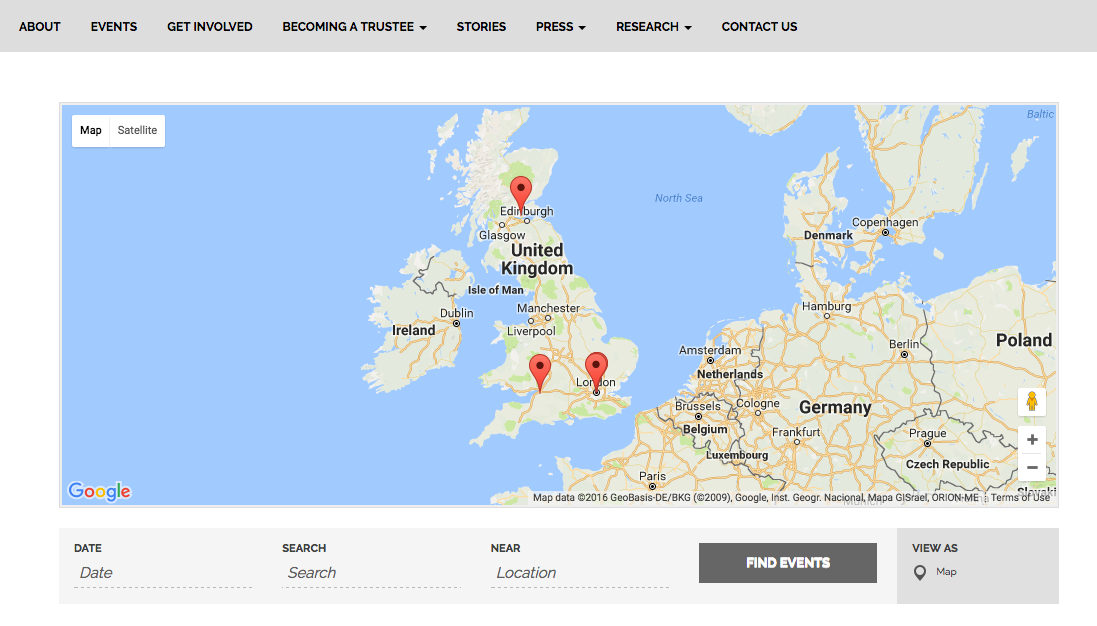
Best regards,
Geoff B.
MemberGood evening Baptiste and welcome to the Events Calendar forum!
Absolutely, there are updates since that thread.
We have begun a working relationship with the folks from WPML.
The good news is that this means that if all goes well, we will have full the Events Calendar Pro support by the end of this month (including recurring events).
Our next item on that list is Event Tickets Plus. In fact, I am working on that very project with our Dev team.
It is still in it’s early stages, but we are hoping to be able to offer support for Event Tickets Plus with WPML this fall.The good news is you are fully entitled to a refund if you want one since you are within 30 days of your purchase. To obtain the refund, you just need to follow the procedure described here.
So, in the end, it is totally up to you. But I can tell you that we are truly committed to making this happen.
Best regards,
Geoff B.
MemberGood evening Dong Lin,
Thank you for writing back.
Yes, Event Tickets Plus offers full email notification to the website owner.
In fact, you can tweak any notification to add as many people to it.Once you buy that plugin, you will have access to our premium support forum where we can help you out with the install if you need us to.
But as a starting point, I would recommend reading the following: https://theeventscalendar.com/knowledgebase/new-user-primer-event-tickets/
Let me know if you have any additional questions on this topic.
Best regards,
Geoff B.
MemberGood evening Sarah,
I’m mostly glad you found a way to display it correctly on your end. Kudos on that.
We are always glad to help.
In fact, you are welcome back on our support forums any time 🙂
For now, I am going to close this thread.
Have a great week!
Geoff B.
MemberGood afternoon Robert,
Thank you for writing back.
I went on the secondary page and I can see the issue there.
What is happening is that something in your WordPress theme is overriding the built-in CSS rule.Normally the rule is:
.datepicker.dropdown-menu {

position: absolute;

top: 100%;

left: 0;

z-index: 1000;

float: left;

display: none;

min-width: 160px;

list-style: none;

background-color: #ffffff;

border: 1px solid #ccc;

border: 1px solid rgba(0, 0, 0, 0.2);

background-clip: padding-box;

color: #333333;

font-family: "Helvetica Neue", Helvetica, Arial, sans-serif;

font-size: 13px;

line-height: 20px;

}
But something hardcodes the following value in your datepickers
element.style {

top: -58px;

left: 556px;

z-index: 10;

display: block;

}
The first thing I would recommend is to try the following CSS rules
.datepicker.dropdown-menu {

top: 100% !important;

left: 0 !important;

z-index: 1000 !important;

}
Let me know how that goes.
Best regards,
Geoff B.September 8, 2016 at 1:04 pm in reply to: Date selector in backend doesn't show Saturday or Sunday #1161693MemberGood afternoon Joel,
Thank you for writing back.
What is going on is that your theme is actually trying to take over the display rules of all date pickers – including ours.
You could still edit that rule in the file even if the layout is compressed in a single line.
CSS is not parsing sensitive for the most part.Ideally a custom CSS rule somewhere else than in a theme file (e.g.: Child Theme, Custom CSS panel) would ensure it does not get overwritten when comes time for a theme update.
But in this specific case, what is going on is that the CSS is loaded via jQuery so in any change in a normal CSS file won’t work.
So it looks like you’ll have to either edit or remove that line in the Option Tree folder (/wp-content/themes/barcelona/option-tree/assets/css/A.ot-admin.css)
Let me know how that goes.
Best regards,
Geoff B.MemberGood afternoon Steph,
Typically people send us a copy of the theme by:
- Downloading the theme from their website (FTP or file manager). The theme is located in /public_html/wp-content/themes/ typically.
- Compressing the folder containing the theme’s files to a .zip file
- Uploading the said .zip file to their Dropbox, Google Drive or Cloudup account
- Sending us a link to the uploaded file
If you prefer, I could take a look at your site directly if it’s not live.
Just make sure that any credentials you provide are in a private reply.Did i understand it right that the events I post and events that users post don’t end up on the same calendar?
Actually, that is not accurate. Both end up on the same calendar.
The main difference is that you have control over the users posts – via Events -> Settings -> Community.
For example, some webmaster prefer to approve the events posted by users before they are published.If you need to, it’s always possible to filter the calendar by category built-in. Additionally, our Filter Bar add-on provides even more filtering capabilities: https://theeventscalendar.com/product/wordpress-events-filterbar/
Best regards,
Geoff B.
September 8, 2016 at 12:32 pm in reply to: Move whole or part of venue section – single event display #1161680MemberGood afternoon Sally,
I’m super stoked that this was helpful to you!
You are welcome back on our support forums any time 🙂
For now, I am going to close this thread.
Have a great week!
Geoff B.
September 7, 2016 at 12:17 pm in reply to: After import with Maps API key "Use latitude + longitude" not checked #1161136MemberGood afternoon Rodrigo,
Thank you for your patience on this topic as I managed to discuss these points with my teammates upon their return from the labor day long weekend.
I have a couple of follow-up questions to dig deeper into this.
1. Venue import doesn’t seem to have latitude and longitude if you don’t have PRO installed, so if you go from having the free version, learn about importing, check fields, then update to PRO, there are two fields you are missing.
I am unclear on this point. Could you expand on why you see this as an issue ?
Pro does provide geolocation as a feature (which is not the case for the free version).
2. When I import a venue, (without importing the latitude and longitude), the latitude and longitude show up atomagically (nice!) when I click “Use latitude + longitude” checkbox. I’m assuming that the import is getting that from Google Maps during import. However, for some reason, the checkbox is not checked.
That this very interesting.
Could you provide me with an example of that with CSV files you are using.
Also, could you please provide us with your complete system information in a private reply using the instructions found in the following link?
https://theeventscalendar.com/knowledgebase/sharing-sys-info/
3. If the “Use latitude + longitude” checkbox is not checked by design (even after those fields are automatically populated), then there should be an import field to populate the “Use latitude + longitude” field.
This is also a great suggestion. As a side note, that would be a Pro feature only since geolocation is not in our free plugin.
4. Sometimes I get the dropdown suggestions on the location search field when I enter a value there and sometimes I don’t (same data) so I’d like to figure out what is happening there.
I am not so sure why that is the case at this point. I’ll need to know about your system information to run some tests.
5. It would be useful if there was a troubleshooting guide specifically for getting location working.
We actually tend to do exactly that when there are several requests on any specific issue.
To be fully transparent, that has not been the case so far with geolocation. But thank you for the tip.
Best regards,
Geoff B.
-
AuthorPosts