

Forum Replies Created
-
AuthorPosts
-
Geoff B.
MemberGood evening Sean and welcome to the Events Calendar Support forum!
Thank you for reaching out to us.
We are sorry to hear about the option to add an event not being available on your site.
I would love to help you with this topic.The first thing you need to do is to make sure the Events Calendar free is installed on your site.
This is necessary since the Events Calendar Pro extends the Events Calendar, it does not replace it: https://theeventscalendar.com/product/wordpress-events-calendar/Once that is done, make sure you have gone through the following guide: https://theeventscalendar.com/knowledgebase/new-user-primer-the-events-calendar-and-events-calendar-pro/
Let me know how that goes.
Best regards,
Geoff B.MemberGood afternoon Denkin and welcome back!
Thank you for reaching out to us.
We are sorry to hear about the struggles you had to deal with while trying to add recurring events.
I would love to help you with this topic.By the looks of it, you are most probably dealing with a recent issue impacting our customers that are using https.
More specifically, if you head over to Settings > General in WP-Admin, you have to make sure that both URLs found there are set to https.
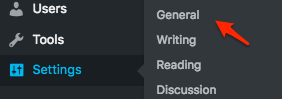
Let me know if that helps.
Have a great day!
Geoff B.
MemberGood afternoon Mike and welcome back!
Thank you for reaching out to us.
We are sorry to hear about the struggles you had to deal with while trying to add recurring events.
I would love to help you with this topic.By the looks of it, you are most probably dealing with a recent issue impacting our customers that are using https.
More specifically, if you head over to Settings > General in WP-Admin, you have to make sure that both URLs found there are set to https.
Let me know if that helps.
Have a great day!
Geoff B.
MemberGood afternoon Fumihiko,
That is indeed very odd.
However, I am super stoked that you managed to solve it. Kudos!
You are welcome back in our support forums any time 🙂
For now, I am going to close this thread.
Have a great week!
Geoff B.
MemberHey Mike,
Thank you for writing back.
I wish you a happy holiday season.
You are welcome back in our support forums any time 🙂
For now, I am going to close this thread.
Have a great week!
Geoff B.
MemberHey John,
I am glad the revised version of the child theme helped.
What is going on is that the recurrence days are not going through the language filter when displayed on the front-end.
You might want to get in touch with the good folks from Eventica to see what they would recommend.
You are welcome back in our support forums any time 🙂
For now, I am going to close this thread.
Have a great week!
Geoff B.
MemberHey Mark,
Sorry for the delay.
Our wizards have been pretty hard to get a hold of, but I should be able to give you an answer on Monday.
Hang in there!
Have a good week-end,
Geoff B.
MemberGood evening Mike,
It looks like your test site is no longer available, but I would have recommended looking at the styling of your select elements.
Let me know how that goes.
And again, if you need a hand let me know, but I will need to be able to see the test site somehow 🙂Best regards,
Geoff B.December 9, 2016 at 11:43 pm in reply to: I am getting an error message when trying to import an iCal feed #1204316MemberGood evening Alison,
Thank you for writing back.
The recommended fix would be to have both URLs under Settings > General set to https (https://bodhitreelive.staging.wpengine.com)
Let me know how that goes.
Best regards,
Geoff B.MemberGood evening Jason and welcome to the Events Calendar Support forum!
Thank you for reaching out to us.
We are sorry to hear about the struggles you have faced with your license key.
I would love to help you with this topic.I would recommend:
- Disconnecting any trace of your license on your install: https://theeventscalendar.com/knowledgebase/moving-your-license-keys/
- Making sure you have the latest Eventbrite tickets version from here
- Trying to input your license key again under Events -> Settings -> Licenses
Let me know if that helps.
Have a great day!
Geoff B.
MemberGood evening Chelanie and welcome to the Events Calendar Support forum!
Thank you for reaching out to us.
We are sorry to hear about the struggles you have faced while changing domains.
I would love to help you with this topic.Based on the error message you are getting, it looks like you are entering your the Events Calendar Pro license number in the Event Aggregator box under Events -> Settings -> Licenses.
Here is a simple way to fix this:
- Remove your license key completely. If you need to, read the following: https://theeventscalendar.com/knowledgebase/moving-your-license-keys/
- Make sure you download and activate the latest the Events Calendar Pro to your new domain: https://theeventscalendar.com/my-account/downloads/
- Once it is activated, go back to Events -> Settings -> Licenses and enter your license in the Events Calendar Pro box
You should be good to go.
Let me know how that goes.
Best regards,
Geoff B.MemberThis reply is private.
MemberHey Karon,
I am glad this worked out for you.
You are welcome back in our support forums any time 🙂
For now, I am going to close this thread.
Have a great weekend!
Geoff B.
MemberDear Doug,
I am super stoked that we were able to help you out.
You are welcome back in our support forums any time 🙂
For now, I am going to close this thread.
Have a great week!
Geoff B.
MemberGood afternoon Ivan and welcome to the Events Calendar Support forum!
Thank you for reaching out to us.
We are sorry to hear about the recurring event dropdown missing from your site.
I would love to help you with this topic.By the sound of it, it looks like there is some type of conflict at play.
This is usually because of:- A conflict with another plugin
- A conflict with your WordPress theme
- A template customization for the Events Calendar that requires updating
A first quick test is to simply temporarily revert back to a default WordPress theme such as twenty-sixteen to see if the issue persists.
The next step would be to go through our testing for conflicts procedure (preferably in a staging/dev environment or local install of your WordPress website) and let us know what you find out.
Basically the goal here is to revert back to a bare WordPress installation to see if the problem persists. It also allows us to pinpoint what the cause of the issue is.
But, before you do that, there are 2 things I would advise:
- Make a backup of your database
- Consider activating a “Maintenance Page” plugin if you are doing this on your live site (to minimize impact on your visitors)
Let me know how that goes.
Best regards,
Geoff B. -
AuthorPosts