

Forum Replies Created
-
AuthorPosts
-
Geoff B.
MemberThis reply is private.
MemberGood evening Edward,
Thank you for the files.
For good measure, I even tested with the following extension: https://theeventscalendar.com/extensions/advanced-options-for-adding-events-to-the-main-blog-loop/
As I suspected, in the Shuffle theme, the blog loop is specifically limited to basic WordPress posts.
You can see that by quickly reverting back to a default WordPress theme such as twenty-sixteen.
The events show alongside the normal blog posts.The best workaround I could suggest for now is to run your blog loop through a normal page where you are using Visual Composer’s Post Masonry Grid. This could work if you use the custom query setting to also include tribe_events posts (instead of just posts).
I wish I had a better answer for you, but for now it’s the best one I have.
Best regards,
Geoff B.
MemberGood evening Carlos and welcome back!
Thank you for reaching out to us.
We are sorry to hear that your reservation form is not functioning as expected.
I would love to help you with this topic.As a first troubleshooting step, could you please provide us with your complete system information in a private reply using the instructions found in the following link?
https://theeventscalendar.com/knowledgebase/sharing-sys-info/
Secondly, would it be possible to get the URL of an example where this happens ?
Hang in there!
Best regards,
Geoff B.
MemberGood evening Cindy and welcome back!
I would love to help you with this topic.
As a side note, I am noticing that you are a few versions behind on the Events Calendar Pro.
I would recommend updating it to 4.3.3 (our latest version). Non-matching versions can create issues.As for displaying the city and state from the list view, you should be able to do that using a template override. Avada already has several in place (for example, showing the country is not a built-in feature).
You might want to read our Themer’s guide to get a sense of how that works.
Basically, you will need to tweak the file found at /wp-content/themes/Avada/tribe-events/list/single-event.php (ideally in your theme child).
Let me know if that helps.
Have a great day!
Geoff B.
MemberGood evening Ross and welcome to the Events Calendar Support forum!
Thank you for reaching out to us.
I would love to help you with this topic.(1) In the event list view I’ve changed the featured image to thumbnail (see attachment). I cannot work out how to change the width of the excerpt wrapper so that the text goes to the end of the page. Can you please help?
With pleasure. However, since each theme is so different, if you had a URL to share (where I can see your change, it would be awesome.
If that is not possible, as a first troubleshooting step, could you please provide us with your complete system information in a private reply using the instructions found in the following link?
https://theeventscalendar.com/knowledgebase/sharing-sys-info/
(2) How can I reduce the number of words for the excerpt? I copied the entire “tribe_events_get_the_excerpt” function from general.php into my own child-theme functions.php file and changed the value from 55, but that didn’t work. Can you please advise?
Here are a couple of ways you can do this: http://smallenvelop.com/limit-post-excerpt-length-in-wordpress/
Additionally, you can actually control every excerpt individually using the Event’s excerpt metabox
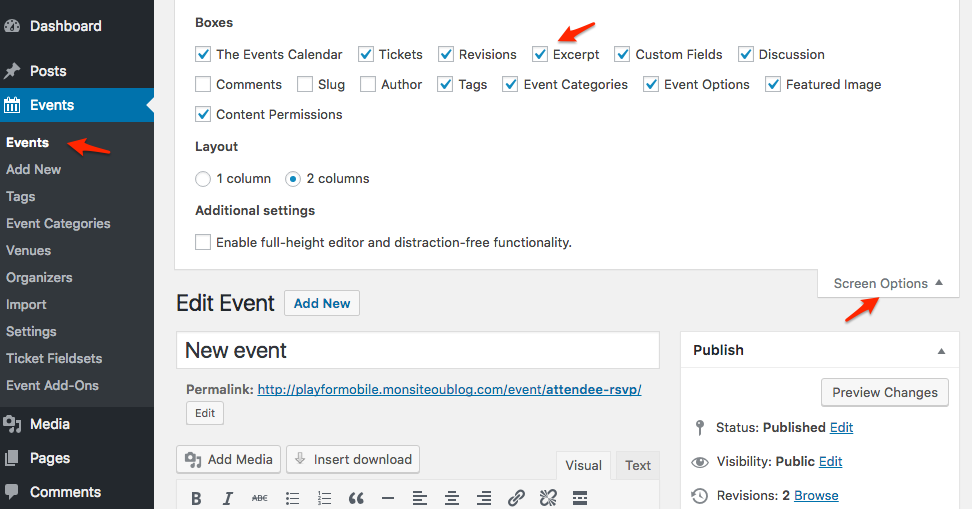
Let me know if that helps.
Have a great day!
Geoff B.
MemberGood evening Cindy and welcome back!
Thank you for reaching out to us.
I would love to help you with this topic.I have not been able to change all the colors around TEC.
I’ve gone into Appearances and TEC and replaced all sections that were green with white. It did not work out
According to your system information, you are using Avada.
As it turns out, this theme bypasses the Customizer found under Appearance > TEC and replaces it with the one found under Avada > Theme options > the Events Calendar
Let me know if that helps.
Have a great day!
Geoff B.
December 19, 2016 at 5:10 pm in reply to: Does the pro version allow for setting a specific filter view depending on the p #1207957MemberGood evening Martin and welcome to the Events Calendar forum!
Thank you for your interest in our products.
We’ll be glad to answer your questions.I need the main page to display all events by default but each region’s page needs a calendar view that should default to the events in that region.
You have 2 ways to go about this:
- Use our awesome Filter Bar premium add-on that allows filtering by city, country, province/state and so much more:
- You can have full calendars sorted by category embedded in pages using the shorcodes from the Events Calendar Pro: https://theeventscalendar.com/product/wordpress-events-calendar-pro/ and https://theeventscalendar.com/knowledgebase/embedding-calendar-views-tribe_events-shortcode/
- Use Event categories and to sort your events by region. You could then display them using Custom WordPress menus
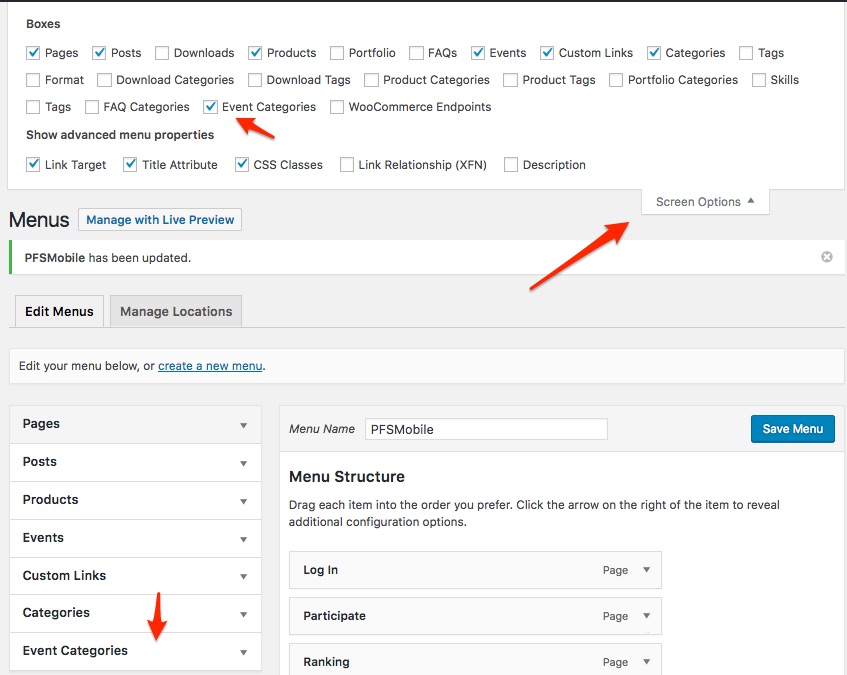
Let me know if that helps.
Have a great day!
Geoff B.
MemberGood evening Nathan and welcome back!
Thank you for reaching out to us.
I would love to help you with this topic.Is it possible to set billing for the events to occur after the event? Or 24 hours before the event?
Since we do hand over all of the transactional aspect of things to the E-Commerce plugin of your choice, the short answer is yes.
But that will be done via your E-commerce plugin (e.g.: WooCommerce).
Either via some customization, or through the use of a plugin (e.g.: https://woocommerce.com/products/woocommerce-pre-orders/)Full disclosure, we have not tested the above plugin, so there might be some customization necessary.
Let me know if that helps.
Have a great day!
Geoff B.
December 19, 2016 at 4:51 pm in reply to: Move Event Details to the top before the write ups #1207952MemberGood evening Derek and welcome back!
Thank you for reaching out to us.
I would love to help you with this topic.Unfortunately, the link above gets me a 404 error message.
You can totally move that box around if you want to: https://theeventscalendar.com/knowledgebase/moving-rsvp-ticket-forms/
If that does not work for you, as a first troubleshooting step, could you please provide us with your complete system information in a private reply using the instructions found in the following link?
https://theeventscalendar.com/knowledgebase/sharing-sys-info/
Best regards,
Geoff B.
MemberGood evening Robyn and welcome to the Events Calendar forum!
Thank you for your interest in our products.
We’ll be glad to answer your questions.How do I hide the feature photo on our event? We still want the feature photo thumbnail to show on month view and list view but on our single event view we don’t. (because it’s too large, has no caption, and does not wrap text)
There are 2 ways to go about this:
- You can create a custom single view that:
- Does not contain an event image
- Adds the caption.You might want to read our Themer’s guide to get a sense of how that works.
- You can hide or change the size of elements and even wrap text using CSS rules
How do we show captions to the feature photo on single event ? I have filled out the caption section but it is not showing on our event.
You can do so in at least 3 ways:
- Tweaking the single view code http://www.wpbeginner.com/wp-tutorials/how-to-display-wordpress-post-thumbnails-with-captions/
- Using a plugin such as https://wordpress.org/plugins/featured-image-caption/
- Using a shortcode https://codex.wordpress.org/Caption_Shortcode
How can we change the size of our feature photo on our single view? It shows at full size automatically.
Without seeing your site, I can’t say for sure what the CSS rule would be. But this should look like the rule below (more or less).
Try adding the following CSS rule to your style.css file or in your Custom CSS metabox:
.single-tribe_events .tribe-events-event-image img {max-width: 25% !important}Is it possible to designate an inserted photo as the feature image?
Most probably, but that would be achieved with a customization (as described in our themer’s guide).
Let me know if that helps.
Have a great day!
Geoff B.
MemberGood evening Daniel and welcome back!
Thank you for reaching out to us.
I would love to help you with this topic.I’d like to shorten the amount of text displayed in the preview, to make it easier to quickly scroll through many events
Actually, the length of the excerpt is based on how your specific WordPress + WordPress theme combo is set up for excerpts in general.
For example, you can have a site-wide length for all excerpts: http://smallenvelop.com/limit-post-excerpt-length-in-wordpress/
As alternative, you can actually control excerpts using the “Excerpt” metabox in your events.
Let me know if that helps.
Have a great day!
Geoff B.
MemberGood afternoon Kuldeep and welcome to the Events Calendar forum!
Thank you for your interest in our products.
We’ll be glad to answer your questions.1. Is there an ability to add filter for event categories ?
Absolutely, there are a couple of ways of doing this:
- By default, you are able to use URL based category filtering (/events/category/category-name/
- Our filter Bar premium add-on, provides you with an actual filter on the site: https://theeventscalendar.com/product/wordpress-events-filterbar/
2. Can we color code events based on categories ?
Absolutely, please see this third-party plugin: https://wordpress.org/plugins/the-events-calendar-category-colors/
3. is there any sidebar widget, that can be used on other pages on same website ?
You could accomplish this with a custom menu widget using event categories
Let me know if that helps.
Have a great day!
Geoff B.
December 19, 2016 at 1:14 pm in reply to: Possible to setup Event Tickets+ to not send the tickets via eMail? #1207893MemberGood evening Dominik and welcome back!
Thank you for reaching out to us.
I would love to help you with this topic.Now my question. Is it possible, with the events calender tickets+ addon, to sell the tickets, but don’t send them via email? The client wants to send them out by mail after the payment arrived.
Yes, that is possible.
In fact, here are a few options available:
- By default, the tickets are not sent until the order status is set to “complete”. This means that the customer will get an email about the order details from WooCommerce. Still by default, this email states: “Your tickets will be sent in a separate email”. You can customize that message to something like “Your tickets will be sent in a separate email”: https://gist.github.com/geoffgraham/50b93c7db1791b213dedfa9ac7a01322.
- You could use the following snippet to stop the ticket email from being sent https://gist.github.com/GeoffEW/67488cc3d5dda12a9e252e16e39191f4
Let me know if that helps.
Have a great day!
Geoff B.
December 19, 2016 at 11:29 am in reply to: cannot edit tickets after install of https ssl certificate #1207851MemberGood afternoon John and welcome back!
Thank you for reaching out to us.
We are sorry to hear that you are no longer able to edit tickets after adding a SSL certificate to your site. I would love to help you with this topic.
I went ahead and checked your site.
What is going on is that you have mixed content on your site (some of it is http, while some is https).
There are quite a few good articles on this topic on the web. Here is one: https://css-tricks.com/moving-to-https-on-wordpress/
A quick solution to this would be to use the following plugin: https://wordpress.org/plugins/ssl-insecure-content-fixer/
Let me know if that helps.
Have a great day!
Geoff B.
MemberGood afternoon Nicole and welcome back!
Thank you for reaching out to us.
We are sorry to hear about the challenges you have faced while trying to connect your site to your license. Yikes!
I would love to help you with this topic.
You are right, the license should still be 100% valid (I took the liberty of removing it from the public eye to make sure it does not get stolen).
Could you tell me what message you receive when you try to connect your license ?
A screenshot would be even better.As a first troubleshooting step, could you please provide us with your complete system information in a private reply using the instructions found in the following link?
https://theeventscalendar.com/knowledgebase/sharing-sys-info/
Without seeing the above info, the are still a couple of things you could do to fix the license issue:
- If you already have a previous version of the Events Calendar Pro installed, you can deactivate and delete it (it won’t impact existing information).
- Then head over to https://theeventscalendar.com/knowledgebase/new-user-primer-the-events-calendar-and-events-calendar-pro/ and make sure you follow the procedure step-by-step, most importantly downloading and installing the latest version of the Events Calendar Pro here: https://theeventscalendar.com/my-account/downloads/
- Once that is done, you should be able to go to Events -> Settings -> Licenses and connect your license
Let me know how that goes.
Best regards,
Geoff B. -
AuthorPosts