
Home › Forums › Calendar Products › Events Calendar PRO › Adjusting content/excerpt for Thumbnail images
- This topic has 6 replies, 4 voices, and was last updated 9 years, 9 months ago by
Ross.
-
AuthorPosts
-
December 18, 2016 at 1:43 am #1207466
Ross
ParticipantHello. Thank you for the plugin.
I’ve made a few minor changes to the template, but I’m having issues with the following:
(1) In the event list view I’ve changed the featured image to thumbnail (see attachment). I cannot work out how to change the width of the excerpt wrapper so that the text goes to the end of the page. Can you please help?
(2) How can I reduce the number of words for the excerpt? I copied the entire “tribe_events_get_the_excerpt” function from general.php into my own child-theme functions.php file and changed the value from 55, but that didn’t work. Can you please advise?
Thank you!
RossDecember 19, 2016 at 5:25 pm #1207963Geoff B.
MemberGood evening Ross and welcome to the Events Calendar Support forum!
Thank you for reaching out to us.
I would love to help you with this topic.(1) In the event list view I’ve changed the featured image to thumbnail (see attachment). I cannot work out how to change the width of the excerpt wrapper so that the text goes to the end of the page. Can you please help?
With pleasure. However, since each theme is so different, if you had a URL to share (where I can see your change, it would be awesome.
If that is not possible, as a first troubleshooting step, could you please provide us with your complete system information in a private reply using the instructions found in the following link?
https://theeventscalendar.com/knowledgebase/sharing-sys-info/
(2) How can I reduce the number of words for the excerpt? I copied the entire “tribe_events_get_the_excerpt” function from general.php into my own child-theme functions.php file and changed the value from 55, but that didn’t work. Can you please advise?
Here are a couple of ways you can do this: http://smallenvelop.com/limit-post-excerpt-length-in-wordpress/
Additionally, you can actually control every excerpt individually using the Event’s excerpt metabox
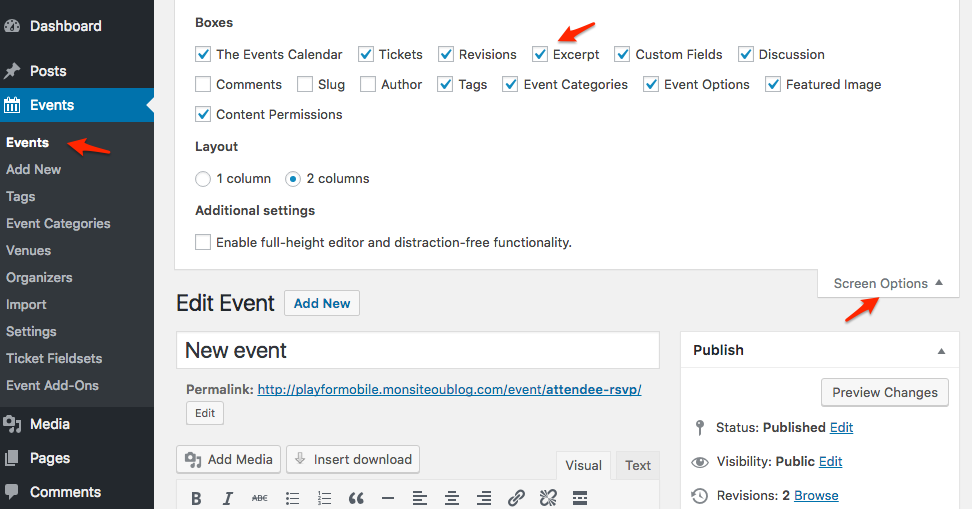
Let me know if that helps.
Have a great day!
Geoff B.
December 19, 2016 at 5:32 pm #1207966ParticipantHi Geoff,
Thank you for the reply.
On (2) I will follow the link and try and make the amendments. Thanks.
On (1), here is a link to the website (
http://www.japanistry.com/events/list/). I’m just testing at the moment.
I’m basically happy with everything apart from the styling for the “list”
view. I would like the text to float to the right of the image (and I’ll
adjust the excerpt as per (2) so that it doesn’t overflow).I was looking through the .php files but I just couldn’t get the right CSS
selector for the content in the list view only. Can you help?December 20, 2016 at 2:26 am #1208078ParticipantHi Geoff,
Can you also please let me know which CSS selector I need to change the
line-height of body text and the margin-bottom of paragraphs? I thought
this was .tribe-events-content but add CSS to my file does not change
anything.December 20, 2016 at 8:06 pm #1208697MemberGood evening Ross,
Thank you for writing back!
To get the text to float to the right of the image, try adding the following CSS rule to your style.css file or in your Custom CSS metabox:
.tribe-events-list .tribe-events-event-image+div.tribe-events-content {

width: 48% !important;

padding-right: 0 !important;

}
Can you also please let me know which CSS selector I need to change the
line-height of body text and the margin-bottom of paragraphs?I would recommend the following selectors:
#tribe-events .tribe-events-content p, .tribe-events-after-html p, .tribe-events-before-html p {

line-height: 1.4 !important;

margin: 0 0 40px !important;

}
Of course, 1.4 and 40 px are just examples.
Let me know if that helps.
Have a great day!
Geoff B.
January 11, 2017 at 8:36 am #1216654Support Droid
KeymasterHey there! This thread has been pretty quiet for the last three weeks, so we’re going to go ahead and close it to avoid confusion with other topics. If you’re still looking for help with this, please do open a new thread, reference this one and we’d be more than happy to continue the conversation over there.
Thanks so much!
The Events Calendar Support Team -
AuthorPosts
- The topic ‘Adjusting content/excerpt for Thumbnail images’ is closed to new replies.