Shorter event preview in "photo" view?

Home Forums Calendar Products Events Calendar PRO Shorter event preview in "photo" view?

Viewing 3 posts - 1 through 3 (of 3 total)
  • Author
    Posts
  • #1207299
    Daniel
    Participant

    Hi, I use the photo view for my default view. I’d like to shorten the amount of text displayed in the preview, to make it easier to quickly scroll through many events, especially on a phone or other small screen. I looked for the setting to change this, but can’t find it. How can I do this please? Thank you,

    -Dan
    http://www.BoredBreaker.com

    #1207900
    Geoff B.
    Member

    Good evening Daniel and welcome back!

    Thank you for reaching out to us.
    I would love to help you with this topic.

    I’d like to shorten the amount of text displayed in the preview, to make it easier to quickly scroll through many events

    Actually, the length of the excerpt is based on how your specific WordPress + WordPress theme combo is set up for excerpts in general.

    For example, you can have a site-wide length for all excerpts: http://smallenvelop.com/limit-post-excerpt-length-in-wordpress/

    As alternative, you can actually control excerpts using the “Excerpt” metabox in your events.
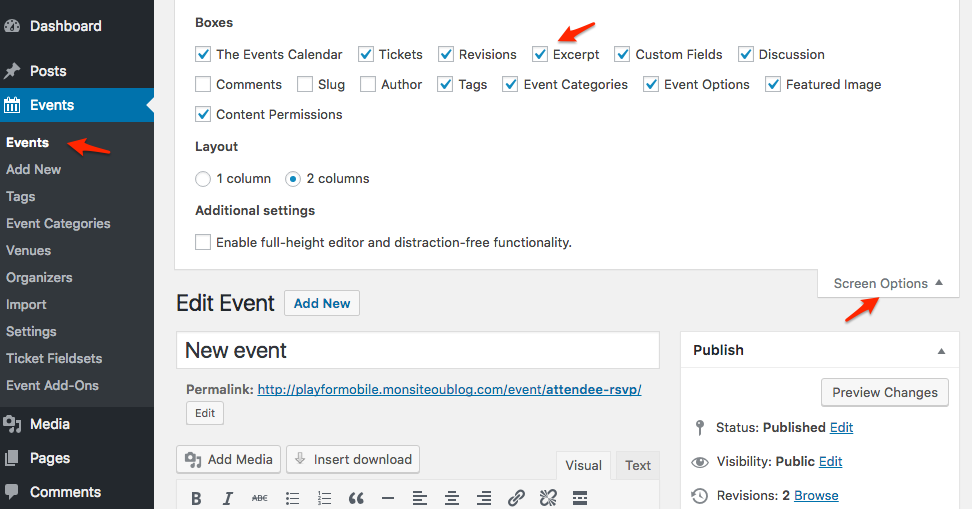
    excerpt

    Let me know if that helps.

    Have a great day!

    Geoff B.

    #1215875
    Support Droid
    Keymaster

    Hey there! This thread has been pretty quiet for the last three weeks, so we’re going to go ahead and close it to avoid confusion with other topics. If you’re still looking for help with this, please do open a new thread, reference this one and we’d be more than happy to continue the conversation over there.

    Thanks so much!
    The Events Calendar Support Team

Viewing 3 posts - 1 through 3 (of 3 total)
  • The topic ‘Shorter event preview in "photo" view?’ is closed to new replies.