

Forum Replies Created
-
AuthorPosts
-
Geoff B.
MemberGood evening Sandrine and welcome back!
Thank you for reaching out to us.
We are sorry to hear that you cannot reach the “Preferences” menu anymore. Yikes!
I would love to help you with this topic.By the sound of it, it looks like there is some type of conflict at play.
This is usually because of:- A conflict with another plugin
- A conflict with your WordPress theme
- A template customization for the Events Calendar that requires updating
When it comes to that type of issue, it is preferable to troubleshoot in a staging environment if you have one.
A first quick test is to simply temporarily revert back to a default WordPress theme such as twenty-sixteen to see if the issue persists.
The next step would be to go through our testing for conflicts procedure and let us know what you find out.
Basically the goal here is to revert back to a bare WordPress installation to see if the problem persists. It also allows us to pinpoint what the cause of the issue is.
But, before you do that, there are 2 things I would advise:
- Make a backup of your database
- Consider activating a “Maintenance Page” plugin if you are doing this on your live site (to minimize impact on your visitors)
Let me know how that goes.
Geoff B.
MemberGood evening Garry and welcome to the Events Calendar forum!
Thank you for your interest in our products.
We’ll be glad to answer your questions.Currently our Event Tickets Plus premium add-on does allow you to use Paypal: https://theeventscalendar.com/product/wordpress-event-tickets-plus/ or any payment gateway supported by WooCommerce.
We are also looking at allowing very direct Paypal integration with our free Event Tickets plugin sometime later this year.
Let me know if that helps.
Have a great day!
Geoff B.
June 16, 2017 at 7:52 pm in reply to: display of the images in the Day view of the event calendar #1299442MemberGood evening Michel and welcome back!
Thank you for reaching out to us.
I would love to help you with this topic.It appears that this is caused by a basic CSS rule.
Try adding the following CSS rule to your style.css file or in your Custom CSS metabox:
.tribe-events-day .tribe-events-loop .tribe-events-event-image {

    width: 100% !important;

}
Let me know how that goes.
Best regards,
Geoff B.MemberGood evening Monty and welcome to the Events Calendar forum!
Thank you for your interest in our products.
We’ll be glad to answer your questions.What information comes on the actual tickets
By default, the tickets look exactly like this:
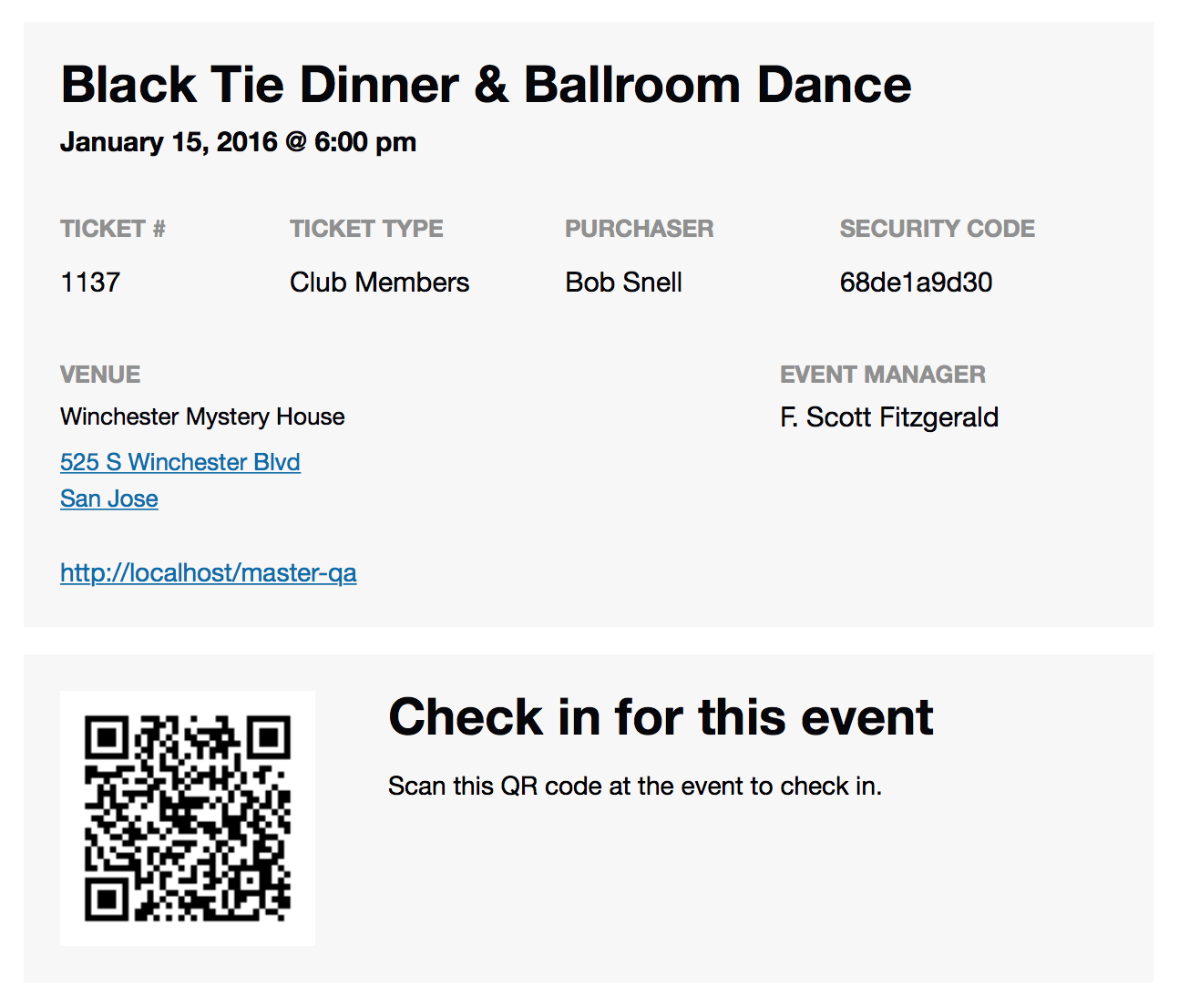
how do we know someone hasn’t copied someone else’s ticket? How do we know that it’s unique?
Each ticket has a unique ID and a security code.
Furthermore, you can check-in the attendees (either electronically or via a QR code scanner app).
You can read about this here: https://theeventscalendar.com/knowledgebase/managing-your-orders-and-attendees/Let me know if that helps.
Have a great day!
Geoff B.
MemberGood afternoon Guillaume and welcome to the Events Calendar Support forum!
Thank you for reaching out to us.
I would love to help you with this topic.What you are describing looks a lot like WooCommerce Composite products plugin. Alas, we only support Simple Virtual products at the time of writing.
However, the short answer is that this is probably possible, but it will most likely require a bit of customization or an extra plugin, as there are no built-in feature for that.
I wish I had a better answer for you, but for now it’s the best one I have unfortunately.
Best regards,
Geoff B.
MemberThis reply is private.
MemberGood evening Paula,
I just tried adding the https://gist.github.com/cliffordp/66bf05df61ee269c60ff20d6f39e2cab#file-functions-php snippet to your Child theme and it worked great on my end.
Could you tell me which version of Divi you are using ?
Here is a copy of the modified functions.php: functions_for_Divi_child
This leads me to believe that there has to be some type of conflict at play with one of the other plugins.
By the sound of it, it looks like there is some type of conflict at play.
This is usually because of:- A conflict with another plugin
- A conflict with your WordPress theme
- A template customization for the Events Calendar that requires updating
When it comes to that type of issue, it is preferable to troubleshoot in a staging environment if you have one.
A first quick test is to simply temporarily revert back to a default WordPress theme such as twenty-sixteen to see if the issue persists.
The next step would be to go through our testing for conflicts procedure and let us know what you find out.
Basically the goal here is to revert back to a bare WordPress installation to see if the problem persists. It also allows us to pinpoint what the cause of the issue is.
But, before you do that, there are 2 things I would advise:
- Make a backup of your database
- Consider activating a “Maintenance Page” plugin if you are doing this on your live site (to minimize impact on your visitors)
Let me know how that goes.
Geoff B.
MemberThis reply is private.
MemberGood evening Jameel,
Absolutely, the featured image is not a Pro feature. Therefore it also “appears” in the free version.
If it is not appearing it is because there is some type of conflict interferring.
Best regards,
Geoff B.
June 15, 2017 at 11:41 pm in reply to: Error 404 displaying all recurring events for a event #1298974MemberGood evening Francisco,
I am glad you found a solution to the “view all” link.
The simple answer is you have to make sure that strings are translated to your liking in both the Events Calendar and the Events Calendar Pro.
Depending on the context, the plugins will use one or the other of those language files.
You might also be interested in the following approach: https://theeventscalendar.com/knowledgebase/change-the-wording-of-any-bit-of-text-or-string/
Let me know if that helps.
Have a great day!
Geoff B.
MemberGood evening Michael and welcome back!
Thank you for reaching out to us.
We are sorry to hear that you are unable to create translations for recurring events from the events list while using WPML.
I would love to help you with this topic.
Could you please send me a copy of the latest version of your WordPress theme / child theme via a link to a .zip file link (stored Dropbox or Google Drive) so that I can run some tests on my end ? I recommend a private reply for that purpose.
Please ensure you are using the latest files as found on your actual website.
This way I will get access to any updates or customizations you might have made.Secondly, could I have a screenshot of the “Edit Event” screen of one of these recurring events ?
This way I will be able to reproduce your exact situation more accurately.
Hang in there!
Geoff B.
MemberGood evening Ben and welcome back!
Thank you for reaching out to us.
We are sorry to hear about the margins being gone on your site on single events. Yikes!
I would love to help you with this topic.As a first troubleshooting step, could you please provide us with your complete system information in a private reply using the instructions found in the following link?
https://theeventscalendar.com/knowledgebase/sharing-sys-info/
Secondly, I believe that heading over to Events -> Settings -> Display and choosing Default Page template under Events Template will fix your issue.
Let me know how that goes.
Best regards,
Geoff B.MemberGood evening Mauro and welcome back!
I am super stoked that the arrow is gone.
As a first troubleshooting step, could you please provide us with your complete system information in a private reply using the instructions found in the following link?
https://theeventscalendar.com/knowledgebase/sharing-sys-info/
With that in hand, I should be able to reproduce your settings.
Hang in there!
Geoff B.
MemberGood evening Jameel and welcome to the Events Calendar forum!
Thank you for your interest in our products.
We’ll be glad to answer your questions.By the sound of it, it looks like there is some type of conflict at play.
This is usually because of:- A conflict with another plugin
- A conflict with your WordPress theme
- A template customization for the Events Calendar that requires updating
When it comes to that type of issue, it is preferable to troubleshoot in a staging environment if you have one.
A first quick test is to simply temporarily revert back to a default WordPress theme such as twenty-sixteen to see if the issue persists.
The next step would be to go through our testing for conflicts procedure and let us know what you find out.
Basically the goal here is to revert back to a bare WordPress installation to see if the problem persists. It also allows us to pinpoint what the cause of the issue is.
But, before you do that, there are 2 things I would advise:
- Make a backup of your database
- Consider activating a “Maintenance Page” plugin if you are doing this on your live site (to minimize impact on your visitors)
Let me know how that goes.
Geoff B.
MemberGood evening and welcome back!
That is correct, this feature is not ready yet.
We are still working on it.
Alas, I cannot guarantee when it will be released.
The good news is that you will be contacted as soon as it is available.
Thank you for your patience as we see this through.Best regards,
Geoff B. -
AuthorPosts