

Forum Replies Created
-
AuthorPosts
-
Geoff B.
MemberGood evening Dinah and welcome back!
Thank you for reaching out to us.
I would love to help you with this topic.Due to the fact that I do not want to use CSS (because I do not want to hide but remove the buttons) is there a timing when the plugin / Snippet will be repaired and updated?
I just updated the following snippet: https://gist.github.com/GeoffEW/b8f0bb5fc2b8510c6ad4f0b60fcf3fb9
You could apply it in the functions.php file of your theme (without the PHP tag at the top).
I guess the only way to remove the code is by making a template customization. Could you please tell me in which file of the tribe templates I can make these changes ? I already made some changes so i am aware of the Themer’s Guide and have created custom files ? But I could not find the corresponding lines in the “tribe events -> month.php” nor “tribe events -> month -> …”
As Mathew kindly points out, why try to dig deeper when a little piece of code does the trick 🙂
Let me know how that goes.
Best regards,
Geoff B.September 12, 2017 at 6:33 pm in reply to: Calendar hangs when attempting to view previous or upcoming events. #1348350MemberGood evening,
Thank you for writing back.
It looks like the bu-asides has a life of its own. I am saying this because the Javascript error is still very much present and visible from the Google Developer tools console.
Perhaps this is a caching issue (it might be disabled but WP Super Cache does not know that).
While you are at it, can you temporarily deactivate WP Super Cache and flush the cache while you troubleshoot this ?
Let me know how that goes.
Best regards,
Geoff B.September 12, 2017 at 6:28 pm in reply to: Calendar changing language when advancing months. #1348348MemberGood evening Allan,
Thank you for writing back.
I am using a Mac myself. Would you mind expanding a bit on what specific Apple Machines you are using (Model and browser)?
Secondly, did you try my suggestion (using a private browsing window)?
Best regards,
Geoff B.
MemberGood evening Matthew,
Thank you for writing back.
Out of the box, the The Events Calendar is formatted differently on a site where I’ve used your product before.
This is a combination of the theme being used (the blue example looks like an Avada the Events Calendar integration – but I might be mistaken) AND your settings under Events -> Settings -> Display (especially the 2 first ones).
1) Search bar background at 100% width
I would recommend a few things:
- Try different settings for Events Template under Events -> Settings -> Display to see if that helps
- Try to borrow any the Events Calendar related CSS rule AND content of the /tribe-events/ from that other site and copy these over to your site
If none of the above works, you can emulate that with CSS.
You will need to change the width and margins of the following elements:#tribe-events-pg-template, .tribe-events-pg-template {
max-width: 100% ! important;
}#tribe-bar-form, #tribe-events-pg-template #tribe-events-content {
max-width: 1200px;
margin: 0px auto !important;
}2) All the date, time, lcoation, map, and preview text for The Events Calendar in the blue is organized into tidy boxes. I would LOVE THIS on my yellow website, but IDK why out of the box it was different.
This is clearly coming from that other theme. As suggested, you might want to “borrow” those view customizations.
You might want to read our Themer’s guide to get a sense of how that works.
Best regards,
Geoff B.
MemberGood evening William,
Thank you for writing back.
how do payments get processed once someone registers via Events Calendar Pro and Events Tickets Plus – the simple interface in WooCommerce?
Exactly, Event Tickets Plus adds “Add to cart” buttons to Events pages.
From there onwards, everything is handled exactly in the same way as with any other product in WooCommerce.Have a great day!
Geoff B.
MemberThis reply is private.
MemberGood evening Bart,
I am not exactly sure what happened there.
But the important thing is that this is fixed.That is a valid point for the GUI side of things. Thank you for the suggestion.
As per the sidebar not showing up, this has to do with the Events Template setting under Events -> Settings -> Display.
It was set to Default Events Template. Changing it to default page template solves the issue.
Best regards,
Geoff B.
MemberGood evening Jane,
I am super stoked that we managed to get things working for you.
You are welcome back in our support forums any time 🙂
For now, I am going to close this thread.
Have a great week!
Geoff B.
MemberGood afternoon Jose and welcome to the Events Calendar Support forum!
Thank you for reaching out to us.
I would love to help you with this topic.Can you confirm if:
- You are logged-in through wp-admin before scanning the QR code ?
- If the user you are logged-in with has the Edit post capability ?
Best regards,
Geoff B.
MemberGood afternoon Patricia and welcome to the Events Calendar forum!
Thank you for your interest in our products.
We’ll be glad to answer your questions.My question is if an user creates the event, could an administrator modify the event and add RSVP functionality to the event?
Absolutely.
By the way Event Tickets Plus will also provide the additional attendee info feature to RSVP tickets.
And, if at some point you want your users to be able to manage that themselves, you will simply need to throw Community Tickets in the mix 🙂
Let me know if that helps.
Have a great day!
Geoff B.
MemberGood afternoon Hassan and welcome back!
Thank you for reaching out to us.
We are sorry to hear about the date acting up on you.
I would love to help you with this topic.As a first troubleshooting step, could you please provide us with your complete system information in a private reply using the instructions found in the following link?
https://theeventscalendar.com/knowledgebase/sharing-sys-info/
Secondly, this looks like it could be one of 2 things:
- A date format issue (between the different date formats available – WordPress, our plugins, any customization in your theme, etc…)
- Some Customizations you might have in place that require some updating
- Some conflict between plugins
Could you please send me a copy of the latest version of your WordPress theme / child theme via a link to a .zip file link (stored Dropbox or Google Drive) so that I can run some tests on my end ? I recommend a private reply for that purpose.
Please ensure you are using the latest files as found on your actual website.
This way I will get access to any updates or customizations you might have made.Hang in there!
Geoff B.
MemberGood evening Elizabeth and welcome to the Events Calendar Support forum!
Thank you for reaching out to us.
I would love to help you with this topic.in the cart sales tax is being added unnecessarily. How can I resolve that?
The way to tackle this is to Edit the ticket product directly in WooCommerce.
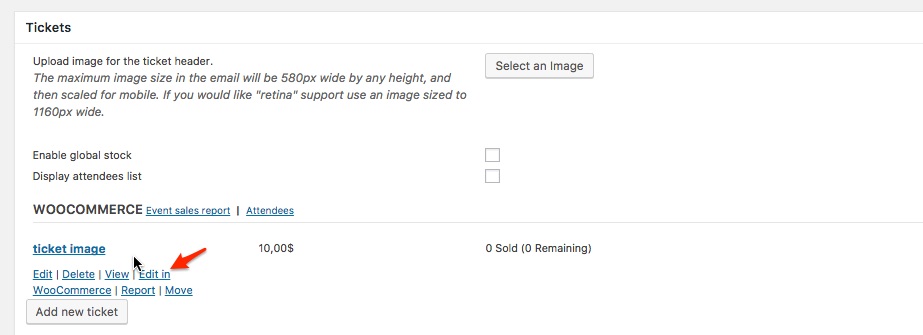
This should allow you to set the tax status of the ticket to none.
Let me know how that goes.
Best regards,
Geoff B.MemberHi again Jitske,
This has been a long time coming, but we were just reviewing open tickets and noticed we never confirmed to you that these strings have been added to our language files for a while now.
Best regards,
Geoff B.MemberThis reply is private.
MemberGood afternoon Saikat,
I am super stoked that this was helpful to you.
You are welcome back in our support forums any time 🙂
For now, I am going to close this thread.
Have a great week!
Geoff B.
-
AuthorPosts