

Forum Replies Created
-
AuthorPosts
-
Geoff
MemberAwesome, thanks so much! That helps a ton.
I have added this thread to the ticket that is already open for this issue — assuming that your issue is directly related to it as you suspect. That will allow us to follow up with you directly here in the forums when we release an official patch for it.
I do see that this is marked Priority 1, which is the highest on our radar. We already have a maintenance release in the works and while I cannot guarantee that this ticket will make it in there, I have flagged this to our development team and I’m hoping we can squeeze it in. Again, no guarantees here, but know that we’re certainly prioritizing this, working on it and will keep you posted when we have a fix. In fact, I’ll mark this thread Pending Fix to as an additional reminder for us to follow-up with you.
In the meantime, the temporary fix is to specify HTTPS for the site URL in the WordPress settings under Settings > General if you are using HTTPS across your entire site. If you are using HTTPS only in some areas of the site, then you may be able to use this plugin to help identify and fix insecure content errors. These workarounds have worked for some customers, but not all, so I am hoping it helps you for now.
Thanks for your patience and understanding while we work on this!
Geoff
MemberHey Rob, welcome back!
I tried creating a discounted ticket for an event in WooCommerce and it seems to show the correct discounted price everywhere I checked. The ticket I created is set to $1,295 and discounted to $699 just like your settings.
Here are screenshots of what I tested:
Are those the same spots you are seeing the issue? If so, we may need to try testing for conflicts as a next step. Nut let’s confirm that I’m looking in the right spots first before we go down that route.
Thanks!
GeoffDecember 2, 2016 at 9:45 am in reply to: Recurring events not showing up event for the upcoming year #1200964MemberHi Daniel,
Oh no, that’s no good! I’m happy to help troubleshoot this with you.
To help me dig into this, would you be willing to share a screenshot of the recurrence settings for that event? I’d like to try create an event based on the exact same settings and see if the same issue comes up on my test site as a first step to figuring this out.
Thanks so much!
GeoffMemberHi Richard, thanks for writing in! I’m really stoked to hear you’re checking out our plugins and I hope they are a great fit. 🙂
1. Will this work with listify? If not will it take must customising?
I cannot say I have personally tried The Events Calendar with Listify. I did look through our forums and found a thread that asks a similar question, but I couldn’t tell if there was as traight answer in there about whether the plugin is solidly compatible with it. I will say that we try to be compatoble with as many themes (and other plugins as possible) but we do not actively check compatibility with each and every release, except for default WordPress themes and a few widely popular ones we know a bunch of our customers use. That said, The Events Calendar is a free download and I would recommend installing it as a test because if it is compatible, then it’s likely that all of our paid extensions will be compatible with it as well.
2. Can the filters be edited? so maybe remove map display.
I am not quite following your question but, if I am reading it correctly then, yes, you can customize the filters that allow website visitors to view events by specific filters, such as Categories, Tags, Time of Day, Cost, Distance, and other attributes using our Filter Bar add on. That will also allow you to configure which filters to use, which means you can remove the Distance filter, should you choose to.
3. … So visitors can select there region and what type of event they are looking for. Is it possible?
Yes, I think my answer above also relates to this in that our Filter Bar add on will give you a ton of options for allowing visitors to see specific events based on a custom set of filters.
Does this help answer your question? Please let me know!
Cheers,
GeoffDecember 2, 2016 at 9:17 am in reply to: Community Events submission form not displaying recurrence rules #1200952MemberRight on! I’m so glad to hear everything is working smoothly and I appreciate you following up to let us know. Definitely keep us posted if any other questions come up and we’d be happy to help.
Cheers,
GeoffMemberHi Michael,
That’s certainly strange! Let’s dig in here together and see why those images are not importing.
First off, I tried importing an event from Facebook without Events Calendar PRO active and the featured image appeared to import correctly. Here’s a quick screencast I put together that shows how I tested it out and the featured image displayed in the event editor.
Are you seeing the same thing when you try importing? If not, would you be willing to share the Facebook URL you are importing from and an example of an event where the featured image is not being pulled in at the same time? That would be super helpful!
Thanks so much,
GeoffMemberHey Michael,
Oh no, sorry for the trouble here with AJAX in IE!
We unfortunately were not able to see the same issue when testing this out on your site with IE 10 and 11. Here’s a screencast of what I saw when testing it out. You can see that the AJAX is a little slow, but does appear to load.
Is there a different version of IE or perhaps Edge that we should be looking at instead? Let me know and I’d be happy to keep looking.
Cheers,
GeoffMemberHey there and thanks for getting in touch!
We’d be happy to help — but I do want to note that our pre-sales forum is used to answer questions about purchasing our premium plugins.
If you’re looking for technical support, it would be awesome if you could post your question to our WordPress.org support forum.
Or, if you already have an active license for one of premium plugins, will you please log into your account? I will move this thread to our Events Calendar PRO forum, but you will need to log into your account to reply.
In the meantime, it sounds like your site may use a custom query to display blog posts and, if that’s the case, the setting in The Events Calendar will not work because it is meant to work with the default WordPress query for blog posts on the homepage. You may want to reach out directly to the theme developer in that case for tips on a filter you could use to add the tribe-events post type to the query to the custom query.
Thanks so much!
GeoffMemberHi Gary,
Thanks for writing in!
I’d be more than happy to look into the issue we have on file for you, but would you be willing to share which thread you are referring to? That will allow me to trace it back to our development ticket and get a status update for you.
That will also allow me to see if there any recommendations have been made on the ticket that would allow you some temporary relief until an official patch comes in.
Thanks so much!
GeoffMemberHello Joy, and happy Friday!
I’d suggest taking a look at the following plugins for event registration:
- <u>Event Tickets</u> (free) – This extends <u>The Events Calendar</u> so that you can add RSVPs for events where folks can register for attendance.
- <u>Event Tickets Plus</u> – This extends Event Tickets so that you can create and sell paid tickets on The Events Calendar. In order to process the actual ticket sales, it integrates with WooCommerce, which handles the payment processing.
Those should get you a good system for being able to create and sell tickets for your events, whether they are online or in person.
Does this help answer your question? Please let me know!
Cheers!
GeoffMemberRight on, glad to hear all is working! Thanks for following up and definitely let us know if any other questions pop up and we’d be happy to help.
In the meantime, have a great weekend!
Geoff
MemberHi Elizabeth and thanks for following up!
The number of events that import doesn’t really matter as far as Event Aggregator’s import limits go — it’s the number of times it is asked to fetch them that you have set up in advance.
Funny enough, we just published a new post on the topic yesterday and it should help clarify things a ton:
https://theeventscalendar.com/knowledgebase/event-aggregators-import-limits-work/
Also, we don’t want to include an image for each event pop up – is it possible to not include an image?
There’s no need to include images on an event if you do not want them. I do not believe Event Aggregator fetches images from Google Calendar anyway, so you should be good to go there. 🙂
Any other questions I can help answer? Let me know and I’d be happy to help.
Cheers,
GeoffMemberHi Caroline,
Thanks for writing in! As a heads up, I’ve moved this topic to our Events Calendar PRO forum since the Translations forum is an open community forum for discussing language translations for our products. That just means you’ll need to log in to your account in order to reply to this thread.
I can’t speak specifically for version 3.11.2 because we only support the latest versions of the plugins, but I do know that this snippet will reverse the order of events from newest to oldest in the latest version of the plugins:
https://gist.github.com/geoffgraham/39d59bf67175e9b93bda
Please note that this is only an example and should be used as a starting point. It’s limited to List View and the current screen of events being viewed, but you could tailor it for other views and other pages, if needed.
I hope this helps!
GeoffMemberHi Matt,
Are tickets being sent to orders in Pending status? If so, that’s a problem indeed, though one I could not replicate on my test site in default conditions.
As long as an order is set to Pending, there should be no way to immediately check that person in because (1) they have not received a ticket to use to check in at the door and (2) the system does not process those attendees as being able to be checked in.
For further clarification on that second point, here is a screenshot of the Attendee List in the WordPress admin that shows how the system both distinguishes Pending from Completed orders and prevents Pending orders from checking in:
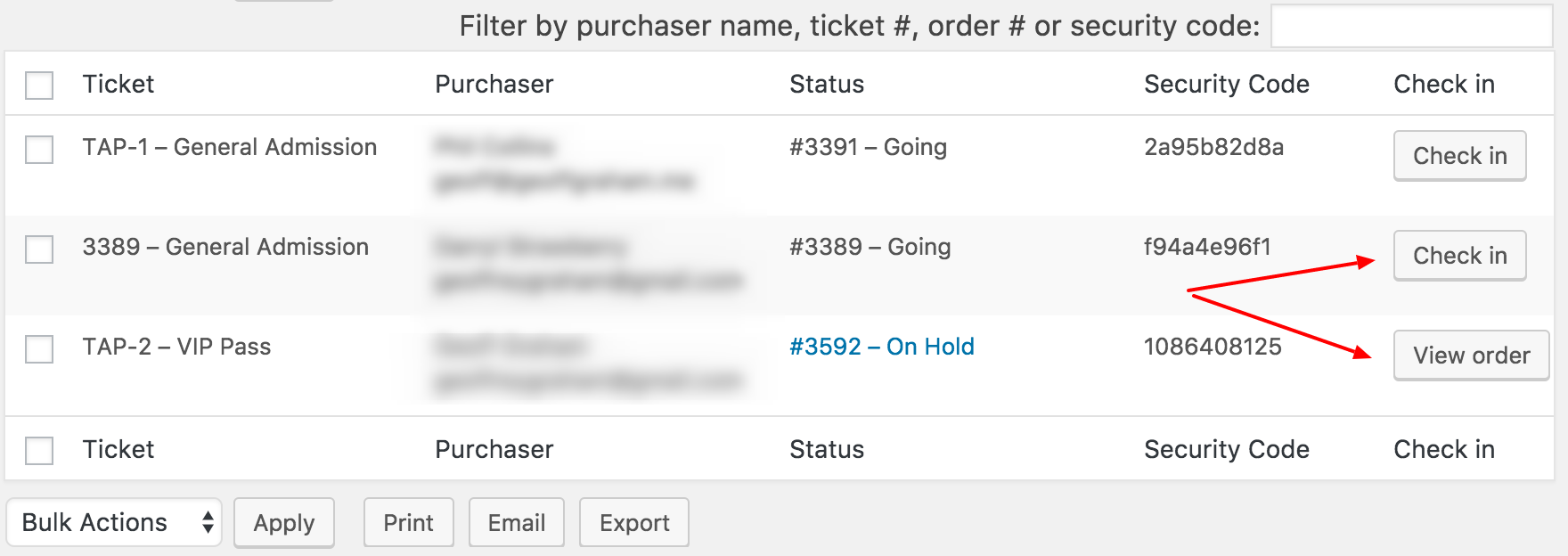
If your team happens to be using the exported CSV file of attendees to check attendees in, it’s worth noting there is a column in there as well that indicates an attendee’s order is On Hold, which should also raise a red flag for checking them in manually offline.
Are you seeing something different on your site than what I’ve described so far? Please let me know because I’d be happy to look into this further if things are not working as they should be expected to.
Thanks,
GeoffMemberHi Beccy,
Great question! Charging for event submissions in Community Events is definitely something we’re interested in doing but it hasn’t been developed, I’m afraid.
One thing you might consider trying is adding a paywall between the visitor and the submission form. I think using something like Restrict Content Pro might be a good way to accomplish that. I haven’t tried it personally, but I’ve heard others having success with it and it definitely looks like a good option to consider based on what I’ve read on it.
Does this help answer your question? Please let me know.
Cheers!
Geoff -
AuthorPosts