

Forum Replies Created
-
AuthorPosts
-
December 7, 2016 at 8:15 am in reply to: Safari Only Infinite spinner trying to search with filter bar #1202645
Geoff
MemberHi Ryan,
Oh no, that’s no good! Sorry to hear about the trouble here.
While I do not have access to Safari 9.0.3, I do have access to 8, 9.1 and 10.0.1 and Filter Bar appears to work correctly in each instance.
Here’s a quick screencast I put together that shows the result I got in each one:
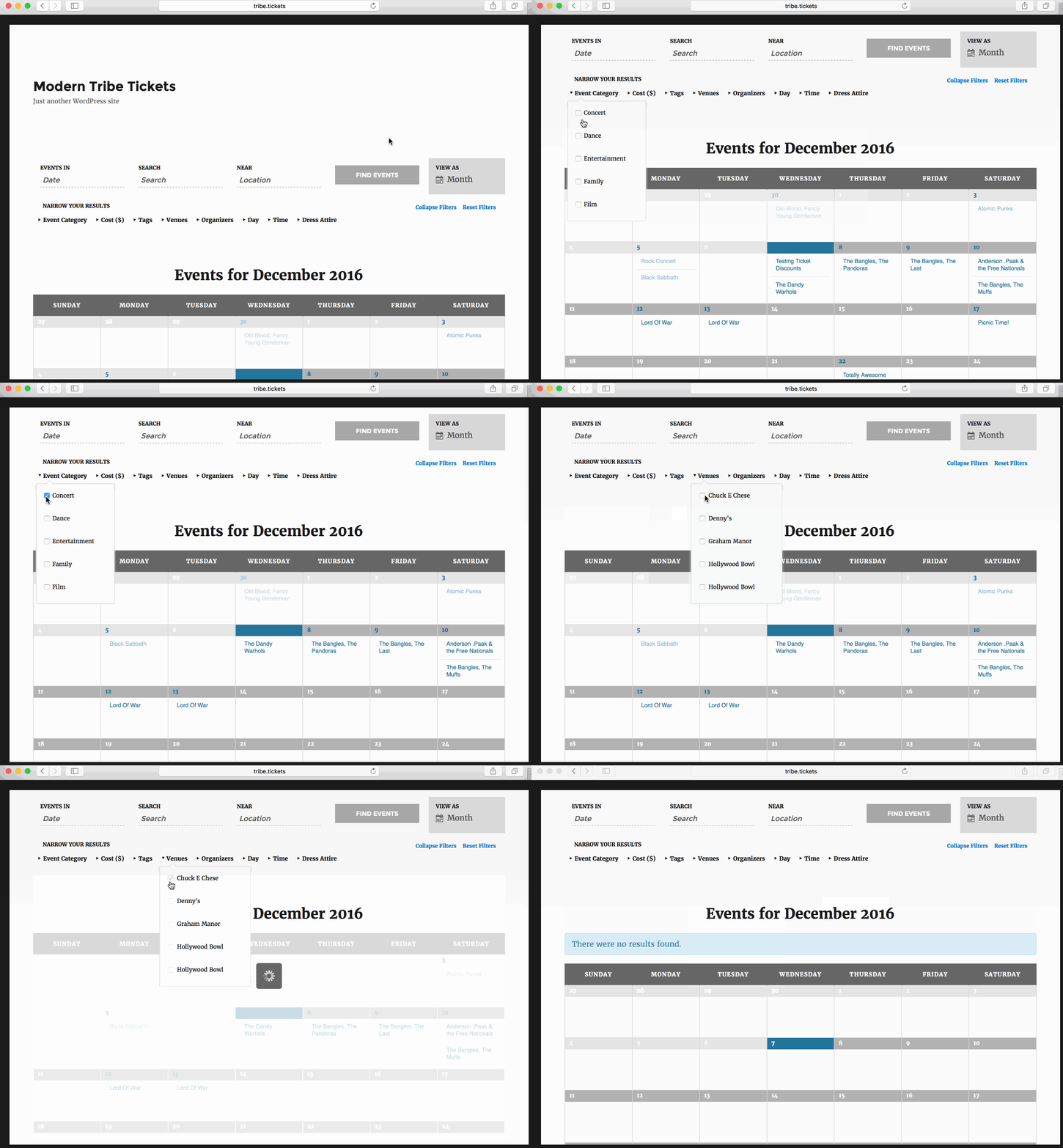 Note that, like you, I am testing in a default WordPress environment with the Twenty Sixteen theme and the only installed plugins are:
- The Events Calendar 4.3.3
- Events Calendar PRO 4.3.3
- Filter Bar 4.3.3
It seems odd that we would experience different results running the same test. Would you be willing to share a link with me to your site in the default conditions you describe so I check a little more? There must be something different between our two sites that should help explain what’s up.
Cheers!
GeoffMemberHi Carlo,
Thanks for writing in!
Events Calendar PRO includes a feature that allows you to create recurring events much like the one you describe.
The recurring event settings for an event do allow you to exclude specific dates from being included in the recurrence. Here’s a screenshot of a recurring event that would skip Christmas both this and next year:
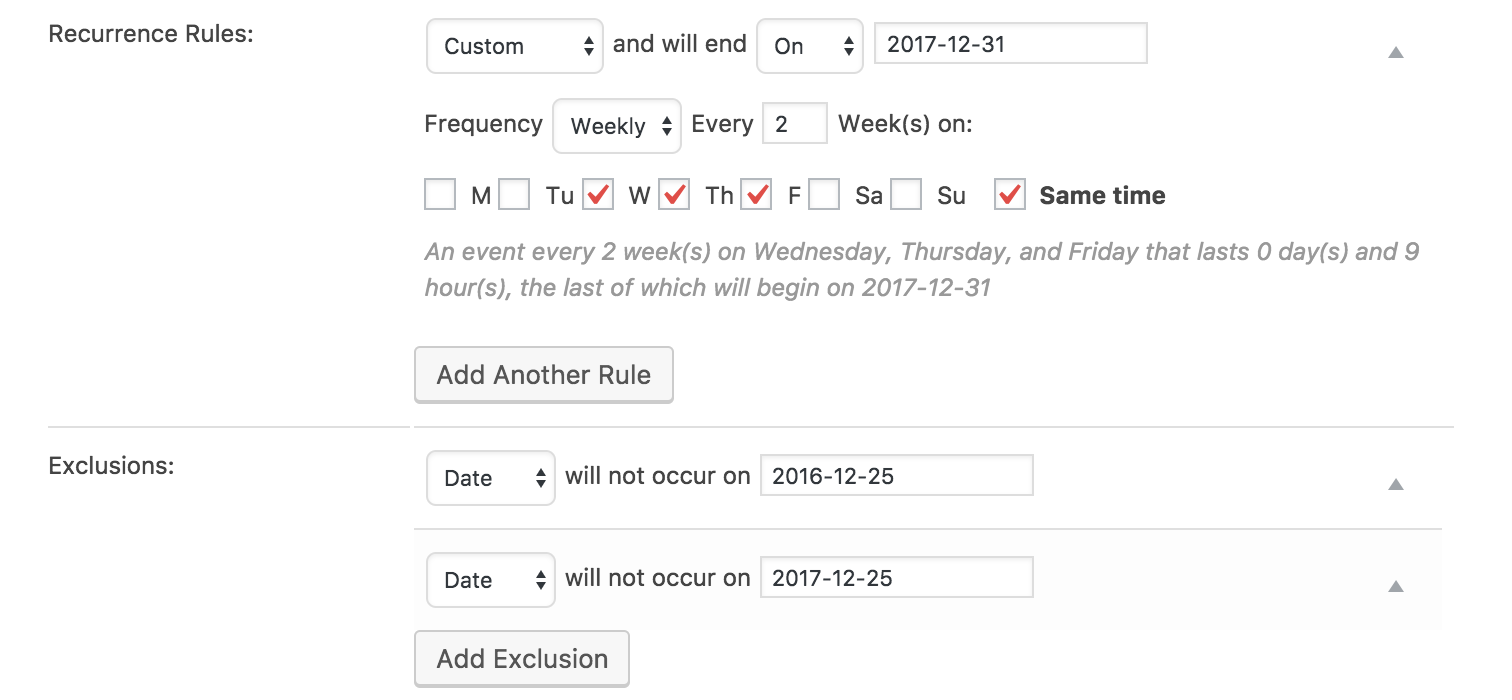
Does this help answer your question? Please let me know!
Cheers!
GeoffMemberHi Michael,
Interesting question. I have to admit that I have no come across this request before but it’s a neat one.
I’m afraid that the only Month View widget available in Events Calendar PRO is the Mini Month Calendar. That’s going to be the only supported way to get the calendar into the sidebar.
That said, Event Calendar PRO does include shortcodes for the full calendar views, including Month View. So, as long as your sidebar or widget area support shortcodes, you could theoretically put something like this in there:
[tribe_events view="month"]I will note that Month View has a responsive design so, while the shortcode makes a call to embed the full calendar view, whether it shows the full version ultimately depends on how much horizontal space you have allocated for it in the sidebar. If it’s too narrow of a space, then it will show a condensed view for small screens, which is really the same thing as the Mini Calendar widget we began with. 🙂
Does this help answer your question? Please let me know!
Cheers!
GeoffMemberHello @sukhwinder,
Thanks for getting in touch!
Event Tickets Plus does allow you to set up event registration. First, however, please make sure that you also have Event Tickets installed because Event Tickets Plus will not work without it.
Once you have created an event, there is an option to create tickets for the event. That option is directly in the event editor (screenshot).
When you create a ticket, it will provide you options to request attendee information that a person must complete when purchasing a ticket (screenshot).
Once you have created your tickets, added the attendee information fields and saved the event, the tickets will display on the event post (screenshot).
That will allow your site visitors to purchase tickets and enter their registration information directly on your site.
This process is explained in much more detail in this guide:
https://theeventscalendar.com/knowledgebase/collecting-attendee-information/
Does this help answer your question? Please let me know!
Cheers!
GeoffDecember 7, 2016 at 7:23 am in reply to: Purchased Event Aggregator yet My Account Downloads offers me Event Tickets inst #1202598MemberHi Katy,
Thanks for reaching out and so sorry about the trouble here!
I think the confusion is that Event Aggregator is a service and not a plugin that you install. In fact, it’s already included in The Events Calendar and you can activate it by navigating to Events > Settings > Licenses from the WordPress dashboard and entering in the license.
Once the license key has been entered, you will unlock Event Aggregator’s features and you will be able to start importing events by heading to Events > Import.
I also want to assure you that you were not charged for Event Tickets. It is a free plugin that we make available in all accounts by default, and I do not see an additional charge for it in your invoice.
Does this help clarify things a bit? Please let me know!
Cheers!
GeoffMemberHello @jskk123,
Oh no, sorry to hear you’re having the same issue with image importing from Facebook!
The first thing to try here is to deactivate Events Calendar PRO and try re-importing an event from Facebook that has an image attached to it. There is a known issue where Events Calendar PRO prevents Event Aggregator from importing the featured image from Facebook, so let’s rule that out.
If the event imports the featured image when Events Calendar PRO is deactivated, then the good news is that we have a fix for it that is currently being tested and we are planning to ship it in our next maintenance release, if all goes according to plan.
Let’s start there and see what we find. 🙂
Cheers!
GeoffMemberHowdy @zivameditation,
Welcome to the forums! I see you picked up Events Calendar PRO a couple of days ago and I really hope you are enjoying it so far. 🙂
Good question about syncing events. Events Calendar PRO actually does not sync events with Google Calendar.
We do offer a service called Event Aggregator that will import events from Google Calendar into The Events Calendar for you on a scheduled basis. You can set Event Aggregator to fetch events from Google Calendar anywhere from Hourly to Monthly. Once an event is imported, you can edit the event and tell Event Aggregator to either import the latest content for the event from Google Calendar or to ignore it and leave your edits — totally up to you!
Does this help answer your question? Please let me know!
Cheers!
GeoffMemberRight on! I’m so glad to hear everything is working smoothly and I appreciate you following up to let us know. Definitely keep us posted if any other questions come up and we’d be happy to help.
Cheers!
GeoffMemberOh cool! I bet you can remove Event Rocket altogether in that case. It has since been retired by the author and is no longer maintained, so it is likely not serving you a purpose at this point since you’re running the latest versions of our plugins.
Let’s do the test site and we will use it to test whether the URL returned by Filter Bar works correctly, like it does on my test site. To do this, we’ll be working in a default WordPress environment. Here’s how to start:
- Please install a fresh copy of WordPress in a subdirectory (if you have a CPanel-type hosting account there will probably be a one-click install script to make this really easy)
- Don’t install anything except The Events Calendar and Events Calendar PRO, Filter Bar and Community Events
- Please also stick to a default theme, like WordPress Twenty Sixteen — again, there’s no need to install anything else just yet!
- Create a few events so we have some test data to work with
- Use the Filter Bar to filter the calendar and generate a URL for that filtered search
- Can you replicate the same problem? In other words, does that URL link directly to the filtered results?
If you find you can replicate the problem under these conditions it would be awesome if you could stop and let us know so we can take a look while the site is still running under default conditions.
Thanks for your help while we work on this together!
Cheers!
GeoffMemberMy pleasure and thanks for following up to let me know! I’ll go ahead and close this thread but let us know if any other questions come up and we would be happy to help. 🙂
Cheers and have a great day,
GeoffMemberRight on and thanks for following up, Sascha!
I see you marked this thread as Resolved. I’ll go ahead and close this thread but please feel free to open a new one if any other questions pop up and we’d be happy to help.
Cheers!
GeoffDecember 7, 2016 at 6:17 am in reply to: HELP: Bought Events Calendar PRO instead of Community Events! #1202563MemberRight on! I’m so glad to hear everything is working smoothly and I appreciate you following up to let us know. Definitely keep us posted if any other questions come up and we’d be happy to help.
Cheers!
GeoffMemberRight on! I’m so glad to hear everything is working smoothly and I appreciate you following up to let us know. Definitely keep us posted if any other questions come up and we’d be happy to help.
Cheers!
GeoffMemberRight on! We’ll be sure to follow-up with you over email.
I’m happy to leave this thread open in the meantime, should you want to follow up again. 🙂
Cheers,
Geoff -
AuthorPosts