

Forum Replies Created
-
AuthorPosts
-
Geoff
MemberHi Roger,
Yes, that is correct: The venue and organizer should not have a link when The Events Calendar is the only plugin active. The name of the venue or organizer should only ever link if Events Calendar PRO is active as well.
Here’s a side-by-side comparison of the change when Events Calendar PRO is activated:
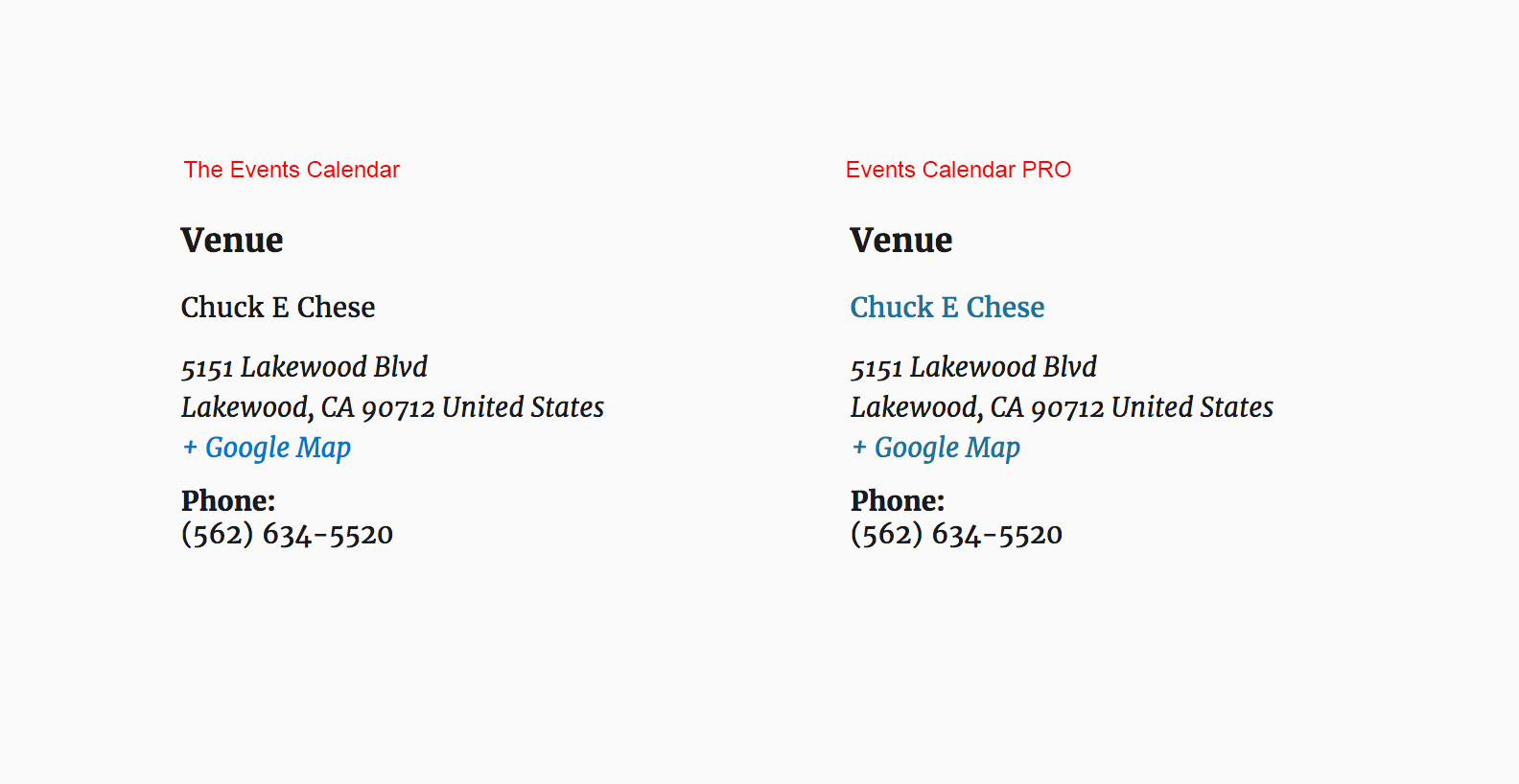
Once Events Calendar PRO is active and the link is displayed, the link will open up a page with more information about the venue or organizer.
Does this help answer your question? Please let me know. 🙂
Cheers!
GeoffDecember 21, 2016 at 7:50 am in reply to: Want to make sure importer add-on will do what I need AND we’re non-profit #1208838MemberHi Rebecca,
Thanks for getting in touch — I’m really glad to hear you’ve been using The Events Calendar and that you’ve enjoyed using it so far. That’s awesome!
Events Calendar PRO will not make the process of importing events any easier. That said, it does include a bunch of additional features for things like extra calendar views, custom event fields, recurring events, shortcodes, to name a few.
And, if you’re interested in Events Calendar PRO, then I would suggest looking into our nonprofit program to see if your organization qualifies. If it does, then we’d be happy to grant you a free license of the plugin. 🙂
The special add-on you’re probably referring to though is Event Aggregator. This does indeed make adding events to WordPress much easier, if you are moving events from one place (like Google Calendar or Facebook) to your site.
The nice thing about Event Aggregator (other than making it easy to import events from other sources) is that there is nothing to install. Simply purchase a license, enter it on the Events > Settings > Licenses screen and the importing features will be unlocked on the Events > Import screen.
Does this help answer your question? Please let me know. 🙂
Cheers!
GeoffMemberIt’s my absolute pleasure to help, Thomas.
I went ahead and updated the feature request based on your feedback, including a mockup of the proposed change:
Please follow up directly in the feature suggestion if you have any other thoughts or feedback you’d like to share on that.
In the meantime, is it ok we close this thread? Please let me know!
Cheers,
GeoffDecember 21, 2016 at 7:10 am in reply to: Scheduled imports, do they count towards allowance if no changes? #1208827MemberRight on, glad to hear that helps!
I’ll go ahead and close this thread but please feel free to open a new one if any other questions pop up and we’d be happy to help. 🙂
Cheers!
GeoffMemberHi Dirk,
Thanks for following up — I’m so glad to hear you’re using Event Tickets Plus and that you were able to find the customization for names below the avatar.
For reference, that can be found here:
https://gist.github.com/geoffgraham/9d5ff5b61f1afacc2708ed77b8f65af2Hey there!I’ll go ahead and close this thread but please feel free to open a new one if any other questions pop up and we’d be happy to help.
Cheers!
GeoffMemberHi Thomas and thanks for following up.
I just want to be able to delete a rule. Simple. An x by a recurrence rule. Once it is saved, it cannot be deleted.
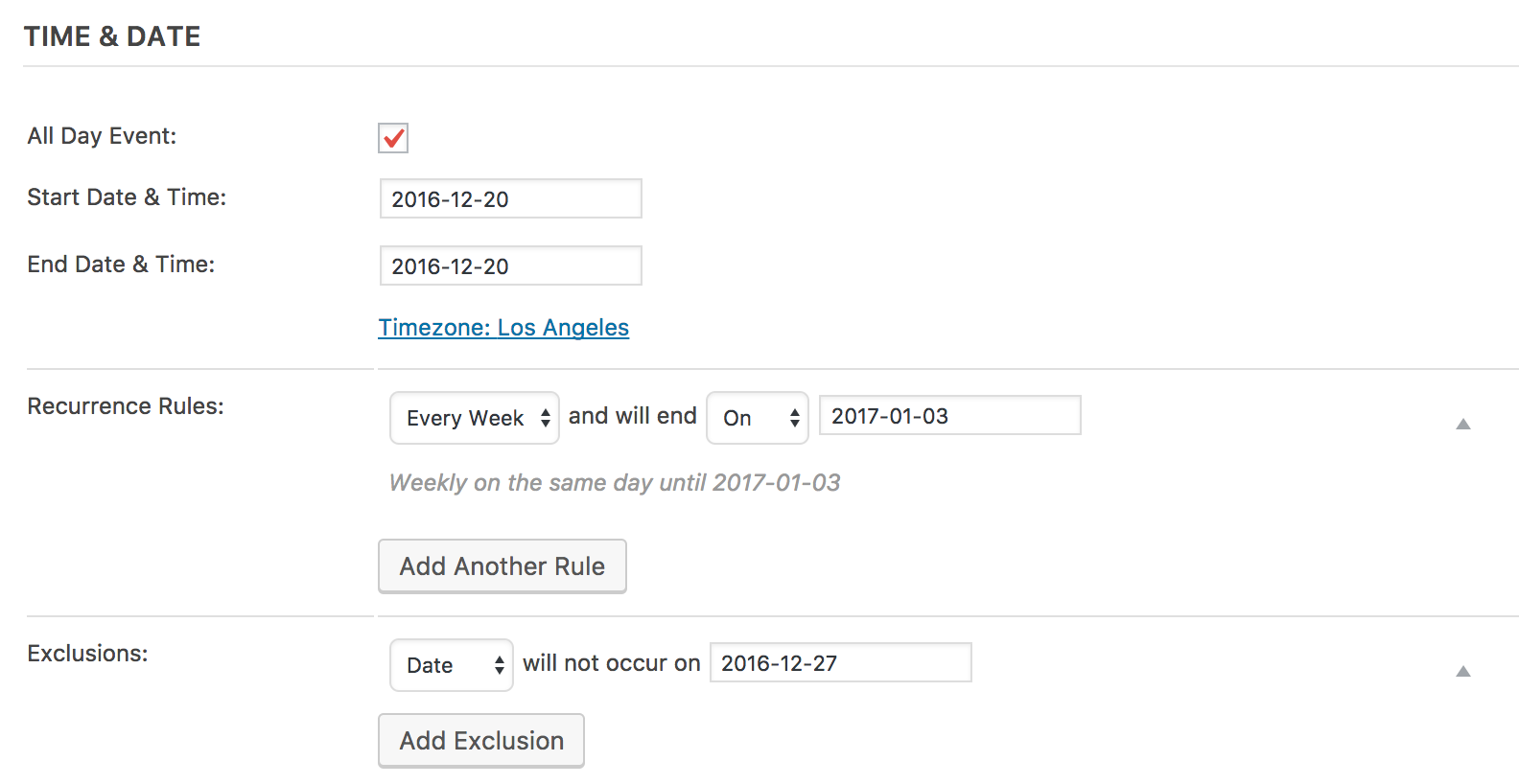
Did my last reply in this thread not give you the answer your were looking for? As the screencast shows, you can “delete” a recurrence rule by switching the recurrence to “None” even after the post has been saved.
I can see how it might be more clear to use a word like “Delete” or have a trash can in the interface to signify that a recurrence rule can be removed, but does what I showed you already accomplish what you’re looking for as far as being able to remove a rule?
My request was deleted by an admin staff member within days […]
I think there might be a miscommunication here because it does not appear that your feature suggestion was deleted. In fact, I was able to find it right away:
And the status of it is set to “Needs More Clarification” where our team has asked you for additional information. In no way was that intended to discourage you from posting the feature request, but it’s an attempt to get a better understanding of what you are looking for and how we can use your additional information to ensure the best course of action, even if it is being honest with you that it is something we do not intend to build — which is not what we have said to date.
Your comment seems to suggest that we deleted your feature request. If this is not the feature request you are referring to, please let me know and I’d be happy to look into it further. Either way, we openly welcome your requests, which is why we have a feature request forum open to the public.
Some of my more complex rule sets can use all of the simplification they can get and having a rule set to none that I can’t get rid of after I realized I did not need another rule is useless.
Just to clarify, once you set a rule to “None” it will be removed once you re-save the post. Again, it is the same as effectively trashing the rule from the post, even if we both believe there could be clearer ways to go about it.
Now how does removing a rule translate to excluding a single date?
I’m not sure I understand this question, but removing a rule and excluding a date in a recurring series should have no impact on one another. In other words, you can remove a rule by setting an unwanted rule to “None” and still add another rule to exclude a specific date from the recurrence:
If this is reflecting on your support that was not intended. I merely meant to criticize the complete failure to actually understand a simple request.
I appreciate this comment, though I would still respectfully push back on what you think is a simple request. It’s not so much that we are misunderstanding what you are looking for, but we want to be completely sure we have all the information we need from you so that we are not making false assumptions and wind up either declining your request or building it with incorrect ideas of how it should look or work.
I truly hope this helps clarify things and I appreciate you continuing this discussion with me. I know there can be hiccups when it comes to communicating online but I think we’re ultimately on the same page: we simply want some additional information from you on the existing feature request so we can serve you as best we possibly can.
Cheers,
GeoffMemberHi Thomas,
I wanted to follow up with you because I saw that you had left a comment about a lost feature enhancement suggestion after this thread had been closed automatically by our system after 3 weeks of inactivity.
I’ve re-opened this thread — would you be willing to let me know what feature enhancement you are referring to? Our practice is not to simply delete customer input, so I am certainly interested in looking into this further with you. If you could let me know where you posted the feature suggestion and what it was, then I would be happy to look into it.
Thanks,
GeoffMemberHi there,
Sure thing! I’ve gone ahead and issued a refund for your order (#1207167) and the funds should be back in your account within 5-10 business days.
Definitely sorry to see you go after being a long-time customer, but I know how needs change over time and I hope that you’ll keep us in mind for future sites down the road. We certainly appreciate you. 🙂
Cheers,
GeoffDecember 20, 2016 at 10:19 am in reply to: Once a ticket is deleted, the attendees list and orders report do not match #1208405MemberHi Ben,
I certainly appreciate you following up here and I hear you loud and clear — this ticket has been open for about a month now and I understand that you’re eager for it to be patched up. You can be assured that I am equally eager for a patch to be released as well because I have no interest in keeping anyone waiting.
That said, the issue has more to do with prioritization. While I (and the team at large) see this and every issue as worthy of getting fixed, we are currently in the development cycle for another pair of releases and have a number of other high priority issues that we’re working on.
I can absolutely assure you that this will get the attention it deserves. I have also made additional notes in the ticket that was created for this issue so it remains on the team’s radar and I will stand by my promise to keep you posted as I learn more.
Thanks again for your patience,
Geoff
MemberHi Mary-Anne,
Great question! I’m afraid that none of our plugins directly integrate with MailChimp.
That said, it’s definitely possible to download the Attendee list, which is CSV format:
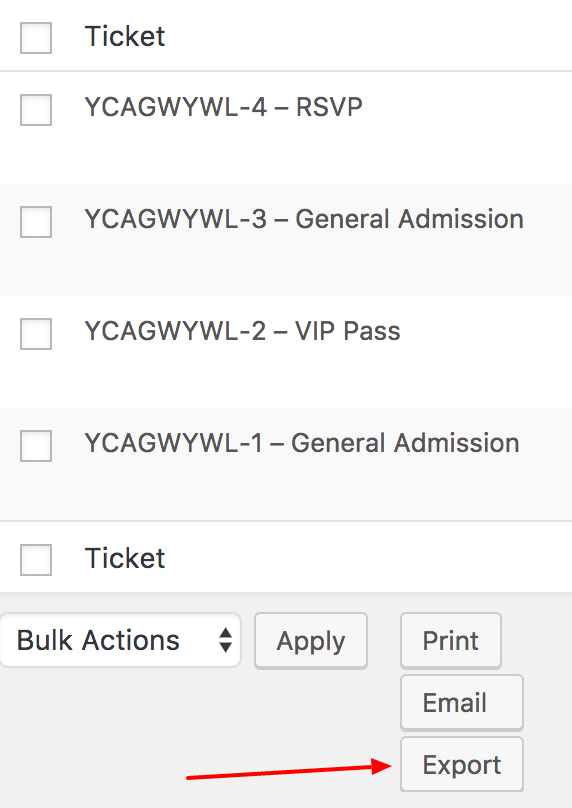
You can use the downloaded CSV file to import into MailChimp and create a list of email subscribers for that particular event — or combine it with the CSV files from other events to create a master list of attendees from all events.
Does this help answer your question? Please let me know.
Cheers!
GeoffDecember 20, 2016 at 9:06 am in reply to: Scheduled imports, do they count towards allowance if no changes? #1208355MemberHello Stuart,
Good question! A scheduled import only counts toward your daily import limit if it runs and does not depend on the number of events that it returns.
So, for example, if a scheduled import runs and no events return from Facebook, that counts as an import the same as a scheduled import that returns 1,000 events. It’s related to the number of times the import runs.
In other words, yes, you will indeed be counted for 150 imports if you are running a scheduled import on 150 Facebook pages once per day.
Does this help answer your question? Please let me know.
Cheers!
GeoffMemberHello Pia,
Thanks so much for contacting us and for using our plugins!
The good news is that both Facebook Events and iCal Importer still work. The big difference is that you will now navigate to the Events > Legacy Import screen from the WordPress admin menu to import your events.
Based on your screenshot, it looks more like there is a different issue at play. I am not sure what it is specifically, but I ran it by one of the developers on our team and it does appear to be an issue with the plugin. To help me better understand what is happening, will you please follow the steps outlined in this guide and let me know if you can tell if that error message goes away during the testing process? That will help me know what might be causing the issue so that our developers will know where to look.
In the meantime, we have provided you with a free license for Event Aggregator, which you can find by logging into your account on this site and navigating to My Account > Licenses. Enter the license on the Events > Settings > Licenses screen in WordPress and that will allow you to import events on the Events > Import screen using Event Aggregator instead.
Thanks!
GeoffDecember 20, 2016 at 8:35 am in reply to: Issues after updating the events calendar, events calendar pro & filter bar #1208308MemberHi Liz,
Thanks so much for the kind words — I am so glad to hear you’ve been enjoying the plugins and the fact that you’ve had such a great experience with them all year is something I and everyone else here on the team loves hearing. 🙂
Oh yeah, it definitely sounds like some stuff is missing from the plugin folders! For example, here is a screenshot of the Events Calendar PRO directory, which is set up in a pretty consistent way as the rest rest of our plugins.
Does yours look different? If so, I would suggest downloading the plugins by logging into this site and heading over to the My Account > Downloads screen, then following the steps in this guide to manually install the plugins. That should ensure that everything gets properly uploaded to your site’s server.
Let’s start there and see if that does the trick!
Geoff
December 20, 2016 at 8:29 am in reply to: Issues after updating the events calendar, events calendar pro & filter bar #1208207MemberHi Liz,
It looks like this thread was opened twice somehow and that this thread is a duplicate of this one:
Issues after updating the events calendar, events calendar pro & filter bar
I’ll go ahead and close this thread and we will see you in the other one shortly. 🙂
Cheers!
GeoffMemberHi Ross,
Great question! You’re right in that the only way to set up a multiday event is for the start time to be on the first day and the end time to be on the last day. Otherwise, you will need to set up two separate event posts in order to get the start and end times on both dates.
Does this help answer your question? Please let me know. 🙂
Cheers!
Geoff -
AuthorPosts