

Forum Replies Created
-
AuthorPosts
-
Geoff
MemberRight on! I’m so glad to hear everything is working smoothly and I appreciate you following up to let us know. Definitely keep us posted if any other questions come up and we’d be happy to help. 🙂
Cheers!
GeoffApril 13, 2017 at 7:28 am in reply to: List of events using short code is not showing all events #1269423MemberHi Kelly,
Glad to hear you were able to locate how to do the override — nice work!
You can set Filter Bar to display on the left side of the calendar on the Events > Settings > Filters screen:
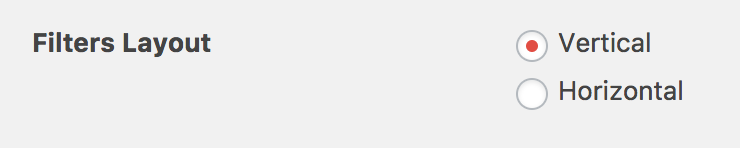
That will place the Filter Bar on the left side of the calendar on the main calendar page. I do want to note, however, that Filter Bar is not currently supported by shortcodes — you may already be aware of that, but wanted to mention that to help avoid any possible confusion up front. 🙂
We typically like to keep support threads to one topic at a time, but let me know if you have any other questions about the search bar settings and I’d be happy to help as best I can.
Cheers!
GeoffMemberMuch appreciated, thanks Dennis! I’ll close this thread and we’ll see you in the other one. 🙂
Cheers!
GeoffApril 13, 2017 at 7:17 am in reply to: Licence is fine and added, but IMPORT shows BUY EVENT AGGREGATOR #1269409MemberHi James,
Thanks for getting in touch and sorry for the trouble here with importing events using Event Aggregator.
Just to confirm, will you please check a of things for me:
- Navigate to Events > Settings > Licenses and confirm that the license key for Event Aggregator has been entered and saved to the screen. If it has, please take a screenshot and share it with me here as a private reply.
- Navigate to Events > Settings > APIs and confirm that Event Aggregator has been connected to Facebook, Meetup and any other services you intend to import from. It everything is already connected, please also take a screenshot of this and share it with me here as a private reply.
Let’s start there and see what we find. 🙂
Cheers!
GeoffApril 13, 2017 at 7:06 am in reply to: Access to attendee lists outside of WordPress backend? #1269399MemberHey Ken,
Oh no, that’s terrible! I’m so sorry to hear about the database issues and I hope they are resolved quickly.
I’m afraid there is no simple way to retrieve your attendee lists for specific events since they are in the database itself and it sounds like the issue you’re experiencing is with the database.
If you do still have access to cPanel, then it might be possible for you to access the database and navigate through the contents of it to locate attendees. The problem with that, however, is that you’re still not going to get the relationships of which attendee is associated with which event, which makes it difficult to check people in at the door.
Normally, I would have suggested exporting the list of attendees in WordPress and then printing the list out as a way to check people in manually, but you don’t have that option available to you either.
I’m really sorry, but I do not think there is a straightforward way to access those lists without your site at least being accessible. I hate being the bearer of bad news, but does this at least help answer your question? If you have any other questions about this or want to run other ideas by men, I’m totally happy to help as best I can.
Geoff
MemberHi Donna,
Thanks for writing in. I appreciate your candidness here and can certainly relate with similar frustrations when hoping to see progress made on features with other themes and plugins in my own work.
We did indeed release a series of ways to embed calendars, widgets and even single events on any WordPress page or post in Events Calendar PRO:
The first one is what you will be most interested in. That will allow you to embed the full calendar on any page or post. So, even if the calendar itself is located at /events, you can embed it anywhere else, including a page that is the child of another page, such as /parent-page/calendar.
I hope this is the sort of flexibility you are looking for and that shortcodes will help you get what you’re looking for. Please let me know if this doesn’t help answer your question for any reason and I’d be happy to clarify or help further as best I can.
Thanks,
GeoffMemberHi @lucaweb,
Sorry for the confusion! There is no need to download and install anything to use Event Aggregator. Simply enter your license into the Event Aggregator field on the Events > Settings > Licenses screen and you should be good to go.
Once you’ve entered your license key, you can connect Event Aggregator to your Facebook account on the Events > Settings > APIs screen.
Then, you will be able to import events from Facebook on the Events > Import screen.
Does this help answer your question? Please let me know. 🙂
Cheers!
GeoffMemberThanks for getting in touch!
1. Given that I purchased this plugin and the license expired, do i not still have use of the plugin or does it no longer function with my license renewal?
Yes, you are still able to use Events Calendar PRO, even after the license has expired. The only things you lose are access to support and future plugin updates.
2. If the answer is YES it still functions, then why am I not able to access the plugin for the PRO version on my SexySpirits.com webiste ? I only access the PREMIUM version.
I’m not quite sure I follow you here. The premium version of the plugin is Events Calendar PRO. You should be able to log into your account here on our site and access a download of the Events Calendar PRO on the My Account > Downloads screen.
According to our records, your license last expired in 2014. If you need access to a past version of Events Calendar PRO from 2014 and are unable to get it by logging into your account, then please email us and we can help you get a copy. Also, please reference this thread in your email.
3. If I downgrade to PRO from BUSINESS, can I upgrade at later date?
Absolutely. You can upgrade at any time by logging into your account and heading to the My Account > Licenses screen.
Does this help answer your questions? Please let me know. 🙂
Cheers!
GeoffMemberYou bet, happy to help! I’ll go ahead and close this thread but let us know if any other questions come up and we’d be happy to help. 🙂
Cheers!
GeoffMemberRight on! I’m so glad to hear everything is working smoothly and I appreciate you following up to let us know. Definitely keep us posted if any other questions come up and we’d be happy to help. 🙂
Cheers!
GeoffMemberHi Manfred,
Welcome back! I’m happy to hear you’re considering using The Events Calendar again and I hope it will be a good fit.
Yes, our Events Calendar PRO add-on does include a slew of shortcodes that allow you to embed events in a number of ways:
Any of those will allow you to embed events into any WordPress page or post of your site — though not on other sites other than yours.
Also, is there a way to edit the single events page / template
Yes, absolutely. We have a Themer’s Guide that outlines how to override any template, including the single-event.php template.
Does this help answer your question? Please let me know. 🙂
Cheers!
GeoffMemberHi Joe,
Thanks for getting in touch!
I’ve seen something like this pop up before. The browser tab titles for both the main calendar (screenshot) and Community Events submission page (screenshot) should render as “Upcoming Events” and “Submit an Event” respectively.
However, sometimes themes and SEO plugins tend to override things and can lead to something like this where the default standard is ignored. I do see that you have an SEO plugin installed. Does it allow you to customize the title tags?
If you are unable to tell whether it allows you to toggle those settings, another place to start is to try deactivating the plugin, clearing cache, and seeing if that returns the titles to normal.
And, if that does not do the trick, then I would suggest following the steps in our Themer’s Guide as a next step to troubleshoot what might be causing that to happen.
Let’s start there and see what we find, 🙂
Cheers!
GeoffMemberHey Daniella,
Thanks for getting in touch! I really hope our plugins will be a great fit for your client. 🙂
Yes, it is totally possible to auto-import events from Google Calendar into The Events Calendar. In fact, The Events Calendar has a service baked into it called Event Aggregator that will allow you to do that.
Simply purchase a license for Event Aggregator and enter it on the Events > Settings > Licenses screen. That will unlock the feature to import events from Google Calendar on the Events > Import screen.
Does this help answer your question? Please let me know. 🙂
Cheers!
GeoffMemberHi @Lindsey,
Oh yeah, that should totally be possible to do with CSS. Try adding something like this yo your style.css file or on the Appearance > Customize > Additional CSS screen:
#tribe-events-bar #tribe-bar-form.tribe-bar-collapse #tribe-bar-collapse-toggle {
color: #fff;
}
Here’s a screenshot of how that looks when I tested it on your site. 🙂
Cheers!
GeoffMemberHi Gely,
Thanks for getting in touch!
I’m glad to hear you’re looking into Filter Bar, but I’m afraid it might not fit your exact needs. The plugin adds additional filters to The Events Calendar and can only be used on the calendar. In other words, it is unable to be used independently on other pages of your site.
That said, you can use Events Calendar PRO to display events in specific categories on other pages of your site. For example, Events Calendar PRO includes a number of shortcodes and they can be filtered to show events by tag or by category:
https://theeventscalendar.com/knowledgebase/pro-widget-shortcodes/
Does this help answer your question? Please let me know. 🙂
Cheers!
Geoff -
AuthorPosts