

Forum Replies Created
-
AuthorPosts
-
February 23, 2017 at 10:54 am in reply to: "Hide Related Events" is not … hiding related events #1244740
Geoff
MemberHey Jon,
Thanks for getting in touch and sorry about the trouble here with the related events setting — I’m happy to look into this with you.
For starters, it does not appear that the Related Events displayed on your events are the same as the ones from our plugin. Do you have another plugin installed that displays related posts? I have a hunch you have JetPack’s related posts module active.
Give that a look and let me know if that’s the case. 🙂
Thanks!
GeoffMemberHey Martin,
Sorry for the trouble here with images not importing from Facebook!
I tried importing both of those events into my test site. It appears that the images imported in both cases. Here’s a screenshot of the first one, as an example.
Do the images properly import when the default WordPress Twenty Seventeen theme is active? I would like you to test that because some themes use different methods for handling featured images and switching will help confirm that in this case.
Secondly, will you please navigate to your Media library and check that those images were added there, even if they do not display on the event post?
Let’s start there and see what we find. 🙂
Cheers!
GeoffMemberHi Tom,
Great question! Yes, Events Calendar PRO does include several shortcodes that allow you to embed calendar widgets on any page, including your home page. Here’s a guide that provides an overview of all the widget shortcodes available for displaying a smaller calendar view:
https://theeventscalendar.com/knowledgebase/pro-widget-shortcodes/
Does this help answer your question? Please let me know. 🙂
Cheers!
GeoffMemberHowdy Ben,
Yes, that is absolutely correct. Name and email are the two default fields for both Event Tickets and Event Tickets Plus right out of the box, though Plus allows you to add more fields, if you’d like.
It’s worth noting that once someone has selected how many tickets they want, they will need to go through a purchase screen and the fields on that depend on the e-commerce plugin (e.g. WooCommerce) you are using with Plus. That process will most certainly ask the user for a credit card and billing address as well on a different screen from the event.
Does this help answer your question? Please let me know. 🙂
Cheers!
GeoffMemberHello Photios,
Thanks for getting in touch!
I am afraid that the recurring events feature in Events Calendar PRO does not yet support tickets. You can create tickets for the recurring series as a whole, but unable to create tickets for specific events in the series. We are working on a new feature that would support this and you can subscribe to notifications when we post updates on our progress.
If you do add Event Tickets Plus, then thickets will display on events like this:
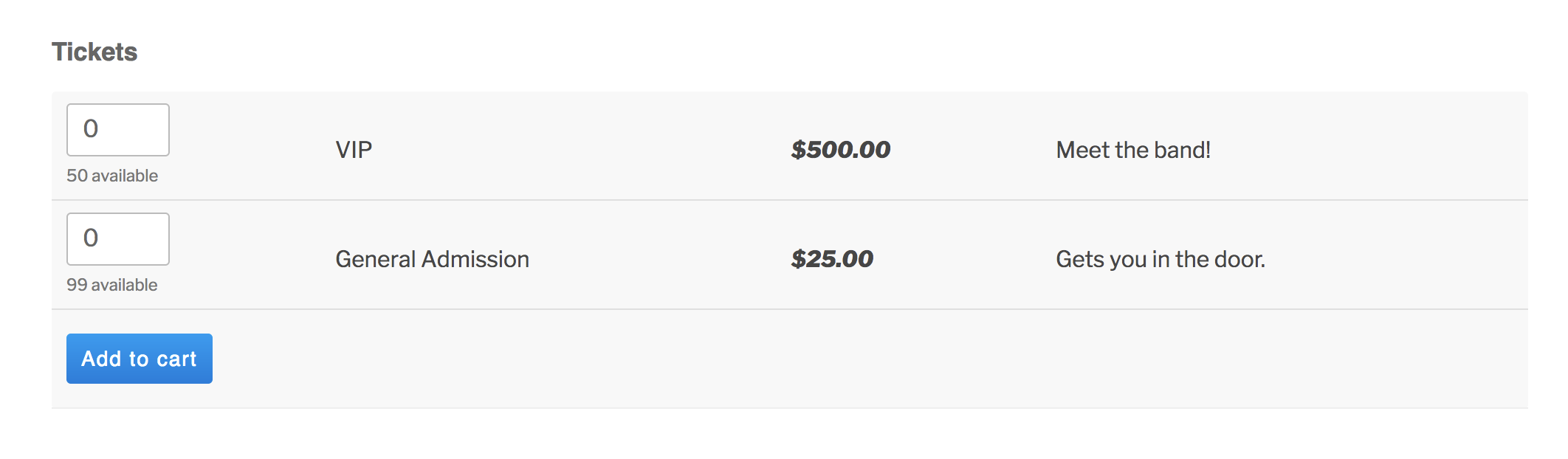
Does this help answer your question? Please let me know.
Thanks!
GeoffMemberHey Toby,
Thanks for getting in touch!
We’d be happy to help — but I do want to note that our pre-sales forum is used to answer questions about purchasing our premium plugins.
If you’re looking for technical support, it would be awesome if you could post your question to our <u>WordPress.org support forum</u>.
Or, if you already have an active license for one of premium plugins, will you please log into your account and post your topic to our premium support forum instead?
In the meantime, it’s worth noting that events should display in chronological order in all calendar views, including Month View. If they are out of order for you, I would suggest trying following the steps in this guide to test for possible conflicts before opening a support thread.
Thanks so much!
GeoffMemberHi Tammy,
No worries! Here are instructions for how to take a screenshot:
https://www.take-a-screenshot.org/
Also, it would be super helpful if you could log into WordPress, navigate to the Events > Help screen, copy the System Information that is on the page, and paste it here for me as a private reply. You can mark a reply private by selecting the option right above the Submit button before posting your reply here on the forum.
Thanks so much!
GeoffMemberHi Melanie,
Absolutely! Community Events works seamlessly with The Events Calendar and does not hijack your ability to publish and manage all events from the WordPress admin as an administrator. 🙂
Cheers!
GeoffMemberOh no! Dang, I had a hunch that might happen but had my fingers crossed. 🙂
Give this a try instead — it looks for a the body class of the specific page to limit the scope of where the styles are applied:
.page-template-default .tribe-bar-geoloc-filter {
padding: 15px 15px !important;
}

.page-template-default .tribe-bar-views-inner {
padding: 45px 0 45px !important;
}
Hopefully that does the trick!
Geoff
MemberHi Rauno,
I’m afraid I have bad news because that is not possible at the moment.
Having multi-day events span days in Month View instead of repeating themselves in each day is something we really want to do and that we’ve actually started work on. In fact, we have an open feature request that you can add your vote to and subscribe to notification for when we share updates on our progress.
Sorry for the bad news, but does this help answer your question? Please let me know.
Thanks!
GeoffMemberHi Melanie,
Thanks for getting in touch,
Yes, Community Events does indeed provide you with a form that folks can use to submit events to The Events Calendar without needing to log into the WordPress admin.
By default, that form is added to it’s own page, which is automatically created by the plugin and located at: [your-site]/events/community/add
Community Events also includes a couple of shortcodes you can use to embed the form and its other content to other pages. You can read more about those here:
https://theeventscalendar.com/knowledgebase/linking-to-community-events-pages/
Does this help answer your question? Please let me know. 🙂
Cheers!
GeoffMemberHey Russell,
Welcome back — hope you’re doing well!
This does take a bit of custom development. I wrote up a quick script that seemed to do the trick, though I did not test it extensively and you can try adding it to your functions.php file:
/* Tribe, limit ticket quantity */
function tribe_limit_tickets() {
?>

<script type="text/javascript">
jQuery(document).ready( function( $ ) {
// do this if tickets available
if ( $('.tribe-events-tickets').length ) {
// set max qty to 1
$('.tribe-events-tickets .input-text').attr('max', 1);
// run on input change
$('.tribe-events-tickets .input-text').change ( function ( ) {
// don't run the manually triggered change event
if ( $(this).val() == 0 ) return;
// make sure it's not more than 1
if ( $(this).val() > 1 ) $(this).val(1);
// change all inputs but this to 0
// manually trigger the change event so available stock gets updated
$('.tribe-events-tickets .input-text').not( $(this) ).val(0).change();
});
// add a oninput event
$('.tribe-events-tickets .input-text').on('input', function (e) {
$(this).change();
});
}
});
</script>

<?php
}
add_action('wp_head', 'tribe_limit_tickets');
We are limited in how much we can support custom development questions like this, but I hope this does the trick or at least helps get the ball rolling to give you something to work with.
Cheers!
GeoffMemberHi Joe,
Oh yeah, I see exactly what you mean. That looks like a classic case where the theme styles conflict with the plugin styles.
Try pasting this snippet to your theme’s style.css file or on the Appearance > Customize > Additional CSS screen:
.tribe-bar-geoloc-filter {
padding: 15px 15px !important;
}

.tribe-bar-views-inner {
  padding: 45px 0 45px !important;
}
Here’s a screenshot of how that looked when I tested it on your site. Does it work for you as well? Please let me know. 🙂
Cheers!
GeoffMemberHi Joe,
Great question! However, I’m afraid that Filter Bar isn’t as portable as the calendar views when it comes to embedding it on pages other than the default plugin templates. For example, our existing shortcodes do not yet support embedding Filter Bar, though that is something I know we are interested in considering and there is an open feature request for it, if you want to add your vote.
Sorry for the bad news, but does this at least help answer your question? Please let me know.
Thanks,
GeoffMemberHey Ian,
Thanks for getting in touch and for following up on your question! You did exactly the right thing by activating the plugin on the specific site where it is needed. Great job!
For further reference on multisite network licenses, we wrote up a guide that helps explain how they work and are different than the other license types:
https://theeventscalendar.com/knowledgebase/multisite-license/
I’ll go ahead and close this thread but let us know if any other questions come up and we’d be happy to help. 🙂
Cheers!
Geoff -
AuthorPosts