

Forum Replies Created
-
AuthorPosts
-
April 21, 2016 at 1:13 pm in reply to: Events Calendar Pro+Events Ticket Plus w woocommerce #1105620
Geoff
MemberHey Sabine, hope you’re having a great day!
Excellent questions and the answer is: yes, Event Tickets Plus will do the trick here.
If you have Event Tickets and Event Tickets Plus installed together, that will enable you to create as many ticket variations as you would like directly in the event editor. You can also set the start and end sale dates for those tickets to help with things like early registration and general pricing.
From there, Event Tickets Plus also allows you to collect information about each registrant with custom fields applied to each ticket. These fields can be used to collect everything from shirt sizes to birthdays and much more, if needed. Here’s the lowdown on how that works.
Does this sound like a good fit for your site? i’d be happy to answer any other questions you might have as best I can. 🙂
Cheers!
GeoffApril 21, 2016 at 1:05 pm in reply to: Wondering if 'Event Tickets Plus' is the right plugin for my business… #1105615MemberHello Noy,
Thanks so much for getting in touch!
I do think Event Tickets and Event Tickets Plus (used together) will ne a nice fit for your site.
Event Tickets sets up the ability to take RSVPs for your events. Event Tickets Plus extends that functionality to include the ability to sell tickets to your program using WooCommerce as the shopping cart.
Event Tickets Plus will allow you to create your tickets directly in the page, post or event editor, depending on where you tell the plugin you want it to be used. Once you make a ticket in the editor (and you can make as many as you’d like), that ticket will be registered as a Product in WooCommerce. Here’s more detail on the ticket creation process, in case you’re interested.
On the front end of all this, a ticket form will appear on the page, post or event where the ticket was created, like this:
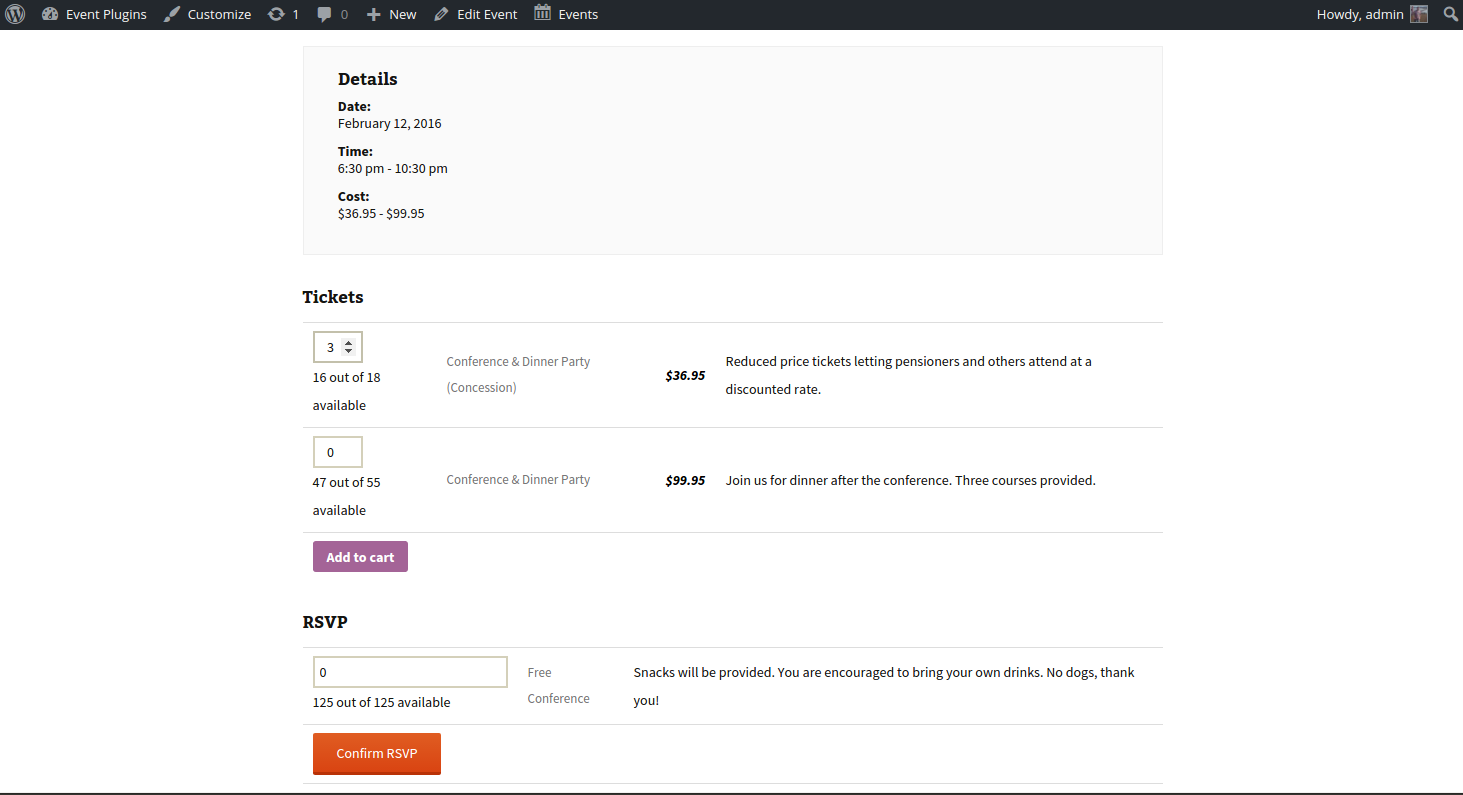
So, the bottom line is this: Event Tickets Plus does indeed allow you to turn a page, post or event into a product which can then be sold with a ticket and each page, post or event can hold as many tickets as you want.
Does that help clarify things and sound like a fit? Please let me know and I’d be happy to help answer any other questions as best I can!
Geoff
April 21, 2016 at 12:57 pm in reply to: How can I purchase the Pro ver. to use on a development domain and later switch #1105607MemberHi Majeed,
Great question! You can move a license from one site to another right here on this site in your account. Here’s a nice little article that covers that in full detail.
Does this help answer your question? Please let me know. 🙂
Cheers!
GeoffMemberHi Hugh,
So sorry to hear the plugin isn;t a fit for your site. We would be happy to refund you right away if you fill out the form located here: https://theeventscalendar.com/knowledgebase/refund-policy/
Just our of curiosity, would you be willing to share what event plugin you are using? That might help us with more integrations in future release.
Thanks!
GeoffMemberExcellent! So glad to hear that does the trick. Nice work and thanks for keeping me posted. Definitely let us know if any other questions or issues pop up and we’d be happy to help.
Cheers,
GeoffMemberYou bet! Thanks again for getting in touch and feel free to let us know if any other questions pop up. 🙂
Cheers,
GeoffMemberThe number of votes is somewhat arbitrary. but 100 is a point at which we start digging into a request.
That said, we review the requests weekly for both new and existing threads and look for trending ideas. So, some requests with fewer votes could theoretically be fast-tracked if we see a fast-growing demand for them and they fit within our roadmap.
Cheers!
GeoffMemberOh sweet, thanks for the heads up! I hadn’t tested The Events Calendar with Swift Builder so it’s nice to know that works.
Cheers and thanks again for reaching out — feel free to let us know if any other questions pop up. 🙂
Geoff
MemberHi Doug, I see my last reply was marked as the correct answer. I’ll go ahead and close this thread but please feel free to hit us with a new one if any other questions pop up and we’d be happy to help. 🙂
Cheers!
GeoffMemberHi Pau, I see my last reply was marked as the correct answer. I’ll go ahead and close this thread but please feel free to hit us with a new one if any other questions pop up and we’d be happy to help. 🙂
Cheers!
GeoffMemberHey Dom and welcome to the forums!
That’s a great question. I wish I could say that is possible, but I’m afraid it isn’t right out of the box. You can refine the results returned from an iCal feed in the iCal Importer settings (Events > Import > iCal) for certain keywords, but to include those events rather than exclude them.
I think that would make an excellent feature, though, and would love for you to add it to our feature request forum, if you are willing to. I could see that being handy for other people as well and would be interested in seeing it collect votes.
Sorry for the bad news, but does this at least help answer your question? Please let me know.
Thanks,
GeoffMemberAwesome! Glad to hear all is working well. 🙂
Feel free to let us know if any other questions pop up and we’d be happy to help.
Cheers,
GeoffMemberHey Pau!
Absolutely. You can upgrade your license at any time and, when you do, it will be for the price difference and will extend your license for a year out from the upgrade date.
Here is a more thorough explanation of how that works:
https://theeventscalendar.com/knowledgebase/upgrading-a-license/Does this help answer your question? Please let me know. 🙂
Cheers,
GeoffMemberHi Alan,
Good question. At the moment, no, recurring events are not compatible with WPML. We do have a feature request open for that, however, and I’d definitely encourage you to add your vote for it if you have a chance.
Sorry for the bad news, but does this answer your question?
Thanks,
GeoffMemberI have seen a few reports of conflicts with Visual Composer as well, but I have also heard from people in that who use them together with no issues at all. In other words, it likely will depend case-by-case.
I was able to find this thread. It’s a little older, but does go into thorough detail where someone reported a conflict with Visual Composer and the troubleshooting that went into it. You could try the suggestions in that thread as a starting point for digging into the compatibility a little more, but it looks like the result of this particular case was an issue with hosting.
Thanks,
Geoff -
AuthorPosts