
Home › Forums › Welcome! › Pre-Sales Questions › Wondering if 'Event Tickets Plus' is the right plugin for my business…
- This topic has 6 replies, 1 voice, and was last updated 10 years, 5 months ago by
Geoff.
-
AuthorPosts
-
April 21, 2016 at 8:22 am #1105398
Noy
GuestHello there,
My colleague and I are selling online fitness programmes. We’ve used Eventbrite previously but now we have WooCommerce and are about to move our flagship product, a 90-day challenge to be sold through it. WooCommerce does not offer by default the option to sell tickets like Eventbrite does. On Eventbrite we always displayed a few ticket options and the point was to show how much the full priced ticket is and at least 1/2 more discounted tickets such as people can see that the price is X until a certain date, X+£50 until a bit later on and x+£100 for instance if you join last minute.
We don’t need most of the functionality of this plugin apart really the option to display things like I described above. I am also wondering – how is an event on ‘Event Tickets Plus’ link to a WooCommerce product? The idea will be that each event is a product and each ticket is a ticket of that same product (like in Eventbrite). Can ‘Event Tickets Plus’ do it? How?
Thank you,
NoyApril 21, 2016 at 1:05 pm #1105615MemberHello Noy,
Thanks so much for getting in touch!
I do think Event Tickets and Event Tickets Plus (used together) will ne a nice fit for your site.
Event Tickets sets up the ability to take RSVPs for your events. Event Tickets Plus extends that functionality to include the ability to sell tickets to your program using WooCommerce as the shopping cart.
Event Tickets Plus will allow you to create your tickets directly in the page, post or event editor, depending on where you tell the plugin you want it to be used. Once you make a ticket in the editor (and you can make as many as you’d like), that ticket will be registered as a Product in WooCommerce. Here’s more detail on the ticket creation process, in case you’re interested.
On the front end of all this, a ticket form will appear on the page, post or event where the ticket was created, like this:
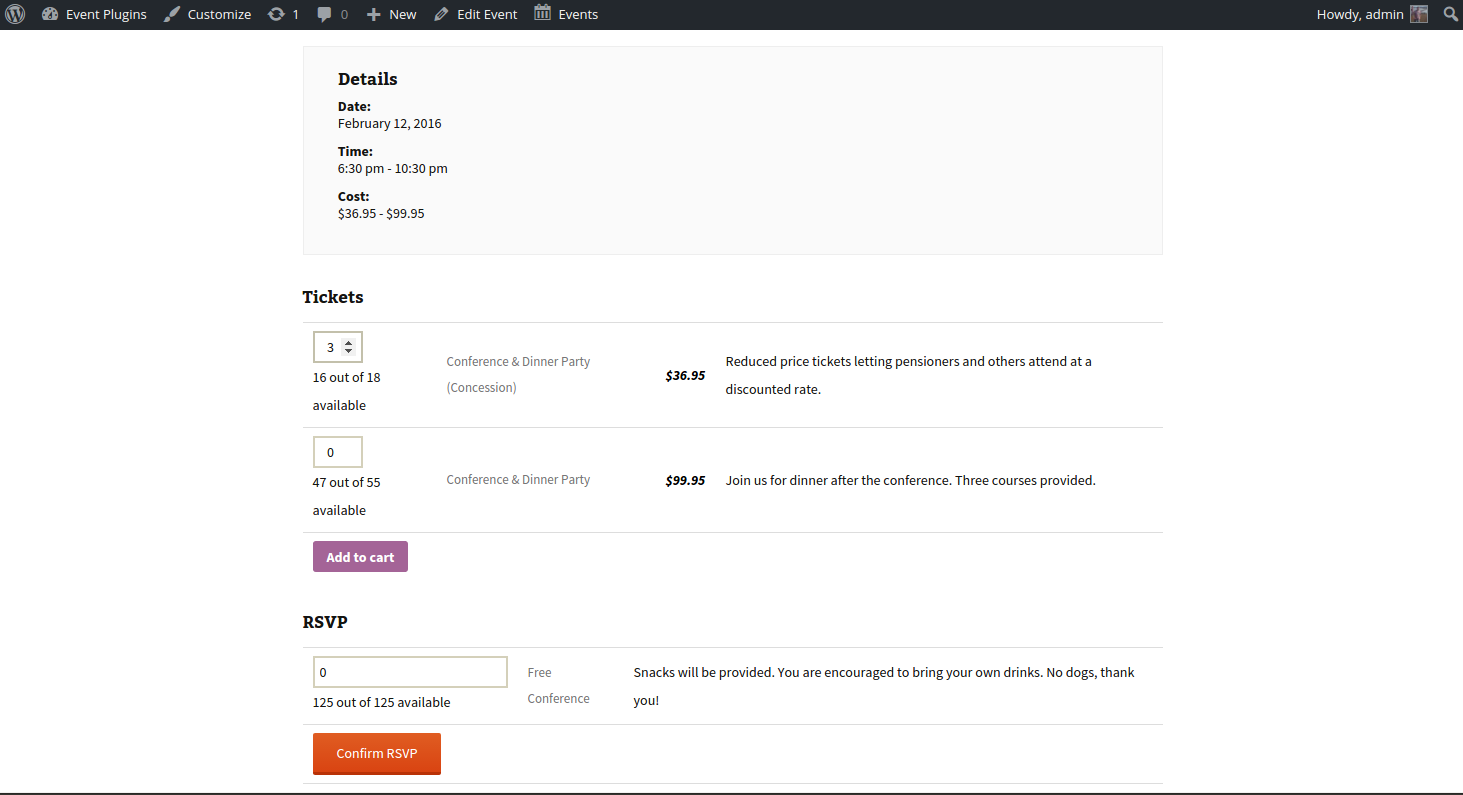
So, the bottom line is this: Event Tickets Plus does indeed allow you to turn a page, post or event into a product which can then be sold with a ticket and each page, post or event can hold as many tickets as you want.
Does that help clarify things and sound like a fit? Please let me know and I’d be happy to help answer any other questions as best I can!
Geoff
April 22, 2016 at 1:22 am #1105794GuestThank you Geoff, so just to clarify: does an ‘Event Tickets Plus’ event automatically become a WooCommerce product?
Noy
April 22, 2016 at 7:18 am #1105891MemberIt sure does. Every ticket created in Event Tickets Plus becomes a Product in WooCommerce.
Did you have any other questions I can help with?
Geoff
April 27, 2016 at 1:26 am #1107588GuestThank you Geoff,
And I have another question:
I want some of the tickets to become unavailable for users on the purchase page after a certain date/time + show it has expired right there whilst other ticket at higher prices are still available. And before they expire I want to clearly display all ticket options and when they are going to expire, for instance:
Our flagship event/product is £249 (GBP) until April 28th. This is one ticket and you can call it ‘early bird’.
Then, from April 29th to May 8th there will be another ticket on the same event page and the price will be £299.
And then, from May 9th to May 15th there will be another ticket on the same event page and the price will be £349.I want that prior to the expiry of the first ticket (expires on April 29th), the next one or even next 2 will appear as not available but people will clearly be able to see that the cheaper ticket expires on April 28th and that from April 29th it costs more as the cheaper one won’t be avilable anymore. Then, once the cheaper one expired it should remain on the screen saying ‘sold out’ or ‘sale over’ or something of that sort.
Is this possible with your plugin?
Thank you!
NoyApril 27, 2016 at 8:29 am #1107696MemberThat’s a great question, Noy!
Event Tickets Plus does indeed allow you to set start and end sale dates for tickets. So, in other words, you can have an early bird priced ticket start sale before any other ticket, then have it expire as other tickets then go on sale.
The thing it will not do, however, is continue to display the expired tickets on the page. Those will automatically be removed from the list of available ticket options once the end sale date has been met.
It is likely possible that you could show those expired tickets and their start and end dates, though I believe it will take a fair amount of custom development for that to work. We do have our complete documentation available, including a Themer’s Guide that outlines the process for overriding our plugin templates with your own.
Does this help? Let me know. 🙂
Cheers,
GeoffApril 29, 2016 at 7:32 am #1108730MemberHey Noy,
I see my first reply was marked as the correct answer. I’ll go ahead and close this thread but please let us know if any other questions pop up — we’d be more than happy to help!
Cheers,
Geoff -
AuthorPosts
- The topic ‘Wondering if 'Event Tickets Plus' is the right plugin for my business…’ is closed to new replies.