

Forum Replies Created
-
AuthorPosts
-
August 23, 2016 at 3:28 pm in reply to: Evetns Calendar PRO Location – How many miles is "Near"? #1155075
Geoff
MemberTo be honest, I do not have the credentials to log into the site. I can confirm though that it would be less than 350 miles.
I did a search for events in Wooster and saw what you’re talking about. However, if you limit the search in the filters to 5 miles, then that returns no events at all:
Cheers,
GeoffMemberMy pleasure! Looking forward to getting you back on track here.
Fill out the contact form and that should give us all the details we need to get you going. 🙂
Cheers!
GeoffMemberHi Valentina, hope you’re doing well!
Great questions. Events Calendar PRO does indeed come with a handful of shortcodes that allow you to embed the Advanced List widget into any page or post.
Specifically, the widget allows you to filter events based on a specific category and the number of events to display. That means you can place the widget into the homepage as many times as you have specific categories to display. Here’s a full rundown of the features for the widget.
And, yes, there is a way to embed a single event into an page or post. You can grab the link for any event, paste it into the WordPress editor, and it will automatically embed into the content.
Does this help answer your questions? Please let me know. 🙂
Cheers!
GeoffAugust 23, 2016 at 3:08 pm in reply to: Integration of full map view (events calendar) in a post #1155058MemberHey Marius,
Thanks so much for getting in touch! I’m so glad you’re checking out our plugins and I really do hope they’re a great fit for your project. 🙂
A custom introduction is totally possible. In fact, there are two ways to make it happen:
- There is a setting in Events > Settings > Display that allows you to type content into the calendar template, both above and below the calendar.
- Any of the calendar’s templates can be overridden in your theme and customized to suit your needs — including custom code markup in the templates
Our plugins will not create static pages for you — instead, all of the calendar’s pages are actually custom archive templates for events, which are a custom post type. That said, we are working on shortcodes as we speak that would allow you to embed full calendar views into any WordPress page or post. We’re expecting to release that feature in version 4.3, which is our next major version and set to come out in the next 1-2 months.
Does this help answer your questions? Please let me know.
Cheers!
GeoffMemberHi Ashlee,
Are you using WooCommerce with Event Tickets Plus, or another ecommerce plugin? Either way, there should be a configurable setting in the ecommerce plugin to provide access to an invoice once a transaction has been made. Event Tickets Plus actually doesn’t handle the payment or contain the order information, but you should be able to create that sort of workflow through the ecommerce side of things. For example, I found this post on how to set up an order invoice using WooCommerce that you might find helpful.
Does this make sense and will it work for you? Please let me know.
Cheers!
GeoffMemberHi Gabriela,
Sure thing, we’d be happy to help!
If you fill out our contact form, there is an option for helping find your account access. At worst, we can help set you up with a fresh account to get things worked out.
Please send that information over and we’ll jump on that.
Thanks!
GeoffMemberHey Chris,
Absolutely! There is a setting under Events > Settings that allows you to enable or disable comments for event posts (screenshot).
Does this help answer your question? Please let me know. 🙂
Cheers,
GeoffMemberHi Jay,
Great question! There are two plugins you will need:
- Event Tickets (free): This allows you to create free tickets on any page or post type in WordPress
- Event Tickets Plus: This allows you to create custom fields that attendees must fill out before registering for the event
Does this help answer your question? Please let me know. 🙂
Cheers!
GeoffMemberHey Will, hope you’re having a great day!
It is indeed possible to import tickets with our CSV importer, which is a part of The Events Calendar.
In fact, here are the specific instructions for doing that. I will note that it requires all your other post types (events, venues, organizers, etc.) to be imported as well in order for the associations to be made.
I’ll also note that Event Tickets Plus actually does not have seat number assignments, though they do have a field for the SKU of a ticket, if needed.
Is this what you were looking for? Please let me know. 🙂
Cheers!
GeoffAugust 23, 2016 at 2:04 pm in reply to: Correspondence regarding Events Calendar PRO license update #1155017MemberHi Ruth,
Thanks for following up! I do see your email from July 8 and it looks like we responded to your nonprofit application submission on Jul7 27. I see you also replied to that email 8 hours ago and that we replied again three hours ago. Please check your inbox (or perhaps your junk folder?) and we’d be happy to keep the discussion going with you there.
Cheers!
GeoffAugust 23, 2016 at 1:58 pm in reply to: Evetns Calendar PRO Location – How many miles is "Near"? #1155014MemberHi Rodrigo and thanks for reaching out!
Yes, the radius is a configurable setting in the plugin. Here’s a screenshot of how that looks:
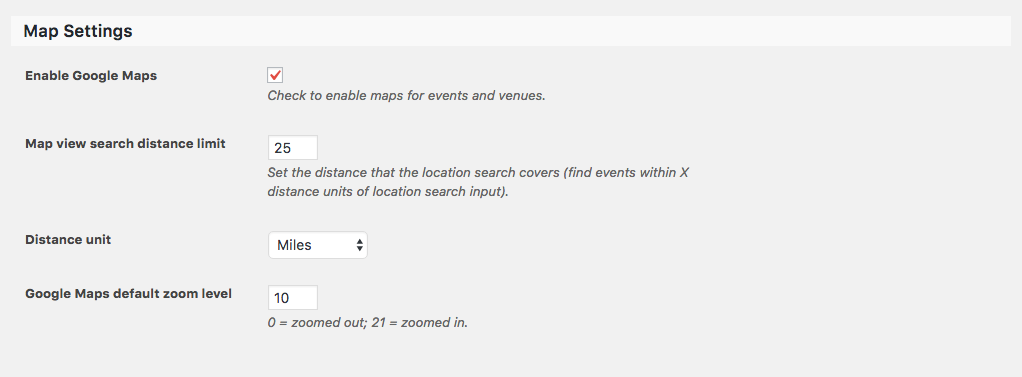
Does this help answer your question? Please let me know. 🙂
Cheers!
GeoffMemberThey do indeed work together! In other words, PRO’s recurring events and custom fields will be enabled in the Community Events submission for if both plugins are activated.
I’m afraid there is no current discount on both, but we do post promotions here when they are available: https://staging.theeventscalendar.com/current-deals-coupons-discounts/
Cheers!
GeoffMemberHi John and thanks for getting in touch!
The Events Calendar does indeed have an upcoming events widget that can be used to display a specific number of future events from the calendar.
To get it looking exactly like that would take a bit of custom development. We have a Themer’s Guide that provides the ins and outs of how to customize any and all of the plugins’ templates that I would recommend checking out.
Speaking of nonprofits, we do have a program that I would encourage you to apply for as well. If qualified, you can get a free license to either Events Calendar PRO or Event Tickets Plus. Here’s more info on how the program works.
Does this help answer your question? Please let me know. 🙂
Cheers!
GeoffMemberHey there, that’s a great question!
Community Events and Events Calendar PRO are both separate plugins with their own set of features that enhance our base plugin, The Events Calendar.
Community Events adds a submission form so that you can accept events from site visitors without them needing to access the WordPress admin. It sounds like this is the one you are looking for.
Events Calendar PRO adds a host of premium features, like recurring events, custom event fields, additional calendar views and widgets.
Does this help answer your question? Please let me know. 🙂
Cheers!
GeoffMemberMy pleasure, thanks for following up!
I’ll also mention that we offer a full refund on all our products within 30 days of purchase. That should give you a good chance to test drive everything to make sure they work for you — and if they don’t, we’ll take them back for any reason at all.
Enjoy the plugins! Feel free to let us know if any other questions pop up and we’d be happy to help. 🙂
Cheers,
Geoff -
AuthorPosts