

Forum Replies Created
-
AuthorPosts
-
Geoff
MemberSure thing, Phil. I’ll be sure to follow-up with you here when we ship the fix.
Geoff
MemberHi David,
Event Aggregator is actually a service that is already included in The Events Calendar, so there is no plugin installation needed. As long as your license is entered in Events > Settings > Licenses, then you will be able to start importing events by heading to Events > Import.
Does that allow you to start importing events? Please let me know. 🙂
Cheers!
GeoffMemberHey Steve,
Great question! Event Tickets Plus includes two reports: one for registered attendees and the other for sales and orders.
Here are screenshots of both. Please excuse the redacted info in them. 🙂
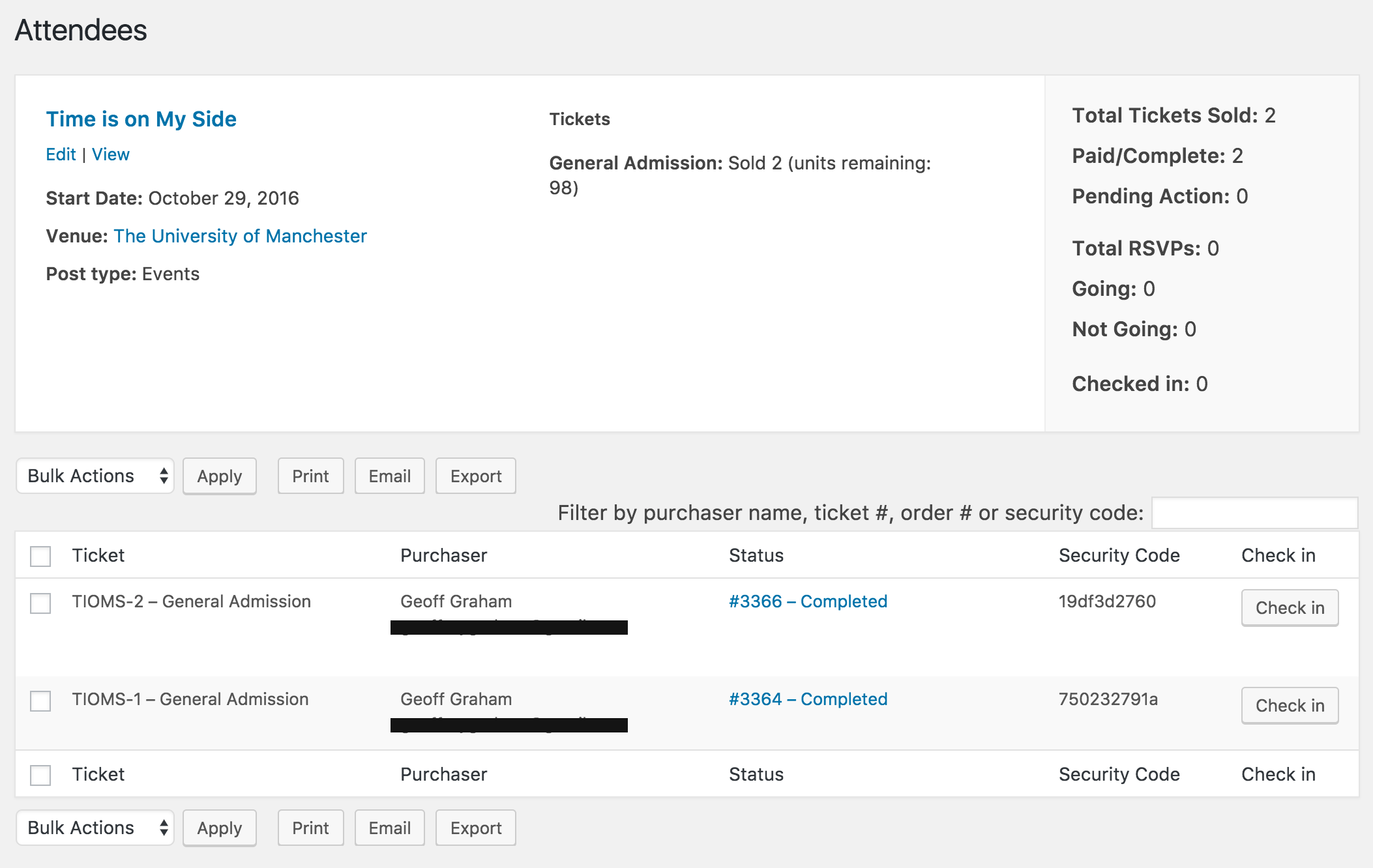
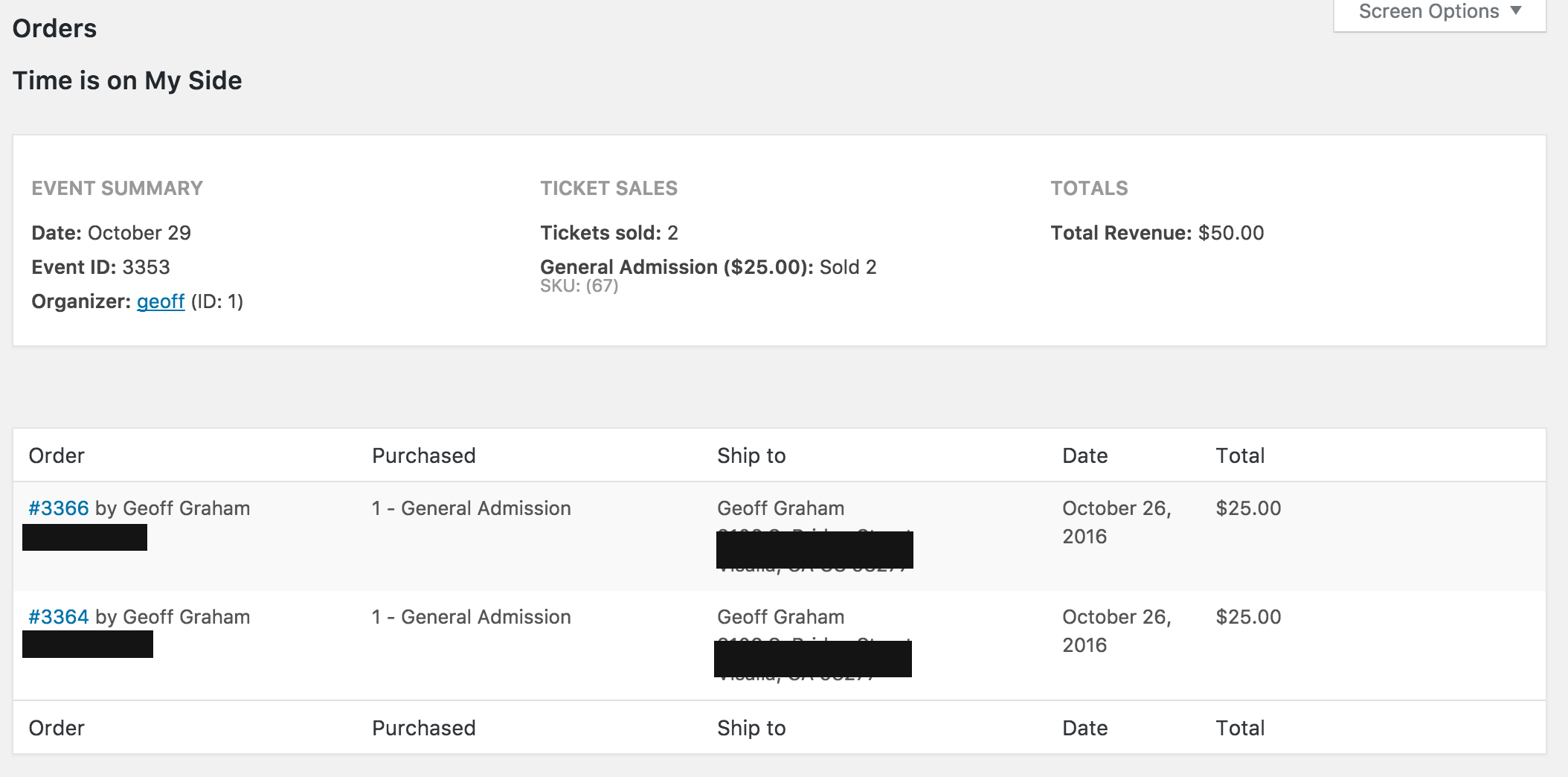
Does this help give you an idea of what to expect? Please let me know. 🙂
Cheers!
GeoffMemberHello Ed,
So sorry to hear about the troubles here with your calendar loading!
The good news is that the event data is not stored by our plugins at all, but in your website’s database. So, you can download a fresh copy of both The Events Calendar and Events Calendar PRO by logging in here to this site and then follow these instructions to re-install them.
Uninstalling and re-installing our plugins will not cause you to lose data. If any data is lost, then I would most definitely recommend reaching out to your host to see if any other website data was compromised, possibly due to the attacks.
Thanks!
GeoffMemberHi Kerry,
Oh shoot, so sorry for the mixup there! You’re right: Event Aggregator allows you to import events from other sources (like Facebook) but does not include the ability to create recurring events.
I’ve gone ahead and submitted a refund for your purchase and you should see the funds back in your account in the next 5-10 business days.
If you are looking for recurring events, then do please check out our Events Calendar PRO plugin instead. It does indeed allow you to create them.
I’d also like to encourage you to check out our non-profit program. It sounds like you’re running a charity and we do grant free license of Events Calendar PRO for qualified applicants. 🙂
Sorry again for the miscommunication but I hope this helps! Please let me know if you need anything else and I’d be happy to help. 🙂
Thanks,
GeoffMemberHi Marilyn,
Thanks so much for getting in touch!
That’s not too confusing at all — great job explaining everything you need. 🙂
I am afraid, however, that our plugins will not be the best fit for your project. The Events Calendar (and it’s add-ons) are great for calendaring but not specifically designed for booking appointment slots with availability.
You might want to consider a plugin that is designed for booking. There are actually quite a few in the WordPress.org plugin directory that offer this and here’s an initial search that pulls up some interesting results.
Sorry for the bad news, but does this at least help answer your question? Please let me know.
Cheers!
GeoffOctober 27, 2016 at 7:33 am in reply to: Can Pro edition display a public/priv calendars/fully integrate all wordpress? #1183714MemberHi Jon and thanks for getting in touch! I’m glad to hear that you’re considering our plugins for your site. 🙂
Great questions, let’s get to them…
1. Can it display multichoice calendars (similar to Google calendar) e.g. a public display available to customers who access through the website and also other private calendars required for managers and staff?
The Events Calendar is a single calendar, but it makes use of categories and can be filtered and linked to specific category views of the calendar. So, even though all events are tied to the same calendar, it can be filtered much like it is multiple calendars, each with their own unique URL.
The plugin also makes use of a feature called Organizers, where you can associate an event to a specific person, in this case managers and staff members. And, If you add Events Calendar PRO to the mix, then each Organizer automatically gets their page that lists their upcoming events.
Also, you might want to consider looking into our Filter Bar plugin because it allows visitors to filter the calendar by a number of variables, including categories, organizers, venues, time of day, distance and many other options.
2. Is the Calendar fully compatible with all wordpress software?
All of our plugins are built specifically for WordPress and are not compatible with any other platform.
That said, I do want to clarify what you mean by “all WordPress software.” If you are referring to themes and plugins designed and built by other third-party developers (like ourselves), then that is something we cannot guarantee simply because there are thousands and all adhere to different standards.
We build our plugins to be compatible with as many other themes as plugins as possible, but ultimately rely on default WordPress as the baseline for our coding standards. That means our products will work right out of the box with in a default WordPress environment, but could conflict with, for example, a particular theme built by a third-party developer.
Does this help answer your questions? Please let me know.
Cheers!
GeoffMemberHi WMG,
That’s a great question! I’m afraid we do not have a promotion that bundles those three plugins together at a discount. Our current promotions and discounts are listed here and we update that page with the best offers we have.
Sorry I don’t have any good news beyond that, but does this at least help answer your question? Please let me know.
Thanks,
GeoffMemberMy pleasure! Definitely let us know if any other questions come up and we’d be happy to help. 🙂
Have a great day,
GeoffMemberHey Matt,
Digging into this a little more, I see we do have a ticket open in our system and this is a legit bug. I have bumped up the priority of that ticket and hope we can get that into an upcoming maintenance release soon.
For reference, here is another thread posted by a customer that includes a possible fix:
Hard Dependency on Local Storage Breaks Page in iOS Private Browsing
Thanks!
GeoffMemberHello Prabhu,
Great questions!
- Online payment
Yes, you can accept online payments - Option is there to register a Event?
Yes, you can require visitors to register for an event - Can we make site Sign up, While registering Event?
No, not right out of the box, though you could add a custom field that asks whether someone wants to sign up for a newsletter. You would still need to manually enter the information from there. - Is there option to add custom fields in event registering form?
Yes, there is. - Can we use any other custom or wordpress forms in event event registration? No, I am afraid not.
Here is the combination of plugins you will need to get started:
- The Events Calendar (free) – This is our core plugin that allows you to create, edit and manage events in a calendar format. All the other plugins require it to be installed and activated.
- Event Tickets (free) – This plugin creates the framework needed for creating free tickets for your events.
- Event Tickets Plus – This extends Event Tickets to allow you to sell paid tickets for your events. It also provides the feature to add custom fields for your ticket registration and connects to WooCommerce so that you can accept payments for your sales.
Does this help answer your questions? Please let me know. 🙂
Thanks,
GeoffOctober 26, 2016 at 9:14 am in reply to: Specific specs: only limit 1 ticket per person possible #1183227MemberHey Gert,
There actually is not direct setting to limit the number of tickets someone can purchase in a single transaction. That said, I do think it would be possible with a little custom development, like using jQuery to disable to quantity field.
Cheers,
GeoffMemberExcellent! Definitely keep me posted — I’ll be interested to see if that’s the culprit. I checked in with a few others here on the team and we’re all hoping the same. 🙂
Geoff
October 26, 2016 at 8:47 am in reply to: Need Documents to add Modern Tribe as approved vendor #1183211MemberHello Jason and thanks for getting in touch! I’m really excited to hear you’re looking into our plugins. We love higher education sites here at Modern Tribe and couldn’t be more thrilled to see The Events Calendar on the MSU site. 🙂
We only tend to complete vendor approval forms for service-oriented projects rather than the products being sold here on our site. In other words, are you planning to hire Modern Tribe to do custom development on your site in addition to purchasing the plugins? If so, I’d be happy to connect you to our sales team to get the vendor approval process started.
Let me know and we can go from there!
Thanks,
GeoffMemberHi there,
Oh man, I’m really sorry for the repeated frustrations here. I know I would be annoyed if that happened to me because there’s nothing more irritating than an error message when you know you’ve done everything right.
I’m happy to help look into this with you so we can wipe that out.
You do indeed have an active license for Events Calendar PRO and I see that it is licensed to your WP Engine URL: http://redemptionaz.wpengine.com. If you have the license on any other sites (such as a development/staging version of your live site) then that does count toward your license count and could be why you’re seeing the message.
I went ahead and upgraded your license to the Business level at no cost. This will allow you to register the plugin on up to three total domains. Hopefully that will wipe out the message for you, but please let me know if it does not.
6) Cannot delete Events Pro Calendar plugin, gives me error “Deletion failed: 0”
7) Tried to upload the downloaded most up to date plugin and get install error. Im assuming cause the later version is still there, even if deactivated.
This sounds like a permissions issue on the server. In other words, WordPress does not have the full permissions needed to access the plugin in the /wp-content/plugins directory.
One thing you can try is changing the folder permissions on the server and the WordPress Codex has a helpful article on how to that. Your host should also be able to help, if needed. Once the folder permissions have been updated, WordPress should be able to automatically replace older versions of the plugin with new ones for you.
Another thing you can do is FTP into the server and manually delete the old version of the plugin and upload the new one in its place. We have some helpful tips for this, including a how-to link in case you haven’t worked with FTP before.
Again, I’m super sorry for the frustrations so far, but I am really hoping that between the upgraded license level and the updated file permissions, everything will be squared away and resolved.
Thanks,
Geoff - Online payment
-
AuthorPosts