

Forum Replies Created
-
AuthorPosts
-
June 1, 2018 at 1:02 pm in reply to: Import a Category from 1 Modern Tribe to another Modern Tribe events calendar #1544289
Courtney
MemberHi Edward
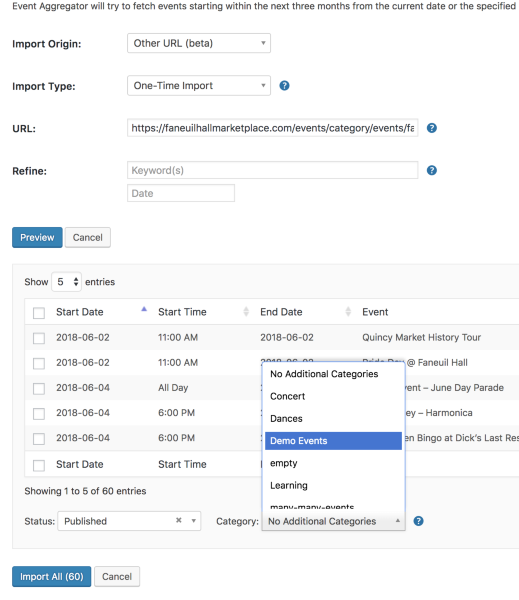
When you import the link exactly as you have it above, it should import only events within that category.
You can then select which category on the destination site that you’d like the events to go to.
Can you let me know if this works for you? For testing, if you are able to make a test category on the origination site with only 1 event in the category, that could spare any mishaps later.
Thanks
Courtney 🙂MemberHi Keith
I’ll close out the other thread and work with you here.
We’re limited in helping with styling customizations, per our Scope of Support / Terms.
But a few tips to help you carry this further include:
- Start by modifying what you can at Appearance » Customize » The Events Calendar.
- We generally don’t recommend that you change the theme or plugin’s CSS files directly, as they will be overwritten. To avoid this, follow the steps outlined in Themer’s Guide
- Use overriding CSS files, or add CSS to your site using Appearance » Customize » Additional CSS.
- Use !important before a semicolon to override every css rule. It’s a brute force method, but works for quick fixes.
- Please check out this Customizing WordPress #2 – Using Chrome Developers Tools YouTube video in addition to our Using Chrome Developer Tools tutorial on how to easily make changes using CSS.
I might be able to take a quick peek but really would need a link to your site to be sure I share the correct code. Can you send me a link, along with an annotated screenshot if possible?
Thanks
Courtney 🙂MemberHey Angela
I’ll certainly pass this on to developers.
At this time, we have submitted an application for access to the Facebook Events API and are awaiting any response from Facebook to achieve this.
We will continue to keep https://theeventscalendar.com/knowledgebase/ea-fb-privacy-policy and https://theeventscalendar.com/event-aggregator-status/ updated as this unfolds with weekly updates.
Please let me know if you have any other questions!
Thanks
Courtney 🙂MemberHey Lauren! Always fun finding familiar faces here.
I just did a test using my own secret calendar https://cloudup.com/cntRCw5Wr6I and was able to get the import to fetch the preview for me. This can be scheduled
You didn’t mention a solution to display the calendar to only logged-in users. At this time, we don’t have that functionality built in, but if you think that is something you would like as a feature I encourage you to visit our User Voice Page and either upvote an existing request or make a new request there.
You can suggest it it http://tribe.uservoice.com.
I’d be curious to hear how you achieve that in the meantime.
Hopefully this year I’ll make it back to WC Philly and a few other local WordCamps.
Let me know if you have more questions.
Thanks
Courtney 🙂MemberHi Richard
Our plugins are based upon an annual renewal. The renewal continues to ensure that we resolve any bugs, like if there is a conflict between Event Tickets Plus and WooCommerce.
If you opt to not renew, the plugin will still work up to the last update before your subscription expired. However, you will lose access to the Help Desk as well as future updates.
Is there anything else I can help you with?
Thanks
Courtney 🙂MemberHi Tam
Can you share a screenshot of what you are seeing and also send us your System Info https://theeventscalendar.com/knowledgebase/sharing-sys-info/? This will help us better diagnose what seems to be happening.
If you are using Yoast’s WordPress SEO plugin, the columns in the admin dashboard may be squished together. Check out So sorry this is happening for you. We’ve made a free plugin available for you that will resolve this.
Check out Advanced Post Manager. It will let you sort out the dashboard further.
Learn more about how to use features like saving filters for faster sorting in our guide: Filter and sort events with Advanced Post Manager.
Let me know if this resolves the issue for you.
Thanks
Courtney 🙂June 1, 2018 at 6:40 am in reply to: Issue with WP Google Maps plugin and Events Calendar Google Maps Integration #1543783MemberThanks again Hans-Gerd and yes, Eric, it does seem like the issue has been resolved. @mpally can you run the update and see if it works now?
Thanks
Courtney 🙂MemberHey there Carlo
So sorry about that mix up. Unfortunately, the code there for the page title is a function of your theme. We do not control that nor do I have any way to help you remove it from just this page.
Are you able to check the settings in Visual Composer or check in with their support team to see if they can assist omitting the title or modifying the text there?
Thanks
CourtneyMemberHey Charlie
Bummer, it sounds then like this is a plugin or theme conflict.
Can you start by going through our Testing for Conflicts Guide https://theeventscalendar.com/knowledgebase/testing-for-conflicts/? I am wondering if you might have a plugin or theme conflict.
We recommend conducting these tests on a staging server (https://theeventscalendar.com/knowledgebase/creating-using-wordpress-staging-site/).
If you are unable to do so, please install the Health Check plugin so that you can effectively disable all plugins without website visitors noticing any changes. See https://make.wordpress.org/support/handbook/appendix/troubleshooting-using-the-health-check/#troubleshooting for how to do this.
Begin by deactivating all other plugins, using a theme such as Twenty Seventeen https://wordpress.org/themes/twentyseventeen/, and see if the issue still persists.
Also, double check for any other updates available (Dashboard » Updates).
Please send in your System Info https://theeventscalendar.com/knowledgebase/sharing-sys-info/ as well after your tests so that we can better diagnose the issues you are having.
I did check your site for Javascript errors (Using Your Browser to Diagnose JavaScript Errors) and again am wondering if this same thing will happen using the default theme & deactivating all other plugins.
Please let me know if the issue still persists after these tests.
Thanks
Courtney 🙂MemberHi Gerhard
It looks like your events page has an empty sidebar. Test how your /events page looks when you change these settings: Events » Settings » Display »
Default stylesheet used for events templates
& Events template.

Let me know if you are able to turn that sidebar off using these options and if that helps the map display full width.
Thanks
Courtney 🙂MemberPerfect Rachel. Glad it’s working now. Let us know if you run into any other issues.
I’ll close this thread out for now.
Thanks
Courtney 🙂MemberHey there
Both Filter Bar and Events Calendar Pro will work after the license expires, but will no longer receive updates for new features or security/bug fixes. Likewise, the account will no longer have access to our Help Desk.
Generally we do not have issues with Events Calendar Pro recent versions working with Filter Bar .
You can test out the default Filter Bar options on our demo site WP Shindig Demo Site https://wpshindig.com/events/. It’s the 2nd row at the top. You are able to create additional filter options with Events Calendar Pro by creating Additional Fields. https://theeventscalendar.com/knowledgebase/pro-additional-fields/?utm_campaign=in-app&utm_medium=plugin-ecp&utm_source=settings. These fields are options to include into your own Filter Bar configuration.
The renewal cost at this time remains the same as the initial purchase price. I do not know if the cost will go up, but would only expect minor price increases.
Is there anything else I can help you with?
Thanks
Courtney 🙂MemberHey Jeremy
Can you walk through the steps on Moving Your License Key https://theeventscalendar.com/knowledgebase/moving-your-license-keys/? That should get the correct domain authenticated.
Let me know if that works for you.
Thanks
Courtney 🙂MemberHey Chris
We really would like to work with you on this. Would you be interested in a license for the remaining time for one of our other plugins instead of a refund?
If you interested in a refund, you can fill out the refund form https://theeventscalendar.com/knowledgebase/refund-policy/.
Please let me know if you have any other questions!
Thanks
Courtney 🙂MemberHello Ryan
Can you start by going through our Testing for Conflicts Guide https://theeventscalendar.com/knowledgebase/testing-for-conflicts/? I am wondering if you might have a plugin or theme conflict.
We recommend conducting these tests on a staging server (https://theeventscalendar.com/knowledgebase/creating-using-wordpress-staging-site/).
If you are unable to do so, please install the Health Check plugin so that you can effectively disable all plugins without website visitors noticing any changes. See https://make.wordpress.org/support/handbook/appendix/troubleshooting-using-the-health-check/#troubleshooting for how to do this.
Begin by deactivating all other plugins, using a theme such as Twenty Seventeen https://wordpress.org/themes/twentyseventeen/, and see if the issue still persists.
Also, double check for any other updates available (Dashboard » Updates).
If you are still having issues after that, please post your support request in https://wordpress.org/support/plugin/the-events-calendar.
Thanks
Courtney 🙂 -
AuthorPosts