

Forum Replies Created
-
AuthorPosts
-
Courtney
MemberHello Raul
To display all events in the recurring series, go to Events » Settings » General » Recurring event instances. This should be unchecked. Also see just below that: Front-end recurring event instances toggle. You might want that.
Do you happen to have a page or post named the same thing as the event (https://www.diocesisvitoria.org/evento/adoracion-eucaristica-evangelizacion/todos)? This could be causing the issue.
Is there anything else I can help you with?
Thanks
Courtney 🙂May 18, 2017 at 1:31 pm in reply to: EC Pro license renewed in March, but then expired 1 month later #1285840MemberHello
We’d be happy to help sort that out for you.
Please send an email to
support [at] theeventscalendar [.] com
Please include your order number, a copy of your confirmation email, or the payment method (Stripe or PayPal) and transaction ID.
Thanks
Courtney 🙂MemberHi Dave
There is a chance that your theme has overridden some of our plugin’s settings. You could reach out to your theme’s support to see if that is the case. That might also help solve why the URL doesn’t fully display. I wish I had a better solution, but what you are seeing doesn’t happen with most other themes with our plugin.
Thanks
Courtney 🙂MemberHi Mary Kate
Can you add the following code to your child theme, or in Appearance » Customize » Additional CSS?
.tribe-mini-calendar-wrapper {width: 89%;}Thanks
Courtney 🙂MemberSure Jerome
Event Aggregator is supposed to be able to import events from public Facebook groups. At this moment, there is a bug where the import process stalls. We are aware this this is an issue and will have a solution for this bug in the future. However, I don’t have an exact time for that fix to be available.
Thanks
Courtney 🙂MemberSorry about that David. Have you reached out to Avada’s support for help on this? Divs are set primarily by the theme.
Please let us know what they say.
Thanks
Courtney 🙂MemberHello Annie
You do not need to use a full-fledge multisite license on a multisite. https://theeventscalendar.com/knowledgebase/multisite-license/. You would need to use a Business license (for 2-3 sub-sites) to cover just enough sites in your case. That can be upgraded at My Account » Licenses.
It is worth noting that you will need to perform manual updates (https://theeventscalendar.com/knowledgebase/manual-updates/) of the plugin when used on a multisite, and may not receive notifications that updates are available.
You could either rebuild both separate calendars from scratch, or you could go the route of marking each event into a category called West or South. Keep the original site live until these have been imported.
Then get the link of your category youroldsite.com/events/category/west. Then on the new sites, run the import via Events » Import » Other URL.
The website resources is really a matter of your webhost.
Is there anything else I can do to help you?
Thanks
Courtney 🙂May 17, 2017 at 6:57 am in reply to: When an event is submitted, the date gets submitted as Jan 1 970 #1284875MemberHello Inbar
Can you help me narrow down what might be happening? I’d love to get this fixed ASAP.
Have you tested this with no other plugins active and using a default theme?
Are the users submitting recurring events?
And it looks like all your plugins are up to date, but could you double check to confirm?
I haven’t been able to reproduce this issue myself.
Thanks
Courtney 🙂MemberHello Jerome
Our plugin is designed to do that. Unfortunately, we currently have a bug preventing that from working. I’ve tagged this thread so you will receive a follow up notice when the issue is resolved.
Is there anything else I can help you with?
Thanks
Courtney 🙂MemberHello Steve
I’d suggest adding the link in much the same way as the rest of WordPress Media Files work. When you upload or modify the image, at the bottom of the screen is an option to include a link:
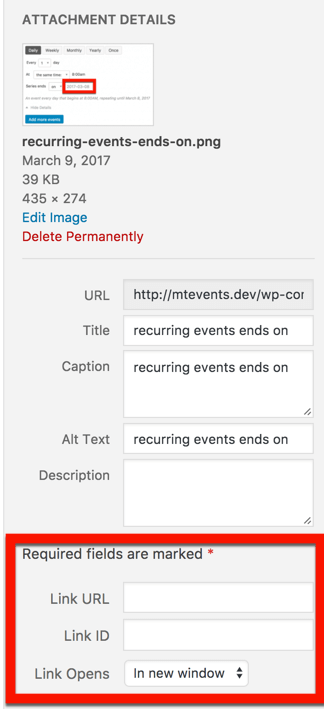
Let me know if that works for you.
Thanks
Courtney 🙂May 16, 2017 at 6:18 am in reply to: Several issues: Invert order of day and month in list view/ list titles #1284345MemberHello Francesca
Could you try this:
Events » Settings » Display » Date Format Settings » Date without year: j F YThanks
Courtney 🙂MemberHi Simon
I checked with our developers and learned that we do scan our plugin with WordFence before releasing any updates.
Can you enable WP_Debug https://codex.wordpress.org/WP_DEBUG and let us know what the errors say? https://codex.wordpress.org/Debugging_in_WordPress#PHP_Errors.2C_Warnings.2C_and_Notices.
We’d like to review those error messages you are receiving. Please test with just The Events Calendar and Events Calendar pro active with WordFence.
It may be helpful to see if you encounter the same results on a fresh install of WordPress with a default theme, TEC, and ECP with WordFence.
Thanks
Courtney 🙂MemberThanks Fowaz – I too would like to reach answers much sooner. Here’s hoping our future support is faster.
Thanks
Courtney 🙂MemberThanks Gary 🙂
MemberHello Tomas

I only see 2 Javascript warnings when I load either link.
To fix your Google Maps API issue, see https://theeventscalendar.com/knowledgebase/setting-up-your-google-maps-api-key/. However, I highly doubt this is the issue.
Do you have other extensions installed in Safari? If so, try in a private window and see if the errors show up still.
Thanks
Courtney 🙂 -
AuthorPosts