Forum Replies Created
-
AuthorPosts
-
Cliff
Member1)
This snippet may help you find all events with Cost Field set: https:// gist.github.com /cliffordp/71a343dd9956b1303dee#file-events_with_cost-php
(without the spaces in the URL)2)
Would you mind grabbing your system information and pasting it here? Make sure to use the “Set as private reply” checkbox to protect your private information from the public.
You can find the system info by going to WP Admin > Events > Settings > Help tab > System Information section — or by going to [yoursite]/wp-admin/edit.php?page=tribe-common&tab=help&post_type=tribe_events#tribe-system-info
That will give me a lot of extra information to help make sure I’m providing you the best support.
Thanks!
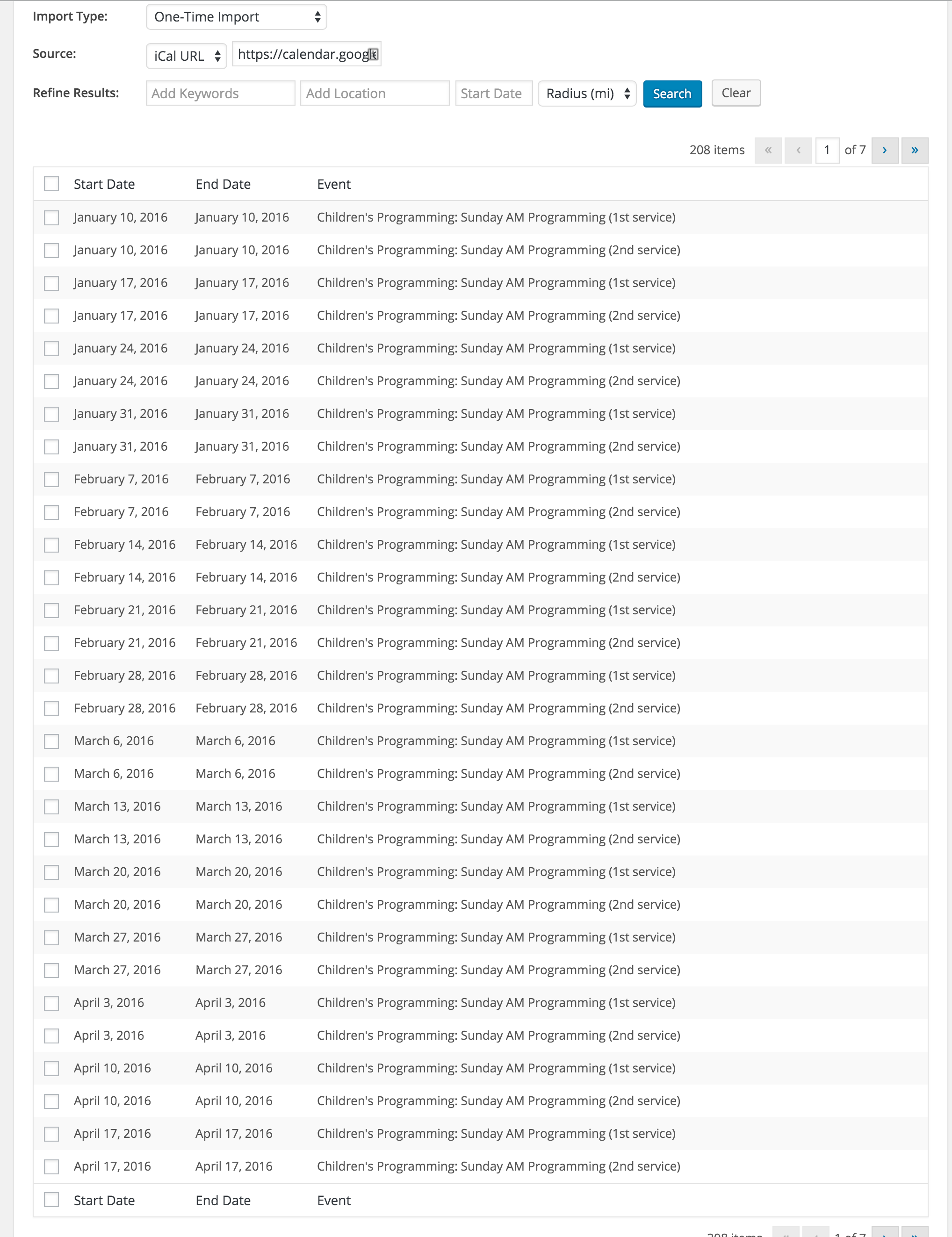
January 5, 2016 at 4:10 pm in reply to: Changes made via iCal link aren’t syncing with site #1050788MemberI re-read your thread and saw you initially said, “when I delete events and try to reimport them” — but most recently said, “once I do the initial import, the iCal importer isn’t grabbing any changes or new events that I make to the calendar.”
So, if the issue is ONLY for re-importing “new” events that have been deleted in WordPress, this code snippet might be what you’re needing:
// Allow events that have already been imported to be updated if the source event
// is changed and if it was pulled in via a saved recurring import (iCal Importer)
add_filter( 'tribe_events_ical_importer_overwrite_existing_events', '__return_true' );
Again, I look forward to hearing back from you.
January 5, 2016 at 3:44 pm in reply to: Changes made via iCal link aren’t syncing with site #1050782MemberThanks for the additional info.
I’m not aware of any issues with iCal Importer recurring import not importing new content.
Have you noticed any patterns about which events (e.g. all day events) aren’t getting imported after the interval import job is setup?
Is the issue for NEW events or are you wanting EXISTING (i.e. already pre-imported) events to be updated by the new data?
I’m looking forward to your reply.
January 5, 2016 at 3:16 pm in reply to: Not understanding how to embed the calendar into a page #1050775MemberClarity, I hear your frustration and apologize for any inaccurate or incomplete documentation. Yes, please provide links and your write-up of where/what should be amended or added.
===
Regarding child themes, the first bullet at https://codex.wordpress.org/Child_Themes, under Why Use a Child Theme, states:
If you modify a theme directly and it is updated, then your modifications may be lost. By using a child theme you will ensure that your modifications are preserved.
Child theming is one of the basics of WordPress customizations, which might be why it’s not explicitly stated at https://theeventscalendar.com/knowledgebase/themers-guide/
Again, feel free to share your suggestions for our documentation at that link and any other.
===
As far as your project requirements go, you might want to consider Cynthia’s suggestion (a big effort help there; thanks, Cynthia!), however it’s not currently a supported implementation (that doesn’t mean it’s wrong or won’t work).
You could also create a custom shortcode and put that shortcode in a widget or a Divi item.
Or, just like http://wpshindig.com/, the home page could redirect to your events page, like http://wpshindig.com/events/
Another option is to use the Event Rocket plugin, which was coded by one of our developers. It might be exactly what you’re looking for. As with all third-party plugins and themes, we cannot guarantee compatibility or functionality.
===
For setting up advertising areas on the Events archive customizations, my 4 new widget areas plugin might benefit you.
===
While my goal is definitely to help you find a pleasing solution and use our products long-term, we have a pretty great Refund Policy if you decide you need it.
I look forward to hearing back from you.
Member1)
With so many events and many of them being recurring, I looked for recurrenceMaxMonthsBefore and recurrenceMaxMonthsAfter from the sysinfo report. It seems your sysinfo report didn’t include all the information at wp-admin > Events > Settings > Help tab > System Information section. Maybe you could try re-sending it — or, at the least, specify what “Clean up recurring events after” and “Create recurring events in advance for” are set to?
Ideally, we’d like the entire sysinfo report if possible.
2)
Have you noticed the performance issue with all views (e.g. Month vs Day)?
3)
Have you noticed the performance issue in all time frames (e.g. current month, +1 month, -3 months, etc)?
I’m looking forward to hearing back from you.
MemberThanks for updating.
Regarding the issue of http://website.heeswijksekampen.nl/agenda/3310/all/ displaying the Dec 23, 2015, and Dec 30, 2015, events even though they’re listed as excluded…
This might be a known bug.
I see you are using Day/Month/Year instead of the “US-Style” Month/Day/Year date format.
Please go to wp-admin > Events > Settings > Display tab > Date Format Settings section and set “Datepicker Date Format” to US-Style format.
Then test with a new event (or change existing event details if you wish) and test if the exclusion dates work.
If it does work, you may wish to try out other Datepicker Date Format settings (e.g. YYYY-MM-DD) and see if that’s more acceptable for your site (assuming it still works to exclude events from a recurring series).
Please let me know what you find out. Thank you.
MemberHi John. Please review https://theeventscalendar.com/knowledgebase/changing-the-word-events-to-something-else/ and let me know if it satisfies your request.
Thanks.
MemberHi.
Please clarify. Are you wanting a cost field of “blank” or “0” (zero) to NOT appear as free?
Thanks for your question.
MemberHi Andy.
Thanks for the additional details. I relayed this thread to our developers and they asked for additional information before they take a deeper look into it:
How many events do you have on this site?
How many recurring events do you have (approximate if you don’t have exact)?
Please grab your system information and paste it here. Make sure to use the “Set as private reply” checkbox to protect your private information from the public.
You can find the system info by going to WP Admin > Events > Settings, clicking on the “Help” tab, and scrolling down to the “System Information” box. (Or by going to [yoursite]/wp-admin/edit.php?post_type=tribe_events&page=tribe-events-calendar&tab=help)
That will give me a lot of extra information to help diagnose the problem.
Thank you.
January 4, 2016 at 2:31 pm in reply to: Append information to event description post submission #1050068MemberPlease provide me with the code you’ve tried, an example of what you want it to do, and I’ll let you know if I can help fix it for you.
MemberHi RJM. Thanks for your screenshot.
There were one or more releases since our last interaction. Could you please make sure all your Modern Tribe plugins (and WordPress core) are at their latest versions?
Once you verify you’re on the latest versions, please test to see if the issue is still happening for you.
If it’s still happening, do you have an updated example (wp-admin screenshot and front-end link) for me to look into?
Thanks!
MemberThanks for your additional comments here. I’m going to mark this topic as Closed.
January 4, 2016 at 2:09 pm in reply to: Changes made via iCal link aren’t syncing with site #1050058MemberHi Ashley.
Thanks for the basic.ics link. I tested it in an iCal Validator and it validated, which is a good start.
I then put it in my local site to test (I didn’t actually import the events) and I saw all these events on the first page of results:

I wonder if, upon importing, you imported them as a Draft or maybe in a specific category that’s being excluded from that widget.
Please let me know your thoughts on this.
Thanks.
January 4, 2016 at 1:55 pm in reply to: Not understanding how to embed the calendar into a page #1050052MemberClarity, I think our plugin’s designers would strongly disagree with, “If you want a good looking page, you have to design or hire a designer.”
Our paid add-ons are just that — add-ons. The free WordPress.org plugin is the core/foundation of the add-ons. As we don’t have additional/custom skins or themes for the plugin (just the built-in ones), your calendar should look similar to how the free version appears.
The plugin’s code is able to be leveraged by designers/coders to create custom layouts, styling, etc.
To the point of your question — getting styling similar to http://wpshindig.com/events/ — you’d have to be specific about what exactly you’re wanting from that page’s styling.
- Are you wanting help with the colors (I don’t think the blue would match your red site)?
- The background image (not related to The Events Calendar at all)?
- The font?
- The hover effect (just add a featured image and event description to your test event)?
We have many Divi Theme users. Things like header images, menus, background images, etc. aren’t handled by The Events Calendar. It’s a plugin, not a plugin plus a theme. It can only control its own styling, not the overall site’s styling like a theme does.
If there are some specific things you’re wanting assistance with, please request them and I’ll let you know how I can best help.
I look forward to hearing back from you.
January 4, 2016 at 1:42 pm in reply to: after update: COMMUNITY can not generate Event location #1050040MemberHi Marian. I again tested anonymous Community Event submissions and the form does allow new venues to be created.
Since you’re having issues with this, please follow our Testing for Conflicts Guide and see if that helps narrow down the cause of this.
Let us know what you find out.
Thanks.
-
AuthorPosts