
Home › Forums › Calendar Products › Event Aggregator › Changes made via iCal link aren’t syncing with site
- This topic has 9 replies, 3 voices, and was last updated 10 years, 8 months ago by
Support Droid.
-
AuthorPosts
-
December 21, 2015 at 7:51 pm #1045014
Ashley
ParticipantHello,
I have The Events Calendar, EC Pro, and the iCal Importer all going on my site. For some reason when changes are made to the calendar these changes aren’t actually syncing with the site at all. It’s set as a Recurring Import: every 30 minutes.
The iCal link is being generated by Planning Center Online. When using this same iCal link on the calendar program on my Macbook, it is syncing just fine. I add a new event in Planning Center Online and it shows up on my personal calendar, but not on my website.
Another issue I was having that may or may not be related is when I delete events and try to reimport them, none of them actually will import. I had to create a new calendar in order to generate a new iCal link in order to be able to reimport these events to the site.
Any help you can provide would be greatly appreciated.
Here is an iCal link generated by Planning Center Online in the event that this is helpful: webcal://resources.planningcenteronline.com/icals/eJxj4ajmsGLLz2SarGLFnpqWyRQ-04q7ILEoMbe4mgEAaXsIDA==c255e7f706980d63348bc2ffd8eca553abe392e6
You should be able to run that iCal link and see there are events for Sunday, Feb. 14, and a weekly event from Sunday, Jan. 24-March 6 (among others) that aren’t showing up on the calendar.
December 21, 2015 at 10:00 pm #1045049Cliff
MemberHi. Thanks for all the details; it really helps.
I tested that link in 2 different iCal Validator sites and both gave the same error:
Problem! Found 1 error
Lines not delimited by CRLF sequence near line # 1
Reference: RFC 5545 3.1. Content Lines
Maybe this iCal URL you’re trying to import is the problem.
Have you tried other iCal URLs? If yes, did they worked just fine?
December 22, 2015 at 6:04 am #1045133ParticipantYeah, I’ve have have seven different iCal links, all with the same issue it seems.
Here are those links:
December 22, 2015 at 11:22 am #1045508MemberI see all those links are from the same source (I’m guessing having the same “not validating” issue). I’d suggest trying some iCal feeds from another source.
For example: click the “Subscribe to > iCalendar Feed” link at http://calagator.org/ and see if you experience the same issue(s) you do with iCal feeds from resources.planningcenteronline.com
Let me know what you find out.
December 30, 2015 at 1:02 pm #1048256ParticipantSorry for the long delay here.
I’ve since been dabbling with using a iCal link generated by Google Calendar (the client is actually using Google Calendars to populate the resources.planningcenteronline.com events).
Now my problem is that it doesn’t seem to be importing all the events. For example, my google calendar has two events that are recurring every Sunday (one at 9:00 a.m. and one at 10:30 a.m.). The iCal Importer imported all of the 9:00 a.m. events but these events don’t begin until January 31, even though in my Google Calendar the recurring event begins on Sunday, January 4. For the recurring event that’s set for 10:30 a.m., the iCal importer didn’t import anything from 2016 and begins in 2017 for some reason.
None of this makes any sense to me.
Here’s the google calendar link if you want to see the events: https://calendar.google.com/calendar/ical/3a774pfcq2enlhcms6bv1hdj4c%40group.calendar.google.com/public/basic.ics
Here’s a page with the Event Calendar widget displaying these events so you can see how it’s not actually importing all the events (this is also present in the backend when looking at all the events that are listed): http://s203923.gridserver.com/gebible/ministries/kidzone/calendar-of-events/
Any clue of what’s happening here?
January 4, 2016 at 2:09 pm #1050058MemberHi Ashley.
Thanks for the basic.ics link. I tested it in an iCal Validator and it validated, which is a good start.
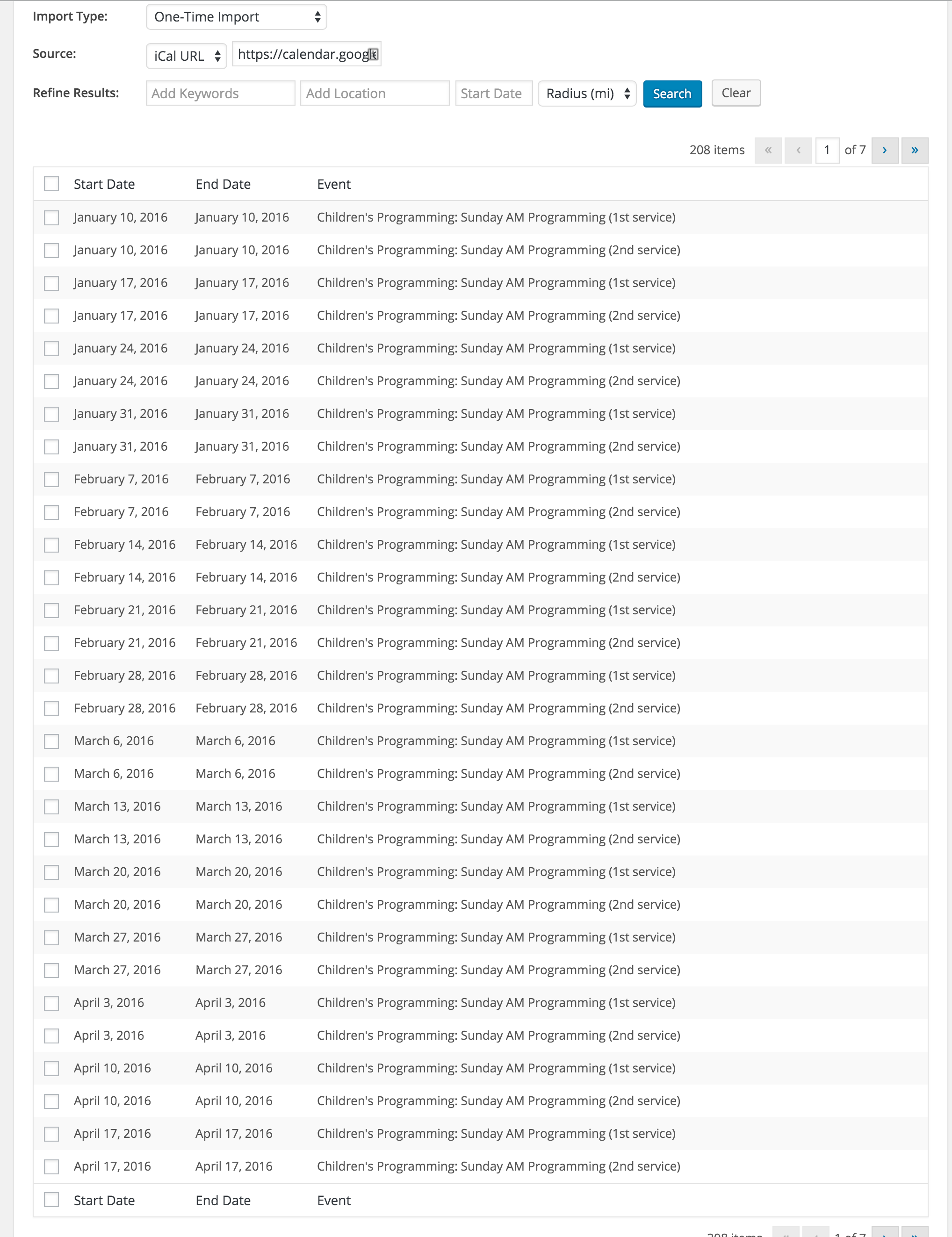
I then put it in my local site to test (I didn’t actually import the events) and I saw all these events on the first page of results:

I wonder if, upon importing, you imported them as a Draft or maybe in a specific category that’s being excluded from that widget.
Please let me know your thoughts on this.
Thanks.
January 4, 2016 at 6:08 pm #1050156ParticipantThanks for getting back with me.
I don’t think this is necessarily the issue. The issue seems to be that the iCal importer isn’t properly grabbing new content. For instance, once I do the initial import, the iCal importer isn’t grabbing any changes or new events that I make to the calendar.
These events are all from the same iCal link and are being filed under the same category. And, I quite certain I didn’t import them as a draft.
Have you guys had other who are experiencing this? Just wonder if the iCal
Importer is a bit glitchy?This site is set to go live this week and I’d really like to give this resolved in the next couple of days.
I really appreciate all your assistance.
January 5, 2016 at 3:44 pm #1050782MemberThanks for the additional info.
I’m not aware of any issues with iCal Importer recurring import not importing new content.
Have you noticed any patterns about which events (e.g. all day events) aren’t getting imported after the interval import job is setup?
Is the issue for NEW events or are you wanting EXISTING (i.e. already pre-imported) events to be updated by the new data?
I’m looking forward to your reply.
January 5, 2016 at 4:10 pm #1050788MemberI re-read your thread and saw you initially said, “when I delete events and try to reimport them” — but most recently said, “once I do the initial import, the iCal importer isn’t grabbing any changes or new events that I make to the calendar.”
So, if the issue is ONLY for re-importing “new” events that have been deleted in WordPress, this code snippet might be what you’re needing:
// Allow events that have already been imported to be updated if the source event
// is changed and if it was pulled in via a saved recurring import (iCal Importer)
add_filter( 'tribe_events_ical_importer_overwrite_existing_events', '__return_true' );
Again, I look forward to hearing back from you.
February 18, 2016 at 8:33 am #1076484KeymasterThis topic has not been active for quite some time and will now be closed.
If you still need assistance please simply open a new topic (linking to this one if necessary)
and one of the team will be only too happy to help. -
AuthorPosts
- The topic ‘Changes made via iCal link aren’t syncing with site’ is closed to new replies.