

Forum Replies Created
-
AuthorPosts
-
Brook
ParticipantHowdy Cindy,
Thank you very much for your thorough documentation of this issue. It is extremely helpful.
I noticed in your last mapping screenshot that you have the State/Province mapped twice:
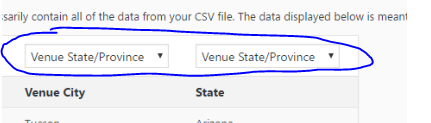
I think this is the cause of your issue. Like Geoff, I am able to import your venues just fine. The state shows up as expected. If you set the Venue City up properly, does it behave as we’d expect?
If not, would you mind uploading a copy of your CSV file. It might seem like a silly request given that you ares haring your data, and probably downloading it in the same fashion we are. But, sometimes text files are tricky and contain some hidden bits that throw computers off. I am wondering if yours doesn’t match the one Geoff and I are using. The best way to know is to upload it for me so I can download and inspect.
Cheers!
– Brook
January 5, 2017 at 9:06 am in reply to: Extension: "Advanced Options for Adding Events to the Main Blog Loop" tweaks… #1213872ParticipantHowdy Chris,
Sorry for the delay, we were out for the holidays. I hope you enjoyed yours!
I wrote the extension in question. I appreciate you tossing some feature ideas our way. Let’s be sure I understand all of them.
- Add select list for sort order
Do you mean an HTML <select> element? Maybe one that allows multiple selections? I don’t think I understand this one.
Add checkbox to add code to remove old events (aka events before/after now based on direction) Currently it shows all events old and new which doesn’t allow you to show the list of upcoming events (as it shows all of them)
That sounds interesting. Do you have any blog posts in your main page? Or is it just events?
Do you have a shortcode or widget on this page that shows upcoming events?
Would be great to have multiple categories combined also (aka ‘post’ and ‘tribe-events’ categories)
That is a request we see from time to time. Unfortunately it would be well outside the scope of this extension, but it is possible we could create a new one. With how WordPress works, in order for this to happen events will have to share a taxonomy with posts across the site, or not at all. So a separate extension that causes them to share taxonomies site wide would be what’s needed here.
Just to clarify the categories, at the moment the category is 0 for every event in the blog feed.
Are you querying for these categories inside in a template? In that case you should be using tribe_get_event_categories() on events. Since WordPress separates taxonomies (categories) often a different function is needed to get the tax.
Thanks for the ideas, and helping clarify your needs. Once I am completely clear on themwe can move forward.
Cheers!
– Brook
ParticipantHowdy Anne Marie,
Sorry for the holiday delay. I hope you had a wonderful one. Our team is getting back and in full swing.
I just tried downloading that CSV, it said it was a private file. So I requested access. Once access is granted I can download and give it a whirl.
Cheers!
– Brook
ParticipantHowdy Kevin,
Sorry for the delay. You probably saw the banner indicating our team was out for the holidays. That is actually why 4.4 is not released yet. We have already been testing it for a couple of months, and it was ready a few days before the holiday. But, that did not give us time to release 4.4.1 before the holidays as well, and just in case 4.4 introduced any severe bugs in exotic circumstance we wanted to be able to patch within a week. So basically 4.4 and 4.4.1 were put on hold until after the holidays.
4.4 will be released Monday, and 4.4.1 will likely be released the following Wednesday, or about two weeks from now.
Let me know if you have any more questions. Cheers!
– Brook
January 4, 2017 at 1:38 pm in reply to: Exclude category from List/Photo view messes up List Widget query #1213438ParticipantYou’re very welcome. Cheers!
– Brook
ParticipantI am happy you gave that a whirl.
Again I want to mention that it is expected the timezone will be +0000, the international default time zone. But, the times of the events should be shifted to match. If you have an event that is at noon and your event is UTC-7, then it will show as 7pm +0000 in your feed. This is expected behavior. What is not is expected is for it to show as noon +0000.
You can look through our showcase to see countless websites that behave as expected, per the above. For example this feed shows this event as taking place on Thu, 05 Jan 2017 03:30:00 +0000, which is the proper time considering the server is set to pacific time.
I have now tested this on numerous sites and found them all behaving properly. That doesn’t mean this isn’t a proper bug, but it does make it a lot less likely that the cause is our plugin and more likely that it is the result of your server or configuration. More importantly it means that in order diagnose the cause of this on your site we will have to do some in depth technical support.
You asked at the outset where to report bugs. I really appreciate you taking the time to report and test this. In cases like this where in depth support is required to determine if there is a bug in our plugin or in the server config, the support forums are the best venue to continue the discussion. There is of course the premium forum here accessible to licensed users, or the free support forums manned by volunteers. One of these two is going to be the ideal spot to help you find a fix for this problem. And if the problem ends up being a bug in our product, they will file a bug report from there.
Does that all make sense?
Cheers!
– Brook
December 30, 2016 at 10:16 am in reply to: Two questions: Event List in Alphabetical Order and Change Wording #1211831ParticipantHowdy Helen,
Thank you for working to isolate why that event is different. That gives me an idea. Could you try changing this line:
if( tribe_is_upcoming() ) {to:
if( tribe_is_list_view() ) {Does that help with the last event?
Cheers!
– Brook
December 26, 2016 at 3:54 pm in reply to: Exclude category from List/Photo view messes up List Widget query #1210619ParticipantThanks for sharing links to the pages. That helped clarify what you want. Before I was thinking you had a widget in the sidebar on single events pages, but you are running this as a shortcode or widget on a regular WordPress page, not a single event.
In that case I would replace:
if ( is_single() && tribe_is_event() ) return $wp_query;
With:
if ( is_page() || is_single() ) return $query;
As an aside, in WordPress it is common coding practice to put return statements at the top of a function inside of some exit conditions. So instead of doing:
function name( $output ) {
  if ( something() ) {
    // insert code here
  }
  return $output;
}
WordPress devs typically do:
function name( $output ) {
  if ( ! something() ) return $output;

  // insert code here

  return $output;
}
There is no functional difference between these. I see your original code is using nested if statements, per the first example. If you prefer that method feel free to alter my code. It won’t change how things behave.
Did that work?
Cheers!
– Brook
December 24, 2016 at 9:38 am in reply to: Can't update past version 4.2.7 without getting an INTERNAL SERVER ERROR #1210334ParticipantThis reply is private.
ParticipantI completely understand that, we have all had one of those clients. It’s my pleasure to help!
– Brook
ParticipantThank you for getting back with a revised one!
I am glad that helped get past your first issue. I just tried your new CSV and was able to import it succesfully, with the organizer and categories mapped properly. Here is what I did
- First I created one of your organizers. As you probably are well aware the organizer must first exist on your website in the Organizers list, before you run an events import. So I created an organizer with the name “Historical Society of Kent County”, that way all the events in your CSV with that contact name would get mapped to this organizer.
- Mapped the “contact” column in your CSV was associated with the “Event Organizer Name(s) or ID(s)” field.
- Mapped “category” csv column was associated with the “Event Category” field.
- In the “Category:” dropdown on the preview page I selected “No Additional Categories”.
When I ran the import, I saw that all events with the contact of “Historical Society of Kent County” were properly associated with that organizer. And two new even categories were created and associated with all 13 events: Arts & Entertainment, and Imported.
Would you mind retrying the import using the steps I followed? Are you able to get it to import succesfully?
Cheers!
– Brook
ParticipantHowdy Edouard,
I would love to help you with this.
The discrepancy likely stems from the 12 deleted attendees shown there. When an attendee is deleted after their order completes, they will continue to be counted on the order paid/sold category but will no longer appear in the list underneath.
It is showing 120 attendees, -12 that were deleted. Thus the total would be 108. You are saying there were 95 sold for one type, and 18 of the other, thus 108 total. So the numbers should all be accurate.
Does that all make sense?
Cheers!
– Brook
ParticipantHowdy Anne,
I would love to help you with this.
That is certainly strange, I can’t recall seeing that issue before.
Would you mind sharing the CSV file that you are trying to upload? Perhaps there is something in the CSV itself that is causing this glitch. If you would like to keep the CSV file just between you and my team, check the box “set as private reply” in your next response.
Are you able to upload this text CSV file without getting an error? This file was generated by a mock data program. There are three events, each in January 2017 and all have the event category “Test” assigned to them: the-events-calendar-mock-data-generator-events
With that info in hand I should be able to better understand this issue. Cheers!
– Brook
ParticipantHowdy JRz,
Geoff brought this thread to my attention, since performance and scaling is one of my focuses here.
We are growing and will need a solution to sell up to 60K tickets for one event.
That is a lot of tickets! I wish to be up front about two things:
- We are working on making our plugins scale better, but are not even close to finished in this endeavor. It will take more time as we gradually roll out improvements.
- I am not aware of any purely WordPress solution that scales well to your needs. If I knew of one, even from our competition, I would gladly recommend it. That said our Eventbrite Tickets plugin can help, because you can use Eventbrite’s app and checkin process. A lot of the heavy lifting is handled by Eventbrite’s servers, and thus they charge you some fees. But their ticketing and checkin process is designed to handle large events, and with that plugin it can tie everything into your current calendar. This isn’t a pure WordPress solution, but it might be what you’re looking for.
One upcoming feature we are building that will help immensely with your current issue, is paging for the attendee list page. Since it currently tries to show every attendee for the event, that can result in a lot of queries when you have 1000 attendees, especially 60k! Even a powerful server like yours is going to take a long time to process that, and might timeout depending on the settings.
As far as solutions go, I think these are your basic options:
- Investigate Eventbrite and Eventbrite Tickets and see if that would satisfy your needs.
- Hire a website developer skilled with performance to take a look at your site. Likely they will be able to hack together some solutions for your specific bottle necks. It might not be pretty, but if they are only concerned with making certain features work for you and have direct access to your server and its logs, often this is possible.
- Wait on us to keep improving the current Event Tickets Plus plugin. If you be interested in working directly with us, I would like to talk to our strategist and see if he is still on the lookout for site owners that are having trouble scaling. If so we could work with you more directly, and give you a bit of inside track on these features. But, building this sort of improvement so that it works for every one of our users, and their various work flows, takes months. While this is probably the most appealing longterm route, in the short term it won’t help much. If you are interested let me know.
Does that all make sense?
Cheers!
– Brook
ParticipantYou are very welcome! Thank you for getting back.
– Brook
-
AuthorPosts