
Home › Forums › Calendar Products › Events Calendar PRO › Location
- This topic has 24 replies, 4 voices, and was last updated 9 years, 9 months ago by
Cindy.
-
AuthorPosts
-
January 4, 2017 at 5:06 pm #1213519
Cindy
ParticipantHi Geoff,
I did everything you suggested except work in a staging environment because I don’t have one. I went to a WP theme, removed all the custom coding (saved it to a doc) deactivated all plugins possible (I can’t deactivate stuff like Word fence, etc.) and not only did it NOT fix the issue, but when I went to restore back to Avada it is now trashed. All customization for everything is gone. (logo, etc..) The database backup does not have any theme stuff. When I added back in the CSS it no longer makes the TEC pages look correct:
1. All the paragraphs are missing
2. My ‘Discover more” is no longer showing up as separate line with hyperlink
3. It is an ugly colorAll of the above Avada has helped me with. When I tried to get help from TEC it was a huge failure. I am told to go to the Themer guide. I should not be told that when paragraphs weren’t working, etc. Gratefully Avada support figured it out.
As you can tell I’m beyond frustrated and I still can’t import the City to the correct field despite removing the customization, other plugins and use a WP theme. At this point, I have a ticket with Avada for EVERYTHING but that because they have already told me that is a TEC issue.
I appreciate you have spent a lot of time trying to help me. But now I’m so far behind and have a bigger mess than before. Please escalate my case to someone that has an Avada theme and can do some trouble shooting.
Thank-you,
CindyJanuary 4, 2017 at 5:11 pm #1213524ParticipantThis reply is private.
January 4, 2017 at 5:19 pm #1213527ParticipantThis reply is private.
January 5, 2017 at 10:40 pm #1214204Geoff B.
MemberGood evening Cindy,
Thank you for running the tests and for writing back.
I am terribly sorry to hear that your customizations disappeared on you.
With that in mind, theme specific customizations (settings, metaboxes, CSS, etc..) are normally stored in the database.I must say I am quite puzzled that this does not seem to be the case for you ?
Could you tell me how you went about making the Database backup and restoring it ?This might prove very helpful to others down the line.
In any case, I am mostly glad that the Avada team helped with retrieving these.
All of the above Avada has helped me with. When I tried to get help from TEC it was a huge failure. I am told to go to the Themer guide. I should not be told that when paragraphs weren’t working, etc. Gratefully Avada support figured it out.
I totally understand how frustrating your situation must feel. Please know that I actually share your goal: solve things in the shortest amount of time possible.
I am terribly sorry that your experience with our support has not been good so far. Especially provided that making sure our customers get the best experience possible is very high on our priority list.
As for the paragraph not working, I do not recall handling this issue specifically. However, I apologize if you were told to go to the themer’s guide for that on behalf of the team here.
If on the other hand you are referring to my first reply in this thread, this is totally on me. At the time, I had misunderstood what this thread was all about. I wrongly assumed that you were trying to add new information to a view.
I appreciate you have spent a lot of time trying to help me. But now I’m so far behind and have a bigger mess than before. Please escalate my case to someone that has an Avada theme and can do some trouble shooting.
Once again, I am terribly sorry for all the inconvenience experienced while trying to troubleshoot this.
In the future, I would highly recommend setting up a staging site from the get-go to prevent such awful situations.
That being said, I think you should know that I do have Avada installed on my staging site (5.0.1) and that I have used it to run the tests with your CSV files.
As you know, the puzzling thing is that “Tucson” does not get stripped from the import when I try to reproduce the issue.
But, you are right, this has gone already much longer than any of us would have wanted / expected (and in spite of all of our hard work).
For that reason, I would like to follow your suggestion and escalate this to a new pair of eye.
Maybe there is something obvious that we both missed ?Hang in there as I hand this one over.
Best regards,
Geoff B.
January 5, 2017 at 11:07 pm #1214208Brook
ParticipantHowdy Cindy,
Thank you very much for your thorough documentation of this issue. It is extremely helpful.
I noticed in your last mapping screenshot that you have the State/Province mapped twice:
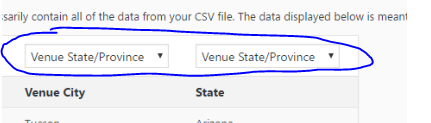
I think this is the cause of your issue. Like Geoff, I am able to import your venues just fine. The state shows up as expected. If you set the Venue City up properly, does it behave as we’d expect?
If not, would you mind uploading a copy of your CSV file. It might seem like a silly request given that you ares haring your data, and probably downloading it in the same fashion we are. But, sometimes text files are tricky and contain some hidden bits that throw computers off. I am wondering if yours doesn’t match the one Geoff and I are using. The best way to know is to upload it for me so I can download and inspect.
Cheers!
– Brook
January 6, 2017 at 4:05 pm #1214564ParticipantHey Geoff and Brook,
Brooks extra set of eyes paid off! Brook’s suggestion was spot on! Thank-you Brook!
Can one have a staging site w/o having to pay for two licenses of everything?
Geoff- I appreciate you handing this off and I hope you realize that I do know you were trying. We both missed the forest for the trees.
I have gathered info on the steps that I used to fix TEC and notes on how I managed to do the download incorrectly:
https://docs.google.com/document/d/1pnauJJJglvYKHbruzmTtnI11u3FBLul9cMWJ4LD5njg/edit?usp=sharingI hope you both have a great weekend.
Kind regards,
Cindy
January 7, 2017 at 12:07 am #1214631MemberGood evening Cindy,
This is fantastic. Brook is truly a mensch!
I am really glad this worked out.To answer your question, yes absolutely! You can move your licenses around as discussed here: https://theeventscalendar.com/knowledgebase/moving-your-license-keys/
Just to be clear, moving the license will not make impact your plugin’s abilities. It will only impact the auto-update functionality.
Is there anything else we can do to help out ?
Best regards,
Geoff B.
January 7, 2017 at 11:17 am #1214761ParticipantHi Geoff,
Thanks for the info on the license. We always figured we would have to buy two of everything.
Have a good weekend.
January 9, 2017 at 12:16 pm #1215271MemberGood afternoon Cindy,
I am glad we got all of your questions answered.
You are welcome back in our support forums any time 🙂
For now, I am going to close this thread.
Have a great week!
Geoff B.
-
AuthorPosts
- The topic ‘Location’ is closed to new replies.