

Forum Replies Created
-
AuthorPosts
-
October 23, 2015 at 8:14 am in reply to: iCal import from Google Calendar not showing All Day Events #1017313
Brian
MemberHi,
If you are having issues with Adminer, you can go into PHPMYAdmin from your hosting and do it there. This was just a way around doing that.
And glad my response helped for the other issue. Look for a better solution to that in the next release to fix it for good hopefully.
Thanks
October 23, 2015 at 8:10 am in reply to: WooCommerce Tickets Isn't Showing Up in Backend of Event Posts #1017309MemberI am glad to see you were able to figure it out.
I am going to go ahead and close this ticket. If you have a similar issue or another in the future, please do not hesitate to create a new ticket.
Thanks!
October 23, 2015 at 8:09 am in reply to: Placing Filter Bar in the Sidebar to filter Event's widgets? #1017308MemberYou’re Welcome.
Since this is marked resolved I am going to close this ticket, but if you need anything else related to this topic or another please post a new topic on the forum and we can help you out.
Thanks
MemberGreat!
I am glad to see you were able to fix this issue.
Since the issue is resolved I am going to go ahead and close this ticket. If you have a similar issue or another in the future, please do not hesitate to create a new ticket.
Thanks!
MemberHi,
You are right. This will not import: “Events created in a Facebook Group (closed/invite only) where I am administrator”
Thanks
MemberI am glad to see you were able to figure it out.
I am going to go ahead and close this ticket. If you have a similar issue or another in the future, please do not hesitate to create a new ticket.
Thanks!
MemberHi,
Sorry for the issues here it is a bug.
To fix it you can replace the contents of this file:
plugins/events-calendar-pro/src/functions/template-tags/widgets.php
With the coding here:
That will fix the issue until we can release a patch in the next release.
Let me know if that works.
Thanks
October 23, 2015 at 5:36 am in reply to: WooCommerce Tickets Isn't Showing Up in Backend of Event Posts #1017214MemberHi,
I see a tickets option 2nd from the left on this image:
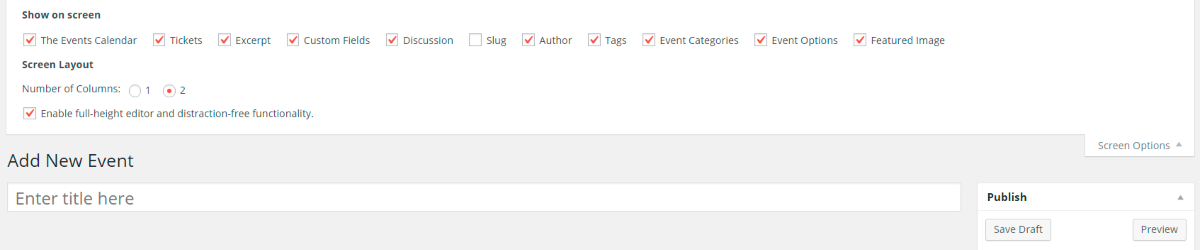
Is the Ticket Meta Minimized somehow?
Can you please provide the system information in a private reply from this guide:
https://theeventscalendar.com/knowledgebase/sharing-sys-info/
Thanks
October 22, 2015 at 1:43 pm in reply to: Placing Filter Bar in the Sidebar to filter Event's widgets? #1017095MemberHi,
Thanks for using our plugins. I can answer your questions here.
So unfortunately, the widgets are not going to work with the Filter Bar they are actually hard coded to not work with the Filter Bar so that there is no conflict if a widget is on a main event view.
I can see a more robust widget filter being a good idea, if you think that is something you would like as a feature I encourage you to visit our User Voice Page and either upvote an existing request or make a new request there.
Let me know if you have any follow up questions.
Thanks
MemberHi,
Thanks for the information.
Lets rule out a custom template first since there is no errors.
Let me know if there are any files in this directory of your theme:
yourtheme/tribe-events/pro/week/
If so does removing them fix the week view?
Let me know and we can go from here.
Thanks
MemberHi Julie,
Thanks for purchasing Pro I can help out.
If you like to add Pro to another site you can download the latest version from your account here on theeventscalendar.com
You can then follow this guide to manually update and skip the parts about replacing an existing plugin:
Also, please do not include your license key in public posts. We have a record of it and you do not need to provide it.
Let me know how that works out.
Thanks
MemberHi,
I can help out here.
The license is only needed for automatic updates.
So feel free to download and manually install on a test environment and do your testing there.
No need on the test environment to add the license unless you would like to do automatic updates there.
Let me know if you have any follow up questions.
Thanks
MemberHi floyboy,
Thanks for posting here. I can certainly help you here, but we can help you better if you create your own topic in the forum, where we can interact with you one on one. Also, we encourage you to post on your own topic because every time we post it will email the author of the topic.
Thanks
MemberGreat glad it helps.
I am going to close this ticket, but if you need anything else related to this topic or another please post a new topic on the forum and we can help you out.
Thanks
MemberGreat glad it helps.
I am going to close this ticket, but if you need anything else related to this topic or another please post a new topic on the forum and we can help you out.
Thanks
-
AuthorPosts