

Forum Replies Created
-
AuthorPosts
-
October 26, 2015 at 5:53 am in reply to: Re-Importing Deleted Events, Featured Image, Venue Info #1017823
Brian
MemberGreat glad it helps.
I am going to close this ticket, but if you need anything else related to this topic or another please post a new topic on the forum and we can help you out.
Thanks
October 26, 2015 at 5:51 am in reply to: iCal import from Google Calendar not showing All Day Events #1017822MemberI found a plugin that might help here instead of going into the database.
This plugin can completely remove trashed posts and events in the database:
It does not do it by default, but there is a setting to Delete Trashed Items.
Before using that plugin it would be a good idea to backup your database just in case something goes wrong.
Thanks
October 26, 2015 at 5:48 am in reply to: mini event widget doesn't show current date in list #1017821MemberGreat glad it is working now.
I am going to close this ticket to new replies, but the issue is still open and we will update this ticket once we release a fix.
If you have any new questions or issues please create a new ticket and reference this one.
Thanks
MemberGreat glad it helps.
I am going to close this ticket to new replies, but the issue is still open and we will update this ticket once we release a fix.
If you have any new questions or issues please create a new ticket and reference this one.
Thanks
MemberHi,
I hope so! And it is a good chance it should be before that, but that could change.
Thanks
MemberHi,
Unfortunately, here on the pre-sales forum, I’m afraid we do not provide technical support. I would ask that you take any technical support questions across to our wordpress.org forum – our staff scan it periodically and other community members may also be able to help out.
However, I would even caution there we are most likely unable to help on this issue.
Thanks again!
MemberHi,
Thanks for the interest in our ticketing plugins.
We are still developing this feature and I do not have a timeline to give out for it.
We are finishing up 4.0 to release next and it is doubtful that it will make it in there or in the beta for it.
Unfortunately, that is all the information I can provide about new features.
Let me know if you have any follow up questions.
Thanks
MemberHi,
Thanks for using our plugins. I can try to help out here, but might not be able to provide everything for a feature we do not provide.
This following coding should work in the single-template.php to get the start date format it to
$startDate_mysql = strtotime( get_post_meta( $event_id, '_EventStartDate', True ) );

$startDate_mysql = date( 'Y-m-d H:i:s', $startDate_mysql  );
Then you could use $startDate_mysql wherever you need the date to be placed.
Thanks
MemberHi,
Thanks for trying out our plugin.
There is not feature in our plugins to display the main events view on the home page.
There is the Event Rocket Plugin an unofficial plugin that has the ability to do this.
However, that plugin is being discontinued and should work now, but may not work with future versions.
Thanks
October 23, 2015 at 2:19 pm in reply to: mini event widget doesn't show current date in list #1017473MemberHi,
I apologize I missed something in QA and we introduced a bug here.
You can replace the contents of this file:
plugins/events-calendar-pro/src/functions/template-tags/widgets.php
With the coding here:
That will fix the issue until we can release a patch.
Let me know if that works.
Thanks
October 23, 2015 at 2:19 pm in reply to: Re-Importing Deleted Events, Featured Image, Venue Info #1017470MemberHi,
Thanks for using our plugins. I can help out here.
Even if you delete an event in WordPress it still keeps a copy of the event in the database and that is preventing it from being reimported as it finds it again.
It looks like this plugin might work for you to delete trashed events from the database:
It does not do it by default, but there is a setting to Delete Trashed Items.
And the image and the Venue address are not part of the iCal format so they do not get pulled over.
I believe if you already have the Venue in your database it will use it instead of creating a new one.
Let me know if you have any follow up questions.
Thanks
MemberOk.
I took another look and see this css in your theme causing the issue:
.tribe-week-grid-wrapper {

    height: auto !important;

}
That is on line 3084 of the style.css file.
Removing that should cause the Week View to Show Again.
Let me know if it works for you.
Thanks
*Note I revised this from an earlier post after I found the above.
MemberHello,
You’re Welcome for the first part.
We will have a fix in the next release so you should not have to change the file then. It should be all set.
For your other questions.
Widget Title
The widget title is created using WordPress’s standard format and generally it is not possible to add a link for it.There is this plugin though that enables you to make a Widget title a link:
https://wordpress.org/plugins/widget-title-links/
That should work for the widget, but there is generally not way to add a link for the shortcode unless you add it to the template per the editing instructions below.
Text Widgets
To use a shortcode in a text widget you must first add this filter to do it in WordPress:https://digwp.com/2010/03/shortcodes-in-widgets/
Editing Templates
You can edit any of the event templates by moving them to your theme following our themer’s guide:https://theeventscalendar.com/knowledgebase/themers-guide/
There you want to move and edit this file:
plugins/events-calendar-pro/src/views/pro/widgets/list-widget.php
To Change the WordPress View More.
Let me know if that helps.
Thanks
October 23, 2015 at 8:24 am in reply to: Wooticket not updating the stock number after purchase #1017324MemberHi,
There is setting still in Paypal that need to be correctly setup. I am limited in troubleshooting on that as it is WooCommerce. I would verify with their documentation it is setup:
https://docs.woothemes.com/document/paypal-standard/
Also, are you marking your orders complete?
And what does the Order Notes say for an Order, it looks something like this in the order:
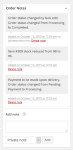
Please provide all the details for that.
The Orders are here:
Admin > WooCommerce > Orders
Thanks
MemberNo worries. Thanks for posting in a new thread. I did remove the login details as those should not be shared on the forums even in a private reply.
Maybe we can help in the other thread and figure it out.
Thanks for posting!
-
AuthorPosts