

Forum Replies Created
-
AuthorPosts
-
Brian
MemberHi,
Thanks for the interest in our plugins.
Unfortunately, they only work in WordPress.
Cheers
January 4, 2016 at 11:39 am in reply to: Fatal Error on change to events tickets plus from woocommerce tickets #1049984MemberHi,
Sorry for the issues here.
Please update to Events Tickets 4.0.4 and Event Tickets Plus 4.0.4
You can download the latest version from your account here on theeventscalendar.com
And follow these steps for manual updates:
If you do not have automatic updates setup.
And that should resolve the issue.
Thanks
MemberHi,
Sorry for the issues here. I can work with you to resolve this.
If you updated The Events Calendar to 4.0.x and leave Community Events at 3.12.x or earlier it will break the site. If you cannot update Community Events for whatever reason you should remain on 3.12.6 for the Events Calendar and follow the steps below to set that up.
Unfortunately, the only way to fix it is to access the files of you site and delete the older version of Community Events. This process itself does not delete or change any of your settings in the database.
This can be done by either your hosting account file manager or through ftp. The files will be found here:
wp-content/plugins/the-events-calendar-community-events/
Please make sure to remove all copies of Community Events.
That will bring your site back and then you can download the latest version of Community Events (4.0) from your account here and manually upload it to your site.
We also have this guide for manual updates:
If you need your site right away with community events I recommended downgrading to the 3.12.x for all the plugins.
You can download the older versions from your account here on theeventscalendar.com and older versions of the core plugin here: https://wordpress.org/plugins/the-events-calendar/developers/
And follow these steps for manual updates:
If you have issues please let me know and I can help out.
Thanks
MemberHi Websource, thanks for jumping in here.
Andreas, what websource said is true you should be editing the PO file with a program such as POEdit and the MO files is generated from that.
Let me know if you have any follow up questions.
Thanks
MemberHi,
Thanks for the interest in Facebook Events.
We do have an automatic importer for events created by Facebook Pages.
See the Facebook Importer Settings here:
https://theeventscalendar.com/knowledgebase/configuring-facebook-events/
To read about how to setup Automatic Imports.
Also on this page as well:
https://theeventscalendar.com/knowledgebase/importing-events-from-facebook/
Let me know if you have any follow up questions.
Thanks
MemberGreat, glad it helps, I am going to go ahead and close this ticket, but if you need help on this or something else please post a new ticket.
Thanks!
January 4, 2016 at 9:40 am in reply to: Tickets Not Displaying – Using Event Tickets Plus + WooCommerce #1049932MemberHi,
Thanks for using our plugins. I can help out here.
What are your ticket settings for a ticket not showing:
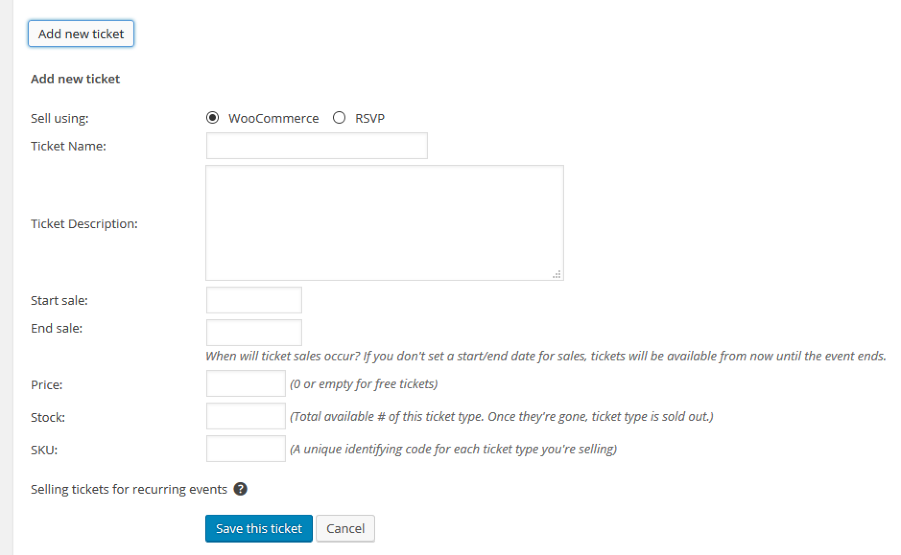
Also, is the event still in the future?
As for Avada they tend to put the Ticket form in the “Event” Sidebar, is your sidebar showing for single events?
Let me know and we can go from here.
Thanks
MemberHi,
Thanks for using our plugins.
We do not have any features to connect to Meetup.
If you would like to request that feature please head to our UserVoice Page and add your own or upvote that feature as they will increase the chances of it being added to a future version.
http://tribe.uservoice.com/forums/195723-feature-ideas
Cheers
January 4, 2016 at 9:38 am in reply to: Changing the text from "Tickets" to Book This Course & "Add To Cart" to Book Now #1049929MemberHi,
Thanks for using our plugins. I can help out here.
Unfortunately, for now adding functions or editing the templates is the only way to make changes to the text.
If you think that is something you would like as a feature I encourage you to visit our User Voice Page and either upvote an existing request or make a new request there.
For making this change the quickest way to do it is to take this template:
plugins/event-tickets-plus/src/views/wootickets/tickets.php
And following our themer’s guide:
https://theeventscalendar.com/knowledgebase/themers-guide/
Move it here:
yourtheme/tribe-events/wootickets/tickets.php
Then once in your theme you can change the word Tickets and Add to Cart what you like.
Let me know if you have any follow up questions.
Thanks
MemberHi,
Thanks for the interest in our plugins.
We have shortcodes in Pro for the Widgets only and not the main views.
You can see the different shortcodes Pro includes here:
https://theeventscalendar.com/knowledgebase/pro-widget-shortcodes/
Let me know if you have any follow up questions.
Thanks
January 4, 2016 at 9:28 am in reply to: No tickets possible on WordPress 4.4 with Woocommerce? #1049921MemberHi,
Sorry for the issues you are having.
I tested on my site and I am able to create tickets.
What are your ticket settings for a ticket not showing:
Also, is the event still in the future?
Let me know and we can go from here.
Thanks
MemberHi,
Thanks for using our plugins.
Unfortunately, we do not have a bulk ticket creation feature and I am not able to support customizations per our terms and conditions.
We have the Community Tickets plugin that enables people to submit events with tickets.
Otherwise I do not have much else to provide on this.
The tickets are WooCommerce Products (if that is your eCommerce) and they have some additional custom fields that ties them to the Event. ( _tribe_wootickets_for_event )
The event with tickets also has some extra custom fields. So all those fields would have to be created.
If you think that is something you would like as a feature I encourage you to visit our User Voice Page and either upvote an existing request or make a new request there.
MemberHi,
Thanks for using our plugins. I can help out here.
When you say this:
“However, my emails don’t show any QR Codes. ”
Do you refer to the Ticket email or the order emails?
The QR codes will only show in the ticket emails and no where else.
Are you not seeing them there?
Let me know and we can go from here.
Thanks
MemberHi,
Thanks for using our plugins I can help out here.
It is true it is not required, if a date is not include it defaults to todays date along with the default time set.
If you would like to make this required you can follow this guide to do that:
Let me know if you have any follow up questions.
Thanks
MemberHi,
Thanks for reporting this issue.
I was able to recreate the issue using Community Events and I have created a bug ticket to address this issue.
If I publish the event using Community Events from the front end it works.
If I set it to Pending Review or Draft that is when the slug takes on the Event.
Is that what you are seeing as well?
Thanks
-
AuthorPosts