

Forum Replies Created
-
AuthorPosts
-
January 4, 2016 at 8:58 am in reply to: Call to undefined function tribe_events_single_event_meta #1049899
Brian
MemberHi,
Thanks for using the Events Calendar.
Here on the pre-sales forum, I’m afraid we do not provide technical support. I would ask that you take any technical support questions across to our wordpress.org forum – our staff scan it periodically and other community members may also be able to help out.
Having said that to to fix this you need to update your custom template single-events.php in your theme.
You want to replace:
echo tribe_events_single_event_meta();with this function:
tribe_get_template_part( 'modules/meta' );Thanks again!
MemberI should add it does still save the changes even with the error on my end.
MemberHi,
Sorry for the issues here.
I was able to reproduce the issue and it appears to be a bug.
I have created a bug ticket for us to address this, but do not have any other information about this right now.
Let me know if you have any follow up questions.
Thanks
MemberHi,
Sorry for the issues you are having.
Since the year is now 2016, those events might be working now.
What are you Date Format Settings in the Events Plugin:
Events > Settings > Display Tab > Date Format Settings
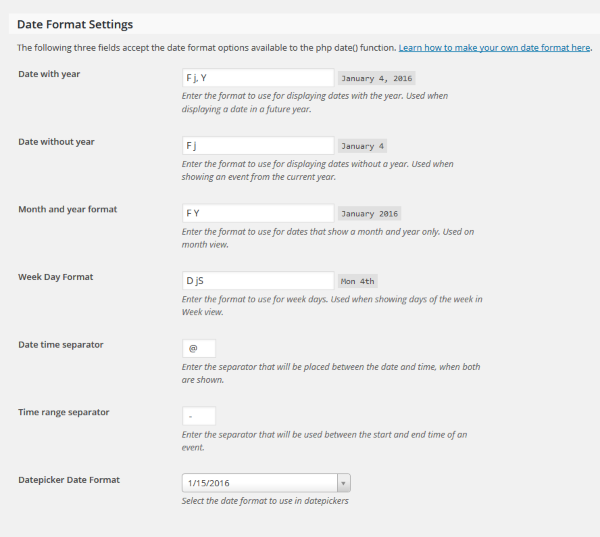
The first setting for Date with Year would have been causing this issue.
What do you have there for it?
Thanks
January 4, 2016 at 8:43 am in reply to: Events on the calendar do not display below a certain site width #1049881MemberHi,
Thanks for using the Events Calendar.
Here on the pre-sales forum, I’m afraid we do not provide technical support. I would ask that you take any technical support questions across to our wordpress.org forum – our staff scan it periodically and other community members may also be able to help out.
If you have purchased a plugin from us, please login and post in the premium forums for that plugin and we can help you out there:
https://theeventscalendar.com/support/forums/
Thanks again!
January 4, 2016 at 8:34 am in reply to: How do I add a sidebar to just the events list view? #1049876MemberI am glad to see you were able to figure it out.
I am going to go ahead and close this ticket. If you have a similar issue or another in the future, please do not hesitate to create a new ticket.
Thanks!
MemberHi,
Thanks for using the Events Calendar.
Here on the pre-sales forum, I’m afraid we do not provide technical support. I would ask that you take any technical support questions across to our wordpress.org forum – our staff scan it periodically and other community members may also be able to help out.
If you have purchased a plugin from us, please login and post in the premium forums for that plugin and we can help you out there:
https://theeventscalendar.com/support/forums/
Please note we provide 100% of our support by the forums per our terms and conditions and provide no phone support.
Thanks again!
MemberHi,
Sorry for the late reply here. I thought someone was going to respond while I was away for Christmas.
I setup a Multisite and using the Twenty Sixteen Theme was able to add comments to an event and create a comment as well without an error.
The multisite is setup using sub domains and both the main blog and a sub blog worked for me when adding comments.
Do you have anything in your htaccess file that might cause this? Since you did the conflict testing already that might be were something is causing this.
Also, can you please provide your system info in a private reply:
https://theeventscalendar.com/knowledgebase/sharing-sys-info/
Thanks
MemberOk thanks.
I am not sure of your configuration and why it is causing this.
The easiest thing to do is to take this template:
plugins/the-events-calendar/src/views/single-event.php
and move it to your theme here:
4pinesbeer/tribe-events/single-event.php
Then replace this:
"> <?php printf( '« ' . esc_html__( 'All %s', 'the-events-calendar' ), $events_label_plural ); ?>With this:
<?php printf( '« ' . esc_html__( 'All %s', 'the-events-calendar' ), $events_label_plural ); ?>That will give you the correct link and the change there will be safe when doing updates.
Does that work for you?
January 3, 2016 at 8:10 am in reply to: Filter Bar no search results after "Find-Button" – but correct after page reaload (browser) #1049448MemberHi,
Thanks for the info.
If you use WordPress 4.4 and Events Calendar 4.0.4.
I am limited supporting older versions of the plugin and same with WordPress 3.8 as that is over 2 years old now.
Let me know.
Thanks
MemberI am going to go ahead and close this ticket, but if you need help on this or something else please post a new ticket.
Thanks!
January 3, 2016 at 8:03 am in reply to: Fatal error: Can't use function return value in write context in #1049444MemberI am going to go ahead and close this ticket, but if you need help on this or something else please post a new ticket.
Thanks!
MemberHi James,
You can share it in this thread if you like.
Or use our contact form on the contact page and send it to us that way.
Cheers
January 3, 2016 at 7:59 am in reply to: Bug: Recurring events on the same day don’t have seperate pages #1049441MemberHi,
Since that is a new string it would not be translated yet.
Please follow our translation guide to help update it:
https://theeventscalendar.com/knowledgebase/adding-or-updating-a-translation/
Cheers
MemberHi,
You could try changing the transalted string in the po file to make it work correctly.
Using a program like poedit can modify the file.
You can also suggest a change for the string following this guide:
https://theeventscalendar.com/knowledgebase/adding-or-updating-a-translation/
-
AuthorPosts