
Home › Forums › Ticket Products › Event Tickets Plus › No tickets possible on WordPress 4.4 with Woocommerce?
- This topic has 7 replies, 4 voices, and was last updated 10 years, 7 months ago by
Support Droid.
-
AuthorPosts
-
December 30, 2015 at 10:08 am #1048225
Daniel
ParticipantHi,
I purchased EventCalendar Pro and EventTicket Plus today and try to create a ticket for WooCommerce. Saving the ticket works, there is a message telling me so. But the ticket is not listed. With RSVP (which I don’t use on my site) ticket is created and saved correctly.
Any idea how to fix it?January 4, 2016 at 9:28 am #1049921Brian
MemberHi,
Sorry for the issues you are having.
I tested on my site and I am able to create tickets.
What are your ticket settings for a ticket not showing:
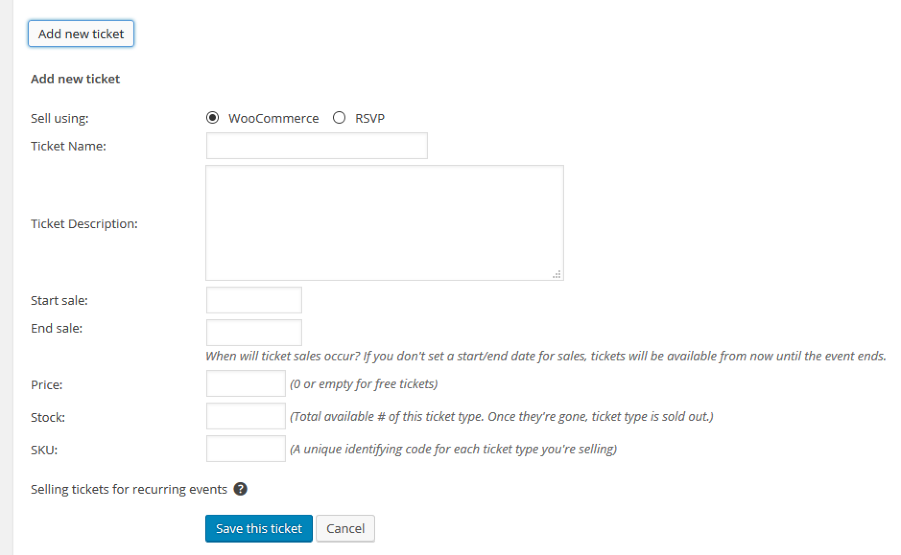
Also, is the event still in the future?
Let me know and we can go from here.
Thanks
January 5, 2016 at 12:39 am #1050247ParticipantHi,
the event is in the future. For settings see attached screenshots: https://www.dropbox.com/sh/12zo20pk415ow36/AAAzOeF_469lsQ4OBzRznNula?dl=0How to proceed?
Cheers, DanielJanuary 5, 2016 at 1:11 am #1050251ParticipantHi again,
apparently the issue is related to WPML plugins. Once they are deactivated all tickets show in the event when editing it. This is a big issue for me as our site heavily relies on WPML to manage the translation into at least 6 languages.
Any idea how to fix this?
Cheers, DanielJanuary 5, 2016 at 8:39 am #1050554MemberHi,
Sorry for the issues here, but unfortunately, at this time Tickets Plus does not support ticket creation with WPML.
If you can create one ticket to display across all the languages that might work, but it beyond that we do not support it at this time.
I understand that can be a deal breaker and to request a refund please follow our policy outlined here:
And we can take care of it.
If you would like to request that feature please head to our UserVoice Page and add your own or upvote that feature as they will increase the chances of it being added to a future version.
http://tribe.uservoice.com/forums/195723-feature-ideas
Thanks
January 22, 2016 at 7:07 am #1060521Danny Andersen
ParticipantI have the same problem… You said: “you can create one ticket to display across all the languages” – how is this done? When I create a woocommerce ticket it just don’t show up. So how do you do what you suggest?
January 22, 2016 at 8:44 am #1060574MemberHi Danny,
I guess my suggestion is to turn off translations for all Products. That might not work for most people though.
We do not support WPML with tickets so I am not able to provide much more information then that unfortunately.
I have used this coding with WPML in the past to force a single language:
global $sitepress;

//changes to the default language

$sitepress->switch_lang( $sitepress->get_default_language() );
//Enter Coding here
//changes to the current language
$sitepress->switch_lang( ICL_LANGUAGE_CODE );
You could follow our themer’s guide:
https://theeventscalendar.com/knowledgebase/themers-guide/
And move this template:
plugins/event-tickets-plus/src/views/wootickets/tickets.php
or here if using WooCommerce Tickets still:
plugins/wootickets/src/views/wootickets/tickets.phpTo your theme here:
yourtheme/tribe-events/wootickets/tickets.php
In that file above the ob_stat(); at the top you could add this:
global $sitepress;

//changes to the default language

$sitepress->switch_lang( $sitepress->get_default_language() );
Then at the bottom of the template add this:
//changes to the current language

$sitepress->switch_lang( ICL_LANGUAGE_CODE );
That might work to show the tickets in the default language for the events.
Beyond that we do not have anything else to provide on this.
Thanks
February 19, 2016 at 8:35 am #1078175KeymasterThis topic has not been active for quite some time and will now be closed.
If you still need assistance please simply open a new topic (linking to this one if necessary)
and one of the team will be only too happy to help. -
AuthorPosts
- The topic ‘No tickets possible on WordPress 4.4 with Woocommerce?’ is closed to new replies.