

Forum Replies Created
-
AuthorPosts
-
Barry
MemberHi GitStray – great question!
You can of course create multiple tickets with different costs, something like this:
- Basic (registration only) – 17.00
- 400m dash – 20.00
- 200m dash – 20.00
Though I fully realize that could be unwieldy if you want to support all the possible combinations. In short, then, this isn’t directly supported right at this time – but is probably possible via some further custom development work.
While we can’t assist with tasks on that level, it certainly seems like it should be possible to implement if you have or have access to a developer with experience of WordPress and all the relevant platforms (Event Tickets and Event Tickets Plus on our side, and the ecommerce plugin you are using on the other).
Thanks!
MemberHi Nhu,
Thanks for contacting us!
That may be possible as a further customization – but isn’t directly configurable through the plugin settings pages.
While we can’t provide in depth support or guidance for custom dev tasks, I’d be interested to know more about what you pictured here: do you wish the default to be a fixed date, or something dynamic (ie, 10 days ahead of the current date, etc)?
MemberUnfortunately, so far, we’ve been unable to replicate this on our side – which of course makes it very hard for us to fix as we can’t see the problem beyond what you’ve described in your report here (it further seems to be only a few users who are hitting this).
So, keen as we are to reach some sort of resolution, we really would love for confirmation from a user like you as to whether this happens in a clean test environment or not.
I fully understand that you may not have the time to run through those steps, though, and we’ll continue to look out for other opportunities to get to grips with this.
MemberThanks, Oliver. Work to ‘refresh’ things in this area is currently underway 🙂
MemberHi Jerome,
Would you be able to enable WP_DEBUG? That might give us something more useful than the current 503 error page.
Alternatively, as before, are you able to work with your host or developer (if you have one) to review your error logs and see if the problem is recorded there?
Thanks!
MemberHi Greta,
Thanks for contacting us.
I’m afraid we don’t actually provide technical support here in the pre-sales forum, so the best course of action here is to login first of all and then post your question within our premium forums or else you can post in our wordpress.org forum where other members of our fantastic community may be able to advise you 🙂
Thanks!
MemberHi Peter,
Thanks for contacting us and our apologies for the delay.
We have a feature request logged to support the import of images supplied through iCal feeds, but it is not currently something we support with Event Aggregator.
On the other hand, our recent 4.5 release introduced support for full imports from one The Events Calendar installation to another. Using that mechanism is much better if you are working between different sites that all run the latest versions of our plugins as richer, more complete import/export functionality becomes available.
I hope that helps!
MemberI trust you’ll send an email or reply to this support thread when the fix is deployed.
Absolutely. This topic has been linked to the bug report (on our internal tracker) and, as soon as it has been resolved, we’ll update this and any similarly linked support topics.
MemberThanks, Gilles. Please do let us know by opening a new topic if we can help with anything else (or indeed if you have any other similarly useful feedback) 🙂
MemberHi Marcela,
Almost all of the frontend views generated by our plugins can be customized pretty extensively – and safely – via template overrides (which are simply custom copies of templates located in your theme or child theme). An overview can be found here:
theeventscalendar.com/knowledgebase/themers-guide
So, if you simply wish to reformat the regular list of tickets into a tabular form that ought to be pretty straightforward 🙂
I hope that helps!
MemberHi! On reviewing your site, the previous/next event links on single event pages are not present – am I correct in thinking you resolved this already, or else can you clarify which links/breadcrumbs you are interested in removing?
Thanks!
April 28, 2017 at 9:08 am in reply to: Compatibility with MS Azure, Standard-Apache/MySQL-System? #1275833MemberHi Kordula,
Great question and thank you for your interest in our plugins 🙂
I believe that should work though I’d highlight that it’s not a platform we ourselves are particularly familiar with (so if there does turn out to be any quirks, we may not be as well positioned to assist as might be the case with more popular hosting stacks).
The Events Calendar itself is completely free to download and install so the best advice I can offer is to take it for a test drive 🙂
Thanks!
MemberHi Claire,
Thanks for contacting us and for considering Event Tickets Plus!
I’m not completely sure I follow your question, but let me try to explain and if I’m misunderstanding feel free to poke me further on this.
The basic idea, though, if you visit Events → Ticket Fieldsets is that you can define a reusable group of custom fields. You can then give them a name – “Questions for Rock Concert Attendees” or whatever is appropriate – and save them by hitting the publish button.
From there, if you decide to use that set of questions for a new ticket, then you can do so by checking the request information for each attendee during registration box when creating or editing individual tickets (it wouldn’t really make sense for that particular field to exist in the ticket fieldset editor itself, because this is what controls whether custom fields are used for individual tickets) and then select your pre-saved set of questions.
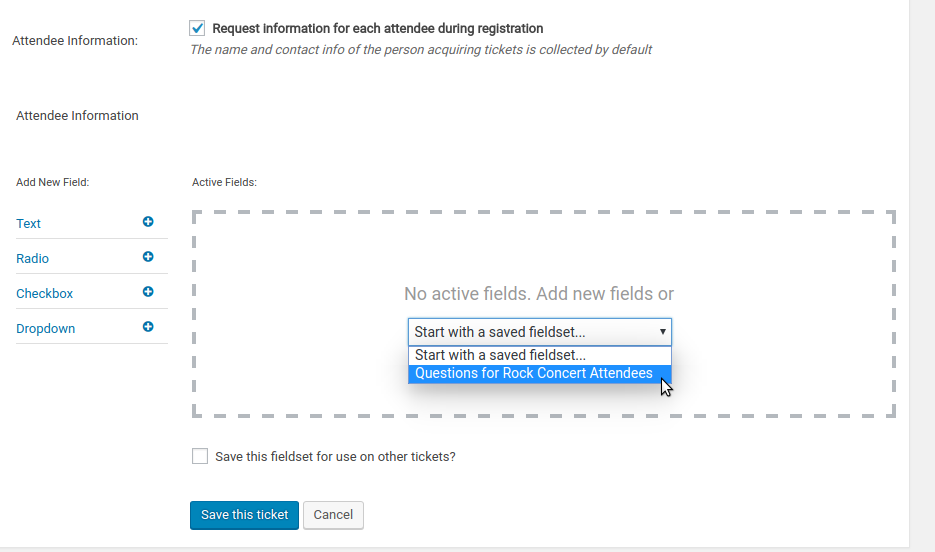
Does that clarify at all/am I misunderstanding?
MemberNo problem at all, those boundaries are not always clear 🙂
MemberHi Teri, I do have an update: we’ve been working on this and it looks like initial tests are passing: we hope to deploy the fix soon.
Do note however that this won’t ship in an updated version of The Events Calendar, as the source of the problem was within the Event Aggregator service rather than the code running within your local WordPress installation.
Thanks so much for your patience – almost there now!
-
AuthorPosts