

Forum Replies Created
-
AuthorPosts
-
May 22, 2015 at 2:08 pm in reply to: Adding "add to cart" functionality outside of event page #964604
Barry
MemberI’m going to propose a different route here. How about adding the following snippet to your theme’s functions.php file or any other suitable location you might prefer:
https://gist.github.com/barryhughes/36a276dca395ee0ea20c
Does that work for you?
MemberDefinitely – and we’re happy to help a little further if we can. As requested, can you share the minimal theme source (via Pastebin/Gist) needed in order to replicate this?
Thanks!
MemberYes, there are definitely some general compatibility issues – for instance tickets may be associated with the wrong post entities, if I recall correctly – and again that comes down to the way WPML functions and alters the environment.
All I can say is we’re aware work needs to be done here – not necessarily or exclusively in relation to our own codebase – and of course we realize this is a source of frustration for you and others. It’s also a large and complex issue to tackle but one which, hopefully, we will start to get to grips with in the course of this year.
As there is little else we can offer right at this point in time I’ll go ahead and close this topic – but should anything else crop up please don’t hesitate to post new topics as needed and one of the team will be only too happy to assist 🙂
May 22, 2015 at 1:21 pm in reply to: Month View Changed to Dots & Giant Images Now in List View #964591MemberHi!
Can you point me to a URL where I can see the widget (perhaps I missed it – but I couldn’t locate it when I visited your site)?
Could you also let me know how the widget is configured – ie, have you applied any filters/how many events is it set to display?
Thanks!
May 22, 2015 at 1:18 pm in reply to: EventBrite Tickets Single Event Improt not visable after installation and verifi #964590MemberThis is strange.
So within the Events menu (in the admin environment), it skips straight over the Import: Eventbrite option?
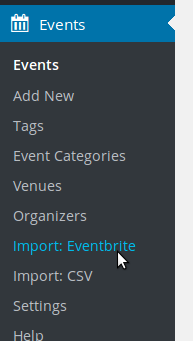
Yet you can still navigate to the Events → Settings → Eventbrite settings tab? I just want to be absolutely sure I’m understanding the problem.
Thanks!
MemberHi Mason,
I’m afraid we do not generally provide specific timelines for planned features or functionality.
In this case it is not absolutely clear that changes are even required or would be best made in our own codebase – which already follows most or all WordPress best practices for internationalization.
It could be that WPML itself needs to change how it works to accommodate a wider range of plugins, like our own, or alternatively it may need to introduce new facilities our plugins can interact with before we can make changes on our end.
Given the number of unknowns we just can’t commit even to an approximate timeline.
May 22, 2015 at 8:39 am in reply to: EventBrite Tickets Single Event Improt not visable after installation and verifi #964501MemberThat is odd, all the more so as it looks like you were able to successfully set up your Eventbrite API key.
Would it be possible for you to run through our standard troubleshooting steps in case there is a conflict of some kind?
MemberWe can definitely check in on this – but since it’s really a distinct problem from the initial issue where Eventbrite was failing due to a bug on 32bit server, can I ask you to create a fresh topic?
(Please also avoid using private replies unless you are sharing URLs or something else you prefer not to be shared publicly – it makes it hard for others to read and benefit from support topics if everything is marked as private, even when no sensitive information is being shared.)
Thanks!
MemberHi Ruud,
There isn’t really an easily-accessible means of resetting all the settings (besides starting with a clean installation).
If you feel comfortable doing so you could edit the database directly and delete the tribe_events_calendar_options entry from the options table. Please make the precaution of taking a backup before doing this, though 🙂
MemberGlad it’s working and thanks for your patience while we worked through this 🙂
Re your featured image problem, you would need to manually update the featured image – I’m afraid that in this regard it will not automatically stay in sync.
MemberHi Jeremy,
That’s odd.
I see what I think is the problem you are describing for some events but not others.
I also note that you seem to have made a few customizations to month view (or perhaps your theme shipped with some customizations): I’m curious, might these relate to the problem you are seeing with tooltips?
If you (temporarily) remove any template overrides or other event-related customizations, is the issue resolved?
If we can pin down the source of this issue that would be a great start 🙂
MemberHi Stu,
It looks like you may have made a mistake in terms of how you commented out the code.
/* <?php ... ?> */
The above will not do what you are perhaps expecting it to – this style of comment can only be used within PHP blocks, like this:
<?php /* ... */ ?>
PHP comments also have no effect on HTML. Perhaps instead you could delete this block entirely? If you need it back at some point, you could always restore it from the pristine copy of the template found within the plugin views directory (or just delete the template override).
Would that work?
May 22, 2015 at 7:29 am in reply to: EventBrite Tickets Single Event Improt not visable after installation and verifi #964457MemberHi there!
It looks like you didn’t provide the system information (found in the Events → Settings → Help screen) when you opened this topic.
Would it be possible for you to share this now by posting it in a private reply?
Thanks!
May 22, 2015 at 7:11 am in reply to: Does the Pro version of The Events Calendar come with a Payment Gateway? #964449MemberHi there,
Thanks for considering our plugins!
The key difference is that WooCommerce Tickets allows you to set up and sell tickets using The Events Calendar and WooCommerce (both of which are free).
Events Calendar PRO has different goals unrelated to selling tickets – it extends the capabilities of The Events Calendar with new ways to view the calendar (like week, photo and map view) and with additional systems such as recurring event management.
If your primary goal here is selling tickets to classes, I’d imagine you only need WooCommerce Tickets.
Does that clarify things?
May 22, 2015 at 7:01 am in reply to: Adding "add to cart" functionality outside of event page #964446MemberHi Northern Pacific Digital!
At time of writing the URL you provided doesn’t resolve/never finishes loading and so I’m afraid I cannot take a look at this time.
I’m also sorry that the approach outlined in the other topic wasn’t quite clear enough for you – but please do understand that when it comes to customization work we are generally limited to outlining a strategy and providing some helpful resources: the implementation is something you need to drive forward under your own steam.
I have to say that I think Geoff did a nice job of concisely parceling up the information in that other topic. Can you confirm which part is causing problems/isn’t clear enough – did you manage to set up a template override for instance and add the suggested function call?
What does your template override code like like at this point (can you share it via a Pastebin or Gist link)?
Thanks 🙂
-
AuthorPosts