

Forum Replies Created
-
AuthorPosts
-
April 13, 2017 at 7:51 am in reply to: after purchase ticket with BACS and check the customer get ticket right away. #1269452
Barry
MemberHi Inaki,
Thanks for contacting us 🙂
This knowledgebase article about WooCommerce specific settings may help. Basically, you can control when attendee records should be created and when the tickets should be sent to your customers.
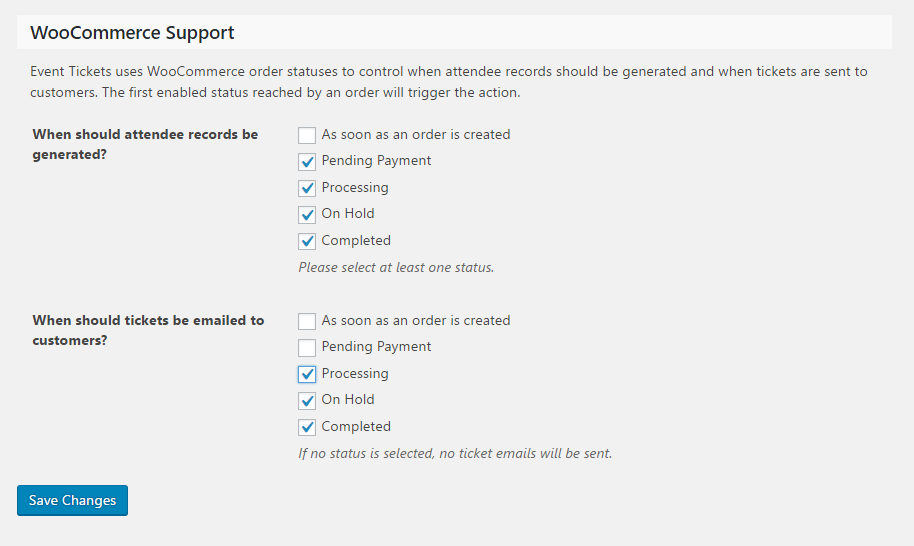
Using the above screenshot as an example, you might adjust the second setting (“When should tickets be emailed to customers?”) so that only Completed is checked — that way tickets will not be sent unless the order has actually completed.
Does that help at all?
MemberHi Sean,
That’s an interesting question!
Unfortunately there’s not quite enough information to help me fully understand the scenario. Do you mean that, if a user is logged in, calendar view should only display those events they have RSVP’d to (wouldn’t that stop them from finding events in the first place)?
I’d love to know more so I can guide you if at all possible — though, please be aware that the degree of support we can offer for custom development tasks tends to be limited 🙂
Thanks!
MemberHi Ingrid,
I’m sorry to hear you’ve hit up against some difficulties.
My hunch is that this is indeed a conflict of some kind and if you didn’t deactivate all other plugins (except for The Events Calendar) then doing so is probably worthwhile.
I realize that may not be a step you are comfortable with on a live site, so a good alternative is to create a test site (which can be as simple as a fresh installation of WordPress in a subdirectory – ie example.com/test-wp – which is something most hosts make pretty straightforward) and add only The Events Calendar and your Event Aggregator key to begin with.
Confirm the problem doesn’t happen there, then begin adding the same plugins and ultimately the same theme as you have on your live site. Hopefully, you can then discover which component is triggering the conflict.
Would it be possible to give this a go?
Thanks!
MemberHi Chris!
I’m afraid we can’t offer guidance in relation to custom coding with Follow-up Emails, as that isn’t our plugin.
Extracting the custom field value (if you are using “regular” WordPress custom fields) ought to be easy enough, though, by using get_post_meta() — the use of which would be something like:
get_post_meta( $event_id, ‘_your_custom_field_name’, true );
Good luck with the project — and if you discover anything useful that might help other FUE users it would be great to hear back from you 🙂
April 13, 2017 at 7:26 am in reply to: Events Calander Pro not displaying images in sidebar listing #1269418MemberHi Kelly – great question!
By default, the advanced events list widget only displays featured images if the event itself is marked as featured:
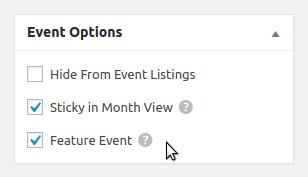
The above setting can be found within the event editor screen. “Regular” events, however, do not show a featured image. It’s certainly possible to change this behaviour, though, via a template override. The basic process would be as follows:
- Locate plugins/events-pro/src/views/pro/widgets/modules/single-event.php
- Copy this to YOUR_THEME/tribe-events/pro/widgets/modules/single-event.php
- Within that copy, find the line containing tribe( ‘tec.featured_events’ )->is_featured( $post_id )
- Change that line to simply read true
With that done, you should find that featured images display within the widget even if the event itself is not ‘featured’ 🙂
I hope that helps!
MemberThat’s unfortunate.
WPML is a great tool and we understand why you and so many others depend on it, but it is also a complex one and our initial roll-out of WPML compatibility changes (for The Events Calendar and Events Calendar PRO) involved a considerable effort – in fact, we have some outstanding issues that still need to be resolved there.
With that in mind, I’m sorry to say that – at this time – I can’t really give you an indication of when WPML support will be added to Event Tickets/Event Tickets Plus.
MemberThank you – we appreciate exactly this kind of feedback.
MemberSo far I’m unable to replicate.
I do see however that you are using WPML and I wonder if that is the complicating factor, here (unfortunately, we do not yet support WPML integration with Event Tickets or Event Tickets Plus).
I don’t expect you to deactivate WPML to test that theory, but I wonder if you could create a test site in a subdirectory (ie, example.com/test-wp and install only WooCommerce plus the latest versions of Event Tickets and Event Tickets Plus — and optionally The Events Calendar, too). Can you replicate the same issue in that environment?
MemberOne option could be to keep Yoast enabled and try some code like this to workaround the situation (it could be added to a custom plugin, for example):
function unregister_tribe_events_shortcode() {
	remove_shortcode( 'tribe_events' );
}

function reregister_tribe_events_shortcode() {
	if ( ! class_exists( 'Tribe__Events__Pro__Main' ) ) {
		return;
	}

	$tribe_shortcodes = Tribe__Events__Pro__Main::instance()->shortcodes;
	add_shortcode( 'tribe_events', array( $tribe_shortcodes, 'tribe_events' ) );
}

add_action( 'init', 'unregister_tribe_events_shortcode', 20 );
add_action( 'wp_head', 'reregister_tribe_events_shortcode', 5 );
Alternatively, you could try a different SEO solution or even experiment with different settings provided by Yoast. The above might be sufficient by itself, though.
Let me know if it helps!
MemberOK – perhaps setting the End of Day Cutoff to a value like 8am would help? That setting can be found in the Events → Settings → General tab.
If you happen to have month view caching enabled (found in Events → Settings → Display) the impact may not be immediate, so you may wish to temporarily disable this while you adjust things.
Does that work for you?
MemberOK — and if you try deactivating only Yoast at this point, do you find the problem is resolved? While I appreciate that may not be viable as a long term solution, I’m keen to ascertain if our experience is the same or not.
MemberHi Lance,
Thanks for the update. I’ve shortened the logs you shared just a little to make for easier reading (they essentially repeat the same error in relation to the same import record – 23175 – which is noteworthy).
Please bear with me a little longer while we check this out in some more detail.
MemberHi!
Apologies for the delay and for any problems you’ve been hitting. At this point, can you confirm that you also updated Event Tickets Plus to our latest version (4.4.5)?
Thanks 🙂
MemberGreat to hear – thanks for the update, Deichenlaub.
MemberThanks for clarifying.
To follow from Cliff’s previous note about the same thing, please be aware that we do not see the inline images you are trying to share. Are you replying by email? If so, that could explain why they aren’t appearing for us and it may be better if you post directly on the forum should you wish to share screenshots (or else host them on Dropbox or a similar service and provide links).
Go to the calendar. Select List view. Select Events from August 1, then scroll through until you see all the recurring events. On my screen only the first one appears.
I see the same. However, your system information tells me that you have enabled the following setting:
Recurring event instances setting — Show only the first instance of each recurring event (only affects list-style views)
This means that only the first or ‘parent’ event will appear within list-style views, such as list view itself. If you don’t want that behaviour I’d recommend disabling that setting.
Can you confirm if that helps?
Question for you: if I uninstall all the Modern Tribe plugins and reinstall latest versions, will it find existing events in the database, or will I lose everything? Would that eliminate potential sources of the problem?
Removing our plugins should not result in data being dropped from the database – so yes, this should be possible. With that said, it is of course prudent to make regular backups of your database and know how to restore them in the event that something does go wrong.
Is there a way to export the event data and re-import to re-establish the event tables from scratch?
It’s possible, yes – one way would be to use WordPress’s own import/export tools and select only event and related post types such as venues and organizers for export. There are no dedicated event tables at this time, though – rather event data is contained within the existing post and post meta tables.
I hope that helps!
-
AuthorPosts