
Home › Forums › Calendar Products › Events Calendar PRO › Events Calander Pro not displaying images in sidebar listing
- This topic has 5 replies, 2 voices, and was last updated 9 years, 5 months ago by
Kelly.
-
AuthorPosts
-
April 10, 2017 at 7:11 pm #1268015
Kelly
Participanthttp://yogavidya.com.au/events/
Hi there,
The events widget is not showing the images in the event listing on the sidebar. I have provided a link of the events page here so you can see what I am talking about. Could you please advise how to make the featured image show on the listing. I know it has to be something simple, but I can’t figure it out. I tried adding the shortcode for tribe events in the sidebar but it doesn’t work at all. Also, where can I find all the shortcodes?
Regards,
KellyApril 13, 2017 at 7:26 am #1269418Barry
MemberHi Kelly – great question!
By default, the advanced events list widget only displays featured images if the event itself is marked as featured:
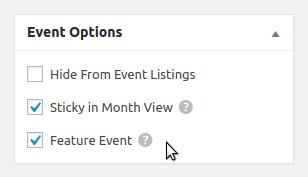
The above setting can be found within the event editor screen. “Regular” events, however, do not show a featured image. It’s certainly possible to change this behaviour, though, via a template override. The basic process would be as follows:
- Locate plugins/events-pro/src/views/pro/widgets/modules/single-event.php
- Copy this to YOUR_THEME/tribe-events/pro/widgets/modules/single-event.php
- Within that copy, find the line containing tribe( ‘tec.featured_events’ )->is_featured( $post_id )
- Change that line to simply read true
With that done, you should find that featured images display within the widget even if the event itself is not ‘featured’ 🙂
I hope that helps!
April 14, 2017 at 3:27 am #1269912ParticipantThanks so much for getting back to me Barry.
I didn’t quite understand where to find the line you referred to so I have just made all the events featured events which is perfect.
Is it possible to disable the “upcoming events” heading on the events page? I can see I can disable a lot of the options but I can’t see how to get rid of that. I have set up my own events page using shortcake and have already created the heading to match the rest of the site a lot more. It would be great if I could disable the plugins default heading. I did have a look in the forums but could’ find anything.
April 14, 2017 at 7:23 am #1269967MemberHi Kelly!
Is it possible to disable the “upcoming events” heading on the events page?
Yes, though it would require a further customization. One approach would be to add some custom CSS:
.tribe-events-page-title { display: none }This can be done via the Appearance → Customize → Additional CSS setting.
If you need further assistance on this or the above approach doesn’t work, would you mind creating a new topic? We do try hard to stick to one issue per forum topic – it helps us to provide timely assistance to everyone and, by keeping each topic focused on a specific problem, it also makes it a lot easier for others to research problems and solutions in the future.
Thanks!
May 6, 2017 at 9:35 am #1279808Support Droid
KeymasterHey there! This thread has been pretty quiet for the last three weeks, so we’re going to go ahead and close it to avoid confusion with other topics. If you’re still looking for help with this, please do open a new thread, reference this one and we’d be more than happy to continue the conversation over there.
Thanks so much!
The Events Calendar Support Team -
AuthorPosts
- The topic ‘Events Calander Pro not displaying images in sidebar listing’ is closed to new replies.