

Forum Replies Created
-
AuthorPosts
-
Andras
KeymasterHello Brian,
I have checked your issue with the current releases of the plugins and for me it works without any issue.
What version of the plugins are you using?
Cheers,
AndrasKeymasterHello Benjamin,
Thanks for reaching out with this question. Let me try to help you.
If I understand correctly, your issue is that you want to feed a specific image to facebook, but instead you are getting a random one each time. Is that it?
I check the code of your events page and there I see 2 images as og:image. One is the header image, the other is a revolver.
If I check your page with the facebook debug tool, then it pulls the header image:
https://developers.facebook.com/tools/debug/sharing/?q=http%3A%2F%2Fwww.stationcasinosevents.com%2Fevents%2FYou want a different image to be pulled?
Andras
KeymasterHello James,
Thanks for reaching out and I’m sorry you are having this issue.
What happens is that when you delete an imported event, it still remains in the database, only hidden, so the importer will not import it again. There’s a workaround / snippet for this.
Please check this thread where the issue came up. You will find the solution and the snippet there in the beginning:
Please let me know if this helps or is you have any other questions.
Cheers,
AndrasAugust 10, 2016 at 11:11 am in reply to: Pro Widget Shortcodes – How to include uncategorized events? #1150114KeymasterHi Riccardo,
Thanks for reaching out.
I’m afraid listing events without any category with a shortcode is not possible at the moment. You would need to assign a generic category to those events and then you can include them in the list.
I hope this helps.As for your second question, please allow me some time to look into the issue. I’ll get back to you on that soon. Thanks for your patience!
Cheers,
AndrasAugust 10, 2016 at 8:40 am in reply to: This Week Widget week start does not match settings #1149998KeymasterHi Julia,
Thanks for checking this. Yes, you can switch back your theme and plugins.
It looks like an issue with the plugin. The week seems to switch at UTC midnight.I have already filed a bugreport and added your thread to it. We’ll be investigating the issue. I ask for your patience.
I am going to close this ticket to new replies, but the issue is still open and we will update it once we release a fix.
If you have any new questions or issues please create a new ticket and reference this one.
Cheers,
AndrasAugust 10, 2016 at 8:35 am in reply to: Sending/Receiving Notification of purchased ticket issue. #1149996KeymasterThis reply is private.
August 9, 2016 at 4:31 pm in reply to: Remove link before category title and show description #1149774KeymasterHi Marlene,
Thanks for reaching out.
In order to display the category description after the title, paste this snippet into your functions.php file:
function category_description_below_title() {
	if ( tribe_is_photo () ) echo '<div class="category-description" style="text-align: center;">' . category_description() . '</div>';
}
add_action( 'tribe_events_after_the_title', 'category_description_below_title' );
This will add the description in the photo view. If you would like to add it to all views, then remove this part:
if ( tribe_is_photo () )You can format the category description with css using the .category-description class. And of course, you can further adjust the function for your needs.
As for your second request, that looks a bit more complicated. Please give me some time to look into that a bit.
Cheers,
AndrasAugust 9, 2016 at 4:03 pm in reply to: [tribe-this-week] shortcode – alternate day format D jS #1149764KeymasterHallo Stefan,
Thanks for sharing this with us. I added your thread to our bugticket.
I am going to close this ticket to new replies, but the issue is still open and we will update this ticket once we release a fix.
If you have any new questions or issues please create a new ticket and reference this one.
Thanks and cheers,
AndrasKeymaster🙂 Thanks!
If you can, please let me know when it jumps. I’m super curious. 🙂
Andras
KeymasterThanks Julia,
Meanwhile I managed to recreate the issue locally.
Could you please send me a screenshot of your Timezone settings under Settings > General, like this?
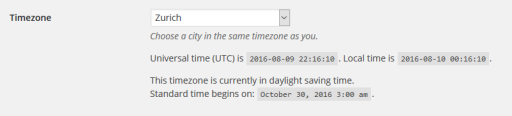
I’ll keep investigating.
Andras
KeymasterThis reply is private.
KeymasterWhere is your server located? Is it also in New Zealand, so in the same timezone?
And do you know what time the widget jumps to the right week? I see it’s almost 10am in Auckland and it still shows the last week. This might shed a light on things.
Andras
August 9, 2016 at 2:44 pm in reply to: tickets showing differently for logged in user over non logged in visitor #1149713KeymasterHi Amanda,
I am glad to see you were able to figure it out.
I am going to go ahead and close this ticket. If you have a similar issue or another in the future, please do not hesitate to create a new ticket. We’ll be happy to help.
Cheers,
AndrasAugust 9, 2016 at 2:40 pm in reply to: Sending/Receiving Notification of purchased ticket issue. #1149710KeymasterHello metapixel,
As a first I would remove all such customization and check if the issue still exists.
Could you also share with me your system information? That might shed some light on the issue. Here’s a guide for that: https://theeventscalendar.com/knowledgebase/sharing-sys-info/
Let me know the results. Thanks,
AndrasKeymasterHello again,
Do you have any customizations / custom codes in your functions.php file? If yes then removing these and running a test like that would be worth it.
Also, would it be possible that you do a test for conflicting plugins / theme based on this guide? https://theeventscalendar.com/knowledgebase/testing-for-conflicts/
In short, you need to switch off all plugins except the Events Calendar ones, and switch to a default theme like twentysixteen, and check if the issue still exists.
I’ll be waiting for your results.
Cheers,
Andras -
AuthorPosts