

Forum Replies Created
-
AuthorPosts
-
Andras
KeymasterHi Julia,
I take it you set it the start of the week to Wednesday. This is what I see:
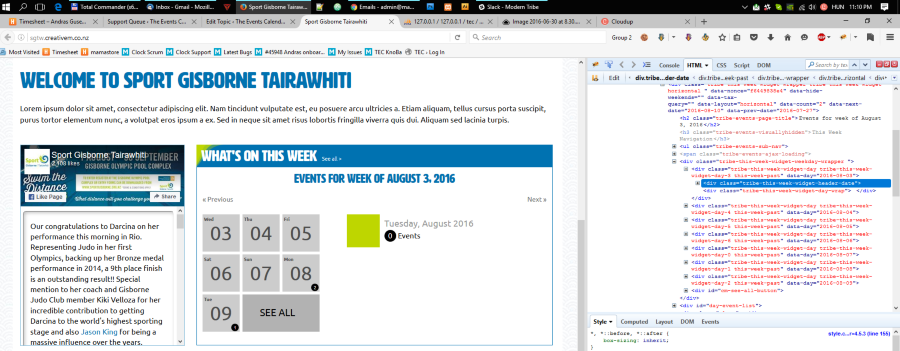
Since it is already Wednesday in New Zealand, it should be showing the next week. Very strange.
I ask for a bit of patience, please give me some time to investigate. Meanwhile I would like to ask you to keep updating the start of the week before leaving for the night.
Thank you and I’ll be in touch soon.
Andras
KeymasterNo problem and thanks for your patience.
I’m going to close this ticket for now. If you have any other question, do not hesitate to open a new thread and we’ll help.
Cheers,
AndrasKeymasterHello Matt,
If the recurring events stopped after some customizing, then it is highly likely that the customizing did something bad. Can you undo the customizing and check if that helps?
What were actually the customizations you tried? Maybe that will bring us closer to what happened.
Resetting the plugin can be done but requires working in the database. If you are comfortable with that, then this is what you need to do: first you need to deactivate all your Events Calendar plugins, then you will need to delete all rows from your wp_options table that contain the string ‘tribe’.
Before doing all this I recommend that you do a full site and database backup, just in case.
Waiting for your feedback.
Andras
KeymasterHello Mark,
Sorry you are having this issue. Let me try to help you with that.
In order to investigate this, could you first share with me your system information? Here’s how you can do that:
https://theeventscalendar.com/knowledgebase/sharing-sys-info/Do you maybe have some custom code in your functions.php file that could influence this?
Thanks,
AndrasKeymasterHi Daniel,
Sorry you are having trouble. Let me help you with this.
My very first guess is to check your main menu set up. It is usually under Appearance > Menu, or it could be handled by your theme. There could be a checkbox or a dropdown where you can set where the link should open. Look for something like ‘new tab’, ‘new window’ or if it is coded then ‘target=”_blank”.
If this does not help you fix it, then please share with me your system information, so we can investigate further. Here’s a handy guide to help you with this task:
https://theeventscalendar.com/knowledgebase/sharing-sys-info/
Cheers,
AndrasKeymasterHi Atul,
Thanks for reaching out!
I’m not sure we had this problem before, but if you are willing to work on it with me, then I can help you find the source of the issue.
As first I checked the code of the 2 sites. It seems that on the techpal site there is the following css code put in somewhere, which overwrites the category colors:
.events-archive.events-gridview #tribe-events-content table .type-tribe_events {

border-color: #e4e4e4;

}
This is done through The Events Calendar Customizer (Appearance > Customize > The Events Calendar). So setting made there overwrites the category colors.
I also recommend checking this thread, which might help you find the source of the issue.
Let me know if this helps.
Cheers,
AndrasAugust 8, 2016 at 11:04 am in reply to: tickets showing differently for logged in user over non logged in visitor #1149103KeymasterHello Amanda,
Thanks for reaching out! I’m sorry you are having this issue. Let me help you with it.
Beside a caching plugin also the browser can cache some pages based on some settings in the browser itself. Try to empty the browser cache and check the page then.
In most recent browsers you can delete the cache with pressing Ctrl + Shift + Del. This should bring up a window where you can select what all you want to delete.
Try and let me know how that works out.
Cheers,
AndrasAugust 8, 2016 at 10:59 am in reply to: Sending/Receiving Notification of purchased ticket issue. #1149101KeymasterHi metapixel,
Thanks for reaching out! Let me help you with this one.
Based on the error log you sent me it seems like there is a conflict with your theme. Could you please test if the same happens when you are using a default theme like twentysixteen or twentyfourteen?
I suspect that there have been changes in our plugin and the theme creator didn’t yet implement the changes in the files yet. Namely this file:
wp-content/themes/yuneoh/single-ultimate-eventure.php
Let me know how the test works out.
Cheers,
AndrasAugust 8, 2016 at 10:01 am in reply to: This Week Widget week start does not match settings #1149052KeymasterHello Julia,
Thanks for reaching out! That is an interesting problem, let me try to help you with that.
I’m sitting in Europe, I checked your site now (Monday, 7pm CEST / Tuesday 5am Auckland time) and Tuesday is marked as Today, correctly. So that’s good.
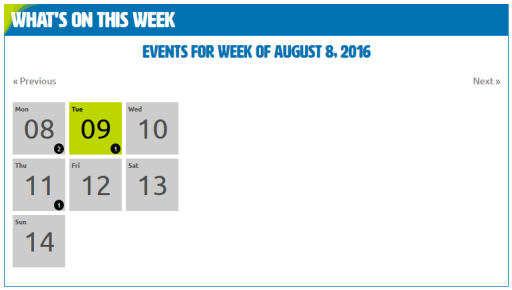
In your system information I see that you are using TEC 4.2.3. A few days ago we have released a bugfix update, I would recommend you to update the plugin in any case.
In the timezone settings, did you also try using the other setting, Use the local timezones for each event?
Until you check these I will also try to ask the team if anybody has any knowledge on this.
Cheers,
AndrasKeymasterHello again Eduardo,
Thanks for reaching out!
We have a ticket open for this and it is assigned to one of our guys, but there is no target date set for it yet, so I cannot commit on that.
The fact that it’s assigned to someone is already good news. 🙂
Cheers,
AndrasKeymasterHello Matthew,
Thanks for sharing those screenshots. In the second one I see there are no recurrence rules set up. I take it that is the button that doesn’t work.
I see that WP and all our plugins are updated. I take it that the rest as well.
I would recommend you to to a test for plugin / theme conflict based on this guide here: https://theeventscalendar.com/knowledgebase/testing-for-conflicts/
That should eliminate any conflicts and could shed a light on the issue. Please do the test and get back to me with the results. And we’ll take it from there. I’ll be waiting.
Cheers,
AndrasAugust 8, 2016 at 7:37 am in reply to: Should I use W3 Total cache with The Events Calendar Pro? #1148969KeymasterHey Lucy,
It also depends on the viewer’s personal browser cache as well: how much disk space the user is using for cache and how much the user is browsing. The less space and more browsing means it won’t be a problem. More space used and less browsing means it will stay in the cache longer (it will not be replaced by other data).
Also depends on what the expiry settings of the pages / data are. I’m not a pro in W3 Total Cache, but there might be a setting for this either something like ‘Expiry’ or ‘Use browser cache’.
Let me know if this helps.
Andras
August 8, 2016 at 7:29 am in reply to: Do lots of instances of a recurring event slow my site donw #1148964KeymasterHello Lucy,
You’re welcome, happy to help out!
Since this is marked resolved I am going to close this ticket for now. If you need anything else related to this topic or another please post a new topic on the forum and we will be happy to help you.
Cheers,
AndrasKeymasterYou are welcome, Marcos!
Since this is marked resolved I am going to close this ticket, but if you need anything else related to this topic or another please post a new topic on the forum and we can help you out.
Cheers,
AndrasAugust 5, 2016 at 8:44 am in reply to: Do lots of instances of a recurring event slow my site donw #1148178KeymasterHi Lucy,
Thanks for reaching out! That’s a very good question you posted there.
Website speed is influenced by a lot of factors, starting from your hosting provider, server setup, plugins you use and the content you have. It is difficult to pin down what exactly causes the slow speed.
As for the recurring events and the 200 instances, think of them as if you had 200 blog posts. That is not too much I would say, there are WordPress sites with far more than that. Though a page load can definitely be slower if you are listing ALL your 200+ events on one page.
If you are willing, we can try to test what slows down your site.
There are several things you can try:
- Deactivate the Events Calendar Pro plugin and check if the site is faster or not. Don’t worry, your data will not be lost and as soon as you activate it again, it will be back to full functionality.
- Remove all recurring events (set their status to draft, you can do it with a bulk action) and check the speed again.
- You can do a conflict test (https://theeventscalendar.com/knowledgebase/testing-for-conflicts/) and check after switching on plugins one by one, when does it slow down. If you see a major difference after a plugin, most likely that is the culprit.
Try these and get back to me with the findings. Then we take it from there.
If you don’t find anything, then please share with me your system information as well. Here’s a handy guide for that:
https://theeventscalendar.com/knowledgebase/sharing-sys-info/Thanks and cheers,
Andras -
AuthorPosts