

Forum Replies Created
-
AuthorPosts
-
Andras
KeymasterThanks for the explanation. Here are the options you have.
1. Free option: The Events Calendar + Event Tickets
With Event Tickets you can collect registrations / RSVPs from users. Note, however, that if one user registers more RSVPs (‘buys’ more RSVPs), you can still only get one name and one email address.
2. $89 option: The Events Calendar + Event Tickets + Event Tickets Plus
With Event Tickets Plus you can sell tickets to events (via WooCommerce or other eCommerce platform) and you can collect custom attendee information. This will also allow you to collect information for all of the tickets / RSVPs sold, even if they are purchased by one user.
Since ET Plus is a premium plugin, you will also receive one year of Premium Support through our forums.
3. $178 option: The Events Calendar + Events Calendar Pro + Event Tickets + Event Tickets Plus
The EC Pro enables recurring events, custom attributes, venue pages, new widgets and a host of other premium features.
Conclusion: if you need the data of every person that has a ticket, then you will need option #2.
Let me know if you need any more info.
Cheers,
AndrasAugust 5, 2016 at 8:04 am in reply to: After Instal – No options to add event etc. Menu not showing in admin! #1148161KeymasterGreat, glad it helps!
I am going to go ahead and close this ticket, but if you need help on this or something else please post a new ticket.
Cheers,
AndrasPS: If you like our plugin, we would be happy to receive a review in the wordpress.org repository. Thanks!
KeymasterHi Melanie,
Got some good news for you. One of my colleagues looked at the code and found a solution. Just paste this snippet in your functions.php file, and remove the old bit.
add_action( ‘wootickets_after_save_ticket’, ‘tribe_add_category_to_woocommerce_tickets’ );
function tribe_add_category_to_woocommerce_tickets( $event_id ) {wp_set_object_terms( $event_id, ‘Ticket’, ‘product_cat’, true );
}
Now when a WooCommerce ticket is saved, then in WooCommerce products it will have the category ‘Ticket’ assigned to it.
Let me know if this helps.
Cheers,
AndrasKeymasterHello Marcos,
Thank you for your questions, let me try to answer them for you.
pro event calendar includes ticket plus?
No, these are separate plugins.
Events Calendar Pro gives you additional calendar views, the ability to create recurring events and advanced widgets.
Here’s a full description of the product: https://theeventscalendar.com/product/wordpress-events-calendar-pro/
Event Tickets Plus extends the functionality of our Event Tickets plugin. With the Plus version you can start selling tickets with your chosen eCommerce solution.
Here’s the link for this product: https://theeventscalendar.com/product/wordpress-event-tickets-plus/
with event calendar , you can know the entry list ?
Unfortunately not.
You need The Events Calendar and Event Tickets plugins (both free) to be able to collect registrations for your events. This is done in the form of RSVP.
In order to collect user information as well (e.g. name, age etc.) you will also need the Event Tickets Plus plugin.
Let me know if this answers your questions and if you have any more, don’t hesitate to ask. 🙂
Cheers,
AndrasKeymasterHi Riccardo,
Thanks for reaching out! I can help you with this one.
The prev/next month links are usually missing if there are no events in those months. If you still want to show the links, then follow the instructions in this knowledgebase article:
https://theeventscalendar.com/knowledgebase/add-nextprevious-links/
Let me know if that fixes it for you!
Cheers,
AndrasKeymasterHello again Matthew,
I’m sorry you are having that problem. Let me try to help you fix this.
Could you please send me a screenshot of
- the recurrence rules of the event
- the Recurring event instances setting on the General tab
Thanks,
AndrasAugust 5, 2016 at 3:26 am in reply to: After Instal – No options to add event etc. Menu not showing in admin! #1148041KeymasterHello Harrie,
Welcome to the forums and thanks for reaching out! I can help you with this issue.
Thanks for submitting your system information! Based on that I see that you don’t have our core plugin, The Events Calendar installed. Without that Event Tickets and ET Plus will not work.
You can download The Events Calendar from the wordpress.org plugin repo for free. Here’s the link:
Let me know if this solves your problem.
Cheers,
AndrasKeymasterCześć Adam,
Welcome to the forums and thanks for reaching out.
What might help you in this case is Events Calendar Pro. The Pro extension of our plugin supports the creation of recurring events, so basically you can set up one movie event with different recurrence rules. The rules can be customized in detail, basically any way you want: daily, weekly, monthly, custom days of the week, custom dates and so on. Check the screenshot of some of the settings.
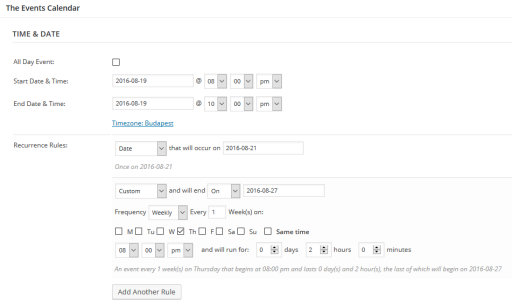
Though I’m afraid all instances of a recurring event will show up on your calendar. In my thinking, if you have a movie on September 10-11-12, as a customer I would like to see it in the calendar on all dates.
Please let me know if this helps. Also, if you give me a more detailed explanation of what your desired outcome is I can try to help you further.
Cheers,
AndrasKeymasterHi Gregory,
I’m glad I could help!
Thanks for the tip, we might just do that. Indeed it would save us some time. 🙂
Since this is marked resolved I am going to close this ticket, but if you need anything else related to this topic or another please post a new topic on the forum and we can help you out.
Cheers,
AndrasKeymasterHello Melissa,
I’m super stoked to hear you managed to get the desired result! 🙂
Since this is marked resolved I am going to close this ticket, but if you need anything else related to this topic or another please post a new topic on the forum and we can help you out.
Cheers,
AndrasKeymasterHello Melanie,
I hear you!
There has been some changes in our plugins, as well as the WooCommerce plugin. Please give me some time so I can look into this. Thanks for your patience in advance!
Andras
KeymasterHello Gregory and welcome to the forums!
Thanks for going Pro!
Since you already have the plugin, the steps are easy:
- upload the Pro plugin to your website
- activate Events Calendar Pro plugin beside The Events Calendar plugin (Pro will not function without the basic)
And you are all set.
As Events Calendar Pro is a extension of The Events Calendar, all your events and settings will be there, waiting for you. Nothing will be deleted or removed.
Let me know if this helps and if you have any other questions.
Cheers,
Andras
KeymasterHello Melissa,
Thank you for reaching out to us and especially for the kind words! We are always happy when our clients have success!
As it seems geekwire.com is also using Events Calendar Pro. 🙂 With the Pro version, on top of the 3 basic layouts of Month, Week and Day you will also get Photo view, Map view and Week view.
What geekwire is using on that page is the Photo view, so yes Events Calendar Pro can do this as well! 🙂
Here you can find all the rest of what the Pro version can give you:
https://theeventscalendar.com/product/wordpress-events-calendar-pro/I hope this helps clarify. Let me know if you have any other questions.
Cheers,
AndrasAugust 4, 2016 at 4:24 pm in reply to: with your community pro can organizer setup event for free registration #1147887KeymasterHello Chris,
Thanks for reaching out! That is a good question.
Indeed, with the Community Manager Bundle your organizers will be able to set up both tickets which are sold for a price, and also RSVPs, which can be used for free registration.
Let me know if this helps and if you have any other questions.
Cheers,
AndrasAugust 4, 2016 at 4:12 pm in reply to: Every event in series goes to one date – no matter which date you choose #1147881KeymasterHello Sarah,
I’m sorry you are experiencing a problem with the calendar. I checked your site and I wasn’t able to recreate what you explained above.
Based on your system information (thanks for sharing it, much appreciated!) I see that you are using older versions of our plugins. A number of issues with recurring events have been fixed since then, so I strongly recommend to update your outdated plugins (after backing up your site for security reasons).
The server you are running on has PHP version 5.3. The currently recommended version is 5.6 or greater, so I also recommend to contact your hosting provider to get that updated.
After all the updates please check if you are still experiencing the issue and get back to me with the results. Then we take it from there.
Cheers,
Andras -
AuthorPosts