

Forum Replies Created
-
AuthorPosts
-
Andras
KeymasterHello Jonahgirl,
Thanks for reaching out! Let me try to help you with your challenge.
I understand what you are trying to do. However, I don’t quite understand this part: pass the category of “Ticket” to WooCommerce.
Tickets created with Event Tickets Plus do not have categories, only Events do. Is that what you would like to pass on to be a tag for the woo product?
Another idea on removing old tickets: if you go to your Products then you see a published date for each ticket. If the client is posting classes each month one month in advance, then the July tickets will be published in June, so after July has passed all tickets published in June can be deleted.
Let me know if this helps, and if you clarify the above for me, then I’ll try to get a solution for you.
Cheers,
AndrasKeymasterHey Ros,
For changing the tax info and shipping check this file:
wp-content\plugins\event-tickets-plus\src\Tribe\Commerce\WooCommerce\Main.php
Let me know if that helps!
Cheers,
AndrasKeymasterGreat, I’m glad it helped.
I am going to go ahead and close this ticket, but if you need help on this or something else please post a new one. We’ll be here to help you out.
Cheers,
AndrasPS: If you like our plugin, we would be happy to receive a review in the wordpress.org repository. Thanks!
August 4, 2016 at 3:16 pm in reply to: Instruction for word or button link for Venues also – not just Event links #1147857KeymasterHi hhireb,
I’m sorry, I don’t see the code I shared with you in the functions.php file. Otherwise I scanned through it and didn’t see anything standing out that could cause a problem.
Do you get any error messages?
Could you share your system information with me? Maybe it will give me a clue.
https://theeventscalendar.com/knowledgebase/sharing-sys-info/Thanks,
AndrasKeymasterHello again Ros,
Thanks for the extensive information. So let’s go further…
the ticket will not update or add or anything. If I turn off the plugin I can use it and if not I can’t
I apologize, I’m a bit confused here. Does this error happen in the admin area, when you try to add or modify a ticket? Or in the front-end, when a user is trying to buy a ticket. Thanks for clarifying this for me.
Could you also tell me what steps are you taking to get this error? I would like to try to re-create the issue.
2) I have not investigated this one fully but when I updated my event last night it wiped out not only the stock but also the venue info.
In order to further investigate this could you please do the following:
- can you confirm that this happens every time when you update an event?
- can you share the steps you did when you updated the event?
- can you check if this also happens when you have a default theme and only the Modern Tribe plugins running? (This will eliminate the possibility of a plugin / theme conflict.)
3) the auto complete does not work (but I am use to this anyway!)
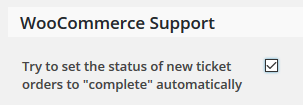
There is a setting for this in Event Tickets Pro. Can you confirm that the checkbox under Events > Settings > Tickets tab > WooCommerce Support section is checked like this?
Using the last woo-commerce events plugin I had located the bit in the php file where you could change the default product (I changed the tax info and shipping).
I need to ask for some patience regarding this. I will try to get that info for you, it will just take a bit of time. Thank you!
On the conflict testing:
I can only guess here, but it looks like that either 1) your theme is trying to load a whole bunch of scripts and runs into a 500 error; or 2) the caching plugin is trying to speed up the site via loading all those scripts at once and the server cannot handle it. In either case the error most likely does not come from Events Calendar plugins. I will still try to get some more info on this for you as well.
Yes, that is how I know I have a conflict with my cache plugin…
Are you getting the similar errors with other caching plugins as well, like W3 Total Cache, WP Super Cache and so on?
Thanks and cheers,
Andras
KeymasterHello Amal,
Welcome to the forums and thanks for reaching out with this question.
It is possible to do that with a bit of customization. For this I recommend using a child theme, otherwise your changes will be lost when the theme gets updated.
Here is what you need to do:
- In your theme folder create the folders tribe-events/month (So the full path will be something like this: wp-content\themes\{your-theme}\tribe-events\month\
- In that month folder create a file called tooltip.php and paste the following code in it:
<script type="text/html" id="tribe_tmpl_tooltip">

<div id="tribe-events-tooltip-[[=eventId]]" class="tribe-events-tooltip">

<h4 class="entry-title summary"><a href="[[=permalink]]">[[=raw title]]</a></h4>
<div class="tribe-events-event-body">
<div class="tribe-event-duration">
<abbr class="tribe-events-abbr tribe-event-date-start">[[=dateDisplay]] </abbr>
</div>
[[ if(imageTooltipSrc.length) { ]]
<div class="tribe-events-event-thumb">
<a href="[[=permalink]]"><img src="[[=imageTooltipSrc]]" alt="[[=title]]" /></a>
</div>
[[ } ]]
[[ if(excerpt.length) { ]]
<div class="tribe-event-description">[[=raw excerpt]]</div>
[[ } ]]
<span class="tribe-events-arrow"></span>
</div>
</div>
</script>
Save the file and check the result. Now the image and the title of the event should have a link in the tooltip.Let me know how this works out.
Cheers,
AndrasAugust 3, 2016 at 4:33 pm in reply to: Instruction for word or button link for Venues also – not just Event links #1147398KeymasterHi hhireb,
Thanks for reaching out! That’s a good question. Here is the snippet that you need to paste into your functions.php file to be able to change the venue website link text:
add_filter('tribe_get_venue_website_link_label', 'tribe_get_venue_website_link_label_default');

function tribe_get_venue_website_link_label_default ($label) {

  if( $label == tribe_get_venue_website_url() ) {

    $label = "Visit Website »";

    $class = "venue-link-button";

  }
return '' . $label . ' ';
}
The rest is basically the same as in the article you mentioned above.
Let me know if this helps.
Cheers,
AndrasAugust 3, 2016 at 4:02 pm in reply to: Should I use W3 Total cache with The Events Calendar Pro? #1147395KeymasterHi Lucy,
Thanks for reaching out! Let me try to help you out.
How a caching plugin like W3 Total Cache affects a site can differ a lot, depending on the theme and the plugins used. It a lot of cases the effects of the different settings can be tested by trial-and-error: if it helps leave it on, if it doesn’t, then switch it off.
I would recommend you to read through the following articles in our knowledge base:
https://theeventscalendar.com/the-events-calendar-performance-considerations/
Let me know if this helps and if you have any followup questions.
Cheers,
AndrasKeymasterHello Ros and welcome to the forums!
I’m sorry you are experiencing some issues, let me try to help you with them.
1) I have a conflict with cache plugins. I have tries a number of cache plugins and they all seem to cause the same problem. I am currently using zen cache (not the updated version as it crashes!) but all similar plugins seem to cause the same problem. Namely that the ticket will not update or add or anything. If I turn off the plugin I can use it and if not I can’t
To solve this I recommend to read through the following articles which can be found in our knowledge base:
https://theeventscalendar.com/the-events-calendar-performance-considerations/
2) I have not investigated this one fully but when I updated my event last night it wiped out not only the stock but also the venue info.
In order to further investigate this could you please do the following:
- share your system information with me based on this guide: https://theeventscalendar.com/knowledgebase/sharing-sys-info/
- can you confirm that this happens every time when you update an event?
- can you share the steps you did when you updated the event?
- can you check if this also happens when you have a default theme and only the Modern Tribe plugins running? (This will eliminate the possibility of a plugin / theme conflict.)
3) the auto complete does not work (but I am use to this anyway!)
Where exactly doesn’t the auto complete work?
Could you you also check if this happens when you have a default theme and only the Modern Tribe plugins running?
4) Using the last woo-commerce events plugin I had located the bit in the php file where you could change the default product (I changed the tax info and shipping).
This made ticket entry a lot faster… could we not have these product parameters in the admin section? if not could you give me a clue as to whee to locate them (they do not appear to be in the main.php where they were before, or am I being blind?
Which plugin are you exactly referring to? We are limited in supporting customization of this kind but if you tell me the name of the plugin (and if it is a Modern Tribe plugin) then I should be able to point you in the right direction.
Okay I have not reverted to basic theme (there would be too much disruption on the site for visitors), but I did remove all plugins and add them in one by one until fault occurred…
Did this solve any of your above questions?
Many thanks, a plugin with great potential
Thanks for your kind words! Much appreciated. 🙂
at the current time I am seriously regretting my site-wide update of plugins and wordpress version
An update is always a tricky thing to do. I would recommend to do 2 things:
- Have a development / staging site and check the update there first. If all works fine, then update the live site. The development site could be running on your own computer with a local server using XAMPP, MAMP or something similar.
- Before an update always do a backup of your files and your database. In this case if an error comes with an update, then you can restore the old version. There are plenty of plugins that can handle backup and restore, e.g. Updraft Plus (free) or Backup Buddy (at a cost). Both of these are pretty good.
Waiting for your answers so we can tackle the issues.
Cheers,
AndrasAugust 3, 2016 at 3:11 pm in reply to: Need help after updating to the latest version. Calling Nico! #1147379KeymasterHi Yury,
Just wanted to check if you need any more help. Let me know.
Cheers,
AndrasKeymasterHi Matthew,
Thanks for reaching out!
Is there a way to have multiple photos assigned to an image?
That could possibly be achieved with some custom development. We are limited in supporting customization but if you need external help, here is a list of professional developers who might be able to help you out.
Are there other 3rd party plugins that work with these plugins to enhance the display?
How do you imagine enhancing the display? Do you have anything specific in mind? Instead of plugins you could also consider a different theme. Plugins are focusing more on functionality, themes are focusing more on the looks.
I can also recommend using the Photo view when listing events and customizing that to your liking. Our themer’s guide (see link below) should get you started on that.
Are there ways that Widgets can be loaded inside of a Single or Recurring event?
It is possible that you could modify the template following our themer’s guide, but it would take knowledge in php, css, and html to do it:
https://theeventscalendar.com/knowledgebase/themers-guide/
I am able to answer some questions to help you get started on a customization, but for the most part that is beyond the support we can provide.
Let me know if you have any follow up questions.
Thanks and cheers,
AndrasKeymasterHello Chris,
Thanks for going pro and welcome to the support forums!
A good question indeed. Yes, it is possible. You will need to create separate page templates for the different views.
I recommend you to read through our Themer’s Guide. That should give you a head-start.Let me know if this answers your question.
Cheers,
AndrasJuly 9, 2016 at 3:01 pm in reply to: Need help after updating to the latest version. Calling Nico! #1137846KeymasterLet’s try this:
In this file wp-content/themes/flex-mag-child/tribe-events/tribe-events.css remove the following. This removes a left padding from the start date/time:
.tribe-events-list .tribe-event-date-start {

    padding-left: 12px;

}
Alternatively, if you cannot remove it, then you will need to add this to your style.css. (If you can remove it, then you don’t need to put this in.)
.tribe-events-list .tribe-event-date-start {

    padding-left: 0;

}
And add this in any case, this adds left and right padding to the whole date block:
.tribe-events-list .tribe-event-schedule-details {

    margin: 0;

    padding: 0 12px;

}
I hope this will fix it for you. Let me know. 🙂
Cheers,
AndrasKeymasterHi Amy,
Great, glad it helps. Yeah, sometimes the cache fools me as well. 🙂
I am going to go ahead and close this ticket, but if you need help on this or something else feel free to post a new one. We’ll be glad to help.
Cheers,
AndrasPS: If you like our plugin, we would be happy to receive a review in the wordpress.org repository. Thanks!
July 9, 2016 at 2:08 pm in reply to: "Attendee" in detailed information per attendee-fields not translated #1137833KeymasterCool, thanks for the reply, Hans!
Since this is marked resolved I am going to close this ticket, but if you need anything else related to this topic or another please open a new thread in the forum and we can help you out.
Cheers,
Andras -
AuthorPosts