
Home › Forums › Ticket Products › Event Tickets Plus › Conflict with cache plugins + more…
- This topic has 7 replies, 4 voices, and was last updated 10 years, 2 months ago by
Judith Bowles.
-
AuthorPosts
-
August 3, 2016 at 5:18 am #1146973
Judith Bowles
ParticipantHi I have a number of issues.
1) I have a conflict with cache plugins. I have tries a number of cache plugins and they all seem to cause the same problem. I am currently using zen cache (not the updated version as it crashes!) but all similar plugins seem to cause the same problem. Namely that the ticket will not update or add or anything. If I turn off the plugin I can use it and if not I can’t
2) I have not investigated this one fully but when I updated my event last night it wiped out not only the stock but also the venue info.
3) the auto complete does not work (but I am use to this anyway!)
4) Using the last woo-commerce events plugin I had located the bit in the php file where you could change the default product (I changed the tax info and shipping).
This made ticket entry a lot faster… could we not have these product parameters in the admin section? if not could you give me a clue as to whee to locate them (they do not appear to be in the main.php where they were before, or am I being blind?
I think that is it…
Oh… I also had ticket sending issued which are now fixed by installing postman, no idea why as it says it is just mimicking the default mail, but it works and at the current time that is all I care about…
Okay I have not reverted to basic theme (there would be too much disruption on the site for visitors), but I did remove all plugins and add them in one by one until fault occurred…
Many thanks, a plugin with great potential, but at the current time I am seriously regretting my site-wide update of plugins and wordpress version and I am looking forward to a resolution. I can not let the site function without a cache as it would be way too slow!
August 3, 2016 at 3:40 pm #1147391Andras
KeymasterHello Ros and welcome to the forums!
I’m sorry you are experiencing some issues, let me try to help you with them.
1) I have a conflict with cache plugins. I have tries a number of cache plugins and they all seem to cause the same problem. I am currently using zen cache (not the updated version as it crashes!) but all similar plugins seem to cause the same problem. Namely that the ticket will not update or add or anything. If I turn off the plugin I can use it and if not I can’t
To solve this I recommend to read through the following articles which can be found in our knowledge base:
https://theeventscalendar.com/the-events-calendar-performance-considerations/
2) I have not investigated this one fully but when I updated my event last night it wiped out not only the stock but also the venue info.
In order to further investigate this could you please do the following:
- share your system information with me based on this guide: https://theeventscalendar.com/knowledgebase/sharing-sys-info/
- can you confirm that this happens every time when you update an event?
- can you share the steps you did when you updated the event?
- can you check if this also happens when you have a default theme and only the Modern Tribe plugins running? (This will eliminate the possibility of a plugin / theme conflict.)
3) the auto complete does not work (but I am use to this anyway!)
Where exactly doesn’t the auto complete work?
Could you you also check if this happens when you have a default theme and only the Modern Tribe plugins running?
4) Using the last woo-commerce events plugin I had located the bit in the php file where you could change the default product (I changed the tax info and shipping).
This made ticket entry a lot faster… could we not have these product parameters in the admin section? if not could you give me a clue as to whee to locate them (they do not appear to be in the main.php where they were before, or am I being blind?
Which plugin are you exactly referring to? We are limited in supporting customization of this kind but if you tell me the name of the plugin (and if it is a Modern Tribe plugin) then I should be able to point you in the right direction.
Okay I have not reverted to basic theme (there would be too much disruption on the site for visitors), but I did remove all plugins and add them in one by one until fault occurred…
Did this solve any of your above questions?
Many thanks, a plugin with great potential
Thanks for your kind words! Much appreciated. 🙂
at the current time I am seriously regretting my site-wide update of plugins and wordpress version
An update is always a tricky thing to do. I would recommend to do 2 things:
- Have a development / staging site and check the update there first. If all works fine, then update the live site. The development site could be running on your own computer with a local server using XAMPP, MAMP or something similar.
- Before an update always do a backup of your files and your database. In this case if an error comes with an update, then you can restore the old version. There are plenty of plugins that can handle backup and restore, e.g. Updraft Plus (free) or Backup Buddy (at a cost). Both of these are pretty good.
Waiting for your answers so we can tackle the issues.
Cheers,
AndrasAugust 4, 2016 at 3:57 am #1147496ParticipantThis reply is private.
-
This reply was modified 10 years, 2 months ago by
August 4, 2016 at 5:31 am #1147505ParticipantInterestingly The error occurs (not being able to update or add event tickets) when I activate my cache plugin without updating the page.
the error message is:
load-scripts.php?c=0&load[]=jquery-core,jquery-migrate,jquery-ui-core,jquery-ui-widget,jquery-ui-po…:4 POST http://www.gilbertwhiteshouse.org.uk/site/wp-admin/admin-ajax.php 500 (Internal Server Error)
send @ load-scripts.php?c=0&load[]=jquery-core,jquery-migrate,jquery-ui-core,jquery-ui-widget,jquery-ui-po…:4ajax @ load-scripts.php?c=0&load[]=jquery-core,jquery-migrate,jquery-ui-core,jquery-ui-widget,jquery-ui-po…:4n.(anonymous function) @ load-scripts.php?c=0&load[]=jquery-core,jquery-migrate,jquery-ui-core,jquery-ui-widget,jquery-ui-po…:4(anonymous function) @ tickets.js?ver=4.2.4:362dispatch @ load-scripts.php?c=0&load[]=jquery-core,jquery-migrate,jquery-ui-core,jquery-ui-widget,jquery-ui-po…:3r.handle @ load-scripts.php?c=0&load[]=jquery-core,jquery-migrate,jquery-ui-core,jquery-ui-widget,jquery-ui-po…:3
Just thought this might help…
August 4, 2016 at 3:02 pm #1147847KeymasterHello again Ros,
Thanks for the extensive information. So let’s go further…
the ticket will not update or add or anything. If I turn off the plugin I can use it and if not I can’t
I apologize, I’m a bit confused here. Does this error happen in the admin area, when you try to add or modify a ticket? Or in the front-end, when a user is trying to buy a ticket. Thanks for clarifying this for me.
Could you also tell me what steps are you taking to get this error? I would like to try to re-create the issue.
2) I have not investigated this one fully but when I updated my event last night it wiped out not only the stock but also the venue info.
In order to further investigate this could you please do the following:
- can you confirm that this happens every time when you update an event?
- can you share the steps you did when you updated the event?
- can you check if this also happens when you have a default theme and only the Modern Tribe plugins running? (This will eliminate the possibility of a plugin / theme conflict.)
3) the auto complete does not work (but I am use to this anyway!)
There is a setting for this in Event Tickets Pro. Can you confirm that the checkbox under Events > Settings > Tickets tab > WooCommerce Support section is checked like this?
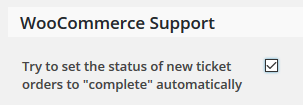
Using the last woo-commerce events plugin I had located the bit in the php file where you could change the default product (I changed the tax info and shipping).
I need to ask for some patience regarding this. I will try to get that info for you, it will just take a bit of time. Thank you!
On the conflict testing:
I can only guess here, but it looks like that either 1) your theme is trying to load a whole bunch of scripts and runs into a 500 error; or 2) the caching plugin is trying to speed up the site via loading all those scripts at once and the server cannot handle it. In either case the error most likely does not come from Events Calendar plugins. I will still try to get some more info on this for you as well.
Yes, that is how I know I have a conflict with my cache plugin…
Are you getting the similar errors with other caching plugins as well, like W3 Total Cache, WP Super Cache and so on?
Thanks and cheers,
Andras
August 4, 2016 at 3:28 pm #1147864KeymasterHey Ros,
For changing the tax info and shipping check this file:
wp-content\plugins\event-tickets-plus\src\Tribe\Commerce\WooCommerce\Main.php
Let me know if that helps!
Cheers,
AndrasAugust 26, 2016 at 9:35 am #1156420Support Droid
KeymasterHey there! This thread has been pretty quiet for the last three weeks, so we’re going to go ahead and close it to avoid confusion with other topics. If you’re still looking for help with this, please do open a new thread, reference this one and we’d be more than happy to continue the conversation over there.
Thanks so much!
The Events Calendar Support Team -
AuthorPosts
- The topic ‘Conflict with cache plugins + more…’ is closed to new replies.