
Home › Forums › Calendar Products › Events Calendar PRO › Sizing Images in List View
- This topic has 6 replies, 3 voices, and was last updated 10 years, 3 months ago by
Amy.
-
AuthorPosts
-
July 7, 2016 at 8:14 am #1136507
Amy
ParticipantHi. I am just configuring my Events Calendar Pro and wondering how to size the images that accompany the List and Photo views on the events page.
Here are examples of the too-big images I see now:
List View:
http://www.enamelcenter.org/events/list/?tribe_paged=1&tribe_event_display=listPhoto View:
http://www.enamelcenter.org/events/photo/?tribeHideRecurrence=1&tribe-bar-date=2016-07-07It appears that changing the size of the image itself doesn’t effect the size of the image on these views (I edited the actual image of the one accompanying the “Jessica Turrell” event in the Media Library to make it smaller, but it did not effect the size on the listings pages).
Can you help me understand how to manage the size of the images on the various page views for the events?
Thank you so much.I’m using Builder, but have seen this work correctly on other Builder sites. Here’s an example:
http://www.theworldcafe.com/events/list/?tribe_paged=2&tribe_event_display=pastAmy
July 7, 2016 at 4:40 pm #1136997Andras
KeymasterHello Amy,
Thanks for going Pro and welcome to the forums! Let me try to answer your questions and solve this mystery. 🙂
As for the photo view, the layout is split into equal width columns. You will have 1, 2 or 3 columns based on the available screen width. And the width of the column determines the width of the picture. The aspect ratio of the picture doesn’t change so the image will be scaled accordingly.
As for the list view, it is a bit more complicated. Check in your Settings > Media what you have set up for Medium size. That will determine the maximum height / width of your featured image. Your featured image will always be scaled down (never up!) to fit into that box. If your image is smaller, nothing will happen, then its original size will be used.
I suspect that your current medium size is set to 200 x 200 px.
Note, if you change this, then the images you have already uploaded will not automatically change. They will remain the same. A plugin line Regenerate Thumbnails might be of help here, but I didn’t test it.
Let me know if this clarifies a bit and if you have any followup questions.
Cheers,
AndrasJuly 8, 2016 at 9:30 am #1137272ParticipantThanks so much for your help, Andras.
I’m afraid the list view advice didn’t seem to work in my case –
I set my medium image size to 250px x 250px (in media settings), but when I inserted a (new) image in an Event post and set that image as the featured image, it still showed up in its original size (i.e. not sized to medium) of 400px x 437px. You can see the result here in the “Altered Surfaces and Sensitive Sifting” event on Sept 3rd:http://www.enamelcenter.org/events/
What now??!
I can always manage the featured image size manually by uploading an image at whatever the optimal size is (which brings up another question because an image that’s just right on the List View but too small on the Event page itself), but the question THAT brings up is about the optimum size for an image on the List View. For me, an optimum size would be the largest image size that wraps the text text around it on the right automatically, rather than show the image on its own line. Do you know what that size is?
Thanks so much for your help!
Amy
July 8, 2016 at 2:32 pm #1137572KeymasterHello Amy,
Hmmm… I just checked your events page and in the list view I see the image fitting into a 250×250 box. See here:
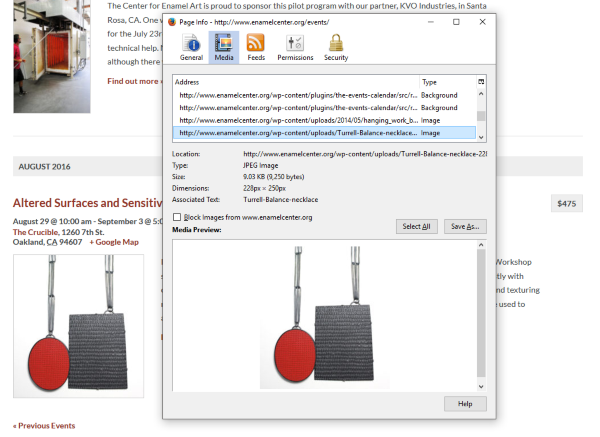
If I go to the page of the event, there I get it full size.
I’m a bit confused here, or I’m misunderstanding something. Could you send me a screenshot of what you see?
Thanks,
AndrasJuly 9, 2016 at 8:11 am #1137741ParticipantHi Andras – Thanks for responding.
Either my client has been messing around and found a solution or it was just taking my screen a while to get the changes I made into the cached version – in either case I am seeing it “right” on my screen now as well.Thank you for your help!
Amy
July 9, 2016 at 2:11 pm #1137835KeymasterHi Amy,
Great, glad it helps. Yeah, sometimes the cache fools me as well. 🙂
I am going to go ahead and close this ticket, but if you need help on this or something else feel free to post a new one. We’ll be glad to help.
Cheers,
AndrasPS: If you like our plugin, we would be happy to receive a review in the wordpress.org repository. Thanks!
-
AuthorPosts
- The topic ‘Sizing Images in List View’ is closed to new replies.