
Home › Forums › Calendar Products › Events Calendar PRO › This Week Widget week start does not match settings
- This topic has 15 replies, 3 voices, and was last updated 8 years, 3 months ago by
Julia Kay.
-
AuthorPosts
-
August 7, 2016 at 4:59 pm #1148835
Julia Kay
ParticipantHi,
I’m using the This Week widget on the homepage of our site and this morning noticed that the widget has not switched over to the new week. When I click to the next week it highlights the correct day (Monday) as being today however the view defaults to the week previous.
I had a look around the documentation and saw that the widget bases off the site settings for week starting. Currently I have it set to week starting Monday – which as today is Monday I would expect the view to have switch to week starting August 8th. I played around with this setting and set it to Sunday and the This Week widget went to the correct week! What I can surmise from this is that the week starting is being determined by a time outside of my timezone.
My timezone is GMT +13 (New Zealand) so we are in Monday morning while the US is in late Sunday and I think my issue is with this.
I have checked that our server is setting to my current timezone and ensured that the site settings are also correct to NZ times. I have The Events Calendar set to ‘Use the sitewide timezone everywhere’.
Is there any way that I can force the This Week widget to use my timezone to determine what week we are in?
I am aware that this problem will be hard to see on my site by the time any support is able to address this so I have supplied screenshots of the default week display and the display of the next week.
Thank you in advance for any support.
August 8, 2016 at 10:01 am #1149052Andras
KeymasterHello Julia,
Thanks for reaching out! That is an interesting problem, let me try to help you with that.
I’m sitting in Europe, I checked your site now (Monday, 7pm CEST / Tuesday 5am Auckland time) and Tuesday is marked as Today, correctly. So that’s good.
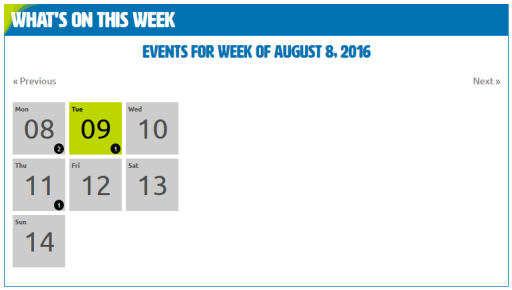
In your system information I see that you are using TEC 4.2.3. A few days ago we have released a bugfix update, I would recommend you to update the plugin in any case.
In the timezone settings, did you also try using the other setting, Use the local timezones for each event?
Until you check these I will also try to ask the team if anybody has any knowledge on this.
Cheers,
AndrasAugust 8, 2016 at 2:27 pm #1149201ParticipantHi Andras,
Yes, this is a funny issue that only presents itself in my mornings so troubleshooting may be interesting between time zones. To counteract this I’m going to start switching the day start before I leave for the night so that when you are able to respond that the issue should still be present provided it’s not a time where we’re both still on the same day.
I just updated TEC to the latest version to see if any bug fixes addressed my issue.
I changed the week starting to Tuesday to see if the cusp of the week change was sorted but it has now gone back to displaying Week starting Aug 2nd (Tuesday start). If I switch to week starting Aug 9th it has correctly identified that today is Aug 9th (but my styling is based on only seeing the current week so won’t highlight – I can see the correct class has been applied, however).
In regards to the timezone settings I did previously have it on ‘Use local timezones for each event’ with the same issue and have also switched back to this to have the same issue.
August 9, 2016 at 2:14 pm #1149698KeymasterHi Julia,
I take it you set it the start of the week to Wednesday. This is what I see:
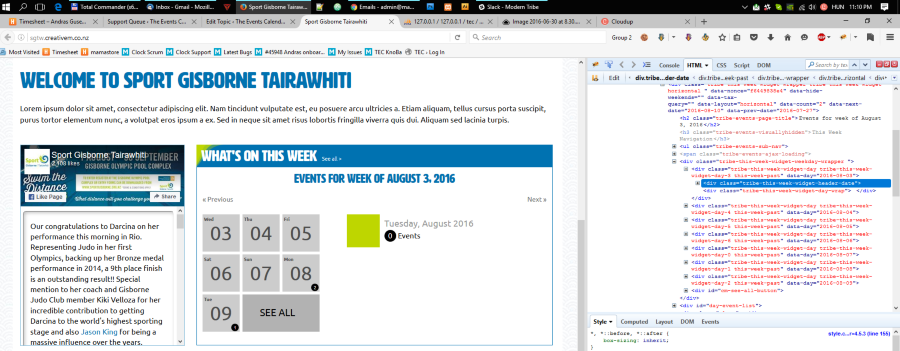
Since it is already Wednesday in New Zealand, it should be showing the next week. Very strange.
I ask for a bit of patience, please give me some time to investigate. Meanwhile I would like to ask you to keep updating the start of the week before leaving for the night.
Thank you and I’ll be in touch soon.
Andras
August 9, 2016 at 2:30 pm #1149703KeymasterHello again,
Do you have any customizations / custom codes in your functions.php file? If yes then removing these and running a test like that would be worth it.
Also, would it be possible that you do a test for conflicting plugins / theme based on this guide? https://theeventscalendar.com/knowledgebase/testing-for-conflicts/
In short, you need to switch off all plugins except the Events Calendar ones, and switch to a default theme like twentysixteen, and check if the issue still exists.
I’ll be waiting for your results.
Cheers,
AndrasAugust 9, 2016 at 2:35 pm #1149706ParticipantHi Andras,
Glad you were able to catch the issue as well!
I will run a test with default theme and no other plugins now – I do have some custom functions, including one for the tribe_get_events_title to change Events titling.
I will be back to you shortly.
August 9, 2016 at 2:48 pm #1149716KeymasterWhere is your server located? Is it also in New Zealand, so in the same timezone?
And do you know what time the widget jumps to the right week? I see it’s almost 10am in Auckland and it still shows the last week. This might shed a light on things.
Andras
August 9, 2016 at 2:55 pm #1149722ParticipantThank you for your patience.
I have disabled all plugins but TEC and TEC Pro and switched theme to TwentySixteen and the problem is still persistent.
Our server is physically located in Canada but is set to NZ time as shown in my WHM (screenshot attached).
The widget jumps around midday. I noticed the switch happened when I came back from my lunch break on Monday around 1pm but I unfortunately can’t tell you the exact time. I will watch it today and can report back when I know the time.
August 9, 2016 at 3:18 pm #1149735KeymasterThanks Julia,
Meanwhile I managed to recreate the issue locally.
Could you please send me a screenshot of your Timezone settings under Settings > General, like this?
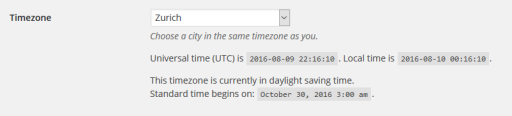
I’ll keep investigating.
Andras
August 9, 2016 at 3:23 pm #1149738ParticipantHere is the timezone set up up under Settings > General
Will be interested to see if the widget jumps over at 12pm here as that is midnight UTC.
August 9, 2016 at 3:24 pm #1149740ParticipantToo trigger happy 🙂
August 9, 2016 at 3:34 pm #1149744Keymaster🙂 Thanks!
If you can, please let me know when it jumps. I’m super curious. 🙂
Andras
August 9, 2016 at 3:54 pm #1149758ParticipantI will do when I see.
In the meantime am I able to switch back to my theme and plugins?
August 9, 2016 at 6:02 pm #1149798ParticipantUnfortunately I did not manage to check the site at 12pm. However I checked at 11:37ish and the widget had not switched over and at exactly 1pm the widget was definitely switched over.
August 10, 2016 at 8:40 am #1149998KeymasterHi Julia,
Thanks for checking this. Yes, you can switch back your theme and plugins.
It looks like an issue with the plugin. The week seems to switch at UTC midnight.I have already filed a bugreport and added your thread to it. We’ll be investigating the issue. I ask for your patience.
I am going to close this ticket to new replies, but the issue is still open and we will update it once we release a fix.
If you have any new questions or issues please create a new ticket and reference this one.
Cheers,
Andras -
AuthorPosts
- The topic ‘This Week Widget week start does not match settings’ is closed to new replies.