

Forum Replies Created
-
AuthorPosts
-
Andras
KeymasterHi playmakerne,
Thanks for reaching out! I’m sorry you are still experiencing translation issues. Let’s try to get to the bottom of this.
I have checked the Danish translation on a local installation and for me all the strings are properly translated. You can see here:
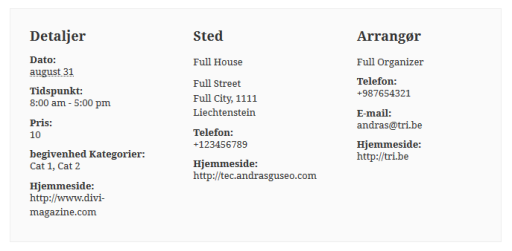
Since you have a couple more strings in the event detail section, I suspect that those come from the theme. If this is the case, then check the translation files of the theme, possibly you will need to translate them there. (These are the strings: Cost, Venue name, Organizer name.)
To check whether it comes from the theme, you just need to switch back to a default theme like twentysixteen. If the string Cost is translated there to Pris, then the translations are working and you will need to check the theme.
“All Begivenheder” SHOULD BE “Alle begivenheder” (All Events)
“Gentagne Begivenhed” SHOULD BE “Gentaget begivenhed” (Repeated Event)This is a bit different case. These strings come from more places. They are put together from All, Recurring, Events, and Event.
Recurring you will find in the wp-content\plugins\events-calendar-pro\lang\tribe-events-calendar-pro-da_DK.po and you will need to look for the string “Recurring %s“.
The other 3 string come from wp-content\plugins\the-events-calendar\lang\the-events-calendar-da_DK.po.
You can change the big letters to small letters in these. Note however, that Event and Events might be used in several places, so if you change them to small letters, they will change everywhere to small.
To edit the language files you can use a software like PoEdit.
As a last request, could you please share your system information with me in a private reply? Here’s how you can do that:
https://theeventscalendar.com/knowledgebase/sharing-sys-info/Let me know how the theme testing works out.
Cheers,
AndrasKeymasterHello again David,
I checked with the team and it seems that currently there is no solution for that.
However, it is something that should be fixed, so I’m going to open a ticket for that internally, so it might come in an upcoming release.
I cannot commit to a time when it will be ready as it needs to be developed, tested, approved, so it will take some time.I’m again sorry for this issue, but hopefully the fix will be done soon.
Cheers,
AndrasKeymasterHi Jayson,
I see the issue and I’m sorry you are having this.
I checked and this bug was fixed in the 4.2.4 version. I see you are already using that version of the plugin, that’s good.
Could be that google needs to re-index your site to get the updated data.
Here is a guide from google on how you can force a re-index:
https://support.google.com/webmasters/answer/6065812?hl=enMeanwhile, I will make a round with this internally to see if there is still someone else with this issue.
Cheers,
AndrasKeymasterHello Jayson,
Thanks for reaching out! Could you please explain the issue a bit more in detail or if this issue was raised before, could you share a link to the topic?
Thanks and cheers,
AndrasAugust 11, 2016 at 1:05 pm in reply to: Pro Widget Shortcodes – How to include uncategorized events? #1150703KeymasterHello again,
Try this:
if ( isset($query->query_vars['post_type']) &&

  $query->query_vars['post_type'] == TribeEvents::POSTTYPE &&

  !is_tax(Tribe__Events__Main::TAXONOMY) &&

  empty( $query->query_vars['suppress_filters'] ) ) {
This should do the trick. Let me know the outcome.
Cheers,
AndrasKeymasterHello David,
Thanks for reaching out! I’m sorry you are having an issue with this. Let me try to help you out.
Of the first issue we are aware, currently what you did (disabling quantity change) is the best solution.
The second issue: I have managed to recreate it. Please give me some time to check around if there is a solution.
Cheers,
AndrasAugust 11, 2016 at 12:22 pm in reply to: Echo the date of the ordered ticket in the e-mail templates #1150692KeymasterOk James,
Let me know if you need any more help or if I can close this ticket.
Thanks and cheers,
AndrasAugust 11, 2016 at 12:13 pm in reply to: 3 Events at the same time in week view are not showing up #1150690KeymasterThis reply is private.
KeymasterHi Ben,
By default The Events Calendar doesn’t add any opengraph code. The second image seems to be generated by another plugin or your theme.
You can easily find out if it is the theme. Just switch to a default one like twentysixteen, then check the code. If the second og:image is not there anymore, then it is the theme. In this case check in the theme settings whether you can disable opengraph or something that can influence this
If it is not the theme, it can be a plugin. You can find out which plugin it is if you run a test for conflicts…
… and check if the code changes in a way that you only see the Yoast part.
Once you find the plugin, you can the setting of it and disable the option that influence opengraph.
If there is no such setting you still have 2 other options: 1) modify the plugin; 2) use an alternative plugin (or not use that plugin at all).
I hope this gets you started. Let me know how it works out.
Cheers,
AndrasAugust 11, 2016 at 6:54 am in reply to: Sending/Receiving Notification of purchased ticket issue. #1150492KeymasterHi metapixel,
Please note, that we are limited in supporting customizations. I can help you figure out where the problem lies and point you in the right direction.
First I recommend you to run a test for plugin and theme conflicts based on this: https://theeventscalendar.com/knowledgebase/testing-for-conflicts/
It it works fine like that, then enable your theme and remove the extra customizations you added. I was referring to this:
functions.php:
function tribe_move_tickets_in_page() {
if ( !class_exists(‘Tribe__Tickets_Plus__Commerce__WooCommerce__Main’) ) return;
remove_action ( ‘the_content’, array ( Tribe__Tickets_Plus__Commerce__WooCommerce__Main::get_instance(), ‘front_end_tickets_form_in_content’ ) );
remove_action ( ‘the_content’, array ( Tribe__Tickets__RSVP::get_instance(), ‘front_end_tickets_form_in_content’ ) );
}
tribe_move_tickets_in_page();custom post type single templates:
<?php Tribe__Tickets_Plus__Commerce__WooCommerce__Main::get_instance()->front_end_tickets_form(); ?>
<?php Tribe__Tickets__RSVP::get_instance()->front_end_tickets_form(); ?>If the issue doesn’t happen without the customizations, then there is an issue with the extra code.
If the issue still occurs, then the issue is with your custom theme. In this case I recommend you to contact the theme creator and he should be able to help you fix that.
Let me know how that works out.
Andras
August 10, 2016 at 3:25 pm in reply to: Pro Widget Shortcodes – How to include uncategorized events? #1150266KeymasterHello again Riccardo,
Thanks for your patience.
If you want to apply the taxonomy query to all event views and widgets then re-write the conditional to the following:
if ( $query->query_vars['post_type'] == TribeEvents::POSTTYPE &&

!is_tax(Tribe__Events__Main::TAXONOMY) &&

empty( $query->query_vars['suppress_filters'] ) ) {
Check this and let me know how that works out.
Cheers,
AndrasKeymasterHi Cesar,
Thanks for reaching out! I’m sorry you are having this issue. Let me help you with that.
In the code you are using, the get_bloginfo(‘template_url’) will give you the active theme’s directory, and not the child theme’s directory.
I suggest you use get_bloginfo(‘stylesheet_directory’), which gives you the directory path for the active child theme (or theme, is you don’t have a child theme).
Then put your custom css files in the child theme directory, since you are referencing that. The other directories you only need if you want to override the page templates, but not for the css files.
Let me know if this helps.
Cheers,
AndrasPS: You also have a typo in the first block: tri<span style=”text-decoration: underline;”>v</span>e-events-pro.css
KeymasterHi Philipp,
Thanks for reaching out with your question.
Users have the possibility to post comments under every event. Would that work for you?
I’m afraid if you want anything more complicated, then you will need to do some custom development for that.
Let me know if this helps.
Cheers,
AndrasAugust 10, 2016 at 2:56 pm in reply to: Echo the date of the ordered ticket in the e-mail templates #1150255KeymasterHello James,
Thanks for reaching out to us with your question! A good one.
And Hello Gergana, thanks for chiming in, much appreciated. Indeed, that article gives a good explanation on how that can be done. James, check it out, and let me know if that works out for you.
Cheers,
AndrasAugust 10, 2016 at 2:13 pm in reply to: 3 Events at the same time in week view are not showing up #1150219KeymasterHello Adrian,
Thanks for going pro and welcome to the forums!
I’m sorry you are experiencing this issue, let me try to help you with this.
To be able to support you, could you please share your system information with me in a private reply?
Here’s a handy guide how you can do that:
https://theeventscalendar.com/knowledgebase/sharing-sys-info/Thanks and cheers,
Andras -
AuthorPosts